
SEO & AI Search
11 best free SEO tools for beginner bloggers (2026 guide)
Discover the 11 best free SEO tools for beginner bloggers in 2026. Find keyword research, audit, and rank tracking tools. Grow traffic free today! No budget. Go
By Bibek Thapa · Published May 10, 2026 · Updated Jul 14, 2026 · 20 min read
Quick Answer
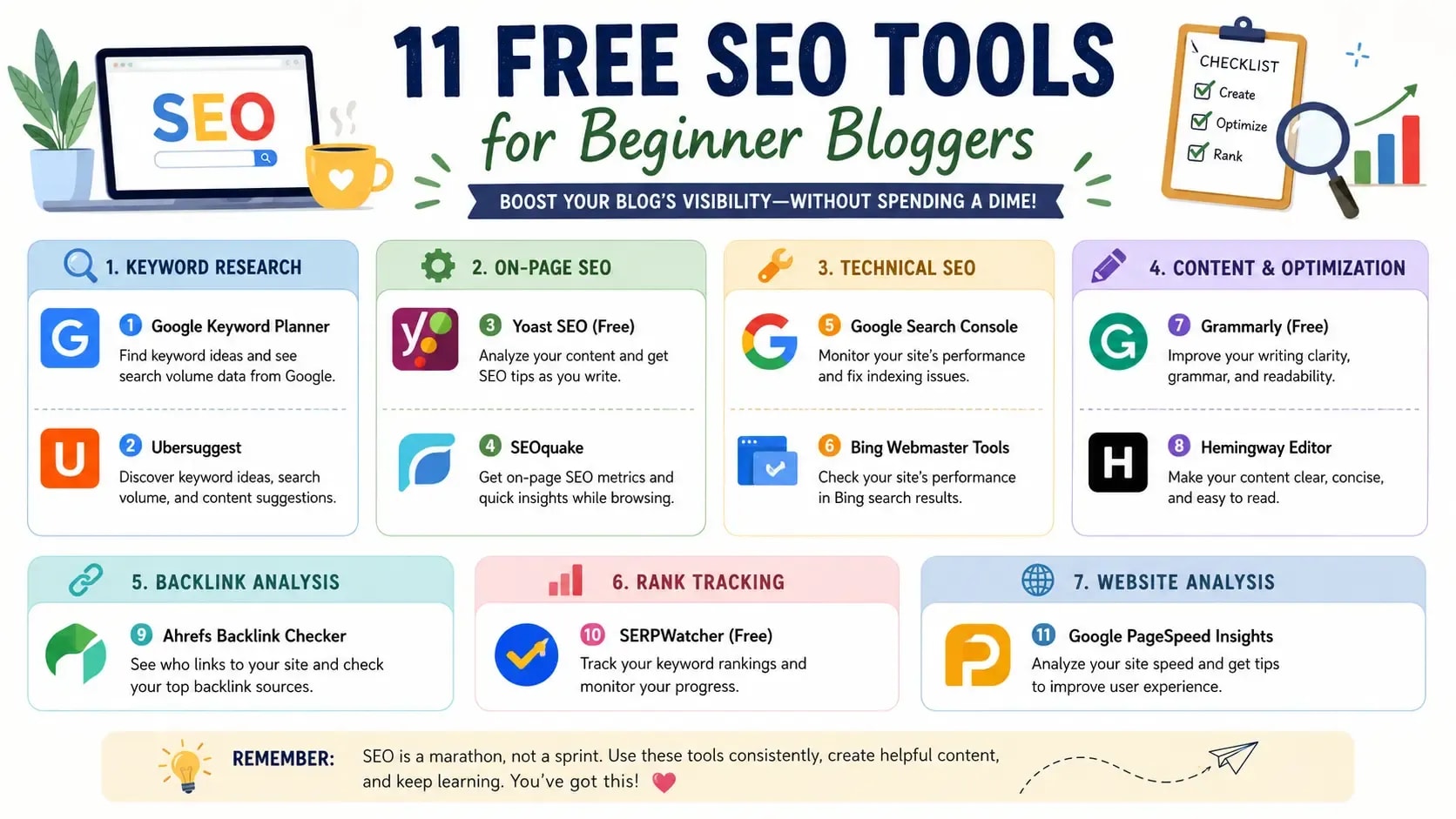
Quick answer: The best free SEO tools for beginner bloggers are Google Search Console, Google Analytics 4, Google Keyword Planner, Ubersuggest, AnswerThePublic, Ahrefs Webmaster Tools, RankMath, PageSpeed Insights, Bing Webmaster Tools, Screaming Frog (free version), and Hemingway Editor. Together they cover keyword research, on-page optimization, technical auditing, and performance tracking at…
Table of Contents
- What are free SEO tools for beginner and why do beginner bloggers need them?
- The real cost of skipping SEO tools
- What "free" actually means
- Best free SEO tools for beginner bloggers at a glance
- The 11 best free SEO tools for beginner bloggers
- 1. Google Search Console: the one to install first
- What it does
- Free tier limits
- How to set it up
- 2. Google Analytics 4: understand what readers do after they arrive
- What it does
- Free tier limits
- Key reports for bloggers
- 3. Google Keyword Planner: search volume data from the source
- What it does
- Free tier limits
- Workaround for exact volumes
- 4. Ubersuggest: keyword difficulty checks made simple
- What it does
- Free tier limits
- How to use it for new blogs
- 5. AnswerThePublic: find the questions readers actually type
- What it does
- Free tier limits
- How to use it for content ideas
- 6. Ahrefs Webmaster Tools: professional backlink data at no cost
- What it does
- Free tier limits
- Site audit walkthrough
- 7. RankMath (free): the best free SEO plugin for WordPress
- What it does
- Free tier features
- Setup checklist for new WordPress bloggers
- 8. Google PageSpeed Insights: the only free tool using real speed data
- What it does
- Free tier limits
- Core Web Vitals explained simply
- 9. Bing Webmaster Tools: the tool almost nobody sets up
- What it does
- Free tier limits
- Why it's worth the 10 minutes
- 10. Screaming Frog (free version): a real technical crawl for small blogs
- What it does
- Free tier limits
- What to check first
- 11. Hemingway Editor: readable writing gets more traffic
- What it does
- Free tier features
- Why readability affects rankings
- The SEED framework: how to use free SEO tools in the right order
- Stage 1: Search (keyword research)
- Stage 2: Execute (write and optimize)
- Stage 3: Evaluate (monitor performance)
- Stage 4: Develop (audit and improve)
- Free SEO tools monthly workflow for bloggers
- Week 1: research and plan
- Weeks 2 to 3: create and optimize
- Week 4: audit and improve
- Common mistakes beginners make with free SEO tools
- Mistake 1: installing too many tools at once
- Mistake 2: setting up GSC and never opening it again
- Mistake 3: treating free tools as second-best
- Mistake 4: relying on a single tool
- When to upgrade from free to paid SEO tools
Quick answer: The best free SEO tools for beginner bloggers are Google Search Console, Google Analytics 4, Google Keyword Planner, Ubersuggest, AnswerThePublic, Ahrefs Webmaster Tools, RankMath, PageSpeed Insights, Bing Webmaster Tools, Screaming Frog (free version), and Hemingway Editor. Together they cover keyword research, on-page optimization, technical auditing, and performance tracking at zero cost.
Here's a frustrating reality: most beginner bloggers waste months writing content that never ranks, then conclude that SEO either "doesn't work" or requires an Ahrefs subscription to get started. Neither is true.
You can grow a blog using only free SEO tools. The right SEO tools for beginner bloggers can help you find keywords, fix technical issues, and improve rankings faster. Plenty of bloggers with 30,000 to 100,000 monthly visitors built their early organic traffic on exactly the stack covered in this guide. The difference isn't the tools. It's knowing which ones to use, in what order, and for what specific task.
This guide gives you that: eleven tools, honest free-tier limitations, and a framework (the SEED Framework) for sequencing them so you're actually using them rather than just collecting them.
These free seo tools for beginner bloggers cover keyword research, technical SEO, content optimization, and traffic tracking without any upfront cost.
What are free SEO tools for beginner and why do beginner bloggers need them?
Free SEO tools are software applications that help bloggers find keywords, optimize content, audit technical issues, and track search performance without paying a subscription fee.
Understanding how to use free seo tools for beginner websites can save months of trial and error.
The real cost of skipping SEO tools
Writing without SEO tools is like driving without a GPS. You might get somewhere eventually, but you'll make wrong turns that cost time you won't get back. Without keyword research data, you write about topics nobody searches for. Without a site audit, you miss indexing errors that hide your content from Google entirely. Without Analytics, you have no idea which posts are working.
Free SEO tools fix all of that. And they fix it well enough for any blogger in their first two years.
What "free" actually means
There are three different models, and they matter:
Forever-free tools have no payment required and no feature cap. Google Search Console, GA4, Bing Webmaster Tools, and PageSpeed Insights all work this way.
Freemium tools offer a free tier for basic use, with premium features behind a paywall. Ubersuggest (3 searches per day), Ahrefs Webmaster Tools (your own site only), and Screaming Frog (500 URL cap) fit here.
Free trials are fully featured but expire after a set period. SEMrush and Surfer SEO offer these. They're not in this guide's core list for that reason.
The distinction matters because hitting a freemium cap mid-workflow is annoying when you weren't expecting it.
Best free SEO tools for beginner bloggers at a glance
The following free seo tools for beginner bloggers are among the most trusted options available today.
The 11 best free SEO tools for beginner bloggers
1. Google Search Console: the one to install first
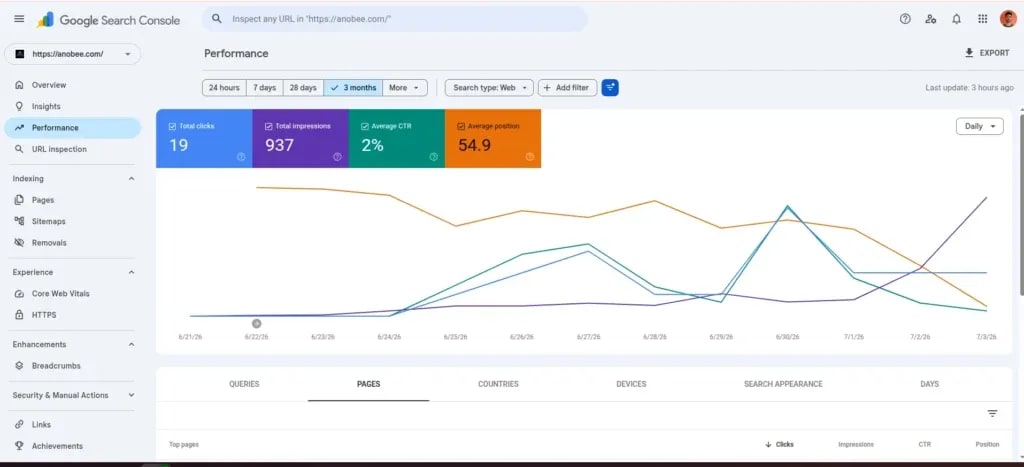
Google Search Console is the only SEO tool that gives you data directly from Google. No third-party tool, free or paid, has the same data source. Ahrefs and SEMrush estimate your rankings from their own crawls. GSC shows you what Google actually knows about your site.
What it does
Google Search Console (GSC) is Google's own free tool for monitoring how your site appears in Google Search. It shows which queries your pages appear for, how many clicks and impressions you get, your average ranking position, and which pages have indexing or crawl errors.
For a new blogger, this is the closest thing to looking at Google's notes on your site. This is one of the most valuable free SEO tools that beginner bloggers can install. No other tool comes close.
Free tier limits
There are none. GSC is completely free, with 16 months of performance data, no page limits, and full access to all reports. Google doesn't upsell you to a premium version.
How to set it up
- Go to search.google.com/search-console
- Click "Add Property" and enter your domain
- Verify ownership (for WordPress, HTML tag method or Google Analytics connection is easiest)
- Submit your XML sitemap, usually at yoursite.com/sitemap.xml
- Wait 2 to 5 days for data to populate
The most useful report for beginners is Performance > Search Results. This is why many experts consider it one of the best beginner SEO tools available today. Sort pages by impressions descending to find which topics Google is already surfacing you for.
2. Google Analytics 4: understand what readers do after they arrive
GSC tells you how readers found your post. GA4 tells you what happened next. These two tools are designed to complement each other, and setting them up on the same day is the right move.
What it does
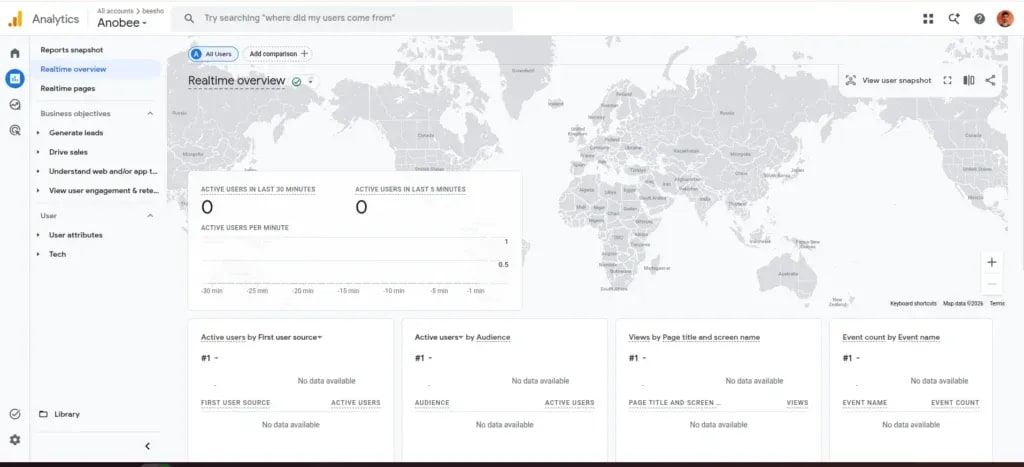
GA4 tracks user behavior on your site: traffic sources, session duration, engagement rate, page views, and conversion events. Among all free seo tools for beginner users, Google Analytics provides the clearest view of visitor behavior. For bloggers, it shows which posts drive the most traffic, which ones have high exit rates, and where readers come from.
Linking GA4 to your GSC account inside GA4 settings unlocks combined data views that show the full path from search query to on-site behavior.
Free tier limits
GA4 is completely free. There is no paid version for standard web analytics.
Key reports for bloggers
Acquisition > Traffic Acquisition shows your organic, social, direct, and referral traffic splits. Engagement > Pages and Screens shows which posts get the most views. The Exploration section lets you build custom reports, including which posts readers visit next, which is useful for internal linking decisions.
3. Google Keyword Planner: search volume data from the source
Google Keyword Planner is the only free keyword research tool drawing directly from Google Ads search data. That makes it the most reliable free source for understanding actual search demand, even with its limitations for non-advertisers.
What it does
Google Keyword Planner remains one of the most popular keyword research tools for beginners.
Keyword Planner shows search volume ranges, competition levels, and related keyword suggestions. It's the tool Google advertisers use to plan campaigns, which means it reflects what real people are searching on Google rather than estimated data from a third-party index.
Free tier limits
Without an active Google Ads spend, you see volume ranges rather than exact numbers. "1K to 10K" instead of "4,400." This is genuinely limiting for precise keyword research, but it's still useful for comparing relative popularity between keywords and ruling out low-volume topics.
Workaround for exact volumes
Starting a minimal Google Ads campaign with a $1 to $5 budget and immediately pausing it sometimes activates exact volume data. Cross-referencing the ranges with Ubersuggest's free daily searches often fills the gap too.
4. Ubersuggest: keyword difficulty checks made simple
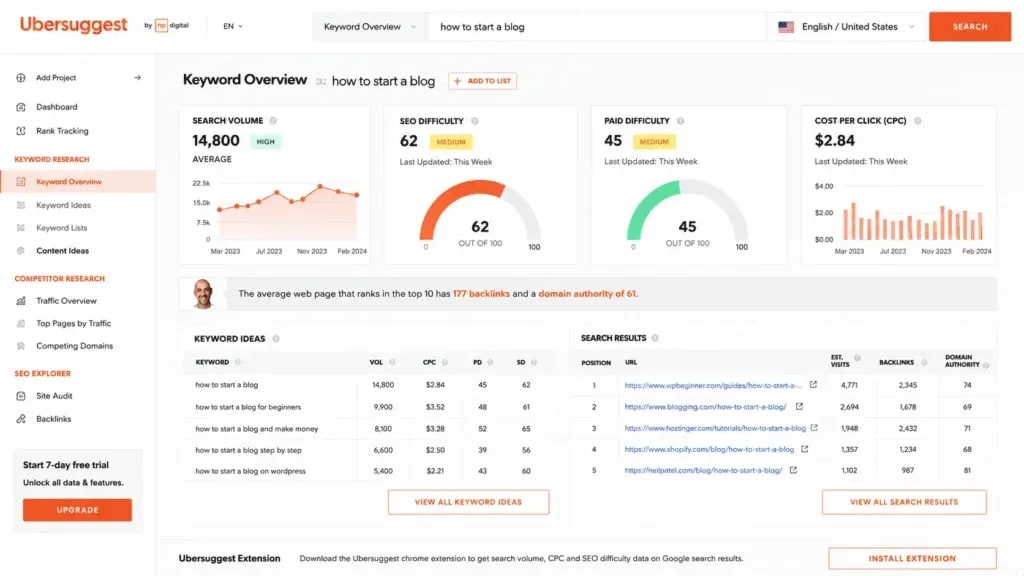
Ubersuggest (by Neil Patel) gives new bloggers something Google Keyword Planner doesn't: a keyword difficulty score on a 0 to 100 scale. Many free seo tools for beginner bloggers use Ubersuggest to evaluate ranking difficulty. That single number is often worth more to a beginner than exact volume data, because it answers the question that actually matters: "Can my new blog rank for this?"
What it does
Ubersuggest shows keyword search volume, SEO difficulty, paid difficulty, CPC estimates, and a snapshot of the top-ranking pages for any keyword. Its competitor analysis feature shows which keywords a competing blog ranks for, which is useful for finding gaps in your own coverage.
Free tier limits
3 searches per day. No keyword export. Limited historical data. The free tier is genuinely tight. Use your three daily searches on your highest-priority keyword ideas and verify the rest with Google Keyword Planner.
How to use it for new blogs
Use Ubersuggest for difficulty checks, not volume research. It is one of the most popular blogging SEO tools for evaluating ranking opportunities. Enter your target keyword, check the difficulty score (anything under 40 is realistic for a new site), look at the top-ranking pages, then decide whether the competition is beatable given your current domain authority. That workflow is worth the 3-search daily cap.
5. AnswerThePublic: find the questions readers actually type
AnswerThePublic surfaces question-based and preposition-based keyword variations that Google Keyword Planner never shows. It's the best free tool for generating content ideas from real user questions because it pulls from Google Autocomplete data rather than an ad-keyword database.

What it does
AnswerThePublic is one of the best free seo tools for beginner content ideation and topic discovery. It takes a seed keyword and generates question variations organized by question word (who, what, when, where, why, how), preposition (for, with, without, near), and comparison (vs, like, and). The output looks like a wheel with the keyword at the center and hundreds of questions branching outward.
Free tier limits
3 searches per day, same as Ubersuggest (the same company owns both). The data disappears when you close the tab unless you export it manually. CSV export requires a free account; screenshots work in a pinch.
How to use it for content ideas
Search a broad topic like "keyword research" and work through the Questions section. Each question is a real search query pulled from Google Autocomplete. Any "how to" or "what is" question with enough volume is a potential blog post. The preposition section is especially good for finding H2 subheadings: "keyword research for beginners," "keyword research without tools," "keyword research with Google Analytics."
6. Ahrefs Webmaster Tools: professional backlink data at no cost
Ahrefs sells its full platform starting at $99 per month. Its Webmaster Tools tier is free and gives you access to the same backlink index, restricted to sites you've verified ownership of. Most "free Ahrefs alternatives" lists miss this entirely.
What it does
Few free seo tools for beginner users offer backlink insights as detailed as Ahrefs Webmaster Tools.
After verifying your domain, Ahrefs Webmaster Tools gives you the full backlink database for your own site, a site health audit with crawl error detection, organic keyword ranking data (limited), and broken link reports. For monitoring your own site's backlink growth and technical health, there's nothing comparable in the free tier market.
Free tier limits
It only works on domains you own. No competitor research. Keyword ranking data is more limited than the paid tier. But for a new blogger who isn't yet doing outreach-based link building, those limits barely matter.
Site audit walkthrough
- Sign up at ahrefs.com/webmaster-tools
- Add and verify your site using the HTML file method or DNS record
- Run a site audit. Ahrefs crawls your pages and gives your site a health score from 0 to 100
- Go to Issues, where errors are sorted by severity: errors, warnings, and notices
- Fix critical errors first: broken internal links, missing meta descriptions, slow pages, duplicate title tags
Run this audit monthly. A new blog accumulates technical debt faster than most bloggers realize.
7. RankMath (free): the best free SEO plugin for WordPress
RankMath's free tier includes schema markup for 14 content types, XML sitemap generation, on-page SEO scoring, 404 monitoring, and redirect management. Competing plugins charge $100 to $200 per year for that same feature set. For a WordPress blogger on a zero budget, this is the obvious starting point.

What it does
Rank Math continues to be one of the most recommended free seo tools for beginner WordPress users.
RankMath is a WordPress plugin that sits inside the post editor and scores your content against SEO criteria as you write: focus keyword in the title, meta description, first paragraph, H2 headings, image alt text, internal links, and more. It gives you a score out of 100 and tells you exactly what to fix.
Beyond the post editor, RankMath handles XML sitemaps (including image sitemaps), robots.txt, schema markup, canonical tags, and Open Graph tags for social sharing.
Free tier features
The free version covers on-page SEO analysis for unlimited posts, schema markup for Article, FAQ, HowTo, and BreadcrumbList, a redirect manager for 301/302/410 redirects, 404 error monitoring, Google Search Console integration, and basic rank tracking.
Setup checklist for new WordPress bloggers
Complete these steps before publishing your first post:
- [ ] Run the Setup Wizard and connect Google Search Console
- [ ] Enable XML Sitemap and submit it to Google Search Console
- [ ] Set your homepage title format
- [ ] Enable Breadcrumb schema
- [ ] Set default Organization or Person schema
- [ ] Configure robots.txt to block /wp-admin/
- [ ] Enable the Auto-Image SEO module (it adds alt text from the image filename)
Aim for a RankMath score of 80 or above before publishing any post. Among all WordPress SEO tools for beginners, Rank Math offers one of the strongest free feature sets.
8. Google PageSpeed Insights: the only free tool using real speed data
Most speed testing tools run a simulated test in a lab environment. PageSpeed Insights is different: it pulls field data from Google's Chrome User Experience Report (CrUX), which means it shows how real users on real connections actually experience your pages. That's the data Google uses in its ranking systems.
What it does
Website speed optimization becomes easier with beginner-friendly SEO tools like PageSpeed Insights.
PageSpeed Insights analyzes any URL for loading speed, interactivity, and visual stability. It returns both a simulated Lighthouse score and real-user field data when available. Google uses Core Web Vitals as a confirmed ranking signal, so this tool is directly tied to search performance.
Free tier limits
Completely free. No login required. No cap on page analyses.
Core Web Vitals explained simply
Three metrics affect your rankings:
LCP (Largest Contentful Paint) measures how fast the main content loads. Target under 2.5 seconds.
INP (Interaction to Next Paint) measures how quickly your page responds to clicks. Target under 200ms.
CLS (Cumulative Layout Shift) measures whether the page jumps around while loading. Target under 0.1.
For most bloggers, the biggest improvements come from compressing images to WebP format, using a fast WordPress host, enabling a caching plugin, and removing unused JavaScript from third-party embeds.
9. Bing Webmaster Tools: the tool almost nobody sets up
Most bloggers skip Bing Webmaster Tools. That's a mistake. Setup takes about 10 minutes (you can import your GSC settings directly), it's completely free, and it gives you a second search index, a keyword research tool with its own data, and a built-in site audit.
What it does
Bing Webmaster Tools is one of the most overlooked free seo tools for beginner bloggers. It works similarly to Google Search Console, but for Bing and Yahoo search. It includes a Keyword Research tool with search volume data from Bing's index, a Site Scan that flags technical issues, and backlink reporting.
Free tier limits
Completely free. No feature caps for verified site owners.
Why it's worth the 10 minutes
Bing's Keyword Research tool often shows less-contested keyword data than Google's. In some niches, Bing drives 15 to 25% of total search traffic. Your pages may not be indexed in Bing at all if you've never submitted them. Submitting your sitemap to Bing is one of the faster wins available to a new blog.
10. Screaming Frog (free version): a real technical crawl for small blogs
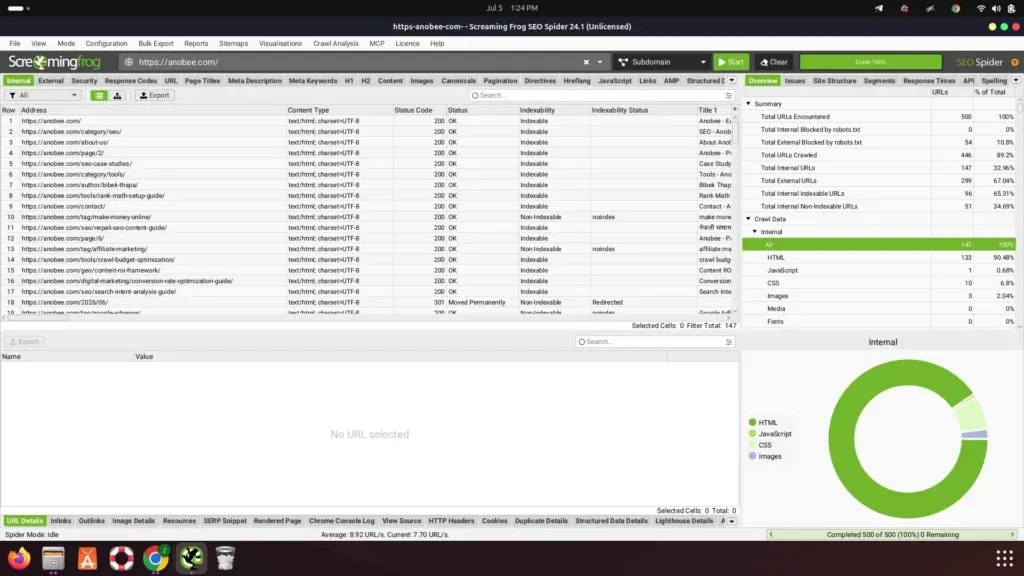
Screaming Frog crawls your website the same way Googlebot does and then tells you everything it found: broken links, missing title tags, missing meta descriptions, missing H1s, images without alt text, redirect chains, duplicate content. For a new blog under 500 pages, the free version covers the full site.
What it does
Screaming Frog is among the most powerful free seo tools for beginner technical SEO audits.
It is a desktop application (Windows, Mac, Linux) that crawls your URL structure and reports technical issues across categories. The free version produces the same reports as the paid version, capped at 500 URLs per crawl.
Free tier limits
500 URLs per crawl. No scheduled crawls. No JavaScript rendering. Exports are limited to what's visible on screen. Once your blog passes 500 indexed pages, you'll need the paid version ($259/year) for complete audits.
What to check first
Run a crawl and open these four reports:
- Response Codes > 4xx errors. These are broken pages that need 301 redirects.
- Page Titles > Missing. Any post with no title tag is invisible to Google in the way you intended.
- Images > Missing alt text. Every untagged image is a missed keyword signal.
- Redirects > Redirect chains. Chains of 3 or more redirects slow your site and waste link equity.
Monthly crawls catch problems before they compound.
11. Hemingway Editor: readable writing gets more traffic
When readers can't follow your writing, they leave. A high exit rate is a signal Google takes seriously when evaluating page quality. Hemingway Editor doesn't do keyword research or backlink analysis. It does one thing: it tells you when your writing is too hard to read.
What it does
Content readability can improve significantly when using free seo tools for beginner writers.
Hemingway Editor analyzes your draft and highlights sentences that are too long (yellow), very hard to read (red), passive voice, unnecessary adverbs, and words with simpler alternatives. It assigns a Flesch-Kincaid reading grade level.
Free tier features
The web version at hemingwayapp.com is free with no limits. The desktop app for offline use costs $19.99 as a one-time purchase, but the web version handles everything most bloggers need.
Why readability affects rankings
A post written at Grade 8 reading level consistently shows higher engagement time than a post written at Grade 14. Not because Google reads your prose, but because your readers do. They stay longer. They read more. Google notices.
Target Grade 7 to 9. Write short paragraphs. Split any sentence over 25 words into two.
The SEED framework: how to use free SEO tools in the right order
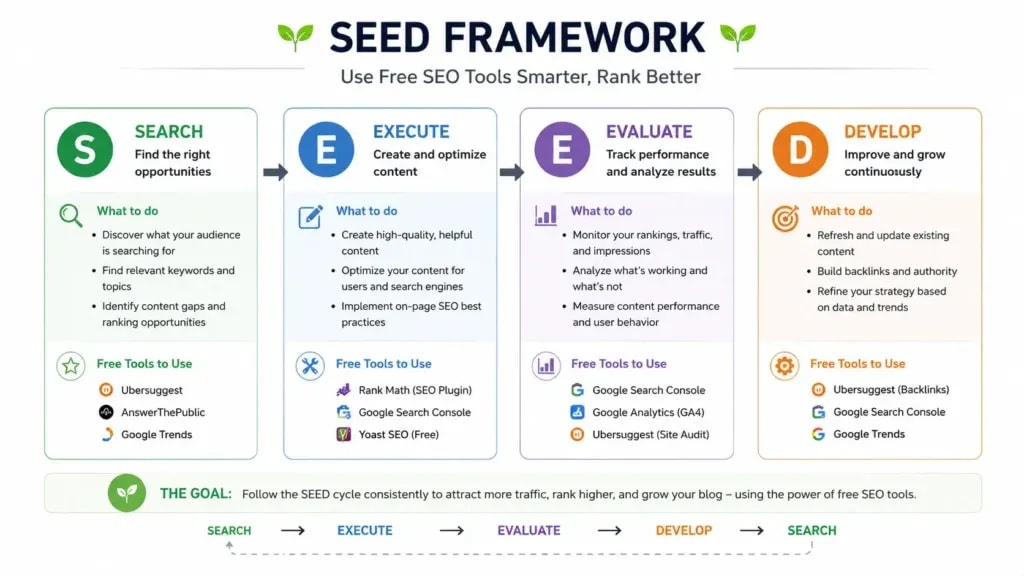
Most beginners install a handful of tools randomly and then don't know which one to open first. The SEED Framework helps organize free seo tools for beginner bloggers into a practical workflow. It fixes this by mapping each free tool to the stage of the blogging workflow where it's actually useful.
SEED = Search, Execute, Evaluate, Develop. Following a structured workflow helps beginners get more value from their free blogging SEO tools.
Stage 1: Search (keyword research)
Before writing anything, use Google Keyword Planner to validate search volume, Ubersuggest to check keyword difficulty (aim for under 40 on a new site), and AnswerThePublic to find question-based variations for H2 headings and FAQs.
Stage 2: Execute (write and optimize)
While creating content, optimize with RankMath (title, meta description, headings, internal links, schema), run your draft through Hemingway Editor before publishing, and test your live page in PageSpeed Insights after it goes live.
Stage 3: Evaluate (monitor performance)
After publishing, check Google Search Console weekly to track impressions, clicks, and average position. Open GA4 monthly to review engagement rates and traffic sources. Check Bing Webmaster Tools to catch any Bing-specific indexing issues.
Stage 4: Develop (audit and improve)
Run Ahrefs Webmaster Tools monthly to check backlinks and fix site health issues. Run Screaming Frog if you added more than 20 new pages. Re-test Core Web Vitals in PageSpeed Insights after any theme or plugin changes.
Following this sequence prevents the common mistake of auditing a site that has nothing yet to audit, or tracking rankings before pages have had time to index.
Free SEO tools monthly workflow for bloggers
Week 1: research and plan
Use Google Keyword Planner and Ubersuggest to identify 4 to 6 blog post topics with search volumes between 500 and 5,000 and difficulty under 40. Use AnswerThePublic for each topic to find 3 to 5 question-based H2 ideas. Check GSC for any posts already getting impressions. Posts ranking on page 2 for a decent keyword are the fastest wins available.
Weeks 2 to 3: create and optimize
Write drafts targeting one primary keyword per post. Paste each draft into Hemingway Editor and reduce it to Grade 8 or below. Optimize with RankMath and don't publish below 70 out of 100. Add internal links to 2 to 3 related posts using exact-match or partial-match anchor text.
Week 4: audit and improve
Open Ahrefs Webmaster Tools and fix any new critical site health issues. Open GSC and find posts ranking positions 11 to 30 for strong keywords. Expanding those posts by 300 to 500 words often moves them to page 1. Run Screaming Frog if you added more than 20 new pages this month. Check PageSpeed Insights on your 3 highest-traffic posts.
This 4-week cycle keeps technical problems from accumulating while keeping content production moving.
Common mistakes beginners make with free SEO tools
Mistake 1: installing too many tools at once
More tools don't mean more results. Installing 8 different tools in the first week creates analysis paralysis. You end up checking dashboards instead of publishing content. Start with Google Search Console and RankMath. Add tools as specific needs emerge.
Mistake 2: setting up GSC and never opening it again
GSC is the tool most beginners configure once and then forget. The most useful feature, checking which keywords you're already ranking positions 11 to 20 for, gets ignored completely. A post sitting at position 15 for a good keyword can often reach page 1 with 300 to 500 words of added depth and a few more internal links. GSC tells you exactly which posts those are.
Mistake 3: treating free tools as second-best
For a new blog with under 100 posts and under 10,000 monthly visitors, free tools aren't inferior to paid ones. They're the right size. The incremental data Ahrefs provides over its free Webmaster Tools tier becomes useful at scale. Before scale, it's genuinely noise.
Mistake 4: relying on a single tool
No single free tool covers everything. GSC doesn't do keyword research. Ubersuggest doesn't show crawl errors. RankMath doesn't track rankings in real time. The value comes from using tools in combination across the SEED stages, not from finding one perfect free option.
Choosing the right free seo tools for beginner bloggers is often more important than buying expensive software.
When to upgrade from free to paid SEO tools
Free tools are enough for the first 12 to 24 months of blogging. These signals suggest you've genuinely outgrown them:
You're publishing 4 or more posts per month and need competitor research. Ubersuggest's 3-search daily limit becomes a real bottleneck for competitive keyword research at that pace.
Your blog exceeds 500 indexed pages. Screaming Frog's URL cap means you can no longer audit your full site.
You want historical keyword ranking data. Free tools don't show how your positions changed over the past 12 months.
You're building backlinks actively. Ahrefs Webmaster Tools only covers your own site. Studying competitor link profiles requires the paid product.
You're managing multiple sites. Free tiers are per-site and managing several properties at once creates serious workflow friction.
The typical upgrade point is around 10,000 to 20,000 monthly organic visits, when data-driven optimization decisions start compounding in a way that justifies the cost. Until then, free seo tools for beginner users provide everything needed to grow organic traffic and improve rankings.
Frequently Asked Questions
Are free SEO tools good enough for a beginner blogger?
Yes. For the first 12 to 18 months of blogging, free SEO tools cover everything you need. Google Search Console, GA4, Google Keyword Planner, and RankMath together handle keyword research, content optimization, technical monitoring, and performance tracking. Most bloggers who upgrade to paid tools like Ahrefs or SEMrush do so after they've already achieved consistent organic traffic, not as a prerequisite to getting it.
What is the most important free SEO tool for a new blogger?
Google Search Console. It's the only tool that shows you data directly from Google about how your site appears in search results. Which queries trigger your pages, how many clicks you get, which pages have indexing errors, how your Core Web Vitals perform. No third-party tool replicates this. Install it the day you launch your blog.
What is the best free alternative to Ahrefs?
For backlink data: Ahrefs Webmaster Tools (the free version of Ahrefs itself, available after verifying your domain). For keyword research: Ubersuggest or Google Keyword Planner. For site audits: Screaming Frog free version (up to 500 URLs) or the site audit inside Ahrefs Webmaster Tools. No single tool replaces everything Ahrefs does, but the combination covers the core needs.
Is Google Keyword Planner useful for bloggers who don't run ads?
Yes, but with one limitation. Non-advertisers see search volume ranges rather than exact numbers, for example "100 to 1,000" instead of "4,400." For a beginner, this is still useful for comparing relative keyword popularity and ruling out low-volume topics. The workaround: run a minimal Google Ads campaign with $1 to $5 spent and then pause it, which sometimes activates exact volume data. Alternatively, cross-reference the ranges with Ubersuggest's free daily searches.
Can I do SEO entirely for free?
Yes. Google Search Console, GA4, Google Keyword Planner, RankMath, Ahrefs Webmaster Tools, and PageSpeed Insights together cover keyword research, on-page optimization, technical auditing, backlink monitoring, and performance tracking. All of it at $0. Many bloggers generating 50,000 or more monthly visits use this exact stack without paid subscriptions.
How many free SEO tools should a beginner start with?
Two: Google Search Console and a WordPress SEO plugin (RankMath or Yoast). These address the most common beginner problems: not being indexed, missing meta tags, and poor on-page optimization. Add keyword research tools after you've published your first 5 to 10 posts and have something concrete to optimize.
Does RankMath free do everything Yoast SEO free does?
RankMath's free version is more feature-rich than Yoast's. RankMath free includes schema markup for multiple content types, a built-in SEO analyzer, 404 monitoring, and redirect management. Yoast locks most of those behind its premium tier. For new bloggers on a tight budget, RankMath free is the stronger starting point.
Sources and References

Written by
Bibek Thapa
AI-Powered Digital Growth Strategist
Bibek Thapa works across AI workflows, SEO, AI search optimization, content strategy, website growth, and productivity systems. Anobee documents practical lessons, tools, experiments, and systems for improving digital presence.
- AI workflows
- Digital growth
- SEO
- GEO
- AEO
- Content strategy
- Website growth


