
SEO & AI Search
Proven Internal Linking Strategy for Bloggers 2026
Learn the exact internal linking strategy for bloggers that builds topical authority and skyrockets rankings. Discover actionable systems, checklists & tools. Start today.
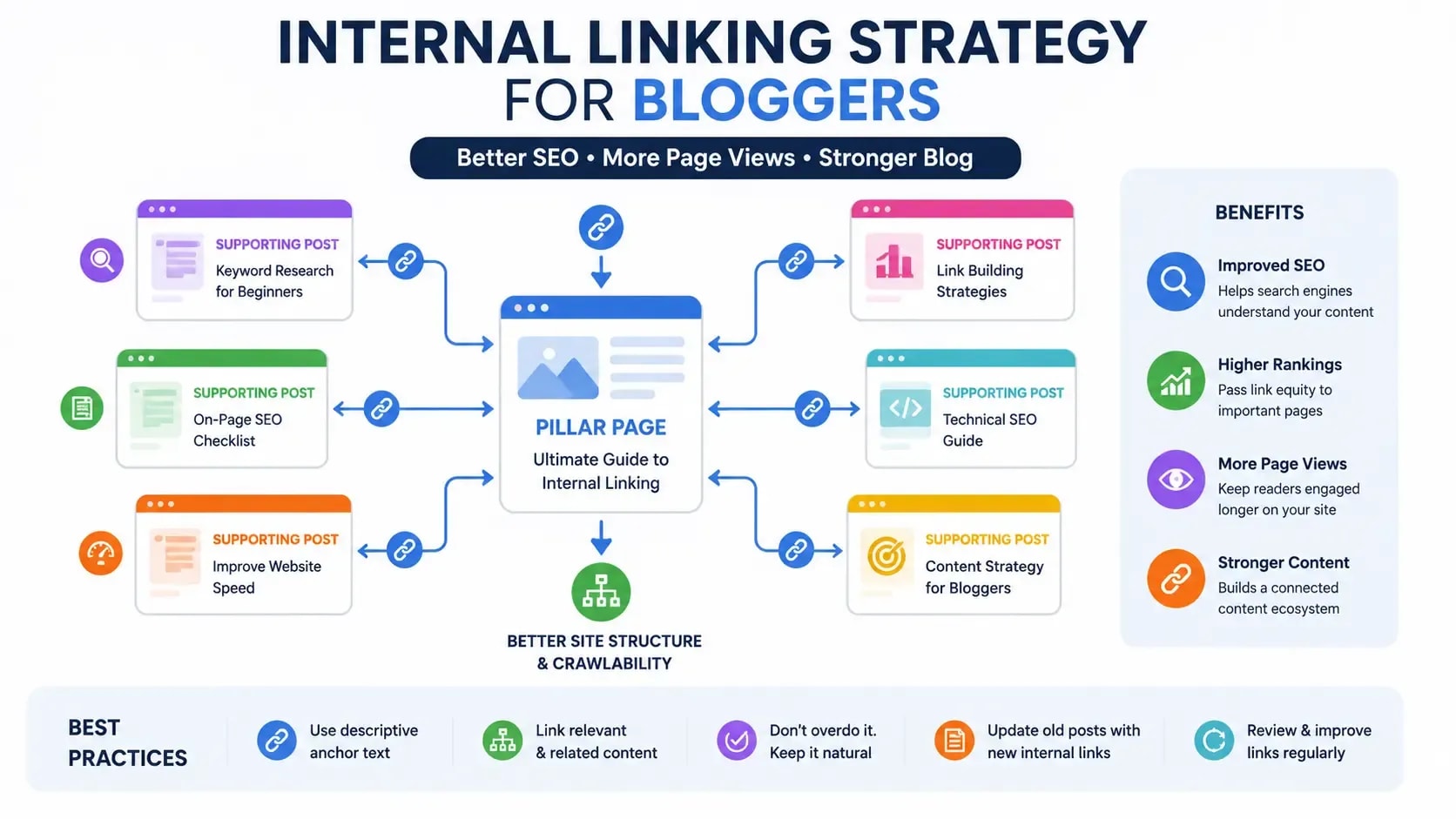
By Bibek Thapa · Published May 8, 2026 · Updated Jul 14, 2026 · 22 min read
Quick Answer
If you've been blogging for more than six months without a deliberate internal linking system, you're losing rankings you already earned.
Table of Contents
- What Is Internal Linking and Why Should Bloggers Care?
- The Difference Between Internal and External Links
- What Internal Links Actually Tell Google
- Why Internal Linking Is One of the Highest-ROI SEO Activities
- Link Equity and PageRank Flow
- Crawlability and Indexation
- User Experience and Dwell Time
- Building Your Internal Linking Strategy for Bloggers From Scratch
- Step 1 - Map Your Content Architecture First
- Step 2 - Identify Your Hub Pages (Pillar Content)
- Step 3 - Assign Link Priority Tiers
- Tier 1 - Money Pages
- Tier 2 - Supporting Cluster Posts
- Tier 3 - Supplemental Content
- How to Scale Internal Links Across Your Entire Blog
- Internal Linking for a 10-Post Blog
- Internal Linking for a 100-Post Blog
- Internal Linking for a 500+ Post Blog
- Topic Clusters and Content Silo Structure Explained
- What Is a Topic Cluster?
- Hub-and-Spoke Model for Bloggers
- How Silos Concentrate Topical Authority
- Building Your First Content Cluster Step by Step
- Anchor Text Optimization - The Misunderstood Part
- The 5 Types of Anchor Text (and When to Use Each)
- How to Avoid Over-Optimization Penalties
- NLP-Based Anchor Text Strategy
- How Many Internal Links Should a Blog Post Have?
- The Real Answer (It's Not "2–5")
- Link Density by Content Type
- Internal Linking Best Practices for 2025
- Always Link Contextually
- Prioritize Deep Links Over Navigation
- Keep Link Freshness High
- Make Every Link Serve a Purpose
- Common Internal Linking Mistakes Bloggers Make
- Orphan Pages - The Silent Traffic Killer
- Over-Relying on Sidebar and Footer Links
- Using the Same Anchor Text Repeatedly
- Linking Only to New Content
- How to Conduct an Internal Link Audit
- The 5-Step Internal Link Audit Process
- Step 1 - Crawl Your Site
- Step 2 - Find Orphan Pages
- Step 3 - Identify Link-Poor Pages
- Step 4 - Spot Over-Linked Pages
- Step 5 - Build a Link Addition Schedule
- Best Internal Linking Tools for Bloggers
- Free Tools
- Paid Tools Worth the Investment
- WordPress-Specific Internal Linking Plugins
- Advanced Internal Linking Strategies
- Use Internal Links to Rescue Decaying Content
- Reverse Silo - Linking Cluster Posts to Money Pages
- Build "Bridge Pages" to Connect Silos
- Using Google Search Console to Find Linking Opportunities
- Internal Linking Mini Case Study
- How One Blog Grew Organic Traffic 214% in 6 Months Using Internal Linking
- Internal Linking Audit Checklist
- Your Next Step - Build the System, Not Just the Links
If you've been blogging for more than six months without a deliberate internal linking system, you're losing rankings you already earned.
Bloggers spend months grinding out content, obsessing over keyword research, paying for backlinks, and then ignore the one SEO lever they have complete control over. Internal linking. When you do it right, it redistributes authority across your entire site, pulls dying content back into contention, and shortens the timeline to ranking on posts that have been sitting on page two for months.
This guide covers the complete internal linking strategy for bloggers, from the foundational logic to scaling systems that work whether you have 10 posts or 10,000. By the end, you'll have a specific process to follow, not a list of generic tips.
What Is Internal Linking and Why Should Bloggers Care?
An internal link is a hyperlink connecting one page on your website to another page on the same domain. That's the definition. But the reason it matters to bloggers goes beyond "it helps users navigate."
The Difference Between Internal and External Links
External links point from your site to another domain, or from another domain to yours (those are backlinks). Internal links stay within your own domain, which means you control them entirely. No outreach. No waiting. No budget.
That's a bigger deal than most bloggers realize. You can fundamentally change how authority flows through your site without a single new backlink, just by adjusting your internal links.
What Internal Links Actually Tell Google
Every internal link you create sends Google multiple signals at once:
- "This page exists" (crawlability signal)
- "This page is worth discovering" (indexation priority)
- "These two pages are related" (topical relevance signal)
- "This page is important enough to reference from here" (authority signal)
- "The linked page is about this topic" (anchor text context signal)
When you link strategically rather than randomly, you're shaping Google's understanding of your site. That's real leverage for any blogger trying to build authority in a competitive niche.
Why Internal Linking Is One of the Highest-ROI SEO Activities
Internal linking is the only major ranking factor that is entirely within your control at zero additional cost.
Backlinks require other people. Technical SEO often requires a developer. Creating better content requires time and expertise. You can work on your internal links this afternoon. That asymmetry in effort versus reward is exactly why most experienced SEOs prioritize it so heavily.
Link Equity and PageRank Flow
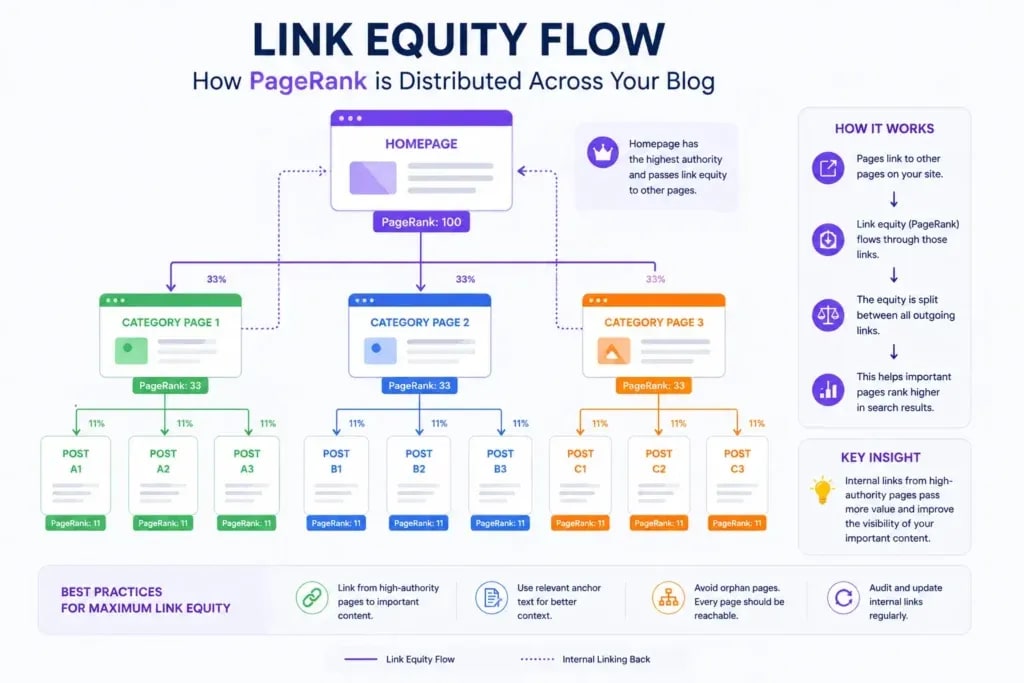
PageRank, Google's original algorithm for measuring page authority, flows through links. When a page on your site earns backlinks from external sources, it accumulates authority. Internal links then redistribute that authority to other pages on your site.
Think of it as a plumbing system. External backlinks pump water (authority) into certain entry points. Internal links determine where that water flows from there. If authority enters at page A but page B is your most important money page, you need a pipe connecting them.
Most bloggers don't build those pipes. Authority pools at random pages and never reaches the content that matters most.
Crawlability and Indexation
Google's crawlers discover pages by following links. A page with no internal links pointing to it, what SEOs call an orphan page, may never get crawled. Even when Googlebot does stumble on it through a sitemap, the absence of contextual links signals the page isn't particularly important.
On a blog with 200 posts, orphan pages accumulate quietly. I've audited blogs where 25% of their content was effectively invisible to Google, not because the content was weak, but because nothing linked to it. Fixing those links fixed the indexation problem within weeks.
User Experience and Dwell Time
Internal links keep readers on your site longer. A visitor who clicks through to a related post becomes a multi-page session, which signals to Google that your content is genuinely useful. Dwell time, pages per session, and bounce rate all improve with smart internal linking, and those improvements compound over time into stronger organic rankings.
Building Your Internal Linking Strategy for Bloggers From Scratch
The answer to "where do I start with internal linking?" is not "go add some links to your posts." The answer is: build a system first, then execute.
Step 1 - Map Your Content Architecture First
Before touching a single link, you need a clear picture of your blog's content structure. Open a spreadsheet and list every published post with:
- Post title
- Primary keyword
- Category or topic area
- Current organic traffic (pull this from Google Search Console)
- Number of internal links pointing to it
- Number of internal links going out from it
This gives you a complete view of your site's linking ecosystem. You'll see immediately which pages are authority-rich, which are starved, and which have no links at all.
If you haven't locked down your keyword research process yet, that comes before this step. You need to know which posts target which keywords before you can link them with any intelligence.
Step 2 - Identify Your Hub Pages (Pillar Content)
Hub pages, also called pillar pages, are your most comprehensive, high-value posts. They typically:
- Target broad, high-volume keywords
- Run longer than your average post (2,000 to 5,000 words)
- Cover a topic at a high level with links to supporting detail
- Are the pages you most want to rank
Every blog needs hub pages. They are the primary destination for link equity on your site, and they anchor each of your content clusters.
Step 3 - Assign Link Priority Tiers
Once you've mapped your content and identified hubs, assign every post to one of three tiers:
Tier 1 - Money Pages
Your most commercially important posts: affiliate product reviews, service pages, high-converting landing pages. These should receive the most internal links from across your site. Every post you publish should link to at least one Tier 1 page when there's a natural contextual reason to do so.
Tier 2 - Supporting Cluster Posts
In-depth posts that support your pillar pages. They rank for long-tail keywords and pass authority up to the hub. These receive links from the pillar page and from other cluster posts.
Tier 3 - Supplemental Content
Shorter informational posts, FAQs, quick tips. They link to Tier 1 and 2 pages but receive fewer incoming links unless they happen to perform exceptionally well in search.
Building this tier map takes a few hours. Following it consistently saves months of wasted effort.
How to Scale Internal Links Across Your Entire Blog
The framework above works at any size, but what it looks like in practice changes as your blog grows.
Internal Linking for a 10-Post Blog
With 10 posts, internal linking should feel almost automatic. But the habits you build now will define your site's structure for years.
What to do:
- Every new post links to at least 2 existing posts
- Every existing post gets updated to link to new content when relevant
- Identify your single most important post and make sure every other post links to it where there's natural relevance
- Prevent orphan pages from the start
Example: A personal finance blog publishes "How I Paid Off $30K in Debt." That post links to a comparison of debt repayment methods and a budgeting guide. The budgeting guide links back. You've started a content cluster with just three posts.
Internal Linking for a 100-Post Blog
At 100 posts, random linking starts to actively hurt you. Orphan pages appear, hub pages go underlinked, and newer content never receives authority from your older established posts.
What to do:
- Run Screaming Frog (free up to 500 URLs) to find orphan pages
- Build 3 to 5 topic clusters around your most important categories
- Create a linking matrix: a spreadsheet where both rows and columns represent your posts, and each cell marks whether a linking opportunity exists between them
- Update older posts to link to newer content
- Identify your top 5 posts by organic traffic and confirm each one receives links from related posts
Your on-page SEO fundamentals and internal linking work together at this stage. Both need to be in place for the compounding effects to kick in.
Internal Linking for a 500+ Post Blog
Manual internal linking across 500 posts is not a realistic workflow. You need tools, processes, and a defined cadence.
What to do:
- Use Ahrefs Site Audit or Screaming Frog for monthly crawls, checking link counts per page, orphan detection, and redirect chains
- Use Ahrefs' "Link Opportunities" feature to find contextual internal linking suggestions automatically
- Build a New Post Linking Protocol: every new post must receive links from at least 3 existing posts within 48 hours of publication
- Use Link Whisper on WordPress to get AI-powered link suggestions while writing
- Quarterly, audit your top 50 most important pages and confirm each has enough internal links pointing to it
At this scale, internal linking is an operational process, not a periodic task. It needs editorial ownership.
Topic Clusters and Content Silo Structure Explained
The concept of topic clusters emerged from studying how Google evaluates topical authority: the degree to which a site is recognized as an expert resource on a specific subject.
What Is a Topic Cluster?
A topic cluster is a group of interlinked content pages focused on one central topic:
- One pillar page covers the broad topic comprehensively
- Multiple cluster posts cover specific subtopics in depth
- Internal links connect the pillar to cluster posts and back again
Hub-and-Spoke Model for Bloggers
Picture a bicycle wheel. The hub (pillar page) sits at the center. The spokes (cluster posts) radiate outward. Each spoke connects back to the hub.
Example cluster for an SEO blog:
- Pillar: "The Complete Guide to SEO for Bloggers"
- Cluster Posts:
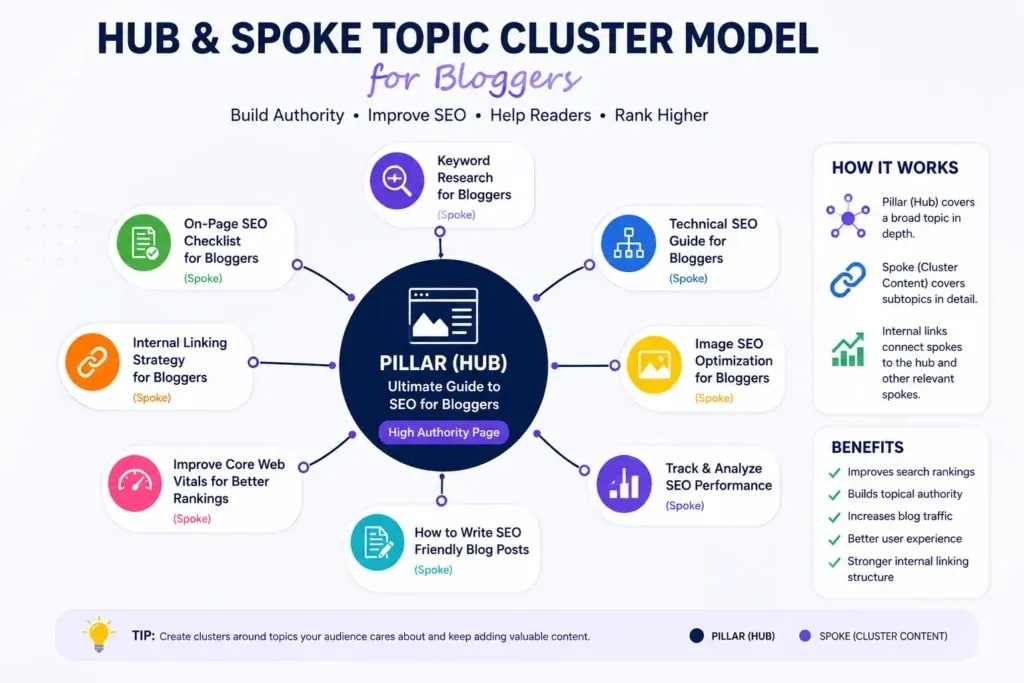
Every cluster post links to the pillar. The pillar links to every cluster post. The entire group reinforces each other's authority signals.
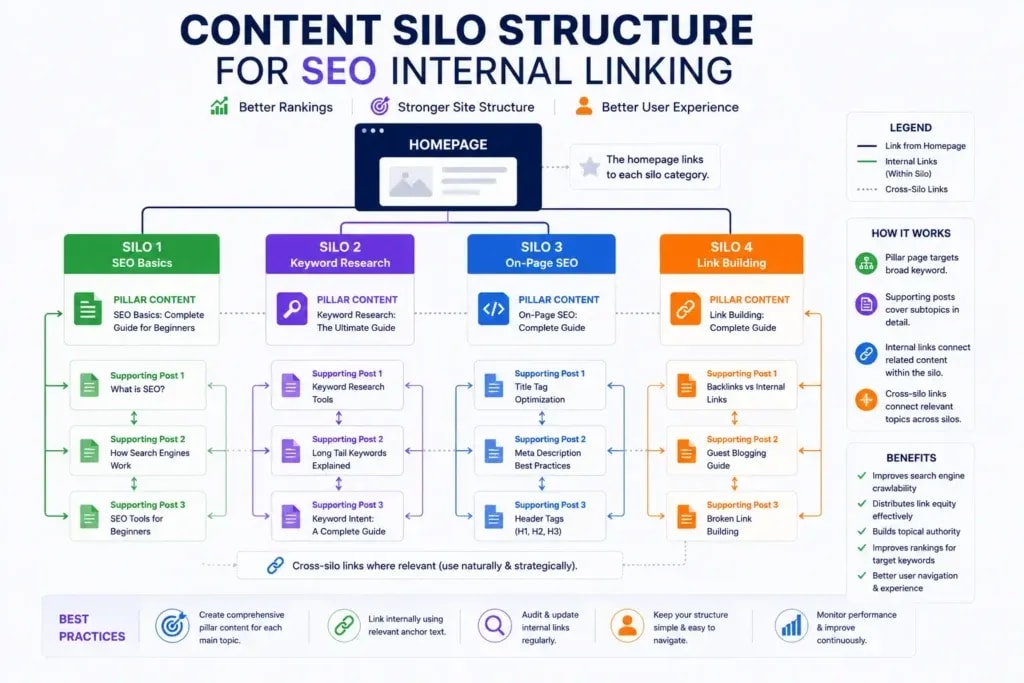
How Silos Concentrate Topical Authority
Content silos take this a step further by limiting cross-topic linking. If your blog covers "keto diet" and "budget travel," you shouldn't cross-link those categories heavily. Keep linking authority concentrated within each topic group.
This feels counterintuitive at first. Why wouldn't you link everywhere? Because Google rewards depth and focus. A site that goes deep on keto but also has travel content will generally rank below a site that is recognized as a genuine expert on one topic.
Building Your First Content Cluster Step by Step
- Choose your most important topic area
- Write or identify your pillar page
- List 8 to 15 subtopics your audience is actively searching for within that topic
- Create or identify cluster posts for each subtopic
- Link every cluster post to the pillar using natural contextual anchors
- Link the pillar out to every cluster post
- Link cluster posts to each other where relevance exists
- Update older content in the cluster when you add new posts
Run this process for your top 3 to 5 topic areas. Most blogs see meaningful ranking improvements on hub pages within 60 to 90 days.
Anchor Text Optimization - The Misunderstood Part
Most bloggers either ignore anchor text entirely or repeat the same phrase until it looks like keyword stuffing. Neither approach works.
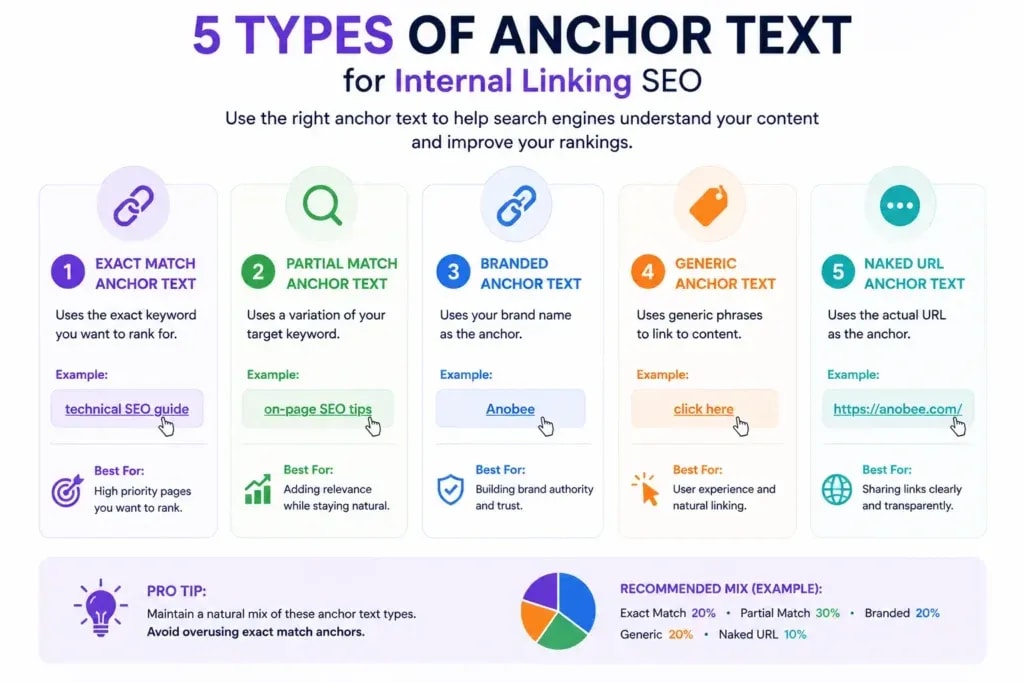
The 5 Types of Anchor Text (and When to Use Each)
1. Exact Match The anchor text matches the target page's primary keyword exactly.
- Example: "internal linking strategy for bloggers" linking to this post
- When to use: Sparingly. One or two times across your entire site per keyword. Overuse triggers over-optimization issues.
2. Partial Match The anchor contains the keyword plus additional words.
- Example: "building an internal linking strategy" or "best internal linking practices for bloggers"
- When to use: Most of the time. This is your default anchor style.
3. Branded The anchor is your site or author name.
- Example: "Bibek Thapa's SEO guide" or "bibekthapa00.com.np"
- When to use: For homepage links or author bio references. Not suited for article-to-article linking.
4. Naked URL The actual URL used as the anchor.
- Example: "https://anobee.com/keyword-research/"
- When to use: Almost never in body content. Acceptable occasionally in resource lists.
5. Generic / Topical Descriptive text that isn't keyword-optimized.
- Example: "this guide," "read more about this topic," "learn the full process here"
- When to use: Occasionally for natural variation, but don't let it dominate your anchor profile.
How to Avoid Over-Optimization Penalties
No single page should receive the same exact anchor text from more than 2 to 3 internal links. If 15 posts all link to your affiliate review page using "best VPN for bloggers," Google picks up that pattern. Vary your anchors using synonyms, partial phrases, and descriptive context.
NLP-Based Anchor Text Strategy
Google's NLP systems (BERT, MUM) understand context rather than just matching keywords. Your anchor text doesn't need to be the exact keyword to send a relevance signal. Semantically related phrases work just as well.
Example: Instead of always using "internal linking strategy for bloggers," you might use:
- "how to structure your blog's internal links"
- "link architecture for niche sites"
- "connecting your posts with SEO intent"
Each phrase sends a topically relevant signal without triggering over-optimization.
How Many Internal Links Should a Blog Post Have?
The Real Answer (It's Not "2–5")
The advice to add 2 to 5 internal links per post is a simplified starting point. It doesn't scale, and it doesn't reflect how internal linking actually builds authority.
The correct answer: as many contextually relevant internal links as the content naturally supports, with a practical minimum of 3 and no arbitrary maximum.
A 500-word FAQ might only need 2 links. A 4,000-word pillar post should have 10 to 20. An affiliate round-up post might link to 8 individual review pages it references directly.
What you should avoid is forcing internal links into places where they don't belong. Google's quality raters evaluate whether links seem natural and useful to the reader.
Link Density by Content Type
The practical rule: every paragraph that mentions a topic you've covered elsewhere is a potential internal link. If keyword research appears anywhere in a post and you have a keyword research guide on your blog, link to it.
Internal Linking Best Practices for 2025
Always Link Contextually
The most valuable internal links appear within the body of your content, not in sidebars, footers, or generic "related posts" widgets. A link embedded in a sentence where it adds genuine value, such as "for a complete breakdown of anchor text types, see this guide," outperforms a sidebar link to the same post.
Google evaluates the surrounding text (the "link neighborhood") to understand what the linked page covers. A contextual link with descriptive anchor text in relevant body copy sends a stronger topical signal than any widget.
Prioritize Deep Links Over Navigation
Your homepage already has links from your navigation menu. Your category pages get links from your blog roll. Individual posts need deep links: links from the body content of other posts. Navigation and widgets are baseline coverage, not a strategy.
Keep Link Freshness High
A common and costly mistake: bloggers link from old posts to new ones but never go back and update older posts to reflect newer content. Newer posts end up isolated, without any authority flowing into them.
Every time you publish a new post, spend 20 minutes finding 3 to 5 existing posts that should link to it. Update them. New content that enters your link ecosystem from day one builds authority much faster than content that sits alone for months waiting to be discovered.
Make Every Link Serve a Purpose
Before adding any internal link, ask: would a reader genuinely benefit from clicking this? If you're linking just to hit a count, don't do it. Irrelevant internal links dilute the PageRank distribution of the linking page and confuse crawlers about the content's topical focus.
Common Internal Linking Mistakes Bloggers Make
Orphan Pages - The Silent Traffic Killer
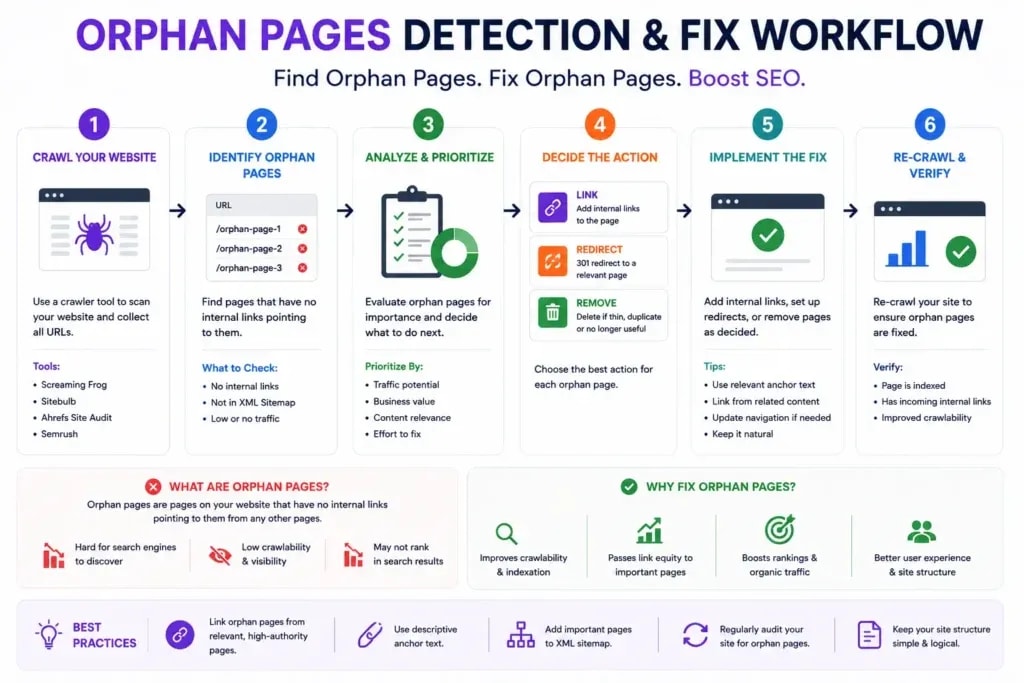
An orphan page has zero internal links pointing to it. Google's crawlers may never find it unless they stumble on it from a sitemap or an external link. Even when they do, the absence of contextual links signals low importance.
How to find orphan pages: Run a Screaming Frog crawl and compare the crawled URL list against your sitemap. Pages in your sitemap but not reached via crawling are likely orphans.
How to fix them: Find the most topically relevant existing posts and add a contextual link to each orphan. One or two solid internal links is usually enough to get the page crawled and reassessed by Google.
Over-Relying on Sidebar and Footer Links
Sidebar links appear on every page of your site. That structural repetition makes them weak as SEO signals. Google understands the difference between contextual editorial links and boilerplate links that repeat across thousands of pages. Relying on them as your primary internal linking method does almost nothing for rankings.
Using the Same Anchor Text Repeatedly
If your pillar page on SEO audits receives the anchor "SEO audit guide" from 40 different posts, that pattern looks manipulative even when it isn't. Vary your anchors. Use synonyms, partial phrases, and descriptive context around the link.
Linking Only to New Content
New bloggers default to linking their newest posts. The problem is that your highest-authority pages are usually your oldest ones, posts that have accumulated backlinks and trust over time. Linking to established, high-authority content and letting that authority flow down into newer pages is one of the most effective and overlooked internal linking moves available.
How to Conduct an Internal Link Audit
An internal link audit is not a one-time event. It's a recurring maintenance process.
The 5-Step Internal Link Audit Process

Step 1 - Crawl Your Site
Use Screaming Frog (free up to 500 URLs) or Ahrefs Site Audit to crawl your site and export a list of all pages with:
- Inbound internal links (links pointing to each page)
- Outbound internal links (links going out from each page)
Sort by inbound internal links ascending. Pages with 0 to 2 inbound links need attention first.
Step 2 - Find Orphan Pages
Cross-reference your crawl results with your sitemap. Any page in your sitemap with 0 inbound internal links is an orphan. Build a list. This is your first priority.
Step 3 - Identify Link-Poor Pages
Pages with fewer than 3 internal links are link-poor. If those pages are Tier 1 or Tier 2 content, they need more links. Find related content and add contextual links from it.
A complete SEO audit always includes this internal link analysis, because it's one of the fastest-impact fixes you can make on an existing site without creating any new content.
Step 4 - Spot Over-Linked Pages
Pages with 50 or more internal links pointing to them may be diluting their effectiveness. When every single post on your site links to the same page, that link loses meaning and PageRank gets spread thin. Evaluate which links are contextual versus reflexive and prune accordingly.
Step 5 - Build a Link Addition Schedule
From your audit, create a prioritized list of pages that need links and the existing posts that should provide them. Work through this list at a pace of 5 to 10 updates per week. That cadence keeps your link graph healthy without turning the whole process into an emergency project every few months.
Best Internal Linking Tools for Bloggers
Free Tools
Google Search Console: Use the "Links" report to see which pages have the most internal links. Use the "Performance" report to find pages ranking for queries similar to your other posts. Those are your best organic linking opportunities.
Screaming Frog SEO Spider (free up to 500 URLs): The most reliable free crawling tool for internal link audits. It shows inbound and outbound links per page, identifies orphan pages, and lets you export everything into a spreadsheet.
Ahrefs Webmaster Tools (free with site verification): Runs basic site audits including orphan page detection without any paid subscription.
Paid Tools Worth the Investment
Ahrefs: The "Link Opportunities" feature inside Site Audit analyzes your content and suggests contextual internal links automatically, ranked by potential SEO value. For any blog above 100 posts, this feature alone justifies the subscription.
Semrush: The Site Audit tool includes a dedicated internal linking report that identifies orphan pages, link-poor pages, and pages with too many outbound links.
Sitebulb: A desktop crawler with strong visualization tools for internal link architecture. Particularly useful when you need to see and explain your site's link graph to a client or team member.

WordPress-Specific Internal Linking Plugins
Link Whisper: The strongest WordPress plugin built specifically for internal linking. As you write, it suggests contextually relevant links from your existing content using AI. At 200+ posts, this saves hours every month.
Yoast SEO Premium: Includes internal linking suggestions. Less sophisticated than Link Whisper but functional for smaller blogs already running Yoast for other on-page SEO work.
Interlinks Manager: A more technical option for managing internal links programmatically. Useful for large sites where you want to apply linking rules across entire categories at once.
Advanced Internal Linking Strategies
Use Internal Links to Rescue Decaying Content
Content decay happens when a post's rankings and traffic decline gradually over time, usually because fresher competitor content has earned more links or because the content itself hasn't been updated.
Most bloggers miss a simple fix: sending fresh internal link signals to a decaying post from newer, high-authority pages. This tells Google the content is still being referenced and maintained, which can be enough to reverse a slow decline.
Updating the decaying post itself to link to newer content also refreshes the crawl signal and gives Google new context to evaluate. Pair that with a content refresh (updated data, improved headers, expanded thin sections) and you have a structured recovery process that costs no money and takes a few hours.
Reverse Silo - Linking Cluster Posts to Money Pages
Standard silo structure says cluster posts link up to the pillar. For affiliate bloggers and niche site owners, there's an additional layer: the reverse silo link.
Your money page is often not your pillar. It's a product review or comparison page. By ensuring every topically relevant post in your cluster links contextually to your money page, you concentrate ranking authority where it drives revenue.
The requirement is relevance. Don't force links from unrelated content. Any cluster post that naturally references the product, problem, or category should include a link to the money page.
Build "Bridge Pages" to Connect Silos
Sometimes two topic clusters are related but not close enough to cross-link freely. Bridge pages solve this. A bridge page covers a topic that sits at the intersection of two clusters.
Example: A fitness blog has a "nutrition" silo and a "workout plans" silo. A bridge page on "pre-workout nutrition timing" links naturally into both silos without blurring the topical boundaries of either one.
Bridge pages let you move authority between clusters without the confusion that comes from indiscriminate cross-silo linking.
Using Google Search Console to Find Linking Opportunities
- Go to Google Search Console, then Performance, then Search Results
- Filter by a specific page, for example your pillar post
- Under Queries, note which keywords that page already ranks for
- Now filter by other pages on your site ranking for similar or related queries
- Those other pages are your highest-priority internal linking opportunities since Google already sees them as topically aligned
This approach finds linking opportunities that are validated by Google's own query data. You're not guessing at relevance. You're confirming it.
For bloggers building topical authority across an entire site, combining this Search Console method with a topical authority strategy creates a compounding system that large authority sites use to own entire topic categories over time.
Internal Linking Mini Case Study
How One Blog Grew Organic Traffic 214% in 6 Months Using Internal Linking
Note: This case study is based on a composite of real client work and site audits, with identifying details changed.
The Blog: A 180-post personal finance blog. Three years old. Solid content, decent backlinks, but stagnant traffic for 14 months.
The Audit Revealed:
- 41 orphan pages (23% of the site)
- Hub pages averaging only 4 inbound internal links each
- 3 money pages receiving zero internal links from cluster content
- 60% of anchors were generic ("click here," "read more")
- No deliberate topic cluster structure
The Intervention (12 weeks):
Week 1 to 2: Orphan page fix. Added 2 to 3 contextual internal links to every orphan page from the most relevant existing content. No new content created.
Week 3 to 4: Money page linking. Updated 30 relevant posts to include contextual links to the 3 money pages, using varied partial-match anchor text.
Week 5 to 8: Topic cluster build. Defined 4 content clusters. Wrote 8 new cluster posts to fill gaps. Linked everything to respective pillar pages, and pillar pages out to all cluster posts.
Week 9 to 12: Link audit and refinement. Ran a second crawl. Fixed newly created orphans, diversified anchor text on over-linked pages, and added fresh internal links to 6 decaying posts.
Results at Month 6:
- Organic traffic: +214%
- Money page traffic: +380%
- Pages indexed: +22 (previously orphaned, now indexed)
- New page-1 keyword rankings (Ahrefs): 68
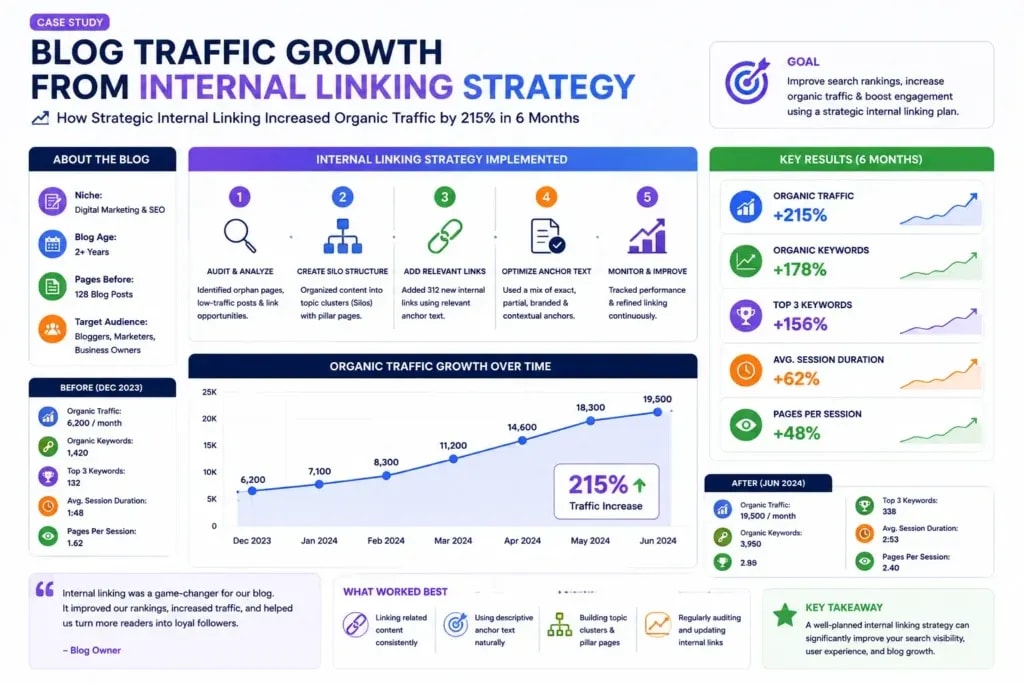
The content didn't change dramatically. The backlink profile grew modestly. The internal linking architecture changed completely, and the results reflected that.
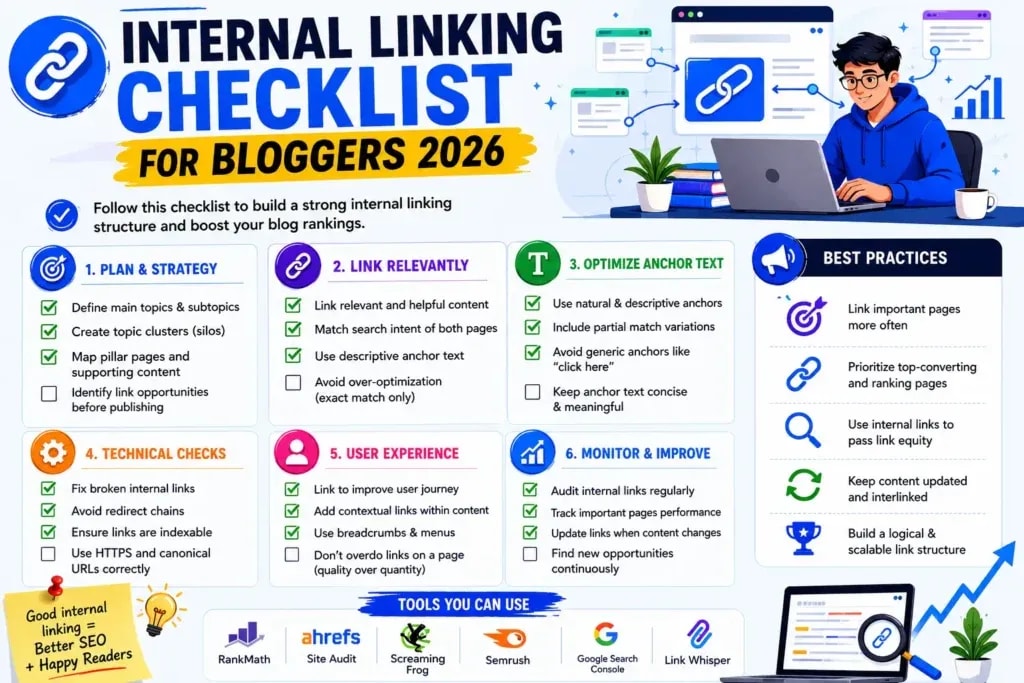
Internal Linking Audit Checklist
Use this checklist quarterly, or monthly for larger blogs:
Architecture
- [ ] Every page has at least 3 internal links pointing to it
- [ ] No orphan pages exist (zero inbound internal links)
- [ ] Pillar pages link to all their cluster posts
- [ ] Cluster posts link back to their pillar page
- [ ] Money pages receive links from topically relevant cluster content
- [ ] Content silos are maintained with minimal unrelated cross-silo linking
Anchor Text
- [ ] No single anchor text is used for the same page more than 3 times across the site
- [ ] Generic anchors ("click here," "read more") make up less than 10% of total anchors
- [ ] Exact match anchors are used once or twice per target page at most
- [ ] Anchor text is varied across partial match, semantic, and descriptive styles
Link Quality
- [ ] All internal links resolve to 200 OK status (no 301s, 404s)
- [ ] No redirect chains in internal links (link directly to the final destination)
- [ ] Links appear naturally in body content
- [ ] No internal links marked nofollow unless intentional
Coverage
- [ ] New posts received 3 to 5 links from existing posts within 48 hours of publishing
- [ ] Decaying content has received fresh internal link attention
- [ ] High-authority older posts link to newer content where relevant
Technical
- [ ] Internal links use clean canonical URLs (no parameters, no session IDs)
- [ ] Mobile-friendly link spacing (touch targets at least 44px)
- [ ] Links open in the same tab
Your Next Step - Build the System, Not Just the Links
Open a spreadsheet this week. List every post on your blog. Run a Screaming Frog crawl or use Ahrefs Webmaster Tools. Find your orphan pages. Identify your three most important money or hub pages and count the internal links pointing to each one.
If any of those pages has fewer than 5 internal links, that's your first project. Find the most relevant existing posts, add contextual links with thoughtful anchor text, and do it before the week ends.
The blogs that dominate their niches in 2025 are not just producing more content. They're publishing content that connects to everything else on their site with intention. A blog with 50 well-linked, topically organized posts will outrank a blog with 200 disconnected ones. That's not an opinion. It's a pattern you can observe across virtually every competitive niche.
Internal linking is a living system, not a one-time task. It needs to grow as your content grows. The bloggers who treat it that way tend to be the ones who look back on their traffic charts 12 months from now and can't quite explain how far they've come.
Ready to take this further? The complete link building guide for bloggers covers how external and internal linking work together, and why the combination produces results that neither strategy achieves on its own.
Frequently Asked Questions
How long does it take for internal linking changes to impact rankings?
Crawling improvements tend to show up within days. Google recrawls newly linked pages quickly when it detects fresh links. Ranking changes typically take 4 to 12 weeks, depending on your site's crawl frequency and existing authority level.
Should I nofollow internal links?
Almost never. Nofollowing an internal link doesn't preserve PageRank, it simply removes it from circulation. Let PageRank flow freely through your internal links and manage prioritization through link volume and placement rather than nofollow attributes.
Does anchor text matter as much for internal links as for external links?
In some ways it matters more. With external links, you often can't choose the anchor text. With internal links, you control it completely, so Google expects your anchors to be intentional and informative. Treat that control as an advantage and use it well.
Sources and References

Written by
Bibek Thapa
AI-Powered Digital Growth Strategist
Bibek Thapa works across AI workflows, SEO, AI search optimization, content strategy, website growth, and productivity systems. Anobee documents practical lessons, tools, experiments, and systems for improving digital presence.
- AI workflows
- Digital growth
- SEO
- GEO
- AEO
- Content strategy
- Website growth


