
SEO & AI Search
SEO Friendly Content Checker: 10 Proven Steps to Write Blog Posts Google Loves
Use an SEO friendly content checker to write SEO-friendly blog posts that rank and convert. Learn proven steps, tools, and beginner tips today.

By Bibek Thapa · Published May 3, 2026 · Updated Jul 14, 2026 · 12 min read
Quick Answer
Most people think writing SEO-friendly blog posts means stuffing keywords into every paragraph. It doesn't. And that misconception is exactly why thousands of well-written posts sit on page seven of Google, never to be found.
Table of Contents
- What Does "SEO-Friendly" Actually Mean? (And Why Beginners Get It Wrong)
- SEO-Friendly Website Means More Than Just Keywords
- The Difference Between Writing for Google and Writing for People
- Start With the Right Keywords - Not Just Any Keywords
- How to Find SEO-Friendly Keywords That Actually Drive Traffic
- Secondary Keywords: The Secret Weapon Most Beginners Ignore
- How to Write SEO-Friendly Titles That Get Clicked
- Using an SEO-Friendly Title Generator the Right Way
- Title Formulas That Work (With Real Examples)
- Structuring Your SEO-Friendly Article for Humans and Search Engines
- Why Headings Are More Powerful Than You Think
- Paragraph Length, Readability, and Flow
- The SEO-Friendly URL Checker Habit Every Blogger Should Have
- What Makes a URL SEO-Friendly?
- Common URL Mistakes That Kill Rankings
- Choosing an SEO-Friendly Blogger Theme (Yes, It Matters)
- Speed, Mobile, and Core Web Vitals
- What to Look for in a Theme Before You Publish
- On-Page SEO Essentials: The Checklist That Actually Works
- Meta Descriptions, Alt Text, and Internal Links
- Using an SEO-Friendly Content Checker Before You Hit Publish
- How Long Should an SEO-Friendly Blog Post Be?
- Real Talk: Common SEO Mistakes Beginners Make (And How to Fix Them)
- Conclusion: Your Next Post Can Rank - Here's How to Start
Most people think writing SEO-friendly blog posts means stuffing keywords into every paragraph. It doesn't. And that misconception is exactly why thousands of well-written posts sit on page seven of Google, never to be found.
Here's the honest truth: SEO writing isn't about tricking search engines. It's about helping them understand what your content is actually about, while giving real readers something worth reading. The reality is, the good news? Once you get the fundamentals down, it's not nearly as complicated as the SEO industry wants you to believe.
This guide walks you through everything beginners need to know, from picking the right keywords and using an SEO friendly content checker, to structuring your post and choosing the right tools, in plain, practical language. No jargon spiral; no fluff.
Let's get into it.
What Does "SEO-Friendly" Actually Mean? (And Why Beginners Get It Wrong)
Here's where most guides lose people. They throw the phrase "SEO-friendly" around like it's obvious. But it means different things in different contexts.
At its core, an SEO-friendly blog post is one that search engines can crawl, understand, and confidently recommend to users searching for that topic. The key takeaway is but that's the technical definition. The human definition is simpler: it's a post that answers what someone searched for, clearly and completely.
SEO-Friendly Website Means More Than Just Keywords
When we sayseo friendly website meansa site optimized for search, we're talking about a combination of things, fast load times, clean code, mobile responsiveness, internal linking structure, and yes, well-optimized content. A single great post on a slow, broken website will still struggle to rank.
Think of your blog like a physical store; your content is the merchandise. What matters most here is but if the store has broken windows, no signage, and the lights keep flickering, customers won't trust it, and neither will Google.
The Difference Between Writing for Google and Writing for People
This used to be a real tension. Early SEO rewarded robotic keyword stuffing. Today, Google's algorithms (especially since the Helpful Content updates) actively penalize content that feels written for bots rather than humans.
The sweet spot? Write for people first, naturally. Conversationally, thoroughly, and then streamline for search engines as a final layer. Not the other way around.
Start With the Right Keywords - Not Just Any Keywords
Before you write a single sentence, you need to know what you're targeting. And this is where most beginners make their first major mistake: they pick keywords based on gut feeling instead of actual data
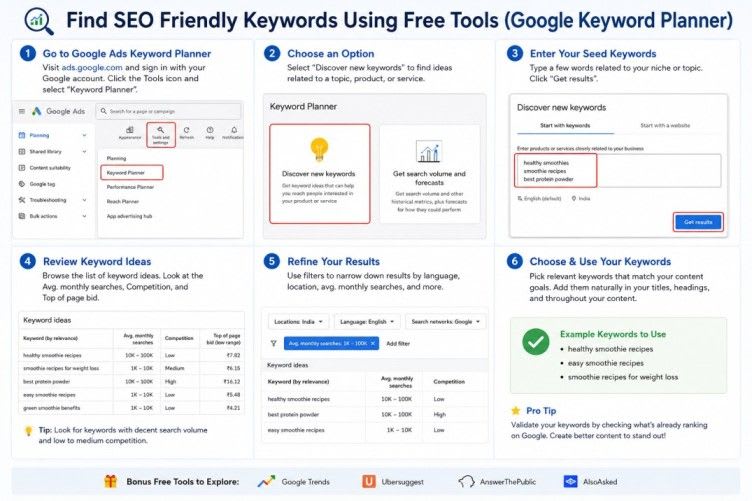
How to Find SEO-Friendly Keywords That Actually Drive Traffic
Good SEO-friendly keywordshave three qualities: reasonable search volume, manageable competition, and alignment with your reader's actual intent.
For a beginner blog, going after high-volume, high-competition keywords is a losing game. What matters most here is if you just started a food blog, you're not ranking for "easy dinner recipes" anytime soon. But "easy dinner recipes for college students with no oven"? That's a different conversation.
Tools like Google Keyword Planner and Ubersuggest are free starting points. Look for keywords with search volumes between 500 and 5. 000 per month, enough traffic to matter, low enough competition to actually win.
One thing I always do: search your target keyword in an incognito window and study the top 10 results. Who's ranking? What kind of content did they write? How long is it? That tells you more than any tool.
Secondary Keywords: The Secret Weapon Most Beginners Ignore
Here's what most people miss, ranking for one keyword isn't the goal. Zooming out a bit, a well-optimized post can rank for dozens of related terms. Secondary keywords are the phrases that orbit your main topic and signal to Google that your content covers the subject deeply.
For this post, secondary keywords likeseo friendly titles,seo friendly article, andseo friendly blognaturally appear throughout. One thing to keep in mind is they aren't forced in. They're part of how the topic is discussed.
Use your secondary keywords in subheadings, naturally in body paragraphs, and in image alt text. That's it. Don't count them. Don't worry about exact-match density. Just write about the topic thoroughly and they'll appear organically.[See our guide on keyword research for beginners]
How to Write SEO-Friendly Titles That Get Clicked
Your title has two jobs: rank and get clicked. In practice, most people fine-tune for one and forget the other. A title that ranks but gets ignored still fails, because click-through rate is a ranking signal too
Using an SEO-Friendly Title Generator the Right Way
An SEO-friendly title generator can be genuinely useful, but only as a brainstorming tool, not a final answer machine. Tools like CoSchedule Headline Analyzer or Sharethrough score your titles based on word balance. Power words, and emotional resonance.
The problem is that many beginners paste in the generated title as-is. Those titles often feel generic. They work fine for the algorithm but don't make a human want to click. Use generators to spark ideas, then edit for your specific audience.
Title Formulas That Work (With Real Examples)
A few formats that consistently perform well:
- Number + Adjective + Noun + Promise:"7 Proven Ways to Write Blog Posts That Actually Rank"
- Question format:"Why Doesn't My Blog Post Rank? Here's What Google Sees"
- How-to with a twist:"How to Write SEO-Friendly Blog Posts (Without Sounding Like a Robot)"
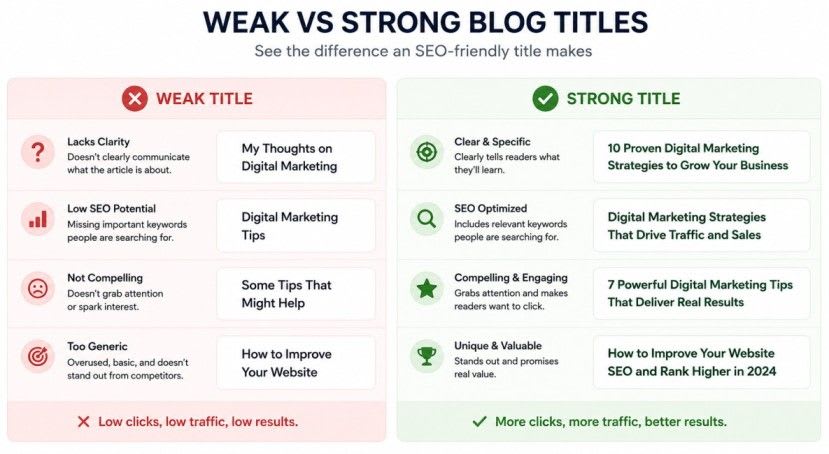
Notice these all include SEO-friendly titlesstrategies without sounding robotic. From a business standpoint, the keyword is there but it reads like a human thought of it first.
Keep your title between 50–60 characters for best display in search results. Anything beyond 60 gets cut off, which looks messy and signals poor optimization.
Structuring Your SEO-Friendly Article for Humans and Search Engines
Structure is one of those things that beginners consistently underestimate. A disorganized post, even one with great information, loses readers within the first few paragraphs. And high bounce rates signal to Google that people didn't find what they were looking for.
Why Headings Are More Powerful Than You Think
Headings (H2s, H3s) do three things simultaneously: they help readers scan and navigate, they tell Google what each section is about, and they give you natural places to include secondary keywords.
A good rule: every H2 should represent a distinct question or sub-topic your reader might have. If you can't explain what a heading section answers. It probably shouldn't be its own section.
For an SEO-friendly article, your H1 contains the primary keyword. On the flip side, two or three H2s include variations of it naturally. And the rest of your headings cover related territory in plain, descriptive language.
Paragraph Length, Readability, and Flow
Online readers scan before they read. Short paragraphs win. Seriously, two to four sentences max, then a break.
Long walls of text signal "this is going to be work. " And most people click back rather than do work.
Mix things up. A one-sentence paragraph can be incredibly effective for emphasis. Then follow it with a longer, more detailed paragraph that goes deep on the idea. This rhythm keeps readers moving.
Tools like Hemingway Editor will flag overly complex sentences and passive voice. Aim for a Grade 7–8 reading level for most general blog content, that's not dumbing it down. That's being respectful of your reader's time.
The SEO-Friendly URL Checker Habit Every Blogger Should Have
Most beginners set up their blog, write a post, and never think about the URL. Then they end up with something likeyourblog.com/?p=4821. That's a problem.
What Makes a URL SEO-Friendly?
A clean, descriptive URL helps both Google and real humans understand what the page is about before they even click. An SEO-friendly URL checker, available in most SEO plugins like Yoast or Rank Math, will flag problematic patterns automatically.
The basics:
- Use your primary keyword in the URL
- Keep it short (under 75 characters is ideal)
- Use hyphens between words, never underscores
- Remove stop words like "a," "the," "and" when possible

So yourblog.com/seo-friendly-blog-posts-guidebeatsyourblog.com/how-to-write-seo-friendly-blog-posts-for-beginners-a-complete-guideevery time. Shorter, cleaner, still keyword-rich.
Common URL Mistakes That Kill Rankings
The biggest one? Changing your URL after publishing. Do that and you break every backlink pointing to that post unless you set up a redirect. Always get your URL right before you publish, it's much harder to fix afterward.
Also, avoid dates in URLs unless your content is genuinely time-sensitive. A URL with/2021/in it already feels stale before someone reads the first sentence.
Run every post through an SEO-friendly URL checker before publishing. It takes 30 seconds and can save you real ranking problems. [See our complete on-page SEO checklist]
Choosing an SEO-Friendly Blogger Theme (Yes, It Matters)
Content is king. But a slow, cluttered theme is the castle with no roads leading to it.
Speed, Mobile, and Core Web Vitals
Google's Core Web Vitals - Largest Contentful Paint, Cumulative Layout Shift, First Input Delay, are now ranking factors. An SEO-friendly blogger theme is one that loads fast, renders cleanly on mobile, and doesn't inject unnecessary JavaScript that slows everything down.
Most premium themes built specifically for bloggers (GeneratePress, Kadence, Astra) are optimized for this. Free Blogger. com themes vary wildly in quality, some are fine, many are not.
Test any theme with Google PageSpeed Insights before committing to it. A score below 70 on mobile is a warning sign.
What to Look for in a Theme Before You Publish
- Schema markup support (helps Google understand your content type)
- Responsive design that actually looks good on phones
- Minimal bloat, fewer plugins and scripts needed means faster load
- Clean typography that doesn't require readers to squint

An honest take: the theme matters less than people think forcontentquality, but it matters a lot for thetechnical foundationthat allows your content to rank. Looking at it from another angle, get a clean, fast theme and stop overthinking it.[Speed up your blog and pass Core Web Vitals].
On-Page SEO Essentials: The Checklist That Actually Works
Once your content is written, there's a layer of optimization that happens before you publish. Think of it as proofreading, but for search engines.
Meta Descriptions, Alt Text, and Internal Links
Yourmeta descriptiondoesn't directly impact rankings, but it does impact click-through rates, which does. Write it like an ad for your post. Include the primary keyword, state clearly what the reader will get, and end with an action signal. The key takeaway is keep it under 160 characters.
Imagealt textis often ignored, and it shouldn't be. Every image on your post should have a descriptive alt tag that includes your keyword naturally.image1.jpg. Not a keyword dump."A beginner using an SEO friendly content checker to analyze their blog post."
Internal links, linking to other relevant posts on your blog, help Google understand your site structure and keep readers engaged longer. Aim for two to five internal links per post, placed where they genuinely add context.
Using an SEO-Friendly Content Checker Before You Hit Publish
This is where theSEO friendly content checkerearns its place in your workflow. Tools like Yoast SEO, Rank Math (for WordPress), or Surfer SEO analyze your draft and flag issues: keyword placement, readability score, missing meta description, thin content, and more.
Run it before every single post. Not to chase a perfect "green light" score, honestly, perfect scores often mean over-optimized content, but to catch obvious gaps. Is the primary keyword in the first 100 words? Is the meta description there? Looking at it from another angle, did you actually add alt text to those images?
Consider it a final sanity check, not a report card. [Read our review of the best SEO content checker tools]
How Long Should an SEO-Friendly Blog Post Be?
Short answer: long enough to fully answer the question.
Slightly longer answer: most top-ranking posts for informational queries are between 1,500 and 3,000 words. This one is on the longer end because the topic genuinely requires depth. A post about "what is a meta description" doesn't need 3,000 words. A post about the full process of writing SEO content does.
The real test isn't word count, it's completeness. Ask yourself: "If someone searched for this topic and only read my post. Would they have everything they need? " If the answer is yes, you're done. If there are obvious questions you haven't addressed, keep writing.
According to Backlinko's analysis of 11 million search results, the average first-page result contains around 1,447 words, but that number shifts significantly by industry and query type. Don't worship it. Zooming out a bit, use it as a baseline, not a ceiling.
Real Talk: Common SEO Mistakes Beginners Make (And How to Fix Them)
Most people hit a wall around month three of blogging. Practically speaking, they've published a dozen posts, none are ranking, and they start questioning everything.
Targeting keywords that are too competitive.A brand-new blog competing for "weight loss tips" is like a local bakery trying to rank for "best bakery. " Go niche. Go specific. Win small first.
Writing thin content.A 400-word post that barely scratches the surface signals low effort to Google. Zooming out a bit, even if you nail every other optimization, thin content rarely ranks.
Ignoring internal links.Every post on your blog should link to at least one or two other posts. This builds topical authority and keeps readers on your site longer. [Internal Linking Strategy for Bloggers] shows exactly how to do it without it feeling forced
Publishing and walking away.SEO isn't a one-and-done task. Update old posts with new information, better keywords, and fresh internal links. A 6-month-old post with an update often outranks a brand-new one.
Skipping the SEO-friendly content checker.Seriously. Even experienced writers miss obvious optimization gaps. From a business standpoint, run the check. Fix the flags. It takes five minutes.
Actually, scratch the idea that SEO is this massive technical mountain. It's really just: write clearly, write completely, make it easy to navigate, and use your keywords like a normal human being would.
Conclusion: Your Next Post Can Rank - Here's How to Start
Here's the thing about SEO, it rewards consistency more than perfection. The key takeaway is a blog with 50 well-optimized, genuinely useful posts will almost always outperform a blog with 5 "perfect" ones.
You don't need to master everything at once. Start with the basics: pick a focused keyword. Structure your post with clear headings, write for your reader first, and run an SEO friendly content checker before you publish. That alone puts you ahead of most beginners.
The real shift happens when you stop thinking of SEO as a box to check and start thinking of it as a conversation, one where you're constantly improving how clearly you explain things, how well you answer questions, and how easy you make it for people (and Google) to find and trust your content.
So here's the challenge: take your next draft, apply the 10 steps in this guide, and see what happens. Because the best way to learn SEO isn't to read more about it.
It's to publish, learn, and refine.
Sources and References

Written by
Bibek Thapa
AI-Powered Digital Growth Strategist
Bibek Thapa works across AI workflows, SEO, AI search optimization, content strategy, website growth, and productivity systems. Anobee documents practical lessons, tools, experiments, and systems for improving digital presence.
- AI workflows
- Digital growth
- SEO
- GEO
- AEO
- Content strategy
- Website growth


