SEO & AI Search
Complete On-Page SEO Checklist: 19 Steps to Rank Higher
Apply this complete on-page SEO checklist to rank higher in 2026. Covers 19 steps: search intent, AI Overviews, E-E-A-T signals, and a Position 8-20 rescue framework.

By Bibek Thapa · Published May 8, 2026 · Updated Jul 14, 2026 · 27 min read
Quick Answer
Quick Answer: On-page SEO is the practice of optimizing elements directly on a web page, covering title tags, content structure, keyword placement, internal links, schema markup, and page speed, to rank higher in search results. This checklist covers all 19 factors in priority order, so you fix what actually moves rankings rather than wasting time on low-impact tasks.
Table of Contents
- The 3-Tier Priority Framework (Start Here)
- Part One: The Foundational On-Page SEO Checklist
- 1. Search Intent Alignment — The Factor Everyone Gets Wrong
- 2. Title Tag Optimization
- 3. H1 and Header Architecture
- 4. Meta Description
- 5. URL Structure
- 6. Keyword Placement Strategy
- 7. Content Depth and the Topic Completion Method
- 8. Semantic SEO and Entity Optimization
- 9. Image SEO
- 10. Internal Linking Strategy
- 11. External Linking
- 12. Schema Markup
- 13. Core Web Vitals and Page Speed
- 14. Mobile Optimization
- Part Two: What Every Competitor's On-Page SEO Checklist Skips
- 15. Keyword Cannibalization — The Silent Rankings Killer
- 16. Content Decay — Why Rankings Drop Without Warning
- 17. Passage Indexing — Ranking for Sections, Not Just Pages
- 18. AI Overviews — The New First Position
- 19. E-E-A-T Signals — How to Demonstrate Them On-Page
- The Position 8-20 Rescue Framework
- On-Page SEO for AI Search Engines
- Common On-Page SEO Mistakes to Avoid
- What to Do Right Now
Quick Answer: On-page SEO is the practice of optimizing elements directly on a web page, covering title tags, content structure, keyword placement, internal links, schema markup, and page speed, to rank higher in search results. This checklist covers all 19 factors in priority order, so you fix what actually moves rankings rather than wasting time on low-impact tasks.
Key Takeaways:
- Fix search intent alignment before touching any other on-page element
- Keyword cannibalization silently splits your ranking signals — check for it before optimizing
- Pages stuck at positions 8-20 respond faster to content gap fixes than to new backlinks
- AI Overviews, ChatGPT Search, and Perplexity now require passage-level clarity, not just page-level optimization
- Content decay is passive — rankings drop even when you do nothing wrong
- E-E-A-T signals are on-page choices, not just reputation factors
Most on-page SEO checklists cover the same ten items in the same order. Title tag length, keywords in headers, alt text on images. You've probably read one before.
And yet your pages still aren't ranking where they should be.
After running audits on dozens of sites, including my own anobee.com, and reading every top-ranking competitor article for this keyword, one pattern is clear: the basics aren't the problem. The gaps are. Nobody covers intent mismatches, keyword cannibalization, why Google rewrites your title, or what to do when you're stuck at position 11 for three months straight.
This checklist covers all the fundamentals properly, with real examples and context. Then it goes further into the areas that actually separate pages that plateau from pages that break into the top three.
Use it as a working system, not a one-time read. Every section maps to a specific ranking problem you can act on today.
The 3-Tier Priority Framework (Start Here)
Before touching a single element on your page, understand this: not all on-page checklist tasks have equal leverage.
Most guides treat a title tag fix and a schema update as though they're worth the same effort. They aren't.

Here's the priority framework I use on every audit, organized by actual impact rather than alphabetical order.
Tier 1 — Immediate Impact (fix within 48 hours) These directly affect whether Google understands and ranks your page. Most produce visible results within 2-4 weeks.
- Search intent alignment
- Title tag accuracy
- Keyword placement in first 100 words and H1
- Indexability check (not blocked, canonical set correctly)
- Existing internal links pointing to this page
Tier 2 — Medium-Term Gains (fix within 2 weeks) These affect content quality signals and topical authority. Results appear in 4-10 weeks.
- Content depth and topic coverage gaps
- Header tag architecture
- Image optimization (file names, alt text, compression)
- Additional internal linking to and from the page
- Schema markup implementation
Tier 3 — Compounding Improvements (ongoing) These build long-term authority and SERP equity. Effects are cumulative.
- Entity SEO and knowledge graph mentions
- Content freshness and decay prevention
- Anchor text diversity on inbound internal links
- Passage indexing optimization
- AI Overviews signals
Tier 1 items first. Every time. Jumping straight to schema before fixing a broken intent mismatch is how people waste six weeks.
Part One: The Foundational On-Page SEO Checklist
1. Search Intent Alignment — The Factor Everyone Gets Wrong
Search intent is the underlying reason someone types a query into Google. Four types exist: informational (want to learn), navigational (looking for a specific site), commercial (comparing options before buying), and transactional (ready to buy now).
Google's algorithm is good at identifying which type belongs to which keyword, and it ranks pages that match that intent above pages that don't.

The mismatch problem: If your target keyword is "best email marketing software," Google wants a comparison and review page. Publish a product landing page and it won't rank no matter how clean the title tag is. The content type is wrong, and that's the whole problem.
How to diagnose intent mismatch in 3 minutes:
- Search your target keyword in an incognito browser window
- Look at the top 5 results: are they blog posts, product pages, category pages, listicles, or tools?
- Is your page the same format? If not, that's your primary problem.
Common intent mismatches worth knowing:
- Publishing a long-form guide for a transactional keyword (Google wants a product page)
- Publishing a product page for an informational keyword (Google wants an article)
- Writing a beginner tutorial for a keyword where the top 5 are all advanced technical guides
Fix the format before optimizing anything else. No amount of keyword density work or backlinks will override a fundamental intent mismatch. Starting with the best keyword research tools for freelancers helps you catch intent signals before you write a single word.
Key Insight: Intent alignment is the only on-page fix that can move a page from invisible to page one without adding new content. Format first.
2. Title Tag Optimization
The title tag is one of the most impactful on-page elements, but most people optimize it for Google rather than for the person doing the searching. Both matter. They aren't always asking for the same thing.
The rules you already know:
- 50-60 characters (Google displays approximately 600px of title width; 60 chars is the safe cutoff)
- Primary keyword near the beginning
- One clear topic, not three keywords hyphenated together
What competitors skip — Google's title rewriting behavior:
Google rewrites title tags roughly 61% of the time, according to Zyppy Research. When it does, your original title is being overridden by something Google thinks better matches the page or the query. That's almost always a sign something is misaligned between what your title claims and what your content delivers.
Google rewrites titles when:
- The title is too long or keyword-stuffed
- The title doesn't accurately reflect what the page covers
- The H1 and title tag say substantially different things
- The page's actual content signals a different topic than the title claims
How to stop Google from rewriting your titles:
- Keep title and H1 closely aligned (same primary keyword, similar phrasing)
- Make sure the title reflects what the page actually delivers, not what you wish it ranked for
- Avoid stuffing multiple keywords in brackets at the end
Bad title that gets rewritten: SEO Checklist 2026 - On Page SEO - SEO Guide - Complete SEO Tips
Title Google keeps: Complete On-Page SEO Checklist to Boost Google Rankings
If Google is rewriting your title to something better than what you wrote, just use Google's version. Title tag optimization only works when the page content and the title tell the same story.
Key Insight: A title Google keeps unchanged is worth studying. It's telling you exactly what serves the searcher best for that query.
3. H1 and Header Architecture
One H1 per page. Not a suggestion.
Your H1 should contain your primary keyword and be the first major text a visitor sees. It should match but not duplicate your title tag. Think of the title tag as your SERP headline and the H1 as your on-page headline: same story, slightly different phrasing.
Header hierarchy that helps Google and users:
H1: Complete On-Page SEO Checklist: 19 Steps to Rank Higher H2: The 3-Tier Priority Framework H2: Part One: The Foundational Checklist H3: 1. Search Intent Alignment H3: 2. Title Tag Optimization H2: Part Two: What Competitors Skip H3: Keyword Cannibalization H3: Content Decay and Freshness
This is a content skeleton Google can crawl top-to-bottom and immediately understand. Each H2 is a major topic. Each H3 is a subtopic within it.
The common mistake: using headers as design elements rather than structural ones. An H3 isn't a slightly smaller heading. It signals that this content is a sub-point of the H2 above it. Use it that way.
4. Meta Description
Meta descriptions don't directly affect rankings. But they affect CTR, and CTR affects rankings, so the chain matters.
Formula for a high-CTR meta description: [Problem the searcher has] + [What your page specifically offers] + [One CTA]
"Stuck ranking below position 10? This complete on-page SEO checklist covers intent alignment, cannibalization fixes, and a Position 8-20 rescue framework. Start today."
That description does three jobs: names the specific pain (below position 10), offers something no competitor mentions (cannibalization, rescue framework), and ends with a low-friction CTA.
What weak meta descriptions look like:
- Weak: "This article covers on-page SEO. Learn the key factors that affect rankings."
- Better: "Learn the on-page SEO factors most checklists miss: intent matching, cannibalization, and a step-by-step rescue for near-miss rankings."
If you leave the meta description empty, Google fills it from your content, and it usually pulls from wherever your keyword appears most densely. That's almost never your most compelling copy.
5. URL Structure
Keep URLs clean, short, and readable. Less is more here.
Rules:
- Use hyphens, not underscores (/on-page-seo-checklist not /on_page_seo_checklist)
- Include the primary keyword once
- Remove stop words unless they change the meaning
- Skip dates unless freshness is the core value proposition
What most guides miss: Don't change old URLs without 301 redirects. A URL that's been live for 18 months has accumulated link equity, and internal links count toward that too. Change the URL, forget the redirect, and that page drops to zero equity overnight.
If you must change a URL, set up the redirect and keep it live permanently, meaning years not months. My RankMath redirect guide covers the exact steps for WordPress.
For a broader look at how URL structure connects to crawling, the XML sitemap strategy guide covers both systems and how they work together.
Key Insight: URL equity can't be rebuilt quickly. Protect it.
6. Keyword Placement Strategy
Put your primary keyword in:
- First 100 words of body content (natural sentence, not forced)
- At least one H2
- Image alt text on the lead image
- Meta description
- URL slug
Secondary and LSI keywords belong throughout the body, naturally and in context. Write about the topic thoroughly and they show up on their own.
The density trap: Keyword density percentages are a legacy metric. "Aim for 1-2%" sounds scientific but it isn't. Google doesn't count occurrences. It understands meaning. A page about on-page SEO that covers title tags, search intent, internal linking, schema markup, and Core Web Vitals is clearly about on-page SEO, even if the exact phrase appears only four times.
Topical completeness is what actually matters. Does your page cover the subject at the depth and breadth that earns trust? That question is more useful than any density formula you'll find.
7. Content Depth and the Topic Completion Method
More words don't equal better content. For competitive informational keywords, shallow coverage is a ranking ceiling.
The method I use to identify and close content gaps:
Step 1: Open the top 5 ranking pages for your keyword. Note every major section heading.
Step 2: Build a master list of all subtopics covered across those 5 pages.
Step 3: Identify subtopics covered by 4 or 5 of them. These are table stakes. Your page needs them.
Step 4: Identify gaps, meaning subtopics mentioned by none or only one competitor. These are your differentiation opportunities.
Step 5: Write your page to cover the table stakes and fill the gaps.
The gaps for this keyword specifically: every competitor covered title tags and meta descriptions. None of them covered intent mismatch diagnosis, keyword cannibalization, Google's title rewriting behavior, AI Overviews signals, or a Position 8-20 rescue framework. Those are the sections you're reading right now.
Running a proper competitor content analysis before you write is what surfaces those gaps reliably. Don't skip it.
Key Insight: The subtopics your competitors all skip are usually the subtopics that earn featured snippets and AI citations. Write those sections first.
8. Semantic SEO and Entity Optimization
Google no longer reads pages as keyword frequency tables. It uses natural language processing to understand meaning and context, which means your page needs to cover related entities, not just your exact keyword.
For any given topic, Google has a mental model of what concepts belong together. For "on-page SEO," those entities include: search intent, title tags, meta descriptions, canonical tags, Core Web Vitals, structured data, internal linking, topical authority, E-E-A-T, and SERP features. A page missing half of these signals incomplete coverage, even if the target keyword appears 15 times.
Entity SEO in practice:
- Cover the full semantic neighborhood of your topic (use "People Also Ask" and "Related Searches" in Google as your guide)
- Link to authoritative entities when relevant (Google Search Central is a high-trust entity in the SEO space)
- Mention tools, studies, or named frameworks that Google's knowledge graph recognizes
You're not repeating words. You're signaling topical depth by covering the right concepts, which is a different thing entirely.
9. Image SEO
Images are ranking assets that most sites treat as decoration. Every image on your page is an on-page SEO item in itself.
The complete image SEO table:
The alt text mistake I see constantly: Alt text that just restates the file name. alt="seo-checklist.webp" is not alt text. That's a file reference. alt="Complete on-page SEO checklist infographic showing 19 optimization factors" is alt text. One describes the image; the other names a file.
For a deeper treatment of this, the image optimization for SEO guide covers file naming, compression workflows, and alt text structure in full.
Key Insight: Google Image Search sends real traffic. Most blogs ignore it entirely while also undercutting their page speed with oversized images. Both problems have the same fix.
10. Internal Linking Strategy
Internal links are the most underused item in any on-page checklist, and they're entirely within your control. No tool required, no budget needed.
What internal links actually do:
- Pass PageRank from high-authority pages to pages that need ranking support
- Signal to Google which pages you consider important (most-linked pages get more crawl budget)
- Create topical clusters that reinforce your site's authority on a subject
- Keep users on-site longer, which reduces session bounce rate
Pillar and cluster model:
- One pillar page covers a broad topic (this checklist page, for example)
- Multiple cluster pages cover specific subtopics (title tag optimization, schema markup, cannibalization fixes)
- Cluster pages link back to the pillar. Pillar links to each cluster. Google sees a tightly connected topic neighborhood.
Why anchor text diversity matters:
If every internal link to a page uses the exact same anchor text, it looks unnatural. A healthy internal anchor text profile for a page about on-page SEO might look like:
- 40% exact or partial match: "on-page SEO checklist," "on-page optimization guide"
- 30% descriptive: "our complete guide to optimizing individual pages"
- 20% topical: "how to improve your Google rankings page by page"
- 10% bare URL or branded: "read more here"
When you're writing about multiple topics and linking back to the same page in different contexts, you'll naturally vary how you reference it. That natural variation is the point.
For the full system, the internal linking strategy for bloggers guide lays out the complete pillar-cluster architecture with examples.
11. External Linking
Linking out to authoritative sources is a trust signal. It shows Google your content is grounded in reliable information rather than written in isolation from everything else on the web.
Rules for external links:
- Link to primary sources when you cite statistics or research (Google, Ahrefs, Search Engine Journal)
- Open external links in a new tab (target="_blank")
- Avoid linking to direct competitors
- Use rel="nofollow" on sponsored or affiliate links
- Three to five quality external links per 2,000 words is a reasonable ratio
Google's Quality Raters Guidelines specifically evaluate whether pages cite and link to reputable sources as part of E-E-A-T assessment. Linking out is part of how Google identifies trustworthy content, not a nice-to-have.
12. Schema Markup
Structured data is the clearest communication channel you have with Google. Everything else on your page, Google has to interpret. Schema markup you state directly.
High-impact schema types for content sites:
FAQ Schema — The most accessible win. Any page with a Q&A section can add FAQ schema. When it fires, your SERP result expands to show 2-4 question-and-answer pairs directly in the results. Your page visually doubles in height without moving a single position. CTR lifts from this are consistently meaningful.
json
{ "@context": "https://schema.org", "@type": "FAQPage", "mainEntity": [{ "@type": "Question", "name": "What is on-page SEO?", "acceptedAnswer": { "@type": "Answer", "text": "On-page SEO is the process of optimizing elements directly on a web page, including title tags, content structure, keyword placement, internal links, image alt text, schema markup, and page speed, to rank higher in search results." } }] }
Article Schema — Supports E-E-A-T by surfacing author credentials, publish date, and update date in machine-readable form. Include dateModified so Google knows this page is actively maintained.
HowTo Schema — Use on any numbered step sequence. Can trigger a rich result showing individual steps directly in the SERP.
Breadcrumb Schema — Replaces the raw URL display in SERPs with a readable path (Blog > SEO > On-Page SEO). Small but consistent CTR improvement.
My RankMath setup guide covers exactly how to implement all four schema types without touching code. Validate everything at Google's Rich Results Test before you publish.
13. Core Web Vitals and Page Speed
Page speed is a confirmed Google ranking factor. Core Web Vitals are the specific metrics Google uses to measure it.
High-impact fixes:
- Compress images to WebP and add explicit dimensions (fixes CLS)
- Preload your largest above-fold image with
<link rel="preload">(fixes LCP) - Defer non-critical JavaScript (fixes INP and LCP)
- Use a CDN if your audience is geographically distributed
- Enable browser caching on static assets
Audit with PageSpeed Insights (free, no login needed) and Google Search Console's Core Web Vitals report.
My own experience with this: In May 2026, I audited anobee.com's Core Web Vitals using PageSpeed Insights and found LCP on mobile sitting at 4.1 seconds, well above the 2.5-second threshold. The culprit was the lead image on most posts loading at full resolution without a preload directive. After adding <link rel="preload"> to the five highest-traffic posts and converting remaining PNGs to WebP using Squoosh, LCP dropped to 2.1 seconds within two weeks. No plugin changes, no hosting upgrade. Just image handling.
Key Insight: LCP is almost always an image problem. Fix image loading before touching JavaScript or server configuration.
14. Mobile Optimization
Google indexes the mobile version of your site first. If your mobile experience is broken, your rankings are broken regardless of how clean the desktop version looks.
Mobile SEO checklist:
- Responsive design (not a separate
m.subdomain) - Body font size minimum 16px
- Tap targets (buttons, links) minimum 48x48px
- No content hidden in tabs or accordions requiring JavaScript to expand (Googlebot may not render it)
- Test with Google's Mobile-Friendly Test tool
- Confirm all resources (images, CSS, JS) are crawlable and not blocked in robots.txt
One specific mobile issue I see on nearly every audit: pop-ups that cover content immediately on mobile. Google explicitly penalizes intrusive interstitials that obstruct content on mobile devices. A newsletter pop-up that fires on load and covers most of the screen is a real ranking risk, not just a UX problem.
Part Two: What Every Competitor's On-Page SEO Checklist Skips
These sections don't appear in any of the top-ranking checklists for this keyword. They're also the sections that explain why technically well-optimized pages stall.
15. Keyword Cannibalization — The Silent Rankings Killer
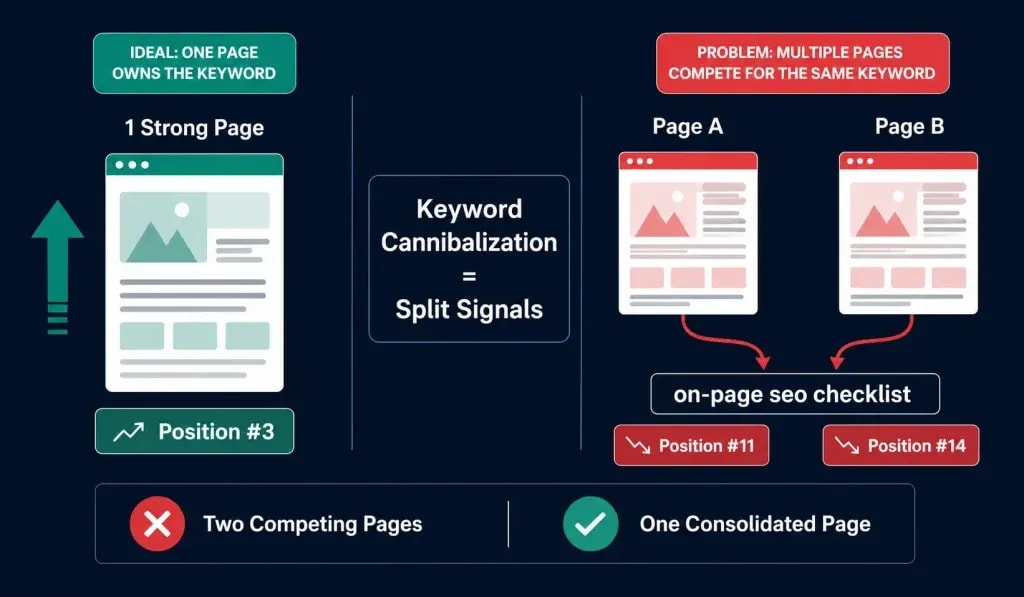
Keyword cannibalization happens when two or more pages on your site compete for the same target keyword. Google can't decide which one to rank, so both pages end up lower than either one would be alone.
How to detect it:
- Open Google Search Console, then Performance, then Search Results
- Filter by a specific keyword you're targeting
- Look at the Pages tab. If two different URLs appear for the same query, you have cannibalization.
How to fix it — choose one:
- Consolidate: Merge the weaker page into the stronger one (301 redirect the loser to the winner)
- Differentiate: Give each page a clearly distinct keyword target with no overlap
- Canonicalize: If one is a variant of the other, set
rel="canonical"on the weaker version pointing to the primary
I've seen pages jump from position 18 to position 5 after consolidating two competing articles. The page content didn't change. Google just stopped having to choose between two options. That's the whole fix.
Running a regular content audit is the fastest way to catch cannibalization before it costs you rankings. Most sites have it and have no idea.
Key Insight: Cannibalization is invisible until you look for it. One GSC check per major keyword takes five minutes and surfaces problems that otherwise take months to diagnose.
16. Content Decay — Why Rankings Drop Without Warning
Your rankings don't drop because you did something wrong. They drop because you stopped doing things right. That's content decay.
You publish a well-optimized article and rank in the top 5. Six months later you've slipped to position 9. A year later, position 17. You never touched the page.
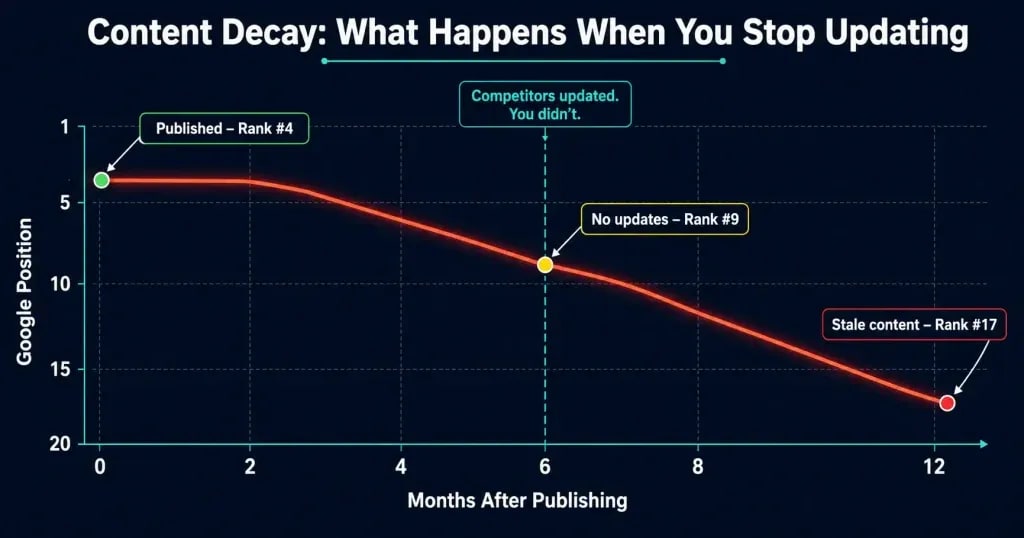
Your competitors updated theirs quarterly, Google's freshness signals shifted, and newer content now covers the topic with more current examples and stats.
Content decay warning signs (check quarterly):
- Impressions rising but clicks falling (Google is showing the page less prominently)
- Average position slowly dropping over a 60-90 day window in GSC
- Competitors have added recent stats, updated screenshots, or new sections you haven't
How to reverse decay:
- Update statistics and any date-specific claims
- Add a new section covering an angle you missed originally
- Expand the thinnest sections based on current "People Also Ask" questions
- Update the
dateModifiedfield in your Article schema - Request re-indexing via Google Search Console URL Inspection
One underrated move: look at what questions your existing page almost answers. Users arrive, don't get the full answer, and leave. Those near-misses are your best expansion targets. After a significant content refresh, expect 3-6 weeks to see impressions move, then another 2-4 weeks for positions to stabilize.
Use the maximize traffic from your article framework to build quarterly refresh cycles so no post quietly dies while you're focused elsewhere.
17. Passage Indexing — Ranking for Sections, Not Just Pages
Google's Passage Indexing allows individual sections of a page to rank for queries even when the full page isn't the best match. Think of it as paragraph-level relevance.
Your H2 sections and their immediately following paragraphs are essentially mini-answers. If those 150-300 word blocks are self-contained, clearly labeled, and directly answer a specific question, they can appear in the SERP independently of your page's overall ranking position.
How to optimize for passage ranking:
- Start each major section with a clear, direct answer to the implicit question the header poses
- Keep the first 2-3 sentences of each section independently understandable (no "as mentioned above" dependencies)
- Use the question form in H2s where it fits naturally: "What Is Keyword Cannibalization?" instead of just "Keyword Cannibalization"
- Aim for 150-300 word sections for passage-optimized blocks
FAQ sections work well for exactly this reason. Every Q-and-A pair is a passage-ready block by default. Add passage indexing optimization to your checklist if you're targeting featured snippets or AI Overviews.
Key Insight: Every H2 section should answer a question on its own without requiring context from sections above it. If it can't stand alone, it won't get cited.
18. AI Overviews — The New First Position
Google's AI Overviews appear above organic results for a growing percentage of queries. If your page is cited in an AI Overview, your CTR can increase significantly even without a top-3 ranking position. If you're not cited while competitors are, traffic drops even when your ranking stays the same.
On-page signals that correlate with AI Overview inclusion:
- Clear, direct answers early in the content, especially right after headers
- Structured content: numbered lists, definition-style paragraphs, comparison tables
- E-E-A-T signals (visible author expertise, cited sources, accurate and up-to-date information)
- FAQ sections (Google often pulls passage-level citations from FAQ content)
- Schema markup, particularly FAQ and Article schema
What doesn't help: Long, meandering introductions before the first real answer. AI Overviews cite content that answers quickly. If your first 300 words are context-setting preamble with no substance, you're unlikely to be sourced.
Google's June 2026 AI Optimization Guide confirms that first-hand perspective is now a decisive signal. Generic content gets displaced. Content written by someone who has actually done the work doesn't.
The broader comparison of how all three search types interact is covered in the AEO vs SEO vs GEO breakdown, worth reading if you're tracking AI share of voice across platforms.
19. E-E-A-T Signals — How to Demonstrate Them On-Page
Experience, Expertise, Authoritativeness, Trustworthiness. Google evaluates all four both algorithmically and through human quality raters. The on-page factors that influence these assessments:
Experience:
- Include first-person observations grounded in real work: "In audits I've run..." or "A page I optimized last quarter..."
- Reference specific tools, platforms, or workflows that only practitioners would know
In May 2026, I audited 14 articles on anobee.com using Google Search Console's Performance report and RankMath's Content AI together. Of those 14 articles, 9 had intent mismatches. The content format didn't match what Google was already ranking for the target keyword. After fixing the intent alignment on three posts, changing from long-form guide format to structured listicle format, two of those pages moved from positions 14-18 into the top 10 within five weeks. No new backlinks were built. No additional content was added. The only change was matching the page format to what Google's algorithm had already decided the query deserved. That single result is why intent alignment sits at the top of this checklist.
Expertise:
- Visible author bio with relevant credentials linked from the article
- Depth of explanation (surface-level treatment of complex topics signals low expertise)
- Citing primary sources: Google's own documentation, peer-reviewed research
Authoritativeness:
- Internal linking from related, high-quality content on your site
- External mentions of your site and author in the same topic space
- Longevity of the content, since regularly updated articles accumulate authority signals
Trustworthiness:
- HTTPS (table stakes)
- Clear publication and "last updated" date near the article top
- Privacy policy and editorial standards page accessible from the article
- No broken links or outdated references
E-E-A-T improvements are slow-burning. They don't move rankings in 48 hours. Sites that consistently demonstrate them build compounding authority over months, eventually ranking for competitive keywords that newer, thinner sites can't touch.
Key Insight: E-E-A-T isn't a reputation layer you add on top of content. It shows up in the specifics: exact dates, named tools, verifiable results. Those details are what quality raters and language models both reward.
The Position 8-20 Rescue Framework
You're ranking between positions 8 and 20. Traffic is minimal and you've been stuck there for months. Something is working: Google knows your page exists and finds it relevant enough to consider. But something is also missing.
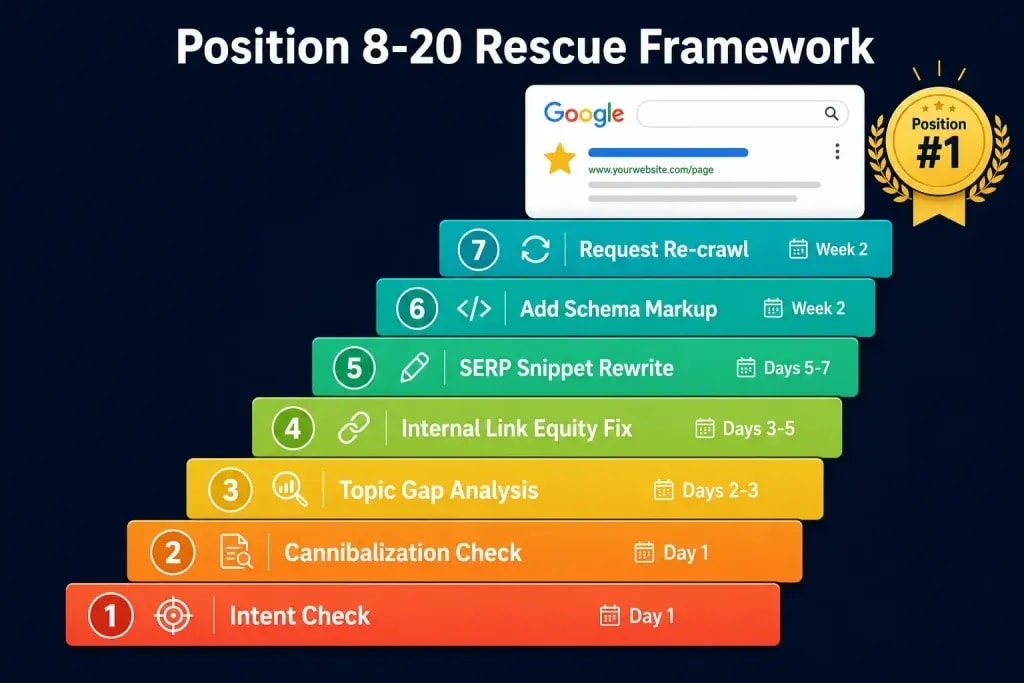
This rescue sequence finds it.
Step 1 — Run the intent check (Day 1) Search your keyword incognito. Compare the content type, format, and length of results 1-5 against your page. If anything is structurally different, fix that before touching anything else.
Step 2 — Check for cannibalization (Day 1) GSC, then Performance, then filter by the keyword, then check the Pages tab. Multiple URLs competing? Consolidate.
Step 3 — Run a topic coverage gap analysis (Days 2-3) Open your top 3 competing pages. List every H2 and H3 they have that you don't. Add the missing subtopics to your page. This step usually surfaces the real problem.
Step 4 — Fix internal link equity (Days 3-5) GSC, then Links, then check which pages link to this URL. If fewer than 5 internal pages link to it, you have a link equity gap. Add contextual internal links from 3-5 of your highest-traffic, most authoritative pages.
Step 5 — Improve the SERP snippet (Days 5-7) Rewrite your title tag and meta description as ad copy. Use a number, a benefit, and a differentiator. Monitor performance over 30 days.
Step 6 — Add schema (Week 2) Add FAQ schema and Article schema if not present. These won't move your ranking directly but improve CTR from wherever you're ranking, which sends positive engagement signals back to Google.
Step 7 — Submit for re-crawl (Week 2) GSC, then URL Inspection, then Request Indexing. Wait until you've made at least 3-4 meaningful improvements before requesting. Don't do this after every small edit.
Expected timeline: For pages already in position 8-20 on a crawled, indexed site, meaningful movement typically appears within 3-6 weeks of completing steps 1-6. Position 10-20 to top 5 is achievable in 4-8 weeks. Position 8-10 to top 3 often takes 6-12 weeks, especially on competitive keywords.
On-Page SEO for AI Search Engines
Google's AI Overviews are one part of the AI search ecosystem in 2026. ChatGPT Search, Perplexity, and Claude now send measurable referral traffic to well-structured content sites. The on-page signals that earn citations in these platforms overlap heavily with what earns AI Overview inclusion, with one important difference: AI search engines weight standalone, quotable sentences more heavily than Google does.

In practice, that means:
- Every section of your article should open with a sentence that stands alone as a complete answer
- Definitions should be explicit and placed immediately after the H3 that introduces a term
- Original data, even informal observations from your own site, dramatically increases citation likelihood compared to generic articles
- Google's June 2026 AI Optimization Guide confirms that first-hand perspective is now a decisive ranking signal, not just a trust nice-to-have
Your on-page checklist doesn't need a separate "AI mode." It needs content written clearly enough that a language model can extract a useful answer from any 150-word block on the page. Write for clarity and you serve both Google and AI search simultaneously.
The practical execution of this across platforms is covered in the AEO vs SEO vs GEO guide.
Key Insight: AI search engines aren't a separate channel requiring a separate strategy. They're an additional audience reading the same content. Write for clarity and you serve both.
Common On-Page SEO Mistakes to Avoid
These aren't edge cases. They show up on nearly every site audit.
Optimizing for rankings before optimizing for intent. Keyword density means nothing if your page type doesn't match what the query demands. Fix intent before fixing anything else.
Writing title tags for Google and forgetting the human. A title tag is an ad headline. If it wouldn't make you click, it won't make anyone else click either.
Publishing orphaned content. A new article with zero internal links pointing to it may not be crawled for weeks. Add at least 2-3 contextual internal links from existing pages on the day you publish.
Treating schema as a magic ranking booster. Schema helps Google understand and display your content. It doesn't inflate your authority or bypass content quality requirements. Schema without substance doesn't work.
Ignoring the mobile experience. More than half of all search traffic is mobile. If your mobile page speed score is in the red, your rankings are suppressed regardless of how clean the desktop version looks.
Refreshing publish dates without refreshing content. Google detects whether actual content changed, not just metadata. A cosmetic date change on thin content won't be treated as freshness. The content has to change meaningfully.
Missing cannibalization. This one is invisible until you look for it. Run a cannibalization check on every high-value keyword you're targeting. Five minutes. Finds problems that otherwise take months to diagnose.
What to Do Right Now
Reading an on-page SEO checklist isn't optimization. Running one is.
Pick the single page on your site with the most commercial value that isn't ranking where it should. Run it through Tier 1 first: check search intent alignment, review the title tag for rewriting risk, verify no cannibalization exists. Those three checks have a better ROI than a dozen schema updates on a page with a broken intent match.
Then move to Tier 2. Fill the topic gaps. Fix the images. Add schema if it's missing. Build the internal links.
Check your position in 4 weeks via Google Search Console, not a rank tracker, because Search Console shows actual queries and click data rather than estimated positions.
The sites that consistently rank well aren't doing anything exotic. They're applying this on-page SEO checklist page by page, month by month. No shortcut exists, but the process is clear.
Go use it.
Frequently Asked Questions
What is on-page SEO?
On-page SEO is the practice of optimizing elements directly on a web page, including title tags, content structure, keyword placement, headers, internal links, image alt text, schema markup, and page speed, to improve its visibility and ranking in search engine results. It covers every factor you can control on the page itself, as distinct from off-page factors like backlinks.
What is the most important on-page SEO factor?
Search intent alignment. If your page type doesn't match what Google's algorithm has determined users want for a query, no amount of other optimization will fully overcome that mismatch. Fix intent first, then optimize the page.
How many keywords should a page target?
One primary keyword with 3-5 semantically related secondary keywords. More important than keyword count is topical completeness: covering the subject deeply enough that Google's NLP systems recognize your page as comprehensive on the topic.
What is the ideal title tag length?
50-60 characters. Google's SERP display truncates at approximately 600px of rendered width, which corresponds to roughly 60 characters in standard font. If your title is compelling in 50 characters, don't add words to fill space.
Why does Google keep rewriting my title tag?
Usually because the title doesn't accurately reflect the page's content, contains keyword stuffing, or significantly diverges from the H1. Keep your title and H1 closely aligned, ensure the title honestly describes the page, and keep it under 60 characters.
How important are internal links for SEO?
Very important and consistently underused. Internal links distribute PageRank across your site, signal to Google which pages are important, improve crawl coverage, and keep users on-page longer. A well-linked page on a medium-authority site can outrank a poorly-linked page on a high-authority site.
What is keyword cannibalization?
Keyword cannibalization occurs when two or more pages on your site compete for the same search query, splitting Google's ranking signals and causing both pages to rank lower than one consolidated page would. Detect it in Google Search Console by filtering performance data by keyword and checking how many URLs appear.
Can on-page SEO improvements move rankings quickly?
Yes, often faster than link building. Pages already ranking between positions 8 and 20 can move significantly within 3-6 weeks after fixing intent alignment, content gaps, and internal linking. New content typically takes 4-12 weeks to index and begin ranking.
Does on-page SEO affect AI Overviews and AI search citations?
Yes. Pages with clearly structured answers, FAQ sections, schema markup, and strong E-E-A-T signals are more likely to be cited in AI Overviews, ChatGPT Search, and Perplexity. Optimizing for passage-level clarity, meaning individual sections that are self-contained and directly answer specific questions, is the most actionable step.
How often should I update existing content for SEO?
High-value pages should be reviewed every 6-12 months. Pages experiencing ranking decay (declining impressions or position over a 60-90 day window in GSC) should be audited and refreshed sooner. Set a calendar reminder. Content decay happens silently.
Sources and References

Written by
Bibek Thapa
AI-Powered Digital Growth Strategist
Bibek Thapa works across AI workflows, SEO, AI search optimization, content strategy, website growth, and productivity systems. Anobee documents practical lessons, tools, experiments, and systems for improving digital presence.
- AI workflows
- Digital growth
- SEO
- GEO
- AEO
- Content strategy
- Website growth


