SEO & AI Search
Best SEO Content Checker Tools for Higher Rankings (2026)
Discover the best SEO content checker tools for 2026 - with real pricing, honest pros and cons, and a decision framework to pick the right tool.
By Bibek Thapa · Published May 8, 2026 · Updated Jul 14, 2026 · 19 min read
Quick Answer
If you're looking for the best SEO content checker tools, let me be honest about something most reviews won't say.
Table of Contents
- Why You Need the Best SEO Content Checker Tools in 2026
- What Makes a Good SEO Content Checker Tool?
- 2026 Pricing Comparison: At a Glance
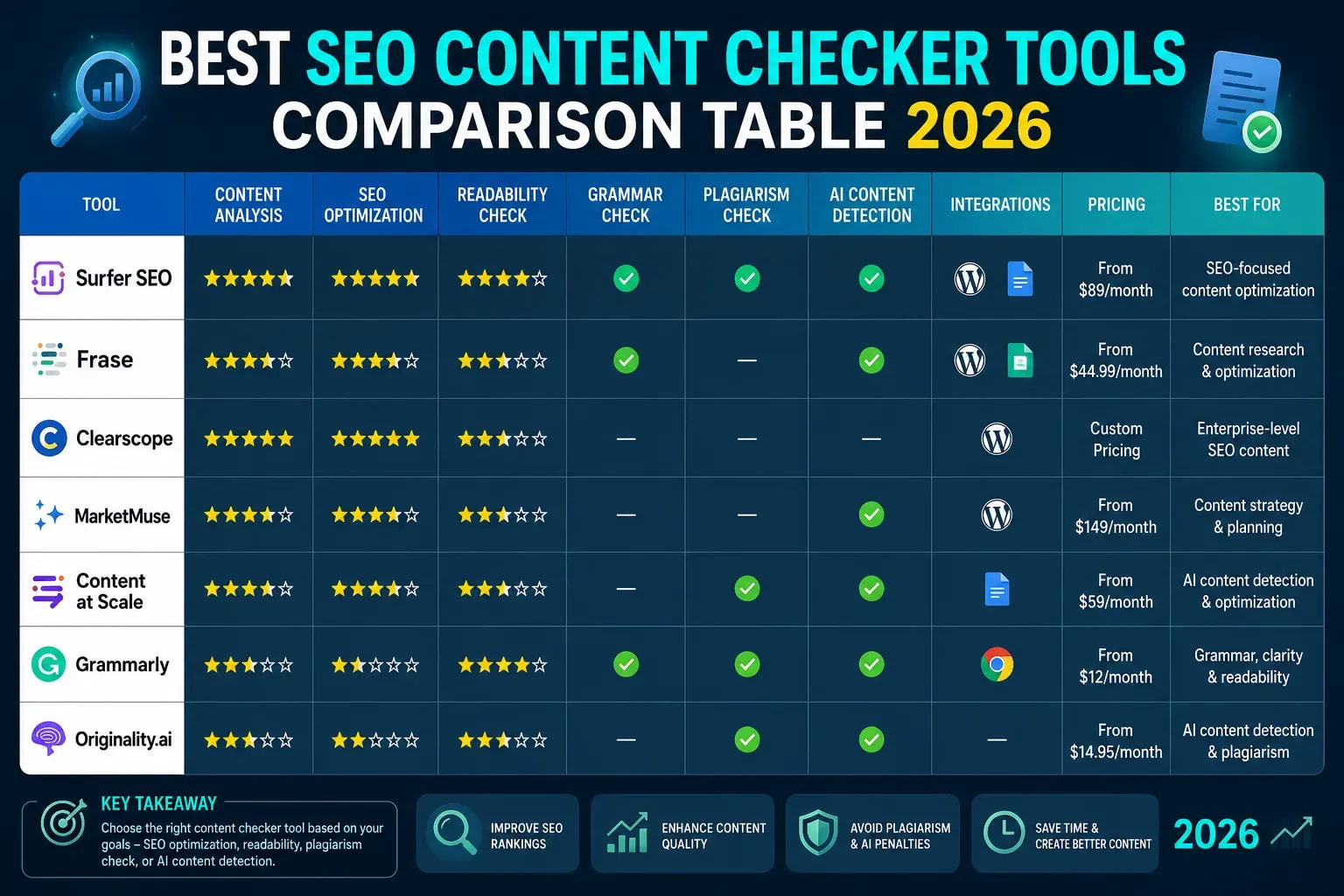
- Best SEO Content Checker Tools: In-Depth Reviews
- 1. Surfer SEO
- 2. Clearscope
- 3. Frase
- 4. NeuronWriter
- 5. MarketMuse
- 6. Originality.ai
- 7. Rank Math
- 8. Screaming Frog SEO Spider
- Free vs. Paid SEO Content Checker Tools: The Real Difference
- Which SEO Content Checker Tool Is Best for Beginners?
- How Agencies Use SEO Content Checker Tools
- Common SEO Content Optimization Mistakes
- The Best Workflow for SEO Content Optimization (Step-by-Step)
- Choosing the Right Tool: Decision Framework
- Final Thoughts
If you're looking for the best SEO content checker tools, let me be honest about something most reviews won't say.
Most SEO content checker tools work. That's not really the problem.
The problem is that most people buy the wrong tool for how they actually work, then blame the tool when rankings don't move.
This guide is different. Instead of giving you a padded list of tools with suspiciously identical feature summaries, it'll walk you through exactly what each tool does well, where it falls short, who should use it, and - critically - who shouldn't.
And because pricing changes constantly, the figures below are updated to reflect actual 2026 plans.
Why You Need the Best SEO Content Checker Tools in 2026
A few years ago, you could rank a 1,200-word article with the right keyword density and a decent backlink or two.
Google was simpler then.
Today, Google's ranking systems evaluate:
- Search intent alignment: does your page actually answer what the searcher wants?
- Semantic relevance: are the right related entities and concepts present?
- Topical authority: does your site own the topic, or dabble in it?
- Content depth: does the page address the topic thoroughly, or skim it?
- EEAT signals: does the content demonstrate expertise, experience, authoritativeness, and trustworthiness?
And with Google's AI Overviews and SGE now eating traffic that used to go to rank-one results, content that merely ranks is no longer enough. You need content that earns citations in the AI overview, which requires comprehensive, authoritative coverage of your topic.
That's where SEO content optimization tools come in. Not as magic boxes that guarantee rankings, but as frameworks that help you understand what comprehensive coverage actually looks like for any given keyword.
What Makes a Good SEO Content Checker Tool?
Before spending money, know what you're evaluating.
The best SEO content checker tools typically offer some combination of:
- SERP-based competitor analysis: what are the top-ranking pages doing that yours isn't?
- NLP term recommendations: which related entities and phrases does Google expect to see?
- Content scoring: a real-time measure of how optimized your draft is
- Search intent analysis: are you targeting the right content format and angle?
- Topic/gap detection: what angles are competitors covering that you're missing?
- Internal linking suggestions: which existing pages should link to this one?
- Content brief generation: automated outlines and subtopic structures before you write
What the score doesn't tell you: whether your content is actually useful, credible, or worth reading. Tools measure correlation, not causation. A page scoring 85/100 can still fail to rank if the content is thin, robotic, or mismatched to what searchers want.
Keep that in mind as you read through the options below.
2026 Pricing Comparison: At a Glance
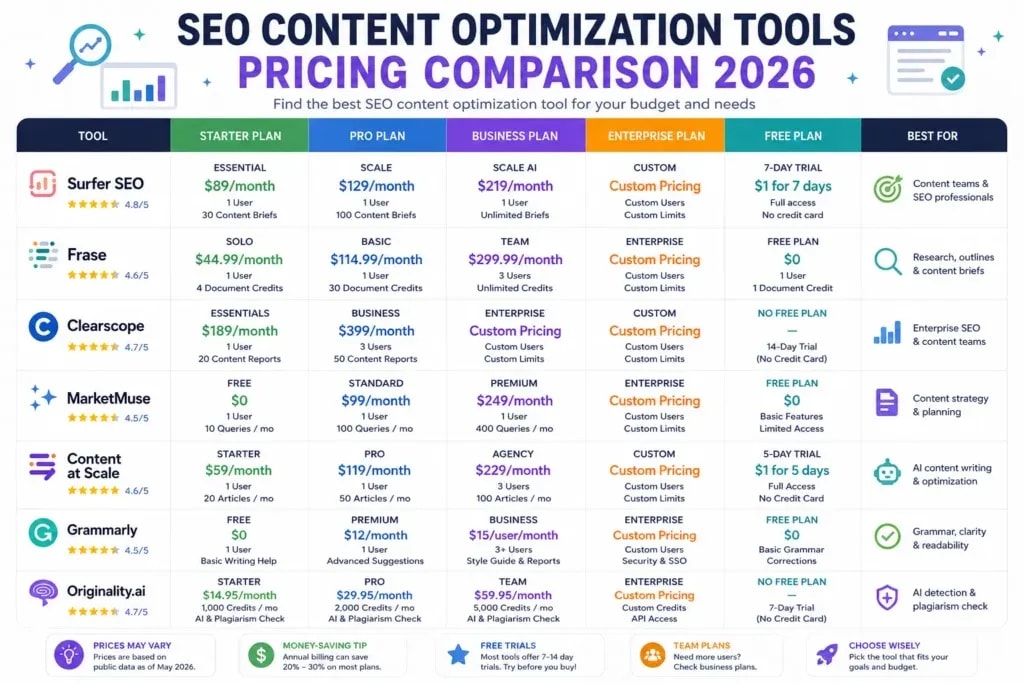
Before diving into individual tools, here's a side-by-side view of current pricing so you can rule out tools that don't fit your budget immediately.
Pricing sourced from vendor pages and third-party comparisons, March–April 2026. Always verify on vendor sites before purchasing.
Best SEO Content Checker Tools: In-Depth Reviews
1. Surfer SEO
Best for: Content agencies, affiliate SEOs, teams publishing at volume
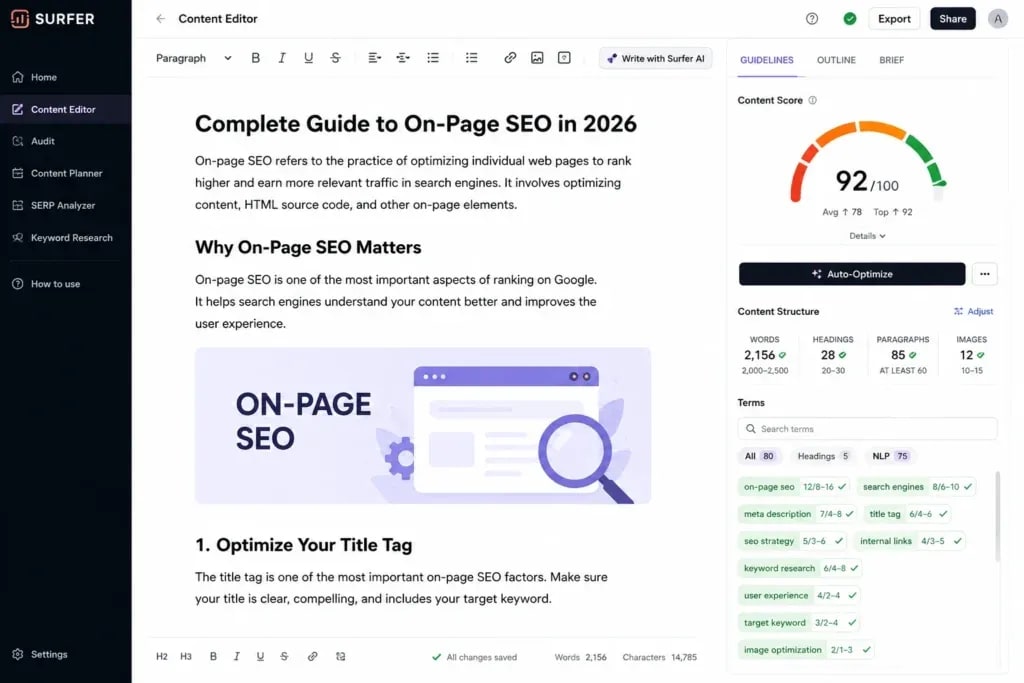
Surfer SEO is still the default recommendation for most SEO professionals, and for good reason. It combines a real-time content editor, SERP analyzer, keyword research, and an AI writing assistant in one platform, and the integrations with Google Docs and WordPress make it easy to work inside your existing workflow.
Its content editor pulls NLP terms from top-ranking pages and gives you a live optimization score as you write. Add the right phrases, hit a score in the 70-80 range, and you've typically covered the semantic bases for your keyword.
What actually works well:
- The SERP Analyzer is genuinely useful for understanding why competitors rank
- Auto-Optimize rewrites underperforming sections in seconds
- Grow Flow offers actionable weekly SEO tasks based on your site's data
- AI Tracker now monitors your brand and content in ChatGPT, Perplexity, and Google AI Overviews, a 2026 addition that few competitors match
Where it falls short:
- Chasing a high content score produces robotic, over-optimized writing. Surfer's biggest danger is that new users treat the score as the goal rather than a signal.
- Pricing at ~$99/month is accessible, but additional features (audit credits, AI drafts) push costs higher quickly.
- No readability scoring built in, you'll need a separate tool like Hemingway for that.
Who should skip it: Solo bloggers publishing fewer than 4-5 articles per month. The cost-per-article math doesn't work out until you're publishing consistently.
2026 pricing: Essential starts at ~$99/month; Scale at ~$219/month.
2. Clearscope
Best for: Enterprise content teams, agencies with dedicated writers, EEAT-focused publishers
Clearscope takes a deliberately cleaner approach than Surfer. Its interface is simpler, its recommendations are fewer and more targeted, and the content that comes out of it tends to sound more human.

The core workflow is the same, enter a keyword, get NLP term recommendations, write against a graded score (A++ at the top), but Clearscope filters out low-value suggestions more aggressively. Writers tend to produce better prose when they're not buried in 80+ keyword recommendations they feel compelled to stuff in.
What actually works well:
- Unlimited user seats on all plans, huge if you have a large writing team
- The A++ grading system is psychologically simpler than numerical scores
- Consistently praised on G2 for clean UX and fast onboarding
- Better for EEAT-focused content: recommendations push toward substantive coverage, not keyword density
Where it falls short:
- No readability metrics, a notable gap that users frequently flag
- No content brief or outline generator in the base plan
- At $129–$399/month, it's hard to justify for small teams or solopreneurs
- The Business plan's AI Drafts cap (20/month) is too low for teams that rely on AI-generated content
Who should skip it: Freelancers and small blogs. At $129/month minimum, the cost per document makes sense only when you're optimizing 10+ articles per month with a team.
2026 pricing: Essentials ~$129/month; Business ~$399/month. Both include unlimited seats.
3. Frase
Best for: Beginners, budget-conscious bloggers, research-heavy workflows
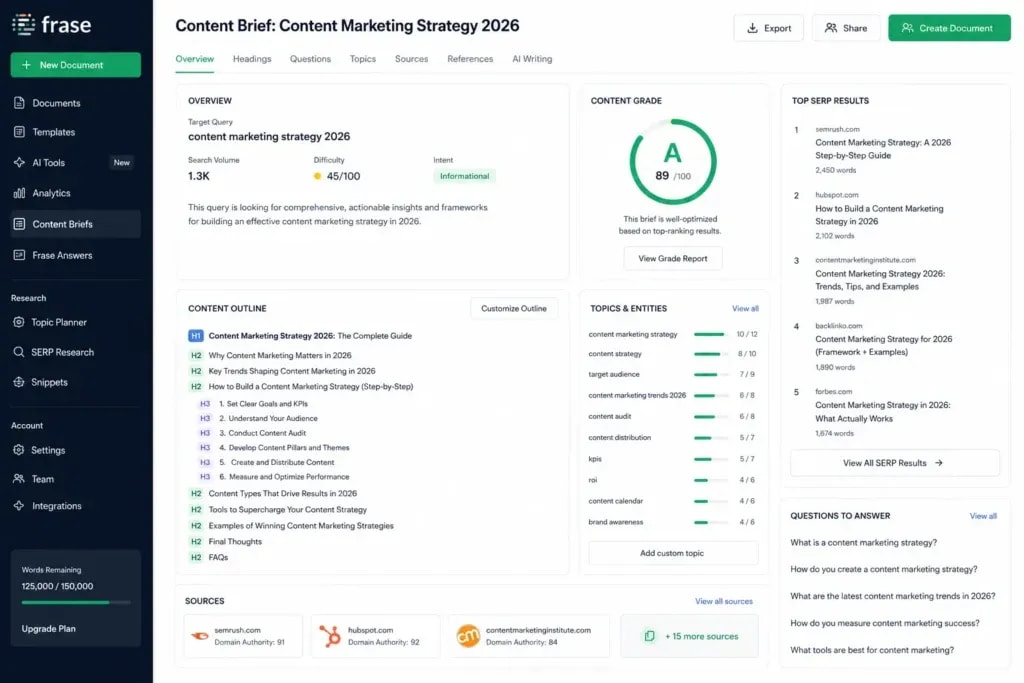
Frase earns its place as the best entry point for most people getting started with content optimization. For the price, Solo starts at around $15/month, you get SERP analysis, automated content briefs, an AI writer, and a real-time optimization editor.
The brief-building feature is where Frase really shines. Enter a keyword and Frase scrapes the top results, extracts headers and questions from "People Also Ask," and assembles a research-based outline in under a minute. That alone saves hours for anyone writing in an unfamiliar niche.
What actually works well:
- Fastest content brief generation of any tool in this list
- $1 five-day trial removes all financial risk, try it before committing
- Good value for budget-constrained content operations
- AI writing is better integrated into the research workflow than Surfer
Where it falls short:
- Keyword data depth is weaker than Surfer's, you'll still want a dedicated keyword research tool
- AI drafts need significant editing; they're better treated as structured first drafts than finished content
- Team plan pricing jumps noticeably: Solo ($15) to Basic ($45) to Team ($115)
- Less accurate NLP recommendations than Surfer or Clearscope in direct comparisons
Who should skip it: High-volume content agencies that need the deepest NLP analysis. Once you're publishing 10+ pieces per month, Frase's accuracy gap becomes relevant.
2026 pricing: Solo ~$14.99/month; Basic ~$44.99/month; Team ~$114.99/month.
4. NeuronWriter
Best for: Freelancers, niche site owners, budget-conscious SEOs who want Surfer-like features
NeuronWriter has quietly built a strong reputation among the niche site and affiliate SEO communities as the "Surfer on a budget" option, and it largely delivers on that promise.
It uses semantic models and NLP to analyze competitors, generates optimization scores, and includes internal link suggestions, all at a fraction of Surfer's cost. The WordPress and Google Docs integrations work reasonably well.
What actually works well:
- Best feature-to-price ratio in this list for solo operators
- Strong on G2 and Capterra (4.9/5), users consistently cite ranking improvements
- Internal link suggestions are genuinely useful and often overlooked by competing tools
- One-time AppSumo deals periodically make it available at lifetime pricing
Where it falls short:
- The interface has a steeper learning curve than Surfer or Clearscope, expect a few hours to get comfortable
- AI writing outputs require heavier editing than competitors
- Less reliable SERP data than Surfer's more sophisticated crawler
Who should skip it: Large teams that need multiple seats and a polished workflow. NeuronWriter is built for individuals, and the enterprise experience shows gaps.
2026 pricing: Plans from ~$19/month (annual); Diamond tier ~$97/month.
5. MarketMuse
Best for: Established content sites, SEOs building topical authority at scale
MarketMuse is categorically different from the other tools in this list. Where Surfer and Clearscope optimize individual articles, MarketMuse approaches content from the top down, mapping your entire site's topical coverage against what's needed to rank across a subject area.
Its core concept: every page on your site either builds or undermines your topical authority. MarketMuse quantifies this with "topic authority scores" and content gap analysis that shows you exactly where your site has thin coverage that competitors are exploiting.
What actually works well:
- Best-in-class for topic cluster planning and content silo strategy
- The Content Inventory feature (paid plans) gives a bird's-eye view of your entire site's coverage and gaps
- Invaluable for large sites that have published hundreds of articles without a coherent structure
- The AI Brief generator creates unusually detailed outlines grounded in competitive research
Where it falls short:
- Significant learning curve, this is not a tool you'll master in an afternoon
- Free tier is very limited; the Standard plan at $149/month is where it becomes genuinely useful
- Overkill for sites under ~100 published articles, the topical authority data isn't meaningful at low volume
- Per-query credits on lower tiers add up quickly
Who should skip it: New sites and bloggers. You need enough published content for MarketMuse's authority mapping to be meaningful. For most users, that means 80-100+ published posts before the investment makes sense.
2026 pricing: Free (limited); Standard ~$149/month; custom enterprise pricing above that.
6. Originality.ai
Best for: Content managers, guest post site owners, agencies managing external writers
Originality.ai exists because AI content detection became a serious business problem in 2024-2025. Sites that outsourced content at scale, or leaned heavily on AI writers without review, got hit when Google's Helpful Content updates began correlating with patterns common in AI-generated text.
The tool detects AI-generated content (GPT-4, Claude, Gemini, and others), checks for plagiarism, and flags "low human" writing patterns. For anyone managing a team of writers or accepting guest posts, it's become a standard quality gate.
What actually works well:
- AI detection accuracy is among the highest available, covers all major models
- Plagiarism checker is solid, not an afterthought
- Readability scores included (missing from most tools in this list)
- Pay-per-use option available if you don't need a full monthly plan
Where it falls short:
- Not an optimization tool, it won't help you write better content, only evaluate existing content
- False positive rate is non-zero; use it as one signal, not a definitive verdict
- No SERP analysis, NLP recommendations, or competitive research
Who should skip it: Solo bloggers who write all their own content. If you're confident in your content's origin, you don't need it.
2026 pricing: ~$20/month for regular users; pay-per-use available for lower-volume needs.
7. Rank Math
Best for: WordPress site owners, beginners, anyone who wants solid on-page SEO without paying for a dedicated content editor
Rank Math is the plugin most WordPress-based SEOs have migrated to from Yoast over the past few years, and the feature difference explains why. Where Yoast focuses on the basics, Rank Math packs in schema markup, redirects, internal linking suggestions, a content SEO score, and rank tracking in a single plugin.
The free version alone exceeds what many paid tools offered three years ago.
What actually works well:
- Exceptional value, the free version covers most on-page SEO needs for new and mid-sized sites
- Schema markup is built-in and extensive (FAQ, HowTo, Article, Product, and more)
- Content scoring gives real-time feedback inside the WordPress editor
- The Analytics tab connects to Google Search Console and GA4, surfacing keyword data without leaving WordPress
Where it falls short:
- Content scoring is based on simpler signals than dedicated tools like Surfer or Clearscope
- Not useful if you're not on WordPress
- NLP analysis is basic compared to dedicated content optimizers
- Heavy plugin setups can create site speed issues if not configured carefully
Who should skip it: Anyone not on WordPress. For non-WordPress sites, look at Yoast's non-WP options, or rely on dedicated content tools rather than a plugin.
2026 pricing: Free (very capable); Pro ~$59/year for 1 site; Business/Agency tiers available.
8. Screaming Frog SEO Spider
Best for: Technical SEO audits, site migrations, identifying crawl issues at any site scale
Screaming Frog is the unsexy tool that every serious SEO relies on constantly. It's not a content editor. It doesn't give you NLP recommendations. What it does is crawl your website the same way Google does, and show you every technical problem it finds in the process.
This is essential because even perfectly optimized content underperforms if it's sitting on a page with thin metadata, broken internal links, duplicate title tags, or crawl errors.
What actually works well:
- Industry standard for technical SEO, no real competition at this level of detail
- Identifies thin pages, duplicate content, redirect chains, missing meta descriptions, and more
- Can integrate with Google Analytics and Search Console for richer reporting
- The free version crawls up to 500 URLs, covering most small sites completely
Where it falls short:
- Steep learning curve, the interface is dense and non-intuitive for beginners
- Not a cloud tool; runs on your desktop, which is a workflow friction point for some
- No NLP analysis or content scoring, purely technical
Who should skip it: Pure content creators who aren't doing technical SEO. For most bloggers, Search Console surfaces the issues Screaming Frog would find, without the learning curve.
2026 pricing: Free up to 500 URLs; £259/year (~$325) for unlimited crawls.
Free vs. Paid SEO Content Checker Tools: The Real Difference
Free tools aren't useless. They're just limited in one specific way: they don't analyze the competitive SERP deeply enough to tell you what top-ranking pages are doing that yours isn't.
Solid free options:
- Rank Math (free tier): on-page scoring, schema, internal linking for WordPress
- Google Search Console: actual performance data; the most underutilized tool in SEO
- Yoast SEO (free): basic on-page guidance for WordPress
- NeuronWriter free tier: limited queries but functional for testing
Where paid tools earn their cost:
- SERP-level NLP analysis (what entities does Google expect for this keyword?)
- Competitor content structure comparison (how long, how many headings, what topics covered?)
- Real-time scoring as you write
- Content brief automation
In a competitive niche, free tools are rarely enough. In a genuinely low-competition niche, local service businesses, very long-tail keywords, free tools combined with strong writing are often all you need.
Which SEO Content Checker Tool Is Best for Beginners?
The shortest answer: start with Frase.
Here's the logic:
- The $1 trial is risk-free
- Brief generation teaches you how to research before writing, a skill that transfers to any tool
- The interface is less overwhelming than Surfer's
- At $15–$45/month, it's the lowest commitment among the paid options
If you're on WordPress and truly budget-constrained, Rank Math's free tier handles basic on-page optimization and costs nothing. Pair it with manual SERP analysis (look at the top 10 results and read them) until you can justify a paid tool.
What beginners should avoid: MarketMuse (too complex for low-volume sites), Clearscope (too expensive before you have a content team), and Screaming Frog (irrelevant until you have technical SEO problems to fix).
How Agencies Use SEO Content Checker Tools
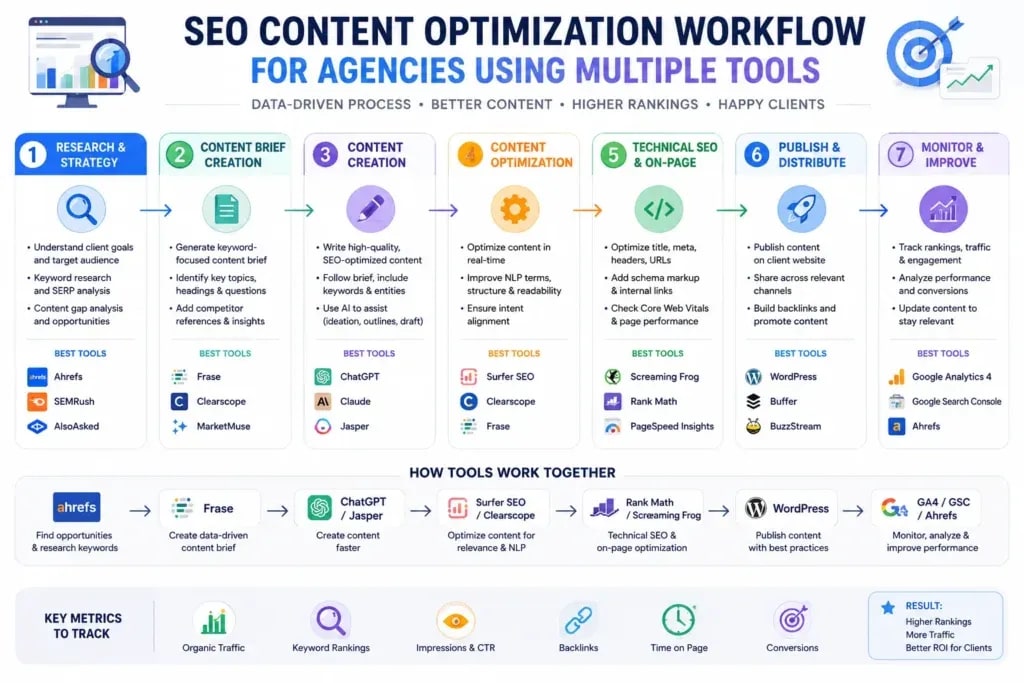
Agencies rarely rely on a single tool. The standard workflow at most mid-to-large SEO agencies looks like this:
Step 1 - Keyword and Opportunity Research Ahrefs or SEMrush for keyword difficulty, volume, and competitive gap analysis.
Step 2 - Topical Strategy MarketMuse (or Surfer's keyword clustering) to map content clusters before writing begins. This is where most agencies invest under-used budget.
Step 3 - Content Brief Creation Frase or Surfer's brief tool. Writers get a structured outline with competitor headings, target word count, NLP terms, and PAA questions.
Step 4 - Content Optimization Surfer or Clearscope during the writing process. Clearscope is increasingly preferred for editorial teams because the simpler interface produces less over-optimized writing.
Step 5 - Quality Gate Originality.ai for AI content detection, especially when using freelancers or accepting guest posts.
Step 6 - Technical Audit Screaming Frog on a monthly basis or after any major site changes (migrations, redesigns, URL restructuring).
Step 7 - Performance Tracking Google Search Console + GA4 for ranking movement and traffic attribution. Both are free and more reliable than third-party rank trackers for long-term monitoring.
Most agencies don't pay for all of these simultaneously. The most common stack for a mid-size agency: Ahrefs (research), Surfer (optimization), Screaming Frog (technical), Search Console (tracking).
Common SEO Content Optimization Mistakes
These patterns show up constantly, even among experienced content teams:
Optimizing for the score, not the searcher. A 90/100 Surfer score doesn't rank if the page doesn't match search intent. A listicle answer to a question that deserves a step-by-step guide will underperform regardless of NLP coverage.
Stuffing NLP terms unnaturally. The tool recommends the term "semantic SEO", so it appears seven times in awkward places throughout the article. Google's NLP is sophisticated enough to recognize forced usage. Write naturally; add terms where they fit.
Skipping intent analysis before picking a tool. If you're targeting navigational intent (someone looking for a specific site or brand), no optimization tool will help you because the SERP isn't winnable. Tools are most valuable for informational and commercial investigation queries.
Using AI drafts without substantive editing. AI-generated content optimized by Frase or Surfer can hit good scores. It can also be structurally shallow and factually generic. High scores on generic content don't hold rankings long-term.
Ignoring the technical layer. You can have the best-optimized article in your niche and still not rank because pages are crawled too infrequently, internal links are broken, or thin duplicate pages are diluting your topical authority. Content tools don't surface this, Screaming Frog and Search Console do.
Planning content in isolation. Publishing articles without a cluster strategy means competing with yourself. Two posts targeting slightly different variations of the same keyword can cannibalize each other. MarketMuse or Surfer's keyword clustering feature solves this, but only if you use it before publishing, not after.
The Best Workflow for SEO Content Optimization (Step-by-Step)
This is a workflow that actually scales, based on how agencies and high-output content teams operate in 2026.
Step 1: Validate the Keyword Before any tool is opened: check search intent manually. Google the target keyword. Look at the SERP format (are results listicles, guides, product pages, videos?), the average word count of the top 3, and whether the query has commercial or informational intent. If the SERP is dominated by product pages and you're writing a guide, reconsider the keyword.
Step 2: Build Your Cluster First Identify 5-10 related queries you can own alongside the primary keyword. Surfer's keyword clustering or MarketMuse's topic modeling helps here. Publishing one article without a planned cluster is a missed opportunity to build topical authority.
Step 3: Generate a Research-Based Brief Use Frase or Surfer to pull competitor headings, PAA questions, and NLP terms. A good brief includes: target word count, H2/H3 structure, key entities to cover, and the angle your piece will take that's meaningfully different from what's ranking.
Step 4: Write Human-First Write for the reader first, optimization second. Get your argument or structure down before opening the optimization editor. Content written with a score target in mind before a real structure tends to be fragmented and shallow.
Step 5: Optimize During Editing, Not Writing Open Surfer or Clearscope after your first draft exists. Add missing NLP terms where they genuinely fit. Aim for a score in the 70, 80 range, not the maximum. Over-optimization beyond that threshold often degrades writing quality.
Step 6: Add Internal Links Deliberately Use Rank Math's suggestions or a manual review to connect new content to existing cluster pages. Internal links are one of the most underused ranking signals. Three to five contextual internal links from relevant existing pages, pointed at your new article, can accelerate indexing and ranking significantly.
Step 7: Technical Pre-Publish Check Ensure the page has a unique meta title, unique meta description, proper H1/H2 structure, alt text on all images, and no broken links. Rank Math or Yoast handles this for WordPress users. For other CMSes, a quick Screaming Frog crawl after publishing catches problems early.
Step 8: Track and Iterate Monitor rankings weekly in Search Console for the first 90 days. If the article isn't moving after 60-90 days, revisit competitor content, update NLP terms, deepen thin sections, and improve internal linking before concluding the article is a loss.
Choosing the Right Tool: Decision Framework

Still unsure? Use this decision logic:
- You're a solo blogger on a tight budget → Start with Rank Math (free) + Google Search Console. Add Frase when you're publishing consistently.
- You're a freelance SEO writer → NeuronWriter or Frase at the low end; Surfer when clients justify the cost.
- You run an affiliate or content site at volume → Surfer SEO. The NLP depth and workflow integrations are worth the cost at scale.
- You manage an editorial team → Clearscope. Simpler grading system, unlimited seats, cleaner writing outputs.
- You're building topical authority on a large site (100+ articles) → MarketMuse for strategy; Surfer or Clearscope for per-article optimization.
- You outsource content or manage writers → Add Originality.ai to whatever content tool you're already using.
- You have technical SEO issues to audit → Screaming Frog, regardless of which content tool you use.
Final Thoughts
The best SEO content checker tools are amplifiers, not shortcuts.
An average article run through Surfer SEO is still an average article. A well-researched, clearly written, genuinely useful piece, optimized with any of these tools, has a real chance at ranking, retaining visitors, and earning links.
The sites consistently winning organic traffic in 2026 are doing four things at once: publishing content that matches search intent precisely, building genuine topical authority through content clusters, optimizing semantic relevance with tools like those above, and maintaining solid technical health.
None of that requires every tool in this list. It requires the right two or three for your specific situation, used consistently over time.
Start simple. Get results. Scale from there.
Frequently Asked Questions
What is the best SEO content checker tool overall?
For most content teams, Surfer SEO is the best all-around choice, it combines the deepest NLP analysis with a practical real-time editor, competitive SERP analysis, and solid AI writing features. However, "best" depends entirely on team size and workflow: Clearscope is better for large editorial teams; Frase is better for solo bloggers watching their budget.
Are SEO content optimization tools worth it?
In competitive niches: yes, clearly. In low-competition niches (thin local markets, very long-tail queries): often not, since free tools and strong writing are usually sufficient. The ROI calculation is simple, if optimizing your next 10 articles improves their average ranking position from 15 to 7, what is that traffic worth versus the monthly tool cost?
Which SEO tool is best for beginners?
Frase, for its brief-generation workflow and low entry price. Rank Math free tier is the right answer for WordPress users who aren't ready to pay for anything.
Can AI-written content rank on Google?
Yes, but not because it's AI-written. AI-written content ranks when it's accurate, comprehensive, well-structured, and genuinely useful. It fails when it's generic, factually shallow, or clearly mass-produced without editorial review. Google's helpful content guidance focuses on quality signals, not authorship.
What is the difference between Surfer SEO and Clearscope?
Surfer offers more features at a lower entry price and is better for teams that need keyword research, NLP optimization, and AI writing in one place. Clearscope is simpler, more focused, and produces cleaner writing, but starts at $129/month and lacks AI writing features in base plans. Surfer suits volume-focused teams; Clearscope suits quality-focused editorial teams. Clearscope also includes unlimited user seats, which is a significant advantage for large content teams.
Are free SEO content checker tools enough?
For very low-competition or local SEO targets, often yes. Free tools like Rank Math and Search Console provide sufficient on-page guidance. For competitive national or global keywords, free tools generally lack the SERP-level NLP analysis needed to understand what top-ranking pages are doing differently.
How do SEO content optimization tools work?
They crawl the top 10-30 ranking pages for your target keyword, extract common semantic terms, entities, and structural patterns (average word count, heading frequency, subtopics covered), and compare your draft against those patterns. The tool then scores your content in real time and suggests terms or topics to add. The underlying assumption is that pages ranking for a given keyword share linguistic and structural characteristics that correlate with what Google rewards, and that mirroring those characteristics improves your chances.
Sources and References

Written by
Bibek Thapa
AI-Powered Digital Growth Strategist
Bibek Thapa works across AI workflows, SEO, AI search optimization, content strategy, website growth, and productivity systems. Anobee documents practical lessons, tools, experiments, and systems for improving digital presence.
- AI workflows
- Digital growth
- SEO
- GEO
- AEO
- Content strategy
- Website growth


