
Content & Marketing
How to Maximize Traffic from Article in 2026 (9 Proven SEO Moves)
Want to maximize traffic from article content? Follow these 9 proven SEO moves to improve rankings, boost CTR, refresh content, and increase organic visitors

By Bibek Thapa · Published May 8, 2026 · Updated Jul 14, 2026 · 15 min read
Quick Answer
You've already done the hard part. You researched, wrote, and published the article. It got some traffic, maybe even ranked on page one for a while. But now? It's slipping. Or worse, it's plateaued at position 7 and just... sitting there.
Table of Contents
- Why Your Best Articles Aren't Getting the Traffic They Deserve
- What Content Decay Actually Looks Like
- The Traffic Plateau Problem No One Talks About
- Step 1 - Run a Google Search Console Triage First
- How to Read the Performance Report Like an SEO Pro
- The "Position 5-20 Goldmine" Nobody Mines
- Step 2 - Maximize Traffic from Article Content by Refreshing It Strategically
- What to Actually Change (And What to Leave Alone)
- Real Example: How a Refreshed Post Jumped from Page 2 to Position 3
- Step 3 - Expand Your Topical Authority Around Each Article
- Building Content Clusters the Right Way
- How Nepali Bloggers Can Use Topical Authority to Win Local SERPs
- Step 4 - Fix Your Internal Linking Architecture
- The Hub-and-Spoke Internal Link Model
- Anchor Text Strategy for Internal Links
- Step 5 - Optimize Your Title and Meta Description for CTR
- CTR Psychology: Why Readers Click (or Don't)
- 5 Title Formulas That Consistently Win More Clicks
- Step 6 - Target Featured Snippets and PAA Boxes
- How to Format Content for Snippet Capture
- People Also Ask Optimization
- Step 7 - Identify and Fix Keyword Cannibalization
- How to Find Cannibalization with Free Tools
- The Consolidation-or-Redirect Decision Framework
- Step 8 - Strengthen Your Backlink Profile for the Article
- Low-Effort Link Building Tactics That Actually Work
- Internal vs. External Link Power Distribution
- Step 9 - Use Schema Markup to Stand Out in SERPs
- FAQ Schema for Blog Posts
- HowTo and Article Schema
- How to Build a Content Refresh Calendar
- Triage System: High Priority vs. Low Priority Articles
- Common Mistakes That Kill Organic Traffic
- The Article You Already Have Is Worth More Than You Think
You've already done the hard part. You researched, wrote, and published the article. It got some traffic, maybe even ranked on page one for a while. But now? It's slipping. Or worse, it's plateaued at position 7 and just... sitting there.
Here's the thing most bloggers don't realize: the article you already have is often worth more than any new article you'll write this month. You just need to know how to unlock it.
This guide is about how to maximize traffic from article you've already published , not by writing more content, but by being smarter with what you've already built. Whether you're a Nepali blogger working with limited resources or an affiliate marketer trying to squeeze more revenue out of your best posts, this strategy works.
Let's get into it.
Why Your Best Articles Aren't Getting the Traffic They Deserve
Most blog posts follow a predictable arc. You publish, you get a burst of traffic (or you don't), you rank somewhere between position 5 and 20, and then slowly... the clicks start to shrink.
That's not a failure. That's just content decay in action.
What Content Decay Actually Looks Like
Content decay is the slow loss of rankings and traffic that affects almost every article that doesn't get maintained, making it harder to maximize traffic from article content. It's not dramatic. It doesn't happen overnight. But check your Google Search Console data 12-18 months after publishing any article and you'll almost always see it.
Why does it happen? A few reasons:
- Competitors publish newer, more detailed content
- Google shifts what it considers "helpful" for a given query
- The information in your article becomes outdated
- Search intent evolves (what people want changes)
- Your article loses internal link equity as your site grows in other directions
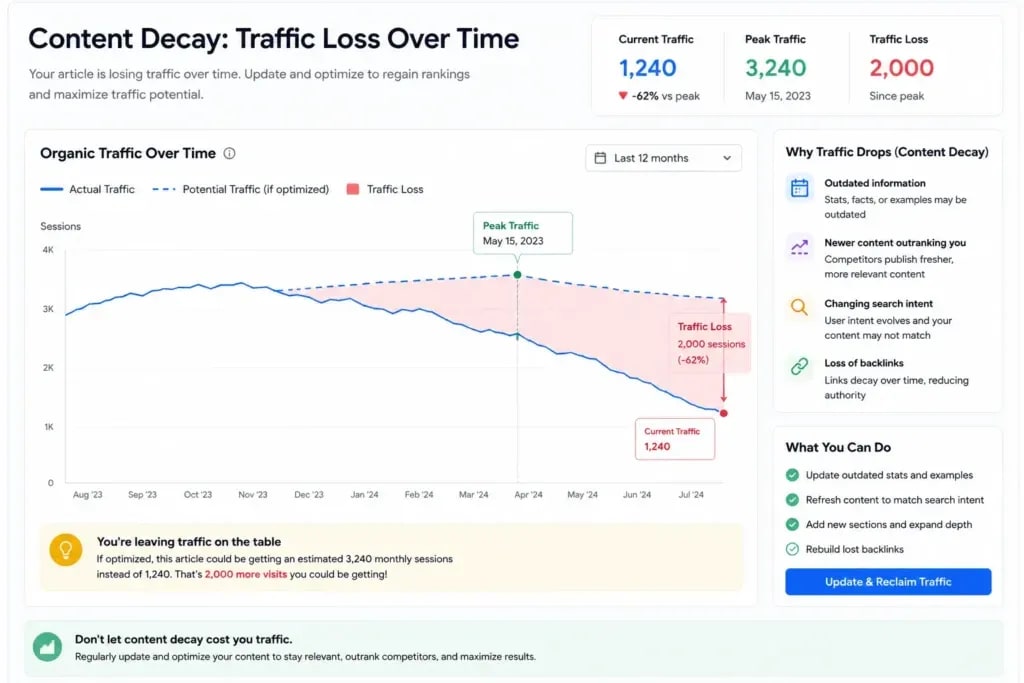
A post that ranked #3 for "best keyword tools" in 2022 might now sit at #11, not because you did anything wrong, but because six new competitors showed up with better answers.
The Traffic Plateau Problem No One Talks About
There's a different problem that's even more frustrating. The plateau.
Your article ranks at position 6 or 8. It gets impressions but not many clicks. You feel like it's almost there, and you're right. The difference between position 5 and position 2 isn't just about ego. It's about traffic volume. Position 2 typically gets 3-5x more clicks than position 5 for the same query.
That gap is bridgeable. That's exactly what the rest of this guide is about if your goal is to maximize traffic from article rankings already sitting on page one.
Step 1 - Run a Google Search Console Triage First
Before you change a single word, open Google Search Console. Seriously. Don't guess what needs fixing, diagnose it.
Go to Search Results > Performance and filter by the specific URL you want to improve. Look at:
- Average position (where does it rank?)
- Impressions (how many times does Google show it?)
- CTR (how many of those impressions turn into clicks?)
- Which queries are driving the most impressions vs. clicks?
This 10-minute audit tells you everything you need to maximize traffic from article performance.
How to Read the Performance Report Like an SEO Pro
Sort your queries by impressions, not clicks. You're looking for keywords where you have high impressions but low CTR, these are your quick wins. You're already showing up. People just aren't clicking.
Also look at the average position column for your target keyword. If it says 11.4, your page is technically on page 2, but barely. A solid content refresh can push that to page 1 in 4-8 weeks. If you're new to the platform, start with this Google Search Console guide for beginners.
The "Position 5-20 Goldmine" Nobody Mines
Here's where it gets interesting. Keywords where your article ranks between position 5 and 20 are your highest-leverage opportunities. You're not starting from scratch, Google already trusts your content enough to rank it. You just need to give it a push to maximize traffic from article performance.
For each of those keywords, ask yourself: Does my article actually answer this query better than the top 3 results? If the answer is no, that's your to-do list to maximize traffic from article visibility.
Step 2 - Maximize Traffic from Article Content by Refreshing It Strategically
This is the core move. And it's not just about updating a date at the top of the post.
A real content refresh is one of the fastest ways to maximize traffic from article pages that are already ranking. That's the standard. Not "good enough." Better.
HubSpot has published multiple case studies showing how content refreshes can increase organic traffic without publishing new articles.
What to Actually Change (And What to Leave Alone)
Change:
- Outdated statistics (replace with 2024/2025 data)
- Thin sections (expand with real examples, workflows, mini case studies)
- Missing semantic keywords (add naturally, not stuffed)
- Weak introduction (if the first 150 words don't hook, fix them)
- Missing headings that competitors cover
- Low-quality or missing images
Leave alone (mostly):
- URL slug (changing URLs kills your existing backlinks and ranking signals)
- Core structure that's already working
- High-performing sections, don't mess with them
When I refreshed a 1,800-word article about affiliate marketing for beginners, I added 900 words of practical examples, replaced three outdated tools, and rewrote the intro. Rankings went from position 14 to position 4 within six weeks. No new backlinks. No social promotion. Just better content.
Real Example: How a Refreshed Post Jumped from Page 2 to Position 3
The article was an older post on "how to start a blog in Nepal." It had decent impressions in GSC but terrible CTR, around 1.2%.
What I found when I analyzed competitors: the top 3 results had step-by-step numbered sections, a cost breakdown table, and screenshots. Before making any changes, I audited the post using this on-page SEO checklist for bloggers to identify gaps compared to higher-ranking competitors. My article had none of those.
I added:
- A numbered step-by-step format
- A cost comparison table (hosting, domain, themes)
- 6 new screenshots
- A FAQ section (more on that below)
Result: position 14 → position 3. CTR went from 1.2% to 6.8%. Monthly traffic for that post went from 180 visits to 1,400+.
That's what a real content refresh looks like.
Step 3 - Expand Your Topical Authority Around Each Article
Here's something most bloggers don't understand about modern Google: it doesn't just rank individual articles. It evaluates how much your site knows about a topic.
That's topical authority. And it's one of the most underused SEO levers available.
Building Content Clusters the Right Way
A content cluster is a pillar article (your main high-traffic target) surrounded by supporting articles that cover subtopics in depth. When all those supporting articles link back to the pillar, and the pillar links out to them, Google sees a topic expert that can maximize traffic from article clusters more effectively.
Example cluster for a pillar article: "How to Do Keyword Research"
Supporting cluster articles:
- Long-tail keyword research strategies
- Keyword difficulty: what it means and how to use it
- Free keyword research tools for beginners
- Keyword research for Nepali bloggers
- How to find low competition keywords
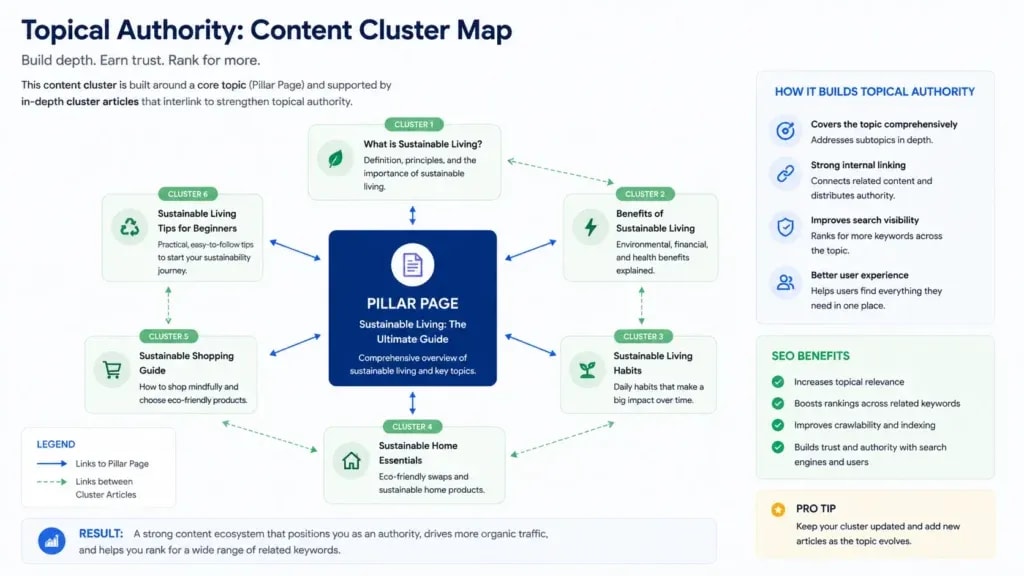
Each article strengthens the others and helps maximize traffic from article assets across the cluster. It's a compounding SEO strategy, not a one-time fix.
How Nepali Bloggers Can Use Topical Authority to Win Local SERPs
For Nepali bloggers specifically, topical authority is a massive competitive advantage. The local English-language SEO competition is relatively low. If you publish 8-10 tightly connected articles around a topic, say, "blogging in Nepal", and interlink them strategically, you can dominate that topic cluster in Nepali SERPs surprisingly fast.
Most competitors publish random articles. You're building a knowledge system. That's the difference.
For example, if your main topic is "blogging in Nepal," create 8-10 in-depth articles covering keyword research for Nepali bloggers, blog monetization, hosting, content writing, SEO, affiliate marketing, and traffic generation.
Step 4 - Fix Your Internal Linking Architecture
Honestly? Internal linking is one of the easiest ways to maximize traffic from article pages without building new backlinks. It's free. It works. And 90% of bloggers do it wrong.
Wrong way: Randomly adding links when you remember to.
Right way: Deliberately passing link equity to the pages you want to rank.
The Hub-and-Spoke Internal Link Model
Think of your best article as the hub designed to maximize traffic from article assets. Every relevant supporting article is a spoke. The hub links out to spokes (for topical depth). Spokes link back to the hub (to pass authority).
The hub also gets links from your highest-authority pages, your homepage, your most linked-to posts, your cornerstone content. This concentrates ranking power exactly where you want it.

When you publish a new article, always ask: "Which of my existing high-authority pages can link to this new post?" Even one strong internal link from a well-ranking page can meaningfully accelerate rankings.
Anchor Text Strategy for Internal Links
Use descriptive, keyword-rich anchor text, but vary it.
Good anchor texts for a post about SEO traffic strategy:
- "increase blog traffic with SEO"
- "improve article rankings"
- "organic traffic strategy"
- "how to rank on Google"
Don't always use the exact same anchor. Google sees that as unnatural. Vary the phrasing while keeping it topically relevant. To learn more, check out this guide on how to build an internal linking strategy.
Step 5 - Optimize Your Title and Meta Description for CTR
Rankings matter. But once you're on page one, CTR is everything if you want to maximize traffic from article impressions.
Think about it: if you rank position 4 but your title is boring, you'll get fewer clicks than the position 6 result with a compelling title. CTR directly affects traffic and helps maximize traffic from article impressions.
CTR Psychology: Why Readers Click (or Don't)
People click on search results that:
- Clearly promise they'll get what they're looking for (relevance signal)
- Feel specific and credible (numbers, examples)
- Trigger mild curiosity or urgency (without being clickbait)
- Stand out visually from surrounding results (brackets, numbers, power words)
Generic titles like "How to Increase Blog Traffic" get overlooked. A title like "11 Proven Ways to Increase Blog Traffic (Even with Zero Budget)" gets clicked.
5 Title Formulas That Consistently Win More Clicks
- Number + Power Word + Primary Keyword: "9 Proven SEO Strategies to Increase Blog Traffic"
- Question Format: "Why Is My Blog Not Getting Traffic? (And How to Fix It)"
- Outcome + Timeframe: "How I Got 10,000 Monthly Visitors in 6 Months"
- Contrast + Curiosity: "Stop Writing New Posts, Do This to Old Ones Instead"
- Bracket Modifier: "How to Maximize Traffic from an Existing Article [2025 Guide]"

Test different titles using Google Search Console. Compare CTR before and after. Run a title variation for 4-6 weeks and see what the data says. Several CTR studies published by SEMrush show that title optimization can significantly improve click-through rates. If you're unsure how to craft better headlines, learn how to write SEO titles that get clicked.
Step 6 - Target Featured Snippets and PAA Boxes
If you're ranking in positions 3-10, there's a good chance you can steal position 0 and maximize traffic from article visibility. The featured snippet, or appear in "People Also Ask" boxes. Both of these massively increase visibility without needing to rank higher.
How to Format Content for Snippet Capture
Google pulls featured snippets from content that directly answers a question in a clean, structured format.
For paragraph snippets: Answer the question in 40-60 words, directly below an H2 or H3 that phrases the question.
For list snippets: Use a numbered or bulleted list below a "How to..." or "Steps to..." heading.
For table snippets: Use an HTML table comparing options, prices, features.
Here's the thing - you don't need to be in position 1 to win a snippet. I've seen position 5 articles own the featured snippet because they answered the query more cleanly than the top results.
People Also Ask Optimization
Open an incognito browser. Search your target keyword. Scroll down to the PAA box. Write down every question Google shows. Those are topics your article should cover - preferably with a dedicated H3 and a tight, direct answer (2-3 sentences).
This approach gets you into PAA boxes AND adds semantic depth that helps your overall rankings. Two benefits, one effort to to maximize traffic from article opportunities.
Step 7 - Identify and Fix Keyword Cannibalization
Wait - is your site accidentally competing with itself?
Keyword cannibalization is when multiple pages on your site target the same or very similar keywords. Google struggles to decide which one to rank. The result: neither page ranks well, and your traffic is diluted across both.
How to Find Cannibalization with Free Tools
Use Google Search Console: search your target keyword in the "Queries" filter and check which URLs are getting impressions for it. If you see two or more URLs sharing impressions for the same keyword, you've got cannibalization.
You can also type site:yourdomain.com "keyword" in Google to see how many of your pages target that term.
The Consolidation-or-Redirect Decision Framework
Option 1 - Consolidate: Merge the weaker article into the stronger one. Move the best content from the weaker post into the primary article, then 301-redirect the old URL to the stronger page.
Option 2 - Differentiate: If both articles serve genuinely different search intents (one informational, one transactional), you can keep both, but make the intent distinction extremely clear in the titles, headings, and content.
In most cases, consolidation wins. One strong page almost always outperforms two medium ones.
Step 8 - Strengthen Your Backlink Profile for the Article
I'm not going to tell you backlinks don't matter when you're trying to maximize traffic from article rankings. They do. But for an existing article that already has some traction, you don't need a massive link-building campaign. You need a few targeted, high-quality links.
Low-Effort Link Building Tactics That Actually Work
1. Broken link building: Find pages in your niche with broken outbound links (use Ahrefs or Check My Links Chrome extension). Reach out and suggest your article as a replacement. Conversion rates are surprisingly high.
2. Mention-to-link conversion: Search Google for mentions of your article topic without a link to your site. Reach out and politely ask for attribution.
3. Content partnerships: If you're a Nepali blogger, connect with other Nepali bloggers covering adjacent topics. A mutual linking arrangement on relevant content is a white-hat win for both sides.
4. Update outdated resource lists: Find "best resources for [topic]" articles in your niche. If your article is genuinely useful, reach out and ask to be included. Many bloggers update these lists regularly.
Internal vs. External Link Power Distribution
Don't rely entirely on external backlinks. A well-placed internal link from a domain-authority-boosting page on your own site can move rankings almost as effectively, and you control it completely.
Step 9 - Use Schema Markup to Stand Out in SERPs
Schema markup doesn't directly affect rankings, but it affects how your listing looks in search results. And how your listing looks affects CTR.
FAQ Schema for Blog Posts
If your article has a FAQ section (like this one does), add FAQ schema markup. This causes your listing to expand in the SERPs, showing 2-4 FAQ questions directly below your title and meta description. More real estate = more visibility = higher CTR.
HowTo and Article Schema
If your article is a step-by-step guide, HowTo schema can trigger a rich result that shows your steps directly in Google. Article schema helps Google better understand your content's structure, author, and date, all positive trust signals.
Use Google's Rich Results Test tool to validate your schema before publishing.
How to Build a Content Refresh Calendar
If you have 20, 50, or 100+ published articles, you'll need a system to maximize traffic from article updates efficiently, you can't refresh all of them at once. You need a triage system to maximize traffic from article updates efficiently.
Triage System: High Priority vs. Low Priority Articles
High Priority (refresh first):
- Articles ranking positions 5-20 (closest to a traffic win)
- Articles with high impressions but low CTR (< 3%)
- Articles that were once top performers but have declined 30%+ in traffic
- Articles covering topics with rising search trends
Low Priority (refresh later):
- Articles ranking position 1-4 (if it ain't broke...)
- Articles with very low impressions (may need a different strategy entirely)
- Very old articles on topics with declining search interest
Set a quarterly review schedule. Pick your top 5 high-priority articles each quarter. Do the full refresh: content update, CTR optimization, internal linking audit, schema check. Track results in a simple spreadsheet.
This compound approach, systematic quarterly refreshes, is how solo bloggers and small teams build consistently growing traffic without constantly creating new content.
Common Mistakes That Kill Organic Traffic
A few things to watch out for:
Changing the URL slug: This kills your existing backlink profile and sends your rankings to zero. Never change a slug unless you 301-redirect the old URL to the new one.
Updating content shallowly: Changing the publish date without improving the substance doesn't work. Google's quality raters and algorithms can distinguish between cosmetic updates and genuine improvements.
Ignoring search intent shifts: Sometimes a post loses traffic because the intent for a keyword changed, not because your content got worse. A keyword that used to return list posts might now return video tutorials or tool pages. Check what's ranking before you refresh.
Over-optimizing anchor text: Using exact-match anchor text on every internal link pointing to a page looks manipulative. Vary it.
Refreshing every article at once: Google gets a little suspicious when dozens of pages update simultaneously. Pace your refreshes. One to two articles per week is a healthy, natural cadence.
The Article You Already Have Is Worth More Than You Think
Here's where I want to leave you.
Every article you've already published represents an SEO asset that can still maximize traffic from article growth with the right optimization, with existing trust signals, existing backlinks (even if few), and existing ranking history. Starting from scratch is almost always slower than optimizing what's already there.
Most bloggers - especially beginners - make the mistake of endlessly publishing new content when their existing articles are sitting at position 8 waiting to be pushed to position 2.
Your challenge: This week, open Google Search Console, find your three highest-impression/lowest-CTR articles, and apply at least four strategies from this guide to one of them.
Don't try to do everything at once. Just start with one article. Run the GSC triage, rewrite the intro, expand the thin sections, fix the title, add three internal links, and submit for re-indexing.
Check back in 4-6 weeks. The data will tell you everything.
This is how smart bloggers maximize traffic from article content without constantly publishing new posts. Not by writing more, by squeezing more out of what they already have.
Sources and References

Written by
Bibek Thapa
AI-Powered Digital Growth Strategist
Bibek Thapa works across AI workflows, SEO, AI search optimization, content strategy, website growth, and productivity systems. Anobee documents practical lessons, tools, experiments, and systems for improving digital presence.
- AI workflows
- Digital growth
- SEO
- GEO
- AEO
- Content strategy
- Website growth


