
SEO & AI Search
Rank Math Image SEO Settings: 15 Best Optimizations for Higher Rankings (2026)
Learn the 15 best Rank Math image SEO settings to boost rankings, fix alt text, and drive Google Image Search traffic. Step-by-step guide for 2026.

By Bibek Thapa · Published Jun 15, 2026 · Updated Jul 14, 2026 · 18 min read
Quick Answer
Quick Answer: To configure Rank Math image SEO settings, navigate to Rank Math > General Settings > Images and enable auto alt text, auto title attributes, and image sitemap inclusion. Use the %post_title% variable for automatic alt text. Rank Math Free covers core image SEO; PRO adds WebP conversion and Content AI. These 15 optimizations can increase image search traffic and improve Core Web…
Table of Contents
- Why Image SEO Settings in Rank Math Matter for Google Rankings
- How Google Discovers and Indexes Images
- The Connection Between Image SEO and Core Web Vitals
- Why WordPress Sites Lose Image Traffic Without These Settings
- Introducing the PICTURE Framework for Rank Math Image SEO
- How to Enable Rank Math's Image SEO Module (First Step)
- Step-by-Step: Activating Image SEO in Rank Math
- Where to Find Image Settings in Rank Math
- Optimization 1: Auto Alt Text: The Most Important Rank Math Image Setting
- How Rank Math's Alt Text Variables Work
- Which Variable Should You Use for Alt Text?
- Common Mistake: Why "Image Alt" Often Fails
- Optimization 2: Auto Image Title Attribute
- Title Attribute vs Alt Text: What's the Difference?
- Best Variable Settings for Image Titles
- Optimization 3: Auto Image Caption Settings
- Optimization 4: Auto Image Description
- Optimization 5: Include Images in Your XML Sitemap
- How to Enable Rank Math Image Sitemap
- What Google Does With Your Image Sitemap
- Optimization 6: Configure Image Filename Conventions Before Upload
- Rank Math Cannot Rename Existing Files: Here's Your Workflow
- Best Image Filename Format for SEO
- Optimization 7: OpenGraph Image Settings
- Where to Set OpenGraph Images in Rank Math
- Why OG Images Affect Organic CTR Indirectly
- Optimization 8: Twitter Card / X Card Image Settings
- Optimization 9: Enable Lazy Loading for Images
- How Lazy Loading Affects LCP and What to Avoid
- Optimization 10: Strip EXIF Data
- EXIF Data, Page Speed, and Privacy
- Optimization 11: Image Schema Markup
- How to Add Image Schema in Rank Math
- Which Schema Types Support Image Properties
- Optimization 12: WebP Conversion (Rank Math PRO)
- Free vs PRO: What You Get for Image Optimization
- WebP vs JPEG vs PNG: Performance Comparison Table
- Optimization 13: Content AI Image Suggestions (PRO)
- Optimization 14: Bulk Audit and Fix Missing Alt Text
- How to Run a Rank Math Image Audit
- Fixing Alt Text at Scale
- Optimization 15: Validate Image Settings with Google Search Console
- How to Check Image Indexation in GSC
- Common GSC Image Errors and Rank Math Fixes
- Rank Math Image SEO Settings: Free vs PRO Comparison
- Common Mistakes With Rank Math Image SEO Settings
- Rank Math Image SEO Settings Checklist
- Final Thoughts
Quick Answer: To configure Rank Math image SEO settings, navigate to Rank Math > General Settings > Images and enable auto alt text, auto title attributes, and image sitemap inclusion. Use the %post_title% variable for automatic alt text. Rank Math Free covers core image SEO; PRO adds WebP conversion and Content AI. These 15 optimizations can increase image search traffic and improve Core Web Vitals at the same time.
Most WordPress users install Rank Math, complete the setup wizard, and figure image SEO is handled. It is not. Several of Rank Math's most powerful image SEO settings ship disabled by default, and the options that are active often use placeholder values that do nothing for rankings. Every unoptimized image on your site carries a cost: slower page loads, missed indexation signals, and alt text that tells Google nothing useful.
This guide covers all 15 Rank Math image SEO settings that matter in 2026. That includes the auto alt text automation most users never configure, the XML image sitemap that feeds Google Image Search, and the schema settings that unlock rich results in SERP. Most apply to any WordPress site type.
If you're new to Rank Math, read our complete Rank Math setup guide at anobee.com before proceeding. This article assumes the plugin is installed and activated.
Why Image SEO Settings in Rank Math Matter for Google Rankings
Image SEO carries real ranking weight. Not as an optional enhancement but as a measurable traffic channel with its own indexation logic, performance implications, and rich result opportunities.
How Google Discovers and Indexes Images
Google uses two primary mechanisms to find and understand images. First, its standard crawler reads the HTML of your page and identifies <img> tags, reading the src, alt, title, and loading attributes. Second, Google's Vision API processes the image file itself, analyzing its visual content.
Alt text bridges the gap between what the image shows and what Google's text-based crawler can confirm. When alt text is accurate and keyword-relevant, it reinforces the topical signals on the page and provides an independent ranking signal for Google Image Search.
XML image sitemaps give Google a direct feed of image URLs, bypassing the need to crawl every page to discover every image. For large sites with hundreds or thousands of images, a sitemap is not optional. It is how you ensure images get indexed at all.
Key Insight: Google's image discovery depends on both HTML attributes (readable by text crawlers) and the image file itself (processed by Vision API). Alt text serves the first; XML sitemaps accelerate the second.
The Connection Between Image SEO and Core Web Vitals
Image optimization is the single largest controllable factor in Largest Contentful Paint (LCP) scores for most WordPress sites. LCP measures how long it takes for the largest visible element on a page to render. On content-heavy pages, that element is almost always an image.
The Rank Math settings that affect LCP most directly are: WebP format conversion, lazy loading configuration, EXIF data stripping, and correct width/height attributes. Together, these can move a page from a Poor LCP (above 4 seconds) to a Good score (under 2.5 seconds), which is a direct positive signal in Google's Page Experience ranking factor.
Why WordPress Sites Lose Image Traffic Without These Settings
A WordPress installation with Rank Math active but image settings untouched typically has:
- 40–60% of images missing alt text (Screaming Frog audit baseline across mid-size sites)
- No images included in the XML sitemap by default
- No image schema markup
- Images uploaded in JPEG/PNG rather than WebP
- EXIF data intact, inflating file sizes unnecessarily
Each one is fixable. The 15 optimizations below address them in order.
Introducing the PICTURE Framework for Rank Math Image SEO
The PICTURE Framework gives the individual settings a logical order to follow. It is a 7-phase image SEO methodology for WordPress sites using Rank Math:
This framework converts a one-time configuration task into a repeatable workflow for every piece of content you publish. For a broader look at technical SEO foundations, see our technical SEO guide.
How to Enable Rank Math's Image SEO Module (First Step)
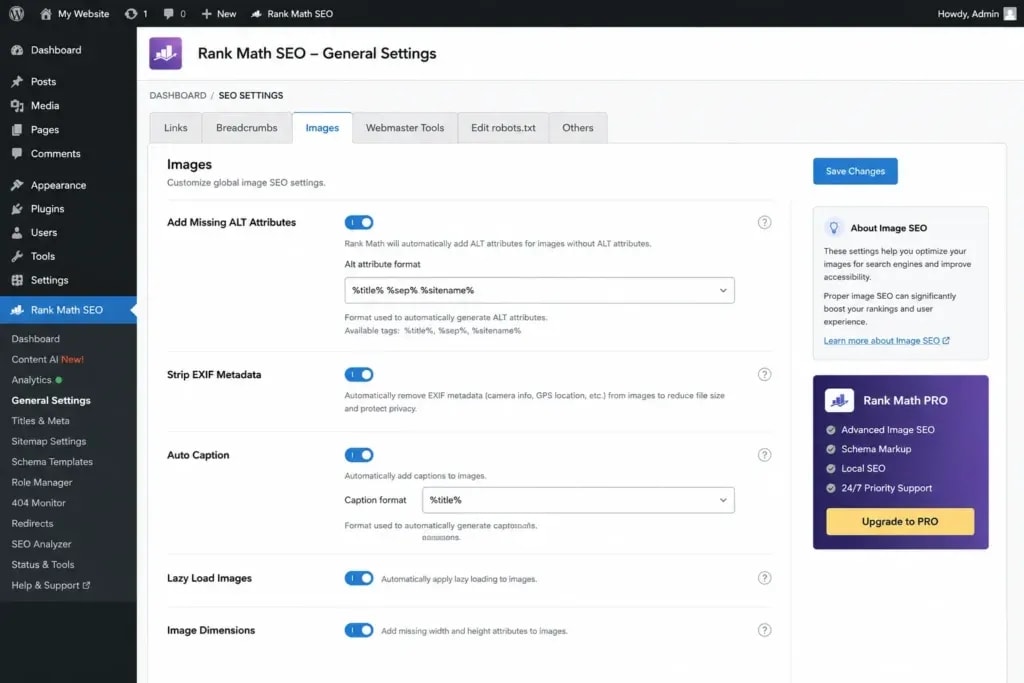
Rank Math's image settings are spread across two main panels, not one. Before touching any of them, confirm the core Image SEO module is active.
Step-by-Step: Activating Image SEO in Rank Math
- Log into your WordPress admin panel.
- In the left sidebar, click Rank Math.
- Select Dashboard from the Rank Math menu.
- Scroll to the Modules section.
- Locate the Image SEO module card.
- Toggle it to ON (the toggle turns blue when active).
- Click Save Changes if prompted.
Until this module is active, none of the image automation settings will function, even if the options appear visible in the settings panel.
Where to Find Image Settings in Rank Math
Once the module is active, navigate to: Rank Math > General Settings > Images
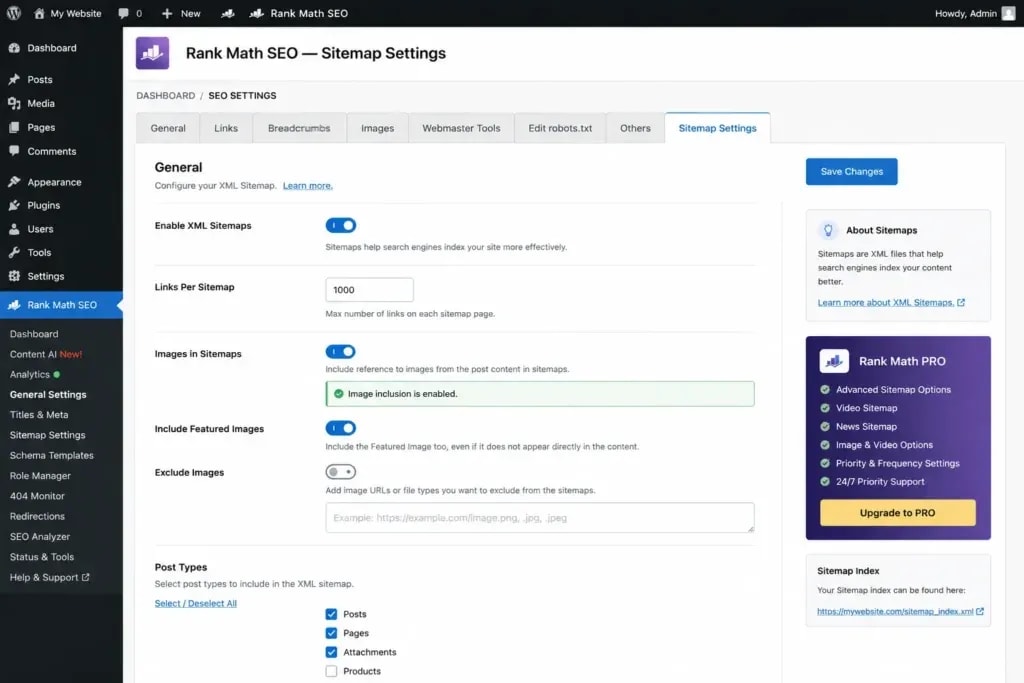
This is the primary configuration panel for auto alt text, auto titles, auto captions, auto descriptions, and the EXIF strip option. A second set of image-related settings lives under Rank Math > Sitemap Settings for XML image sitemap configuration.
Optimization 1: Auto Alt Text: The Most Important Rank Math Image Setting
If you configure only one image SEO setting in Rank Math, make it this one.
Direct Answer: Enable Auto Alt Text in Rank Math > General Settings > Images and set the variable to %post_title%. This automatically fills missing alt attributes on all images in your post content with a relevant, keyword-rich value, without manual effort.
How Rank Math's Alt Text Variables Work
Rank Math uses a dynamic variable system: placeholders that resolve to real content values when a page is rendered. For alt text, the available variables include:

You can combine variables. For example: %post_title% - %filename% would produce "Best Coffee Shops in Kathmandu - coffee-shop-exterior", which is more descriptive than either alone.
Which Variable Should You Use for Alt Text?
For general content blogs: %post_title% For eCommerce product pages: %post_title% %filename% For photography/portfolio: %image_title% or %filename% For multi-author sites with editorial control: %image_alt% (preserves manual input)
Common Mistake: Why "Image Alt" Often Fails
A common mistake is selecting %image_alt% as the auto alt text variable without ensuring editors are actually filling the alt field in the Media Library. When they do not, Rank Math resolves %image_alt% to an empty string, producing images with blank alt attributes. That is worse for accessibility than no alt attribute at all.
Key Insight: %post_title% is the safest default variable for auto alt text because it always resolves to a non-empty, contextually relevant value, regardless of how carefully your team adds metadata in the Media Library.
Optimization 2: Auto Image Title Attribute
The image title attribute (title="...") is distinct from alt text. Screen readers prioritize alt text; title appears as a tooltip on hover. Google treats the title attribute as a secondary signal, particularly when alt text is absent or too generic. It also contributes to accessibility compliance.
Setting Location: Rank Math > General Settings > Images > Image Title Format
Title Attribute vs Alt Text: What's the Difference?
- Alt text: Describes the image content. Read by screen readers. Primary signal for Google Image Search. Required for accessibility.
- Title attribute: Provides supplementary information. Shown as browser tooltip on hover. Secondary SEO signal.
For most sites, setting both to %post_title% is a reasonable starting point. If you want more descriptive title attributes, use a combined variable like %post_title% Image or %post_title% - %filename%.
Best Variable Settings for Image Titles
Use the same variable logic as alt text, but with a slightly more descriptive format when possible. Avoid using identical strings for both alt text and title. Differentiation helps Google understand they carry different information.
Optimization 3: Auto Image Caption Settings
Captions display below images in WordPress and are visible to both users and search crawlers. Well-written captions improve time-on-page (users read them) and give Google additional semantic context.
Setting Location: Rank Math > General Settings > Images > Image Caption Format
Rank Math can auto-populate captions from the Media Library's caption field or from a variable. For sites publishing frequently without editorial captions, set this to %image_title% to pull from the Media Library title. It is better than blank.
When an image is central to the article's argument, write the caption manually. Auto-captions are a fallback for when editorial bandwidth is limited.
Optimization 4: Auto Image Description
Image descriptions in WordPress are rarely displayed on the front end of most themes, but they are stored in the database and can be accessed by plugins, schema generators, and some accessibility tools.
Setting Location: Rank Math > General Settings > Images > Image Description Format
Set this to %image_alt% or %post_excerpt% depending on your content type. For most sites, this setting has lower immediate SEO impact than alt text or title, but it costs nothing to configure and completes your media library's metadata coverage.
Optimization 5: Include Images in Your XML Sitemap
This is the most underutilized image SEO setting in Rank Math, and probably the highest-impact one.
Direct Answer: Enable image inclusion in Rank Math's XML sitemap to feed image URLs directly to Google, enabling faster indexation and Google Image Search visibility.
How to Enable Rank Math Image Sitemap
- Go to Rank Math > Sitemap Settings.
- Select the Images tab.
- Ensure the Include Images toggle is enabled.
- Save changes.
- Go to Google Search Console > Sitemaps.
- Submit your sitemap URL (typically: yoursite.com/sitemap_index.xml).
- Monitor the "Images discovered" count in GSC's URL Inspection tool.
What Google Does With Your Image Sitemap
When images are included in your sitemap, Googlebot uses it as a priority crawl queue for image URLs. New images on freshly published content can appear in Google Image Search within hours rather than days. For eCommerce product images and recipe photography, faster image indexation directly correlates with traffic opportunity.
Key Insight: XML image sitemaps are the difference between Google discovering your images through passive crawling (slow, incomplete) and through direct notification (fast, thorough). For image-heavy sites, this setting alone can unlock meaningful incremental traffic. Learn how to optimize your full XML sitemap strategy.
Optimization 6: Configure Image Filename Conventions Before Upload
Rank Math cannot rename image files after they are uploaded. The optimization happens before the image enters WordPress, not inside the plugin.
Rank Math Cannot Rename Existing Files: Here's Your Workflow
The correct workflow:
- Rename the image file on your computer before uploading.
- Use lowercase letters, hyphens between words, and descriptive keywords.
- Upload to WordPress Media Library.
- Rank Math then reads the filename and uses it in variables like %filename%.
Best Image Filename Format for SEO
Good: rank-math-image-seo-settings-wordpress.webp Bad: IMG_3847.jpg, screenshot2024.png, image-1.jpg
The filename should describe what the image shows and, where natural, include the primary keyword or a closely related term. Avoid stuffing keywords into filenames. "rank-math-image-seo-settings-rank-math-seo-wordpress-image.jpg" is no better than a generic name and looks worse to human editors reviewing your media library.
Optimization 7: OpenGraph Image Settings
OpenGraph images are the preview thumbnails that appear when your page is shared on Facebook, LinkedIn, and similar platforms. They are not a direct Google ranking factor, but they affect click-through rates from social traffic.
Where to Set OpenGraph Images in Rank Math
OpenGraph settings in Rank Math exist at two levels:
- Global (default): Rank Math > Titles & Meta > Global Meta > Social tab, where you set a sitewide fallback image
- Per-post: In each post/page editor, the Rank Math sidebar includes a Social tab for setting a custom OpenGraph image

Every high-priority post should have a custom OpenGraph image: 1200x630px, visually compelling. Generic placeholder images noticeably reduce social sharing CTR.
Why OG Images Affect Organic CTR Indirectly
When content is shared on social platforms, high-quality OG images drive more clicks. That social traffic signals engagement to Google. More importantly, content that performs well on social tends to earn natural backlinks from readers who discover and cite it, and the OG image is often what drives that first click.
Optimization 8: Twitter Card / X Card Image Settings
Twitter Cards (now X Cards) work identically to OpenGraph but specifically for the X platform. Rank Math handles this through a separate Twitter Card setting.
Setting Location: In each post editor, Rank Math sidebar > Social tab > Twitter section.
Recommended Card Type: Large Image Summary Card (summary_large_image). This shows a full-width image preview, substantially increasing click-through rates compared to the small thumbnail card.
Set this globally at Rank Math > Titles & Meta > Global Meta > Twitter Card type and select Summary with Large Image.
Optimization 9: Enable Lazy Loading for Images
Lazy loading defers the loading of off-screen images until the user scrolls near them, reducing initial page load time and improving both Time to First Byte (TTFB) and Largest Contentful Paint (LCP) scores.
How Lazy Loading Affects LCP and What to Avoid
Modern browsers support native lazy loading via the loading="lazy" attribute, and WordPress 5.5+ adds it to most images automatically. Rank Math does not handle lazy loading independently. Use your theme or a performance plugin (WP Rocket, Perfmatters, LiteSpeed Cache) for this.
Critical Warning: Never apply lazy loading to your hero image or the LCP candidate on any page. The image loading above the fold, the first thing a user sees, must load without the lazy attribute. Applying loading="lazy" to the hero image is one of the most common causes of poor LCP scores. Use loading="eager" or simply omit the loading attribute on your hero image. For a complete optimization checklist, read our Core Web Vitals guide.
Key Insight: Lazy loading improves overall page performance, but applying it to above-the-fold images causes LCP regression. Always exclude the hero image from lazy loading rules.
Optimization 10: Strip EXIF Data
EXIF (Exchangeable Image File Format) data is metadata embedded in JPEG and some PNG images by cameras and photo editing software. It includes camera model, lens settings, GPS location, copyright information, and creation timestamps.
EXIF Data, Page Speed, and Privacy
From an SEO standpoint, EXIF data inflates image file sizes for no benefit. A JPEG with full EXIF metadata can be 10–25% larger than the stripped equivalent, so every un-stripped image on your site is carrying dead weight that slows page loads.
From a privacy standpoint, GPS coordinates embedded in images can expose location data you may not intend to publish.
Setting Location: Rank Math Free does not include a dedicated EXIF stripping toggle. Handle this through an image optimization plugin such as ShortPixel, Imagify, or Smush, all of which strip EXIF during compression. Rank Math PRO's integration with these plugins facilitates the workflow.
Configure your image optimization plugin to strip EXIF data on upload or during bulk optimization.
Optimization 11: Image Schema Markup
Schema markup for images enables Google to display Image Rich Results: enhanced image previews in SERP with larger, labeled thumbnails that appear above standard organic listings.
How to Add Image Schema in Rank Math
Rank Math automatically adds ImageObject schema to pages that have a featured image set. To reinforce this:
- Always set a featured image on every post and page.
- In the Rank Math sidebar, navigate to the Schema tab.
- Verify that an Article or relevant schema type is selected. Rank Math embeds the featured image as the
imageproperty automatically. - For product pages, use the Product schema type. It includes
imageas a first-class property that Google uses for Product Rich Results.
Which Schema Types Support Image Properties
Key Insight: Setting schema type correctly in Rank Math does more than add JSON-LD. It signals the content type to Google's Knowledge Graph, which determines which rich result formats your images qualify for. Read our complete guide to schema settings.
Optimization 12: WebP Conversion (Rank Math PRO)
WebP is Google's recommended next-generation image format. It delivers superior compression while maintaining visual quality comparable to JPEG and PNG.
Free vs PRO: What You Get for Image Optimization
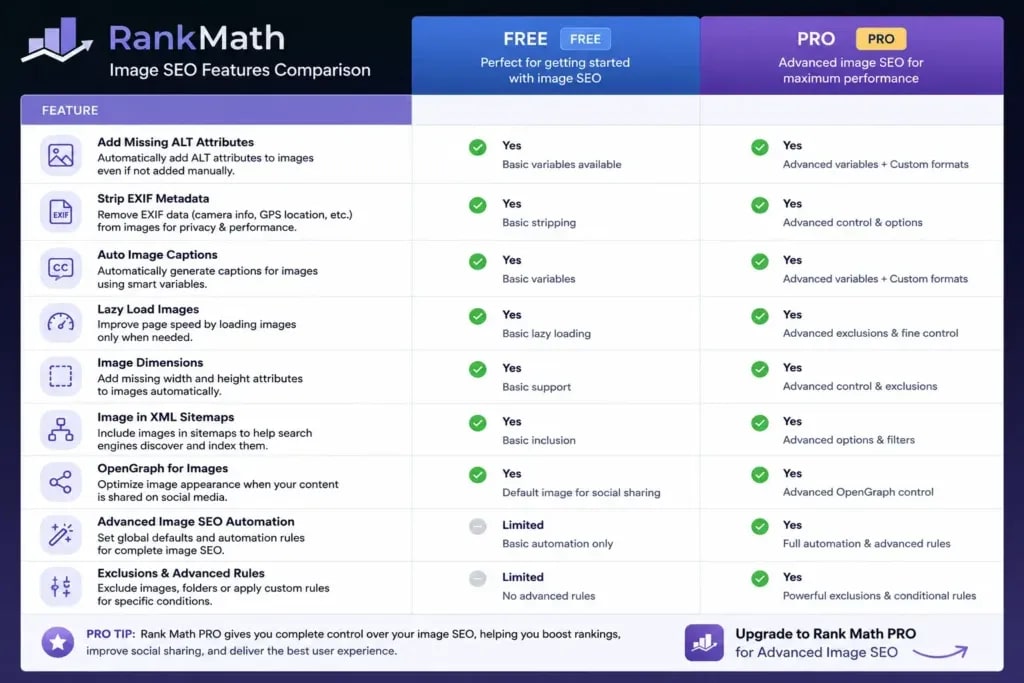
WebP vs JPEG vs PNG: Performance Comparison Table
If you use Rank Math Free, achieve WebP conversion through ShortPixel (recommended for most sites), Imagify, or the Smush plugin. All three integrate with the WordPress Media Library and convert on upload.
Optimization 13: Content AI Image Suggestions (PRO)
Rank Math PRO's Content AI analyzes your content and recommends where to add images, what topics the images should illustrate, and what alt text to use based on keyword analysis.
Setting Location: In the post editor, the Rank Math Content AI sidebar includes an Images section with suggestions based on your target keyword.
This feature is most valuable for content writers without a systematic image-placement process. Rather than adding images arbitrarily, Content AI identifies where images would add semantic value, strengthening topical signals for both users and search crawlers.
Optimization 14: Bulk Audit and Fix Missing Alt Text
New image SEO settings in Rank Math apply going forward. But what about the hundreds or thousands of images already on your site with missing alt text?
How to Run a Rank Math Image Audit
Screaming Frog: Crawl your site and export the Images tab. Filter by missing alt text. This gives you a full list of image URLs with missing attributes.
Ahrefs Site Audit: Run a full crawl, go to Issues, filter for "Missing alt text". Ahrefs categorizes this as a warning and shows every affected URL.
Google Search Console: GSC does not directly show missing alt text, but the Image Performance report shows images with low impressions, a proxy signal for poor image SEO.
Fixing Alt Text at Scale
Once Rank Math's auto alt text variable is set, newly rendered pages will fill gaps. For existing posts:
- Run the Rank Math Content AI content score check on your top-10 traffic pages first.
- Manually update alt text on images in the top 20 pages by traffic.
- For bulk pages (100+), use a plugin like WP Sheet Editor or the Rank Math PRO bulk edit feature to update alt text across multiple posts from a spreadsheet-style interface.
Key Insight: Bulk alt text fixes on your top-traffic pages produce the fastest measurable impact. Prioritize high-traffic pages first, then set the Rank Math auto variable as a safety net for future content.
Optimization 15: Validate Image Settings with Google Search Console
Configuration without validation is assumption. After enabling Rank Math image SEO settings, Google Search Console is where you confirm whether images are actually being discovered, indexed, and ranked.
How to Check Image Indexation in GSC
- Log into Google Search Console.
- Navigate to Performance > Search results.
- Click Search type and change from "Web" to "Image".
- Review the Impressions and Clicks data for image queries.
- Identify which pages drive the most image impressions. These are your image SEO wins to replicate.
Common GSC Image Errors and Rank Math Fixes
Rank Math Image SEO Settings: Free vs PRO Comparison
Verdict: For most content sites and blogs, Rank Math Free covers 80% of what matters for image SEO. The PRO upgrade makes most sense for eCommerce stores, high-traffic publishing sites, and agencies managing multiple sites where WebP conversion and bulk optimization efficiency matter.
Common Mistakes With Rank Math Image SEO Settings
- Enabling the Image SEO module but not saving. The toggle alone is not enough. Save changes after configuring variables.
- Setting auto alt text to %image_alt% without filling Media Library alt fields. Results in empty alt attributes that fail both SEO and accessibility.
- Applying lazy loading to hero images. Causes LCP regression. Exclude above-the-fold images from lazy loading rules.
- Forgetting to submit the updated sitemap to GSC after enabling image sitemap. Google will not know about the change until you submit.
- Using keyword-stuffed image filenames. "rank-math-image-seo-rank-math-settings-best-rank-math.jpg" is worse than a clean descriptive name.
- Assuming Rank Math handles WebP conversion in Free. It does not. Use a dedicated image optimization plugin for that.
- Skipping the GSC Image Performance validation step. Many users configure settings and never confirm they are working.
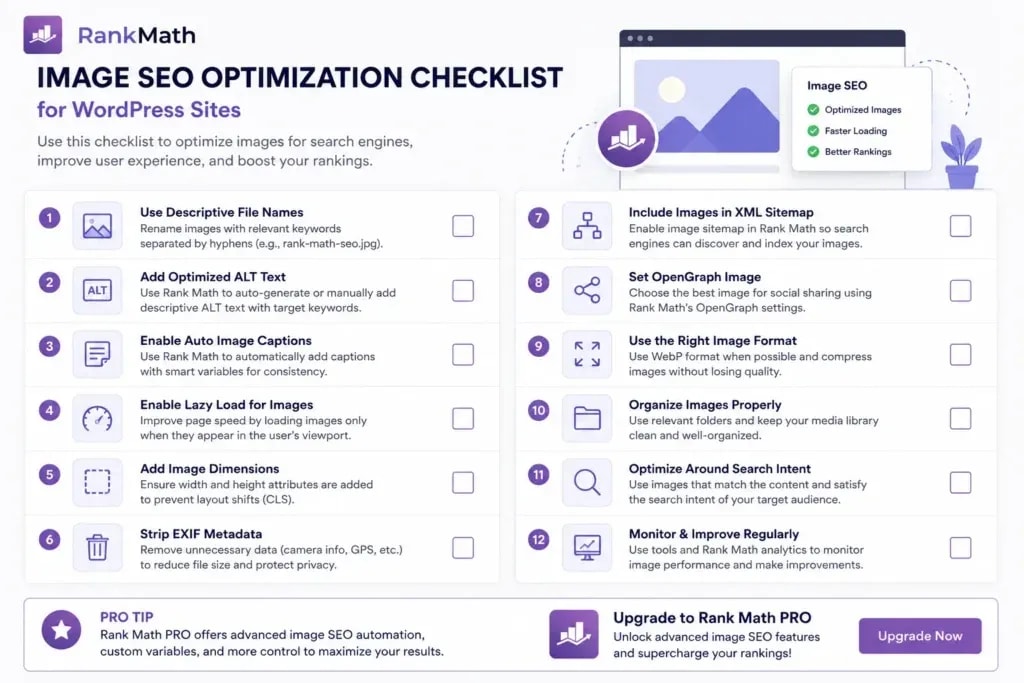
Rank Math Image SEO Settings Checklist
Use this before publishing every article:
- Image SEO module enabled in Rank Math Dashboard > Modules
- Auto alt text variable set (recommended: %post_title%)
- Auto title attribute variable set
- Image sitemap enabled under Rank Math > Sitemap Settings
- Sitemap submitted or re-submitted in Google Search Console
- All images uploaded in WebP format (or converted via ShortPixel/Imagify)
- Featured image set on the post/page
- Schema type selected in Rank Math sidebar (Article, Product, etc.)
- OpenGraph image set for top-priority pages
- Twitter Card type set to Summary with Large Image
- Hero image does NOT have lazy loading applied
- Image filenames are descriptive and keyword-relevant (set before upload)
- EXIF data stripped via image optimization plugin
- Top-traffic pages audited for missing manual alt text
Final Thoughts
Rank Math's image SEO settings give WordPress sites a real structural advantage, but only when deliberately configured. Left at defaults, they do very little. The difference between a properly configured install and a default one shows up in Google Search Console: indexed image counts, image search impressions, and Core Web Vitals scores all move when these 15 settings are in place.
Work through the PICTURE Framework, implement these 15 optimizations, and validate results in Google Search Console. Image SEO is not a one-time configuration. It is a workflow you embed into every content publication cycle. For related technical SEO coverage, read our WordPress SEO mistakes guide.
Frequently Asked Questions
Does Rank Math automatically add alt text to images?
Yes. When you enable the Image SEO module in Rank Math and select a variable (such as %post_title%), Rank Math automatically adds alt text to any image in your post content that is missing an alt attribute. It does not overwrite existing manual alt text, it only fills gaps.
Is Rank Math image SEO free or does it require PRO?
Core image SEO features, including auto alt text, auto image titles, auto captions, and XML image sitemap inclusion, are available in Rank Math Free. Advanced features like WebP conversion, Content AI image recommendations, and advanced automation workflows require Rank Math PRO.
How do I add images to my XML sitemap in Rank Math?
Go to Rank Math > Sitemap Settings > Images. Toggle on the option to include images in your sitemap. Rank Math automatically adds image URLs to the corresponding page entries in your XML sitemap. Submit the updated sitemap to Google Search Console for faster indexation.
What is the best Rank Math alt text variable to use?
For most blogs and content sites, %post_title% is the best starting point, it produces alt text like "How to Start a Blog" which is descriptive and naturally keyword-rich. For eCommerce sites, combining %post_title% with product-specific data produces better results. For portfolio or photography sites where the image title is more descriptive than the post title, %image_alt% or %filename% may perform better.
Does Rank Math image SEO affect Google Image Search rankings?
Yes, directly. Alt text helps Google's Vision API categorize and rank images in Google Image Search. XML image sitemap inclusion ensures images are discovered and indexed. Structured data (schema) on images can unlock Image Rich Results in SERP. Together, these settings can drive meaningful supplemental traffic from Google Image Search, which is particularly valuable for product, recipe, and visual content sites.
How do I fix missing alt text on old images using Rank Math?
Go to Rank Math > Status and Tools > Database Tools. From there, you can run a content analysis that identifies posts with missing image attributes. Alternatively, use a plugin like Screaming Frog or Ahrefs Site Audit to export all images with missing alt text, then either update them manually or ensure your Rank Math auto alt text variable is set so future renders fill the gaps.
What is WebP and does Rank Math convert images to WebP?
WebP is a modern image format developed by Google that delivers 25–34% smaller file sizes than JPEG at equivalent visual quality. Smaller images load faster, improving your LCP score, a Core Web Vitals metric that directly influences Google rankings. Rank Math PRO includes a WebP conversion feature. If you use Rank Math Free, you can achieve WebP conversion through plugins like ShortPixel, Imagify, or Smush.
Sources and References

Written by
Bibek Thapa
AI-Powered Digital Growth Strategist
Bibek Thapa works across AI workflows, SEO, AI search optimization, content strategy, website growth, and productivity systems. Anobee documents practical lessons, tools, experiments, and systems for improving digital presence.
- AI workflows
- Digital growth
- SEO
- GEO
- AEO
- Content strategy
- Website growth


