Website Growth
What Is Cross Network in GA4? What Lands There, Why It Grew, and How to Break It Down
By Bibek Thapa · Published · 9 min read
Quick Answer
Cross-network is a GA4 default channel for Google Ads traffic from campaigns that run across several Google networks at once. In practice that means Performance Max and Demand Gen, plus App, Smart and Local campaigns. To see which campaigns sit inside it, add Session campaign as a secondary dimension in the Traffic acquisition report.

Table of ContentsOn this page
- What cross network in GA4 means
- The exact rules GA4 uses for Cross-network
- Why cross-network traffic grew
- How to break down cross-network traffic in GA4
- Why you may not see cross network in GA4
- Cross network in GA4: common mistakes
- Bottom line on cross network in GA4
- Frequently Asked Questions
- Sources and References
Key Takeaways
- Cross-network is one of GA4's 19 default channels. It holds Google Ads traffic from campaigns that serve across several Google networks at once.
- GA4 assigns it when the Google Ads campaign type is Performance Max, Demand Gen, App, Smart or Local, or the ad network type is Cross-network.
- A manually tagged campaign whose name contains cross-network also lands in this channel, even if no Google Ads campaign is involved.
- The channel grew because Google moved Smart Shopping and Local into Performance Max in 2022 and Discovery into Demand Gen by March 2024.
- Break it down with the Session campaign dimension. No Cross-network row usually means no linked Google Ads account.
Cross network in GA4 confuses people for a simple reason. It is a channel named after where ads ran, but it is filled mostly by campaign types that choose where to run on their own. Once you know the rules Google uses to fill it, the row stops being a mystery and becomes a summary of your automated Google Ads campaigns.
What cross network in GA4 means
Google defines it in one line: "Cross-network is the channel by which users arrive at your site/app via ads that appear on a variety of networks" [1]. The networks are Google's own placements, such as Search, Display and YouTube.
It is one of 19 channels in GA4's default channel group, alongside Direct, Organic Search, Paid Search, Display, Paid Video, Referral and the newer AI Assistant channel [1]. Every session gets exactly one of them. When GA4 cannot match a session to any rule, it labels it Unassigned [1].
The channel exists because some Google Ads campaigns do not run on one network. A Performance Max campaign can show an ad on Search in the morning and on YouTube in the afternoon. Both come from the same budget. Filing that visit under Paid Search or Paid Video would be misleading, so GA4 gives it a channel of its own.
The exact rules GA4 uses for Cross-network
GA4's channel group is a set of rules, not a judgement call. For Google Ads traffic, it reads three fields: the source platform, the ad network type and the campaign type [1]. A session lands in Cross-network when either of these is true:
| Traffic | Condition | Result |
|---|---|---|
| Google Ads | Source platform is Google Ads, and the ad network type is Cross-network or Google owned channels | Cross-network |
| Google Ads | Source platform is Google Ads, and the campaign type is Performance Max, App, Smart, Demand Gen or Local | Cross-network |
| Manually tagged | Campaign name contains "cross-network" | Cross-network |
All three rules come from Google's default channel group definitions [1].

The third row is the one people trip over. For example, if you tag a non-Google campaign with utm_campaign=spring-cross-network-test, GA4 files those visits under Cross-network too, because the rule only checks the campaign name. Keep the phrase out of manual campaign names unless you mean it.
How the other paid channels compare
The same three fields decide where every other Google Ads campaign goes [1]:
| Google Ads campaign | GA4 channel |
|---|---|
| Search, Hotel, Travel (or Google search and Search partners networks) | Paid Search |
| Shopping | Paid Shopping |
| Video (or the YouTube network) | Paid Video |
| Display (or Google Display Network, Google TV) | Display |
| Performance Max, Demand Gen, App, Smart, Local | Cross-network |

So if you run Search and Performance Max side by side, their traffic splits across two channels: Paid Search and Cross-network. Add the two rows together when someone asks how much traffic Google Ads drove.
Why cross-network traffic grew
Cross-network looks bigger today than it did a few years ago, and the reason is Google's own product changes rather than anything in your account settings.
- 2022: Google upgraded Smart Shopping and Local campaigns to Performance Max. Smart Shopping campaigns were upgraded automatically from July through September, and Local campaigns from August through September [3].
- 2023 to 2024: Google replaced Discovery ads with Demand Gen. Remaining Discovery campaigns were upgraded automatically from January to March 2024 [4].
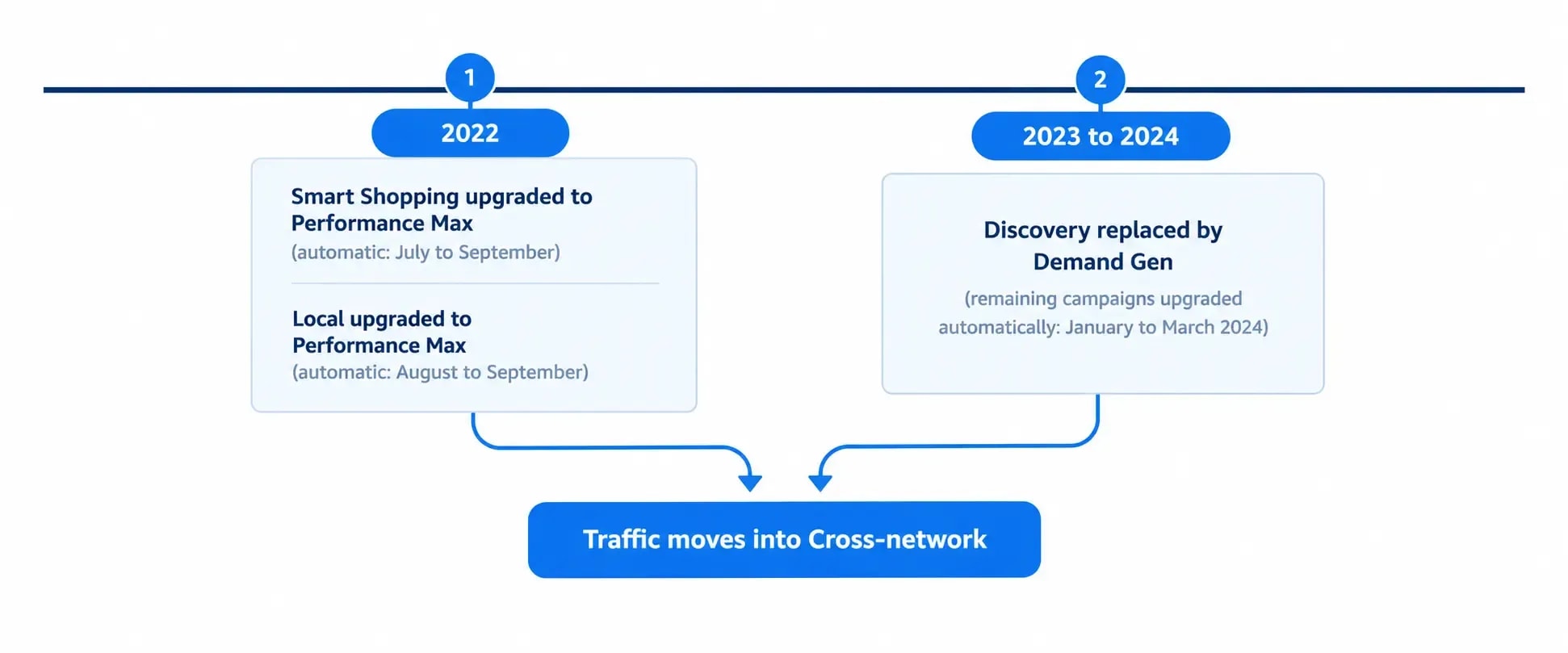
Both Performance Max and Demand Gen are on the Cross-network list [1]. Traffic that once sat in Paid Shopping or Display moved into Cross-network when the campaigns moved. That happened even where the ads and budget barely changed. Did your Cross-network row jump in 2022 or early 2024 while Paid Shopping or Display fell? Then an upgrade is the first thing to check.
How to break down cross-network traffic in GA4
The channel row tells you how much traffic came from these campaigns. It does not tell you which ones. To break down cross network in GA4 by campaign, use these dimensions, documented in Google's Data API reference [2]:
| Dimension | What it shows | Example values |
|---|---|---|
| Session Google Ads campaign type | The campaign type behind the session | Performance Max, Demand Gen, App, Smart, Local |
| Session Google Ads campaign | The campaign name behind the session | Your own campaign names |
| Session Google Ads ad network type | The network that led to the session | Cross-network, Google search, YouTube Videos |
To use them in the standard report:
- Open the Traffic acquisition report. In most properties it sits under Reports, Acquisition. In properties set up with business objectives, look under the objective collection instead. On Anobee's property it sits under Business objectives, Generate leads.
- Confirm the first column reads Session primary channel group (Default Channel Group).
- Click the plus sign beside that column header, open Traffic source, and choose Session campaign. Google describes it as including Google Ads campaigns, manual campaigns and other campaigns [2].
- Search the table for Cross-network to see each campaign inside it.
- If the picker also offers Session Google Ads campaign type, swap to it to group the same traffic by campaign type.
On Anobee's own property, which has no Google Ads account linked, the Traffic source list offers Session campaign, Session campaign ID, Session default channel group, Session source, Session source / medium and Session source platform. The Session Google Ads dimensions from Google's API reference did not appear there. So check what your own picker lists before building a report around them.
For a reusable view, build a free-form exploration in Explore with Session primary channel group and Session campaign as rows, filtered to Cross-network. Add sessions, engaged sessions and key events as values.
Compare like with like. The Traffic acquisition report is session-scoped, so pair it with the Session dimensions above. The User acquisition report uses first user dimensions, which credit the first visit only. Its Cross-network number will differ.
Why you may not see cross network in GA4
No Cross-network row is normal for many sites. On Anobee's own GA4 property, the Traffic acquisition report for 16 September to 13 October 2026 lists six channels: Direct (251 sessions), Organic Search (111), AI Assistant (39), Organic Social (39), Referral (5) and Unassigned (1). There is no Cross-network row, because Anobee runs no Google Ads campaigns.

If you do run Google Ads and still see no Cross-network row, check these in order:
- Is Google Ads linked to the GA4 property? Google notes that after linking, "Google Ads data will be in your Google Analytics reports within 48 hours" [5]. Without the link, the source platform and campaign type conditions cannot match. The Google Analytics setup guide covers the property side.
- Do you run any of the five campaign types? Search, Shopping, Video and Display campaigns go to their own channels, not Cross-network.
- Is the date range recent enough? Newly linked data takes up to 48 hours to appear [5].
- Is traffic landing in Unassigned instead? That points to missing or broken campaign information. Tag setup problems are covered in the Google Tag Manager setup guide.
Cross network in GA4: common mistakes
- Treating it as one channel's performance. Cross-network mixes Search, YouTube and Display placements. A low engagement rate there may simply reflect YouTube or Display traffic inside a Performance Max campaign. It does not prove weak search ads.
- Comparing it with Paid Search as if they were rivals. They are both Google Ads. Report them together for total paid Google traffic, and separately only to compare campaign types.
- Using "cross-network" in manual campaign names. The manual rule matches any campaign name containing the phrase [1].
- Mixing session and first user scopes. Session primary channel group and First user primary channel group answer different questions and will not match.
Bottom line on cross network in GA4
Cross network in GA4 is where Google Ads puts campaigns that choose their own placements: Performance Max, Demand Gen, App, Smart and Local. It grew because Google moved older campaign types into Performance Max and Demand Gen, not because your traffic changed overnight. Read it with the Session campaign dimension. Add it to Paid Search when you report total Google Ads traffic, and keep the phrase out of your own campaign names. If your property has no Cross-network row, start by checking the Google Ads link.
Frequently Asked Questions
What is cross-network in GA4?
Cross-network is a default channel in Google Analytics 4 for visits that come from Google Ads campaigns serving across several Google networks at once, such as Search, YouTube and Display. Performance Max and Demand Gen campaigns are the main sources, along with App, Smart and Local campaigns.
Is cross-network paid traffic?
Yes. Cross-network sessions come from paid Google Ads campaigns, or from manually tagged campaigns whose name contains cross-network. It is paid traffic grouped by campaign type rather than by the single network where the ad appeared.
Why does Performance Max show as cross-network in GA4?
Because a Performance Max campaign can serve on several Google networks from one campaign, GA4 cannot honestly file it under Paid Search, Display or Paid Video alone. Google's channel rules put the Performance Max campaign type into Cross-network instead.
How do I see which campaigns are in cross-network in GA4?
Open the Traffic acquisition report, click the plus sign beside the channel group column, and add Session campaign as a secondary dimension. Then search the table for Cross-network to see each campaign inside it. Google's Session Google Ads campaign type dimension, where your property offers it, groups the same rows by campaign type.
Why does my GA4 show no cross-network traffic?
Usually because the property has no linked Google Ads account, or because that account runs no Performance Max, Demand Gen, App, Smart or Local campaigns. Without either, nothing meets the channel rules, so the row does not appear.
Sources and References
- Google Analytics Help: GA4 Default channel group ↩
- Google Analytics Data API: API dimensions and metrics ↩
- Google Ads Help: Smart Shopping and Local campaign upgrades to Performance Max ↩
- Google Ads Help: Get ready to upgrade your Discovery ads to Demand Gen ↩
- Google Analytics Help: GA4 Link Google Ads to Analytics ↩
Was this guide helpful?
Your answer helps Anobee improve future updates.

Written by
Bibek Thapa
AI-Powered Digital Growth Strategist
Bibek Thapa works across AI workflows, SEO, AI search optimization, content strategy, website growth, and productivity systems at Anobee.
- AI workflows
- Digital growth
- SEO
- GEO
- AEO
- Content strategy
- Website growth