Website Growth
Microsoft Clarity vs Google Analytics: What Each One Answers, and Why Most Sites Need Both
By Bibek Thapa · Published · 10 min read
Quick verdict
Comparison guideMicrosoft Clarity shows how visitors behave on a page: session recordings, heatmaps, scroll depth, and dead or rage clicks. Google Analytics 4 shows where visitors came from and what they did across the site: channels, campaigns, events and key events. They answer different questions, both are free, and most sites get the most from running both side by side.

Table of ContentsOn this page
- Microsoft Clarity vs Google Analytics: which question are you asking?
- What Microsoft Clarity is used for
- What Google Analytics 4 is used for
- Microsoft Clarity vs Google Analytics side by side
- What each tool showed for anobee.com in the same month
- How to use Microsoft Clarity and Google Analytics together
- When one of them is enough
- Privacy and consent with both tools
- Bottom line on Microsoft Clarity vs Google Analytics
- Frequently Asked Questions
- Sources and References
Key Takeaways
- GA4 answers where visitors came from and what they did. Clarity answers how they behaved on the page. Neither replaces the other.
- Clarity is free with no traffic limits or sampling, per Microsoft. GA4's standard version is free; its event-level data expires after 2 or 14 months.
- On anobee.com in the same month, GA4 found 45 AI Assistant sessions; Clarity found dead clicks in 7.33% of sessions. Neither tool showed the other's finding.
- Expect different session counts. Without cookie consent, Clarity splits one visit across pages into separate sessions, per Microsoft's FAQ.
- Use GA4 to choose the page and channel, Clarity to watch what happens there, then GA4 again to measure whether a fix worked.
The usual way to frame Microsoft Clarity vs Google Analytics is a feature checklist. That hides the more useful point: they answer different questions. So this comparison goes job by job, and then shows what each tool actually reported for anobee.com over the same month, including where their numbers disagreed.
Microsoft Clarity vs Google Analytics: which question are you asking?
Start from the question, not the tool.
| Your question | Better tool | Why |
|---|---|---|
| Where did my visitors come from? | GA4 | Channel grouping, source and medium, campaigns |
| Where did people click, and how far did they scroll? | Clarity | Heatmaps and scroll depth [1] |
| Which campaigns or Google Ads drove visits? | GA4 | Campaign and Google Ads data, once linked |
| What did a confused visitor actually do? | Clarity | Session recordings [1] |
| Did visitors complete the action I care about? | GA4 | Events and key events |
| Which elements look clickable but are not? | Clarity | Dead click and rage click signals |
| How much traffic came from AI assistants? | GA4 | A dedicated AI Assistant channel [7] |
| Which of my pages do AI answers cite? | Clarity | AI Visibility Citation dashboard [4] |

The pattern is simple. GA4 counts and attributes. Clarity shows behavior.
What Microsoft Clarity is used for
Microsoft calls Clarity a behavioral analytics tool for understanding how users interact with a website or app [1]. In practice that means:
- Session recordings of real visits, so you can watch a journey instead of guessing at it.
- Heatmaps for clicks, scrolling and attention across a page.
- Dashboard insights, including rage clicks, dead clicks, scroll depth and a performance widget.
- Funnels and smart events for actions such as form submissions and outbound clicks.
- Copilot summaries of recordings and heatmaps.
- AI Visibility, with a Citation dashboard that shows which of your pages are referenced in AI-generated answers [4].
All of these features are listed in Microsoft's Clarity overview [1].
The price is the easy part. Microsoft says Clarity "is a free service forever", that you "never encounter traffic limits", and that it does not sample traffic [2]. Playback data is kept for 30 days; heatmap data and labeled or favorited sessions for 9 months [3]. Microsoft also says Clarity should not be used on websites or apps that target users under 18 [1].
What Google Analytics 4 is used for
GA4 is the counting and attribution layer. It groups every session into a channel, such as Organic Search, Direct, Referral or the newer AI Assistant channel, which Google defines as traffic from sources such as ChatGPT, Gemini, Deepseek, Copilot and Grok [7]. It records events and key events, connects to Google Ads, and keeps standard reports going back much further than a recording tool would.
One limit matters when you compare the two. GA4's event-level data retention is 2 or 14 months on a standard property, and that setting affects explorations and funnel reports, not standard aggregated reports [8]. If you plan to dig into last year's behavior in Explore, set retention to 14 months now.
If GA4 is not set up yet, the Google Analytics setup guide covers it step by step.
Microsoft Clarity vs Google Analytics side by side
| Item | Microsoft Clarity | Google Analytics 4 |
|---|---|---|
| Main job | How visitors behave on a page | Where visitors came from and what they did |
| Session recordings | Yes [1] | No |
| Heatmaps | Yes [1] | No |
| Traffic sources | Referrers and channels in the dashboard | Full channel grouping, source, medium, campaign [7] |
| Conversions | Funnels and smart events [1] | Events and key events |
| AI traffic | AI assistant referrers appear in the dashboard | Dedicated AI Assistant channel [7] |
| AI citations | Citation dashboard in AI Visibility [4] | No |
| Price | Free, no traffic limits [2] | Free standard version |
| Data kept | Recordings 30 days; heatmaps 9 months [3] | Event-level data 2 or 14 months; standard reports unaffected [8] |
What each tool showed for anobee.com in the same month
This is where Microsoft Clarity vs Google Analytics stops being abstract. Both tools run on anobee.com, and both were read on 15 October 2026 for their last 30 days. That is 15 September to 14 October in GA4 and "Last 30 days" in Clarity, so the windows are close but not identical.
What GA4 reported
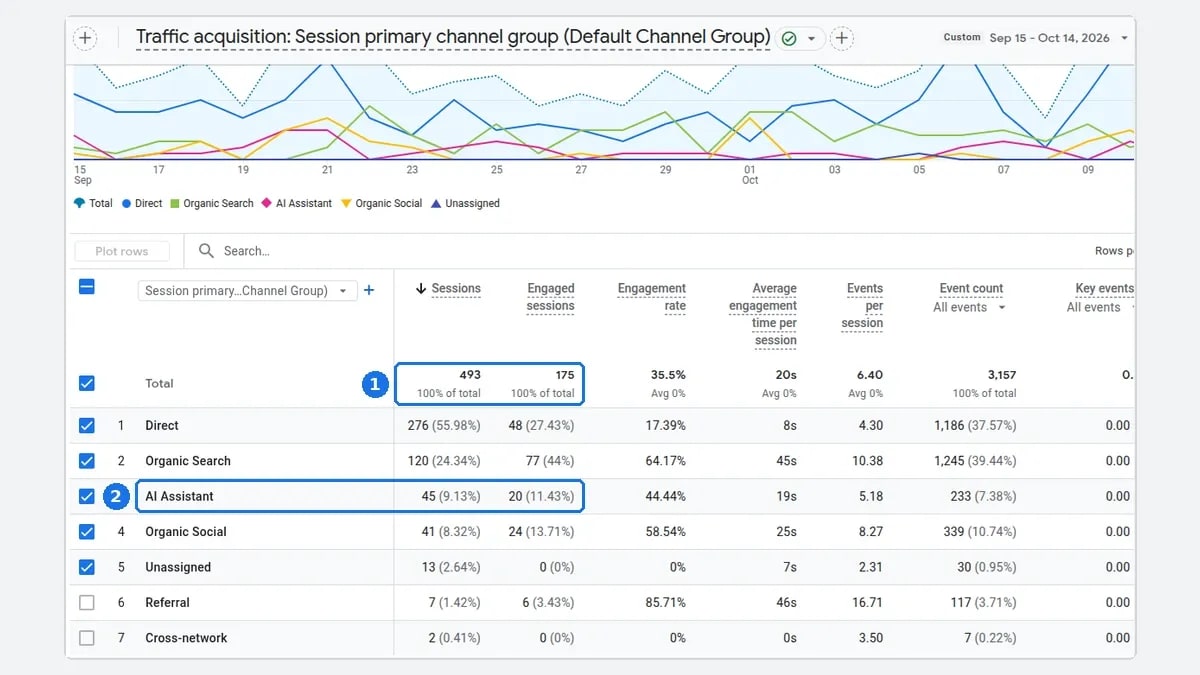
GA4's Traffic acquisition report counted 493 sessions in seven channels:
| Channel | Sessions | Engagement rate |
|---|---|---|
| Direct | 276 | 17.39% |
| Organic Search | 120 | 64.17% |
| AI Assistant | 45 | 44.44% |
| Organic Social | 41 | 58.54% |
| Unassigned | 13 | 0% |
| Referral | 7 | 85.71% |
| Cross-network | 2 | 0% |
Two things stand out that only GA4 could show. AI Assistant was the third-largest channel, ahead of social, and 41 of its 45 sessions came from chatgpt.com. Clarity's referrer list for the same period did not include chatgpt.com at all. Organic Search sessions were also far more engaged than Direct ones. Both findings decide where to spend effort, and Clarity's dashboard surfaced neither.
What Clarity reported
Clarity's dashboard, for its last 30 days, showed:
- 928 sessions, with 219 bot sessions excluded.
- 42.02% average scroll depth.
- 32 seconds of active time out of 3 minutes total time per session.
- Dead clicks in 7.33% of sessions (68 sessions), and rage clicks in 0.11% (1 session).
- Smart events: Submit form in 15 sessions, Search in 13, Contact us in 13, Outbound click in 8.
The dead click figure is the actionable one. One session in fourteen involved a click on something that did nothing. GA4 has no equivalent signal. The next step is to filter Clarity's recordings to dead clicks and watch what those visitors expected to happen.

Why the session counts differ
Clarity counted 928 sessions; GA4 counted 493. Do not try to reconcile them line by line. Each tool runs its own script with its own session and bot rules. Microsoft also documents one cause directly: without cookie consent, Clarity cannot track a continuous journey, so a visit to page A and then page B becomes two separate sessions [2]. Clarity's "1 page per session" average on anobee.com fits that pattern.
So the practical rule is simple: compare trends within one tool, not totals across two.
How to use Microsoft Clarity and Google Analytics together
For example, the two tools work best in a loop:
- Choose the page in GA4. Find a page or channel with real traffic and a reason to improve, such as high entrances with a low engagement rate.
- Watch it in Clarity. Filter recordings and heatmaps to that page. Look for dead clicks, rage clicks and where scrolling stops.
- Fix one thing. Change the element or content the recordings point to.
- Measure in GA4. Compare the engagement rate or key event rate for that page before and after the change.

Clarity can also pull data from Google Analytics into its own dashboard. You need Clarity's tracking code installed first, and each Clarity project can connect only one Google Analytics web property at a time [2][6]. The Microsoft Clarity guide covers setup, masking and the AI Visibility dashboards in detail.
When one of them is enough
- Only GA4: a site whose questions are about traffic and conversions, with no plan to act on page-level behavior. Recordings nobody watches add privacy work without adding value.
- Only Clarity: a small site that needs to see how visitors use a few pages, and can live with Clarity's referrer view instead of full attribution.
- Both: any site that wants to know where visitors come from and why they leave. For most content and business sites, that is the default.
If you are choosing between Clarity and a paid behavior tool instead, the Microsoft Clarity vs Hotjar comparison covers that decision.
Privacy and consent with both tools
Both tools set cookies and both need consent where your visitors' laws require it. Clarity has a specific rule worth knowing: since 31 October 2025, Microsoft enforces consent signals for visits from the European Economic Area, the United Kingdom and Switzerland, and a valid signal is needed for full functionality [5]. If a meaningful share of your visitors are in those regions, set up consent before you rely on Clarity's recordings.
Bottom line on Microsoft Clarity vs Google Analytics
Microsoft Clarity vs Google Analytics is not a contest. GA4 tells you where visitors came from and whether they did what you wanted. Clarity shows what happened on the page in between. On anobee.com, GA4 revealed an AI Assistant channel bigger than social traffic, and Clarity revealed that one session in fourteen hit a dead click. Each finding came from one tool only. Install both, compare trends within each tool, and use them in the GA4, Clarity, fix, GA4 loop. If your next question is which pages AI answers already cite, start with how to check AI citations.
Frequently Asked Questions
Is Microsoft Clarity better than Google Analytics?
Neither is better overall because they answer different questions. Google Analytics 4 is better for traffic sources, campaigns and conversions. Microsoft Clarity is better for seeing behavior on a page through recordings, heatmaps and click signals. Most sites benefit from running both.
Can Microsoft Clarity replace Google Analytics?
Not for most sites. Clarity shows referrers, sessions and on-page behavior, but GA4 provides channel grouping, campaign and Google Ads data, event and key event tracking, and longer reporting. Clarity works best as a companion that explains what GA4 numbers cannot.
Is Microsoft Clarity free?
Yes. Microsoft describes Clarity as a free service forever, with no obligation to upgrade, and its FAQ says there are no traffic limits and no sampling. Playback data is kept for 30 days, and heatmap data and labeled sessions for 9 months.
Can I use Microsoft Clarity with Google Analytics 4?
Yes. Clarity has a Google Analytics integration that brings GA data into Clarity. You need Clarity's tracking code installed first, and each Clarity project can connect one Google Analytics web property at a time, according to Microsoft.
Why do Clarity and GA4 show different session numbers?
They count differently. Each tool runs its own script with its own session and bot rules. Microsoft also notes that without cookie consent, Clarity treats a visit to two pages as two separate sessions. On anobee.com, Clarity reported 928 sessions where GA4 reported 493 for a similar 30-day window.
Sources and References
- Microsoft Learn: Clarity overview ↩
- Microsoft Learn: Clarity frequently asked questions ↩
- Microsoft Learn: Clarity data retention ↩
- Microsoft Learn: Clarity Citation dashboard overview ↩
- Microsoft Learn: Clarity Consent Mode ↩
- Microsoft Learn: Clarity Google Analytics integration ↩
- Google Analytics Help: GA4 Default channel group ↩
- Google Analytics Help: GA4 Data retention ↩
Was this guide helpful?
Your answer helps Anobee improve future updates.

Written by
Bibek Thapa
AI-Powered Digital Growth Strategist
Bibek Thapa works across AI workflows, SEO, AI search optimization, content strategy, website growth, and productivity systems at Anobee.
- AI workflows
- Digital growth
- SEO
- GEO
- AEO
- Content strategy
- Website growth