
Website Growth
How to Reduce Bounce Rate on Your Blog: 12 Proven Fixes (2026)
Learn how to reduce bounce rate on your blog with 12 proven strategies. Fix slow pages, weak CTAs, and intent mismatches. Start improving engagement today.
By Bibek Thapa · Published May 28, 2026 · Updated Jul 14, 2026 · 15 min read
Quick Answer
Quick Answer: To reduce bounce rate on your blog, align every post with its exact search intent, fix page load speed, optimize above-the-fold content, and use strategic internal links to pull readers deeper into your site. Most high bounce rates trace back to a content-expectation mismatch, not a design problem.
Table of Contents
- What Is Bounce Rate, and Why It Still Matters
- Bounce Rate vs. Engagement Rate in GA4: What Actually Changed
- What Is a Good Bounce Rate for a Blog?
- Why Your Bounce Rate Is High (Root Causes, Not Symptoms)
- Search Intent Mismatch: The Most Overlooked Cause
- Poor First Impression Above the Fold
- Slow Pages, High Exits
- Weak Internal Linking Architecture
- The RETAIN Framework: A Systematic Approach to Bounce Rate
- 12 Proven Strategies to Reduce Bounce Rate on Your Blog
- 1. Align Every Post With Its Exact Search Intent
- 2. Optimize What Readers See in the First 3 Seconds
- 3. Fix Page Speed and Core Web Vitals First
- 4. Format Your Content for Scanners and Readers
- 5. Build a Strategic Internal Linking System
- 6. Add Contextually Relevant Related Posts
- 7. Replace Generic CTAs With Contextual Ones
- 8. Cut Intrusive Pop-Ups and Interstitials
- 9. Treat Mobile as Your Primary Experience
- 10. Use Heatmaps to Find Your Exact Exit Points
- 11. Sharpen Your Blog Navigation
- 12. Update Underperforming Content Before Creating New Posts
- Bounce Rate Benchmarks by Content Type
- Common Bounce Rate Mistakes (And How to Avoid Them)
- Chasing a Low Number Without Context
- Ignoring Mobile Experience
- Overloading Pages With Pop-Ups
- Advanced Strategies for Technical Bloggers
- Core Web Vitals as a Bounce Rate Signal
- Scroll Depth + Heatmap Audit Workflow
- How to Track Engagement Rate in GA4
- A Final Word on Sustainable Engagement
Quick Answer: To reduce bounce rate on your blog, align every post with its exact search intent, fix page load speed, optimize above-the-fold content, and use strategic internal links to pull readers deeper into your site. Most high bounce rates trace back to a content-expectation mismatch, not a design problem.
Key Takeaways:
- A bounce rate of 55-70% is normal for most blogs; context always matters more than the raw number
- GA4 replaced Universal Analytics bounce rate with "engagement rate"; understanding both is essential
- Search intent mismatch is the #1 cause of high bounce rate and also the fastest fix
- The RETAIN Framework gives you a repeatable six-stage system for systematic improvement
- Mobile bounce rates typically run 10-20% higher than desktop; mobile-first isn't optional
What Is Bounce Rate, and Why It Still Matters
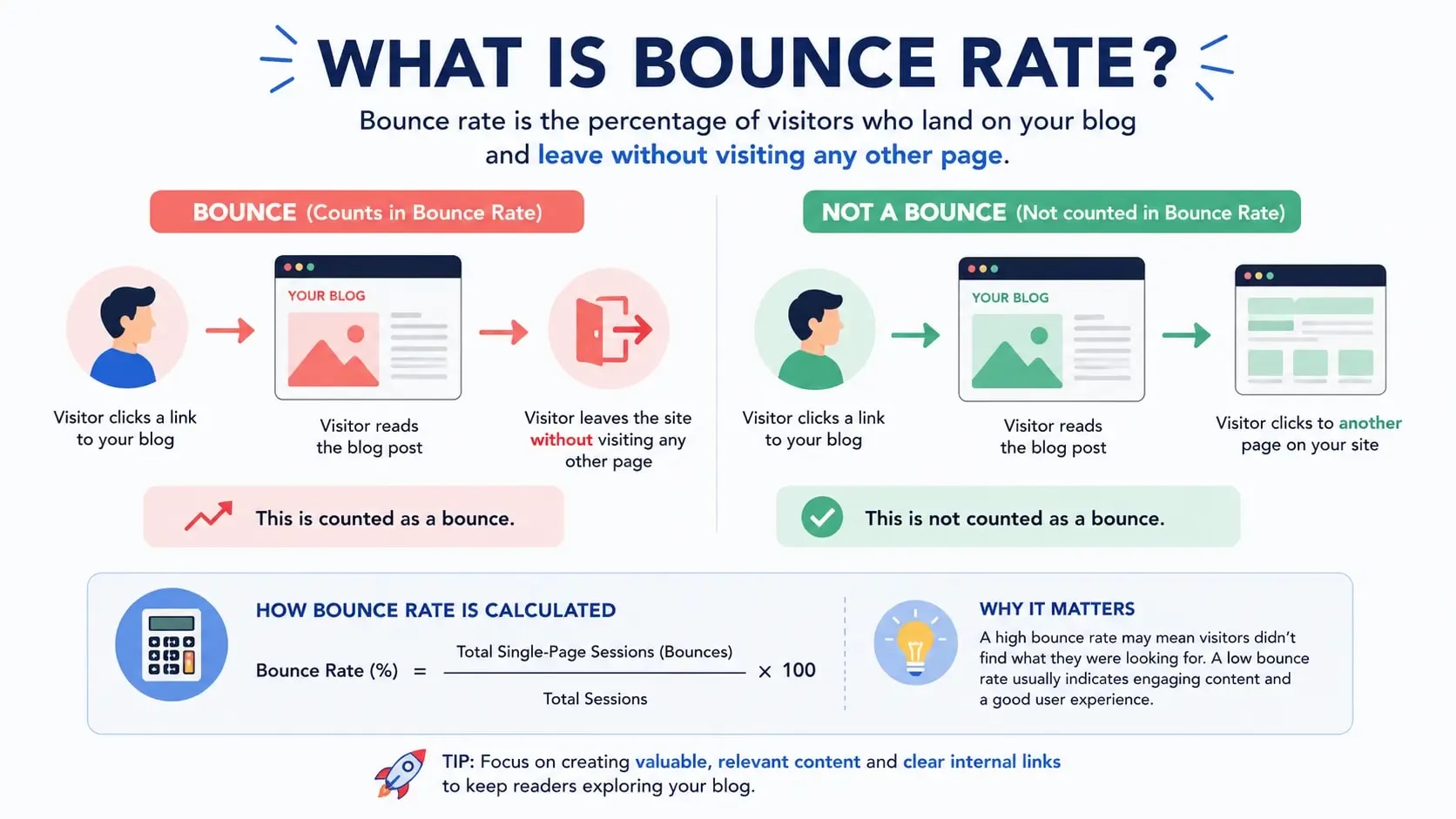
Bounce rate is the percentage of sessions where a visitor lands on your page and leaves without clicking to any other page on your site. One page, one visit, gone.
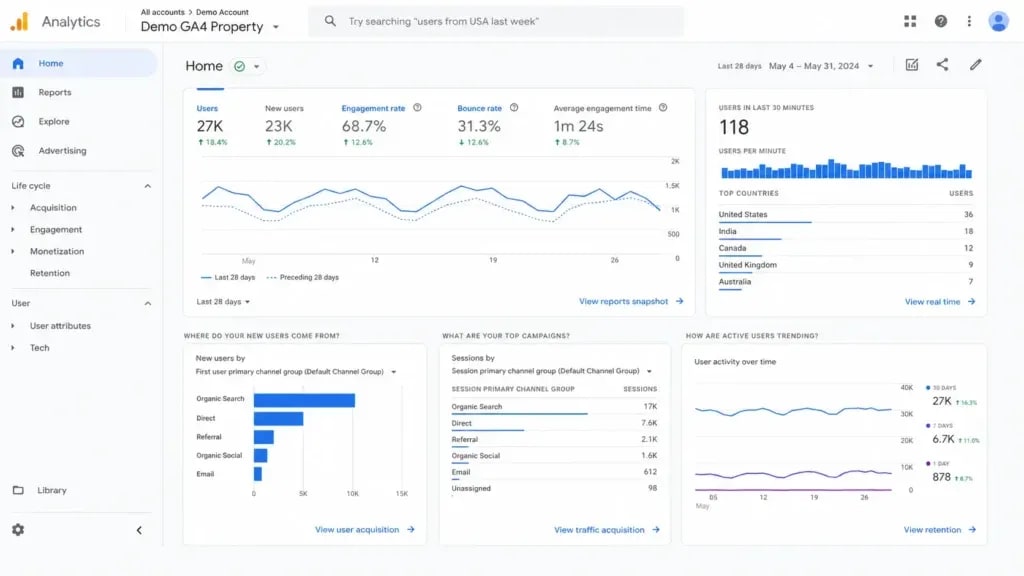
In Google Universal Analytics, a 70% bounce rate meant 70% of your visitors were single-page sessions. In Google Analytics 4 (GA4), which replaced Universal Analytics in July 2023, the primary metric is now engagement rate, the inverse of bounce rate. An engaged session is one that lasts longer than 10 seconds, has a conversion event, or includes at least two page views. If your engagement rate is 40%, your effective bounce rate is 60%.
The metric still matters enormously, just not for the reason most people think. Google hasn't confirmed bounce rate as a direct ranking signal, but a high bounce rate is almost always a symptom of problems that do affect your rankings: poor content-query alignment, slow page performance, and low dwell time.
Bounce Rate vs. Engagement Rate in GA4: What Actually Changed
Universal Analytics counted any session with a single pageview as a "bounce," including someone who spent four minutes reading your 2,000-word post before closing the tab. That was a genuine flaw. GA4's engagement rate is more meaningful because it filters for actual engagement signals rather than pageview counts alone.
For most bloggers, your "bounce rate" in GA4 will look lower than it did in Universal Analytics. The definition changed; your site didn't necessarily improve. Don't assume progress until you verify it in the raw data.
To find bounce rate in GA4: go to Reports > Engagement > Pages and Screens, customize the report to add the Bounce Rate metric, or build a custom Exploration. Your engagement rate is shown by default.
What Is a Good Bounce Rate for a Blog?
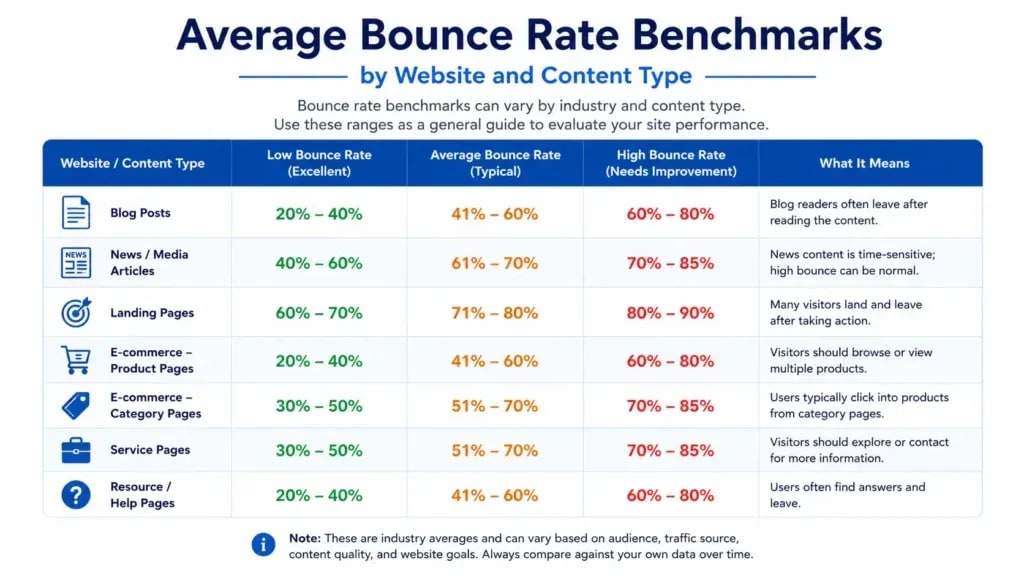
For blogs, a rate between 55% and 70% is normal. If yours is below 40%, suspect duplicate tracking code. If it's consistently above 85%, something is actively wrong, and the sections below will help you find it.
Key Insight: A bounce rate number without context is meaningless. A 70% rate on a standalone recipe post where the reader found exactly what they needed is a success. The same number on a product comparison page is a conversion problem.
Why Your Bounce Rate Is High (Root Causes, Not Symptoms)
Most bounce rate articles skip straight to tips. That's backwards. If you don't understand why visitors are leaving, you'll apply fixes to the wrong problems.
Search Intent Mismatch: The Most Overlooked Cause
The most common cause of a high bounce rate, and also the most fixable, is a gap between what your page promises and what the visitor actually wanted.
When someone searches "best free keyword research tools" and lands on your post selling a paid tool without covering the free options prominently, they leave immediately. Design work won't fix that. You need to fix the content.
Check this by pulling your top-traffic pages in Google Search Console and looking at which queries are actually sending traffic. If the primary query doesn't match what your article leads with, you have an intent mismatch.
Poor First Impression Above the Fold
You have roughly 3 seconds to signal to a visitor that they're in the right place. If your above-the-fold content shows a dense wall of text, an auto-playing video, a full-screen pop-up, or a hero image that pushes the article body below the fold, many readers leave before they've read a word.
Your opening paragraph should confirm the topic, hint at what the reader will get, and invite them to keep reading. Skip the backstory and the preamble about how important the topic is.
Slow Pages, High Exits
Page speed is a bounce rate driver that most visitors never consciously register. Research from Google shows that pages loading in under 2 seconds have significantly lower bounce rates than pages taking 4 seconds or more. Visitors don't wait; they hit the back button.
Check your Core Web Vitals in Google Search Console under the Experience section. Focus on LCP (Largest Contentful Paint), the most direct speed metric correlated with perceived load time. An LCP above 4 seconds will hurt both your bounce rate and your rankings.
Weak Internal Linking Architecture
Most blogs have content organized in silos with no connective tissue between articles. Readers finish (or abandon) a post and have nowhere obvious to go. A strategic internal linking system solves this, but it requires contextual, naturally placed links that offer genuine next steps, not just a related-posts widget bolted to the footer.
The RETAIN Framework: A Systematic Approach to Bounce Rate
Instead of working through a disconnected tip list, use the RETAIN Framework: a six-stage audit process that treats bounce rate as a system problem, not a symptom collection.
RETAIN stands for:

Run every underperforming post through this framework before making changes. Most bounce rate problems concentrate in R, E, or T. Resolve those first before working through A, I, and N.
Key Insight: The RETAIN Framework reframes bounce rate: it's not a single metric but a cascade of six signals. You can fix each one in isolation, but they compound when you address them together.
12 Proven Strategies to Reduce Bounce Rate on Your Blog
1. Align Every Post With Its Exact Search Intent
Pull the post's ranking queries from Google Search Console, then read the top 5 ranking pages for your primary keyword. Check whether your post answers the same core question, at the same level of specificity, in a format that matches what Google is currently rewarding.
If your post is a listicle but the SERP rewards step-by-step tutorials, reformat it. If competitors lead with a definition and you lead with a story, reorder your structure. Intent alignment produces the highest ROI of any change you can make to a high-bounce post.
2. Optimize What Readers See in the First 3 Seconds
A clear H1, a one-sentence Quick Answer or summary, and a short introductory paragraph that promises what's coming is genuinely all you need above the fold. Avoid lengthy definitions, brand stories, and contextual backstories in the first 150 words. Readers are there to get an answer, not hear how you discovered the topic.
Test your above-the-fold presentation on mobile. On a standard smartphone, only about 400px of your page is visible without scrolling. If the headline, a subhead, and the start of your intro aren't visible in that space, you're losing readers before they begin.
3. Fix Page Speed and Core Web Vitals First
Before addressing anything else on a high-bounce page, run it through Google PageSpeed Insights and Search Console's Core Web Vitals report. Focus on:
- LCP (Largest Contentful Paint): Should be under 2.5 seconds. Common fixes: optimize hero images, use a CDN, enable server-side caching.
- CLS (Cumulative Layout Shift): Should be under 0.1. Common fix: set explicit width/height attributes on images and embeds.
- INP (Interaction to Next Paint): Replaced FID in 2024. Should be under 200ms. Common fix: reduce JavaScript execution on page load.
A WordPress site running unoptimized plugins, uncompressed images, and shared hosting can easily have an LCP of 6-8 seconds. Fix this before any content or UX changes. The speed improvement alone often drops bounce rate by 10-15 points.
4. Format Your Content for Scanners and Readers
People don't read web content linearly. They scan first, then read. Your formatting needs to serve both behaviors at once.
Use short paragraphs (2-4 sentences maximum). Break up long sections with subheadings that stand alone as meaningful statements. Use numbered lists for processes, bullet lists for options, and bold text sparingly, reserving it for the one phrase per paragraph that a scanner needs to catch. Tables work well for comparisons and benchmarks.
Avoid walls of text. A reader who can't immediately see the structure of what's ahead will leave rather than commit to parsing a dense block of prose.
5. Build a Strategic Internal Linking System
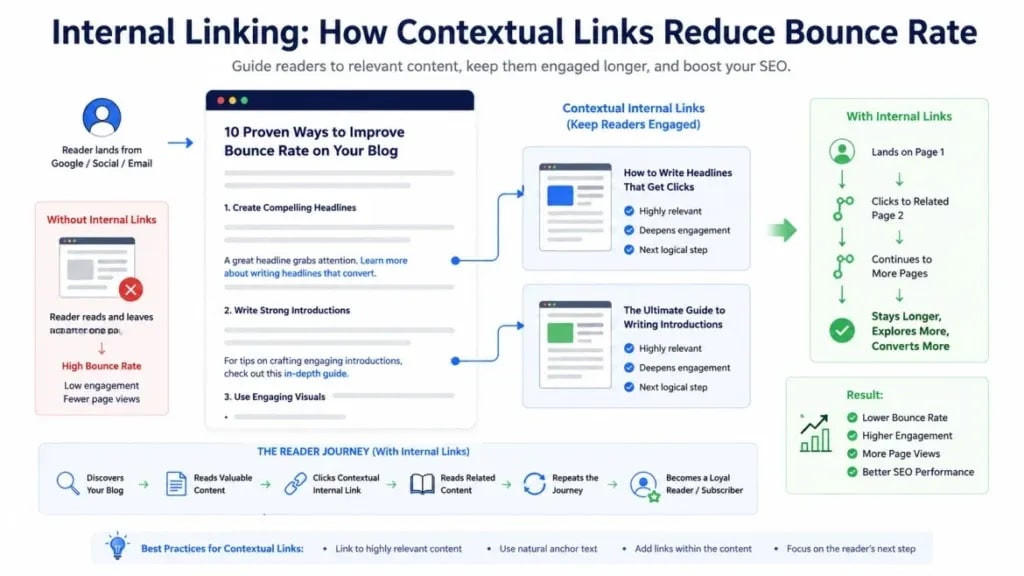
Contextual internal links (links embedded naturally within your article body and tied to a relevant anchor phrase) are the most direct way to convert single-page sessions into multi-page ones.
When writing or editing a post, identify every topic you reference that you've covered in depth elsewhere on your site. Link to it at the most relevant sentence using a descriptive anchor text phrase. Not "click here." Use the keyword the destination page targets.
A well-internally-linked post should have 3-6 contextual links to related articles. Not to your homepage. Not to "popular posts." To the next logical resource the reader would naturally want.
If you haven't built your linking targets yet, start with our [on-page SEO checklist] to identify which pages are worth linking to first. Not sure which posts to link to? Our guide to [keyword research for bloggers] will help you identify your strongest content.
6. Add Contextually Relevant Related Posts
The "Related Posts" section is only useful when the posts are genuinely related to what the reader just consumed, not algorithmically assembled by category or recency.
Curate your related posts manually or use a plugin that allows manual overrides. Aim for 3 posts that extend the conversation the reader just had. A post about bounce rate should link to articles about dwell time, blog UX, or internal linking. Your latest keyword research piece doesn't belong there unless it's directly connected.
7. Replace Generic CTAs With Contextual Ones
A generic "Subscribe to our newsletter!" banner at the end of every post is largely invisible. Readers have learned to skip it.
A contextual CTA that flows directly from the post ("If you want to track these bounce rate improvements over time, here's how to set up a custom GA4 dashboard") converts far better because it reads as a natural next step rather than a marketing insert. Think about what question the reader has after finishing the post, then answer it.
8. Cut Intrusive Pop-Ups and Interstitials
Pop-ups that fire within the first 5 seconds of a visit reliably push visitors to leave. Google has explicitly warned against intrusive interstitials on mobile since 2017, and they remain a consistent source of immediate exits.
If you use pop-ups, configure them to fire on:
- Exit intent (when the cursor moves toward the browser's close button)
- Time delay (minimum 30-45 seconds)
- Scroll depth trigger (50%+ scroll)
Don't fire a full-screen overlay immediately on page load. The conversion gains from aggressive timing rarely justify the visitors you lose.
9. Treat Mobile as Your Primary Experience
Mobile devices now account for over 60% of global web traffic, and mobile bounce rates consistently run 10-20% higher than desktop. Yet most blog optimization work still gets done on a desktop browser.
Test your blog on a real phone, not just a browser resize tool. Check: is the text readable without zooming? Are tap targets (buttons, links) at least 44×44 pixels? Does the navigation collapse cleanly? Does the page load in under 3 seconds on a mid-range Android device on 4G?
Google's mobile-first indexing means your mobile experience is your primary indexed experience. A blog that performs well on desktop but poorly on mobile has a structural SEO problem, not just a bounce rate problem.
10. Use Heatmaps to Find Your Exact Exit Points
Google Analytics tells you that people are leaving. It doesn't tell you where or why. That's what heatmaps are for.
Microsoft Clarity (free) and Hotjar (freemium) both show you scroll depth maps, click maps, and session recordings. A scroll depth map reveals the exact point where most readers stop engaging. A session recording shows you the moment a visitor hits a broken link, a mis-loaded image, or a confusing layout and exits.
Workflow:
- Install Microsoft Clarity (free, no session limits)
- Let it collect data for 7-14 days on high-traffic posts
- Review scroll maps: where does 50% of your audience stop?
- Review click maps: are readers clicking things that aren't links?
- Watch 10-15 session recordings on your highest-bounce posts
- Identify the common drop-off point, then fix the content or design at that location

For blogs running this kind of analysis for the first time, improvements in the 15-25% range are common.
11. Sharpen Your Blog Navigation
A reader who finishes your post and wants to explore more needs to be able to do so without effort. If your navigation is buried, labeled vaguely, or organized by date rather than topic, you're adding friction at exactly the moment a visitor is most engaged.
Add a category navigation in your header, a topic-based sidebar, and breadcrumbs that show readers where they are in your content architecture. WordPress users can set up breadcrumbs with RankMath or Yoast SEO in under five minutes. They also improve your sitelinks in Google's search results.
12. Update Underperforming Content Before Creating New Posts
Many high-bounce posts are simply outdated. A 2019 article about Google Analytics in a post-GA4 world is answering a question that no longer exists in the same form. Readers arrive, find the content stale, and leave.
Before publishing your next new post, audit your 10 highest-traffic, highest-bounce articles and ask:
- Is the information still accurate?
- Does the post match current search intent?
- Are all internal links still pointing to live, relevant pages?
- Is the post still competitive with what currently ranks?
Content refreshes consistently outperform new content creation for bounce rate improvement. You're working with established traffic instead of waiting for new rankings to build.
Bounce Rate Benchmarks by Content Type
Key Insight: Comparing your blog's bounce rate against an e-commerce benchmark produces a useless number. Benchmark against your own content type and traffic source.
Common Bounce Rate Mistakes (And How to Avoid Them)
Chasing a Low Number Without Context
A 30% bounce rate isn't automatically better than a 70% bounce rate. A landing page for a paid course should be at 30%; that's conversion architecture working correctly. A 3,000-word tutorial will naturally sit at 70% because readers find their answer and leave. The goal is contextually appropriate engagement, not an arbitrary low number.
Ignoring Mobile Experience
Optimizing only on desktop while your audience is primarily on mobile is a common pattern on older blogs. Every strategy in this article should be tested and verified on actual mobile devices, not just browser dev tools.
Overloading Pages With Pop-Ups
Two pop-ups firing in the first 10 seconds, a sticky footer bar, and a sidebar subscription widget on a single page is not a conversion strategy. It's an exit trigger. Pick one mechanism, deploy it correctly (delayed or exit-intent), and remove the others.
Advanced Strategies for Technical Bloggers
Core Web Vitals as a Bounce Rate Signal
Google's Page Experience signals (LCP, CLS, and INP) directly affect the perceived load time that drives bounce behavior. An LCP above 4 seconds means a significant portion of visitors may leave before your page has fully rendered.
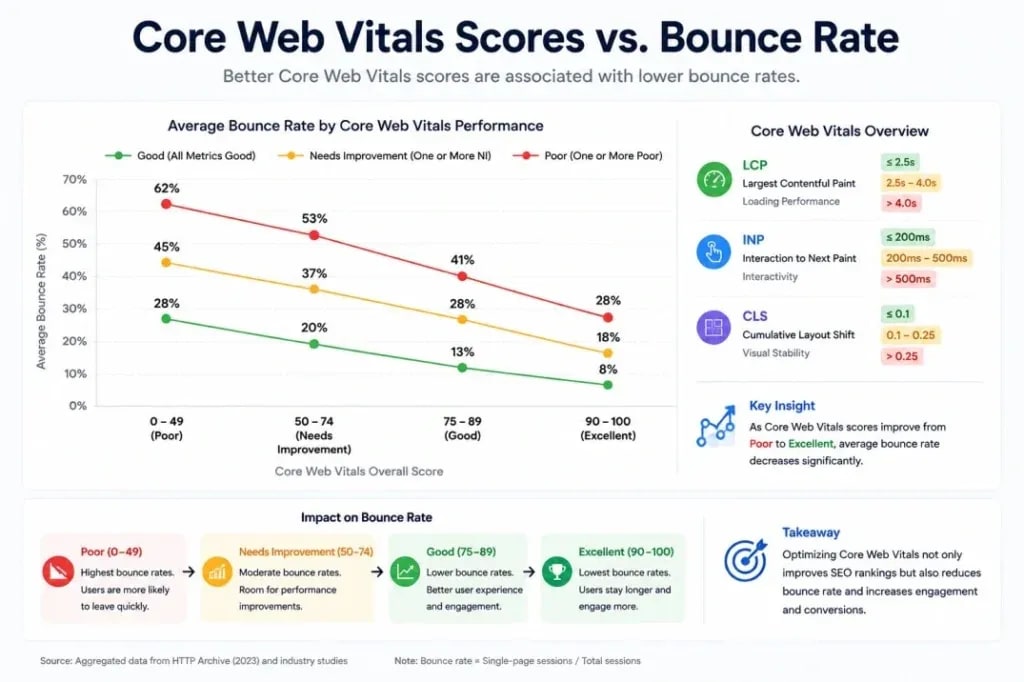
Track Core Web Vitals in Google Search Console under Experience > Core Web Vitals. For WordPress blogs, the highest-impact fixes are: converting images to WebP, enabling lazy loading, using a caching plugin (WP Rocket or LiteSpeed Cache), and serving from a CDN.
Scroll Depth + Heatmap Audit Workflow
- Install Microsoft Clarity (free, unlimited sessions)
- Set up custom GA4 events for scroll depth (25%, 50%, 75%, 100%)
- After 14 days, compare scroll depth data with bounce rate by post
- Posts with high bounce rate AND low scroll depth: entry experience problem
- Posts with high bounce rate BUT high scroll depth: exit strategy problem (weak CTA or missing internal links)
- Use Clarity session recordings to confirm which diagnosis is correct
The entry problem vs. exit problem distinction matters a lot here because the fixes are completely different. Conflating them wastes time.
How to Track Engagement Rate in GA4
In GA4, Engagement Rate = Sessions with meaningful engagement ÷ Total sessions. A session counts as "engaged" if it lasts longer than 10 seconds, includes a conversion event, or has 2+ page views.
For blogs, a healthy engagement rate is typically 35-50%. Below 30% means most readers are leaving before consuming meaningful content. Above 60% is excellent and often indicates strong content-intent alignment.
To monitor this: Reports > Engagement > Pages and Screens > Customize report > Add Bounce Rate and Engagement Rate metrics side by side.
A Final Word on Sustainable Engagement
Bounce rate optimization isn't a one-time project. It's a function of how well your content continues to match the intent of incoming traffic over time, and that intent changes as search behavior, algorithm updates, and your audience composition shift.
The blogs with consistently strong engagement rates are built on repeatable systems: regular content audits, heatmap reviews, internal link checks, and Core Web Vitals monitoring worked into the editorial routine. Not occasional optimization sprints.
Run your highest-traffic, highest-bounce posts through the RETAIN Framework first, focusing on Relevance and Entry Experience before anything else. The other stages build on those two.
Frequently Asked Questions
What is a good bounce rate for a blog?
For most blogs, 55-70% is a normal and healthy range. Highly specific informational posts can see rates above 80% without issue. If you're consistently above 85%, start with intent mismatch and page speed before anything else.
Does bounce rate affect SEO rankings?
Not directly. Google hasn't confirmed bounce rate as a ranking factor. However, the behaviors a high bounce rate reflects, low dwell time, pogo-sticking back to search results, and poor engagement, are related to quality signals Google does evaluate. Fixing bounce rate and fixing underlying SEO quality issues are largely the same work.
What's the difference between bounce rate and exit rate?
Bounce rate measures sessions with only one page viewed. Exit rate measures the rate at which any page is the last page in a session. A post with a high exit rate isn't automatically a problem. It depends on where it sits in the user journey.
Why did my bounce rate suddenly increase?
Common causes: duplicate tracking code, a new post attracting mismatched traffic, a Core Web Vitals regression, or a Google algorithm update shifting traffic quality. Check Search Console's Core Web Vitals report and compare traffic segments in GA4 to isolate the source.
How do I reduce mobile bounce rate specifically?
Focus on load speed (under 3 seconds on 4G), readable font size (minimum 16px), adequate tap target size (44×44px minimum), and no intrusive interstitials. Test on a real Android and iOS device, not just Chrome DevTools responsive mode.
Sources and References

Written by
Bibek Thapa
AI-Powered Digital Growth Strategist
Bibek Thapa works across AI workflows, SEO, AI search optimization, content strategy, website growth, and productivity systems. Anobee documents practical lessons, tools, experiments, and systems for improving digital presence.
- AI workflows
- Digital growth
- SEO
- GEO
- AEO
- Content strategy
- Website growth


