AI Tools & Workflows
How to Use NotebookLM for Research and Content Planning
A practical NotebookLM workflow for organizing sources, extracting insights, planning content, and avoiding unsupported claims.

By Bibek Thapa · Published Jul 12, 2026 · Updated Aug 10, 2026 · 5 min read
Quick Answer
Use NotebookLM as a source workspace, not as a magic writer. Add your best documents, ask questions that force it back to the sources, extract themes and gaps, then turn those findings into briefs, outlines, FAQs, and refresh notes. Keep final writing and claims review outside the tool.
Key Takeaways
- NotebookLM is most useful when your research material is specific and well chosen.
- Ask it to compare sources, find gaps, and pull customer language before you outline.
- Generated summaries are helpful, but they still need human verification.
- Use NotebookLM to make content planning evidence-led instead of guess-led.
Table of Contents
NotebookLM is easy to misunderstand. If you treat it like a general chatbot, it feels like one more writing tool. If you treat it like a research desk built around your own sources, it becomes much more useful.
The search intent for this topic is instructional. The reader wants a workflow, not a feature tour. The goal is to turn scattered source material into a content plan that is easier to trust.
Start With Better Sources
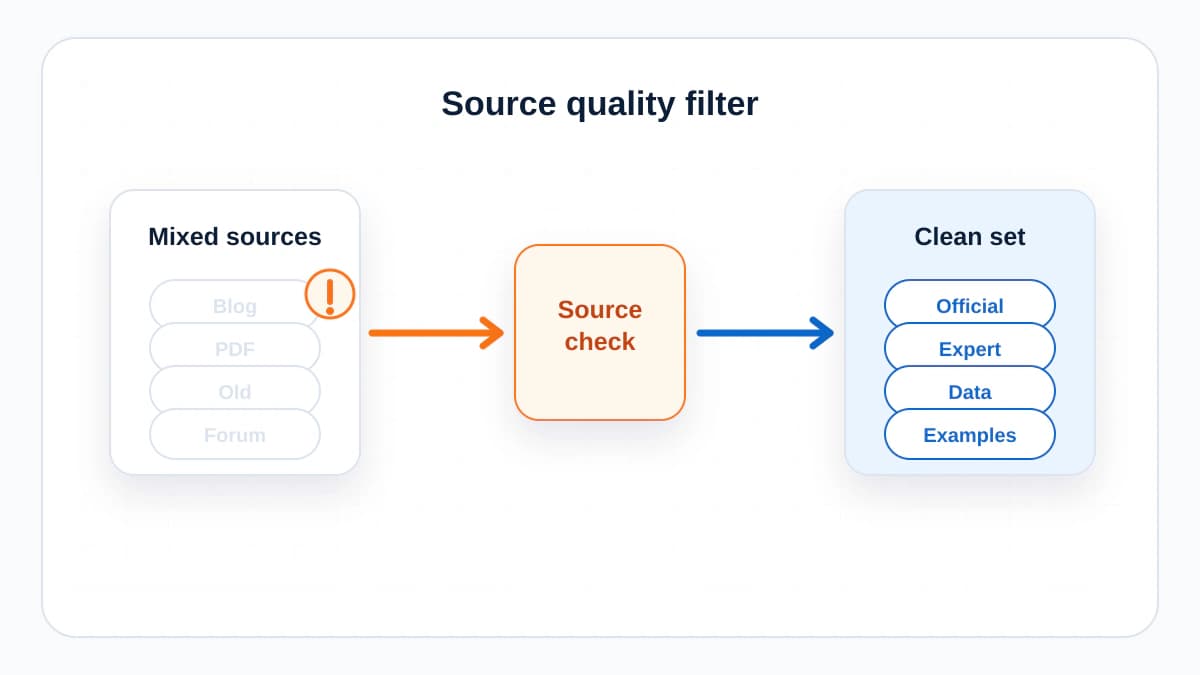
NotebookLM can only be as useful as the material you give it. Do not upload every file you own. Upload the material that should shape the article: customer interviews, product pages, meeting notes, support tickets, survey answers, internal docs, research links, old articles, and competitor notes.
Before you ask for an outline, ask source questions. What problems appear repeatedly? Which phrases do customers use? Which claims have evidence? Which claims appear in one source only? Where do sources disagree?
Use a Research Pass Before an Outline
- Ask NotebookLM to summarize the core problem in the sources.
- Ask for recurring customer questions and objections.
- Ask what evidence supports each major claim.
- Ask what is missing, outdated, or unclear.
- Ask for quotes or source references you should review manually.
This research pass prevents a common content mistake: building an outline around what you already planned to say. Good content planning listens to the material first.
Turn Research Into a Brief
A useful brief should help a writer make decisions. It should not be a bloated document no one reads. Use NotebookLM to create a concise brief with the audience, intent, angle, must-cover points, claims that need evidence, internal link targets, and FAQ candidates.

A Better Prompt
Based only on these sources, create a content brief for an informational article. Include the reader problem, search intent, unique angle, H2 structure, claims that need careful wording, and questions the article must answer.
The phrase based only on these sources matters. It nudges the workflow away from generic internet advice and back toward the material you uploaded.
Plan Content Clusters
NotebookLM is also useful for clustering. Upload your existing articles and ask which topics are repeated, which questions are unanswered, and which pieces should link to each other. This can reveal whether you have a real topical hub or just a list of loosely related posts.
For example, a site about digital growth may have separate articles on technical SEO, Core Web Vitals, topical authority, and AI search. NotebookLM can help identify where one article should answer a narrow question and where a broader hub should connect the cluster.
Use Audio Overviews Carefully
Audio Overviews can be useful when you want to absorb source material while walking or reviewing a topic away from the screen. Treat them as a study aid, not a final source of truth. If a line sounds useful, go back to the original source before using it in an article.
Quality Control Checklist
- Every major claim is supported by a source you can inspect.
- The outline answers a real reader problem, not just a keyword.
- The article has a clear next step for the reader.
- Weak or uncertain claims are either removed or softened.
- The final draft does not sound like a summary of summaries.
The Bottom Line
NotebookLM is strongest before the writing begins. Use it to organize evidence, find angles, expose gaps, and build briefs. Then write with your own judgment. That combination creates content that feels researched instead of assembled.
Frequently Asked Questions
Is NotebookLM good for content planning?
Yes, especially when you have real sources such as interviews, documents, PDFs, transcripts, or product information. It is less useful when you ask it to invent a plan without source material.
Can NotebookLM write the final article?
It can help outline and summarize, but final writing should still be edited by a person. The strongest use is source analysis, not replacing editorial judgment.
What should I upload to NotebookLM?
Upload the material that should constrain the work: customer interviews, support tickets, product docs, competitor notes, research papers, existing content, and internal briefs.
Sources and References

Written by
Bibek Thapa
AI-Powered Digital Growth Strategist
Bibek Thapa works across AI workflows, SEO, AI search optimization, content strategy, website growth, and productivity systems. Anobee documents practical lessons, tools, experiments, and systems for improving digital presence.
- AI workflows
- Digital growth
- SEO
- GEO
- AEO
- Content strategy
- Website growth