AI Tools & Workflows
Best AI Tools for Freelancers Who Want to Work Smarter
A practical AI tool stack for freelancers covering research, writing, proposals, delivery, automation, and client communication.

By Bibek Thapa · Published Jul 10, 2026 · Updated Aug 10, 2026 · 5 min read
Quick Answer
The best AI tools for freelancers are not a giant list. Start with one general assistant, one source-grounded research tool, one design or media tool if your service needs it, and one automation tool for admin work. The goal is to reduce repeat effort while keeping your judgment visible to clients.
Key Takeaways
- Freelancers need a small AI stack that protects quality, speed, and client trust.
- Use AI for research support, outlines, drafts, repurposing, summaries, and admin workflows.
- Do not let AI replace client discovery, strategy, pricing judgment, or final review.
- A useful AI stack should make delivery more consistent, not just faster.
Table of Contents
Freelancers do not need a folder full of shiny AI subscriptions. They need fewer blank pages, fewer repeated admin tasks, cleaner client communication, and more consistent delivery. The best AI tool stack is the one that supports those outcomes without making your work look generic.
Search intent here is commercial and practical. Someone searching for the best AI tools for freelancers is usually close to trying or buying. They do not need a directory. They need a stack that maps to real freelance work.
The Stack I Would Build First
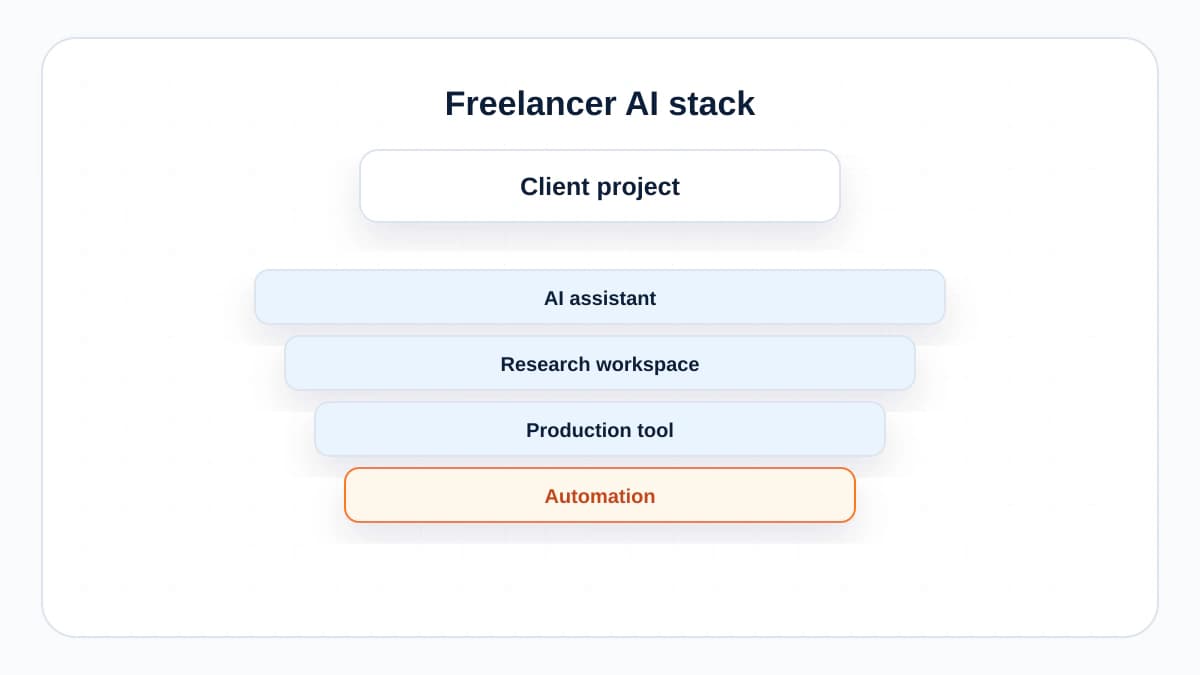
A freelancer's AI stack should cover four jobs: thinking, research, production, and admin. If a tool does not clearly help one of those jobs, it can wait.
1. A General AI Assistant
Use ChatGPT, Claude, or Gemini as the everyday workbench. This is where you turn messy notes into a brief, draft a proposal, compare positioning angles, rewrite a client email, summarize a call transcript, or check whether a deliverable answers the original request.
The mistake is asking it to produce finished client work from a tiny prompt. Better: give it context, constraints, examples, and your own point of view. Then use the answer as a draft to edit, not a final deliverable.
2. A Source-Grounded Research Workspace
NotebookLM is useful when the work depends on specific sources: client documents, interviews, PDFs, research notes, meeting transcripts, product pages, or policy material. The value is not that it sounds clever. The value is that it keeps the conversation close to the material you uploaded.
Use it before writing, not after. Ask it to find contradictions in the source material, list customer language, extract feature claims, group questions by theme, and show where the evidence is thin.
3. A Production Tool for Your Service
A freelance writer may not need the same production tools as a designer, editor, developer, or social media manager. Choose based on the service you sell. Designers may use AI features inside design tools. Video editors may use transcription, clipping, and rough-cut tools. Developers may use coding assistants. Marketers may use AI inside SEO, analytics, or ad platforms.
The rule is simple: if the tool touches client-facing work, your quality bar must go up, not down. AI should help you explore options and remove repetitive steps. It should not make every deliverable feel like it came from the same template.
4. An Automation Tool
Freelancers lose surprising time to tiny admin tasks: copying leads into a sheet, sending onboarding emails, creating project folders, reminding clients about assets, turning form submissions into tasks, and logging invoices. Make and Zapier are both good places to automate this layer.
Zapier is often easier for straightforward workflows. Make is often more visual and flexible when workflows branch, transform data, or need multiple steps. Either way, start with one automation that saves time every week.
Where AI Helps Most
- Proposal drafts based on a real discovery call.
- Scope summaries that clarify what is included and what is not.
- First-pass content outlines and content refresh notes.
- Meeting notes turned into tasks, risks, and follow-ups.
- Reusable client onboarding emails.
- Repurposing a finished deliverable into a newsletter, LinkedIn post, or checklist.
Where AI Should Stay Away
Do not outsource pricing judgment, client fit, legal promises, performance claims, or final quality control. Those are the parts clients are paying you to own. If an AI tool writes a confident sentence that you cannot defend, delete it.
A Simple Buying Order
- Use free plans for one week to identify repeat tasks.
- Pay for one general assistant if it saves at least two hours a month.
- Add NotebookLM or a similar research workspace when source material gets heavy.
- Add automation only after your process is stable enough to repeat.
- Review subscriptions every month. Freelancers collect tools faster than they cancel them.

The Bottom Line
The best AI tools for freelancers are boring in the best way. They help you prepare faster, communicate more clearly, and deliver with fewer dropped details. Keep the stack small, keep your judgment visible, and let AI handle the repetitive work around the craft.
Frequently Asked Questions
What AI tool should a freelancer start with?
Start with one general assistant such as ChatGPT, Claude, or Gemini. Use it for briefs, outlines, emails, summaries, and quality checks before adding specialized tools.
Can freelancers use AI for client work?
Yes, but disclose it when appropriate, protect client data, and keep human review in the process. AI can assist delivery; it should not quietly replace expertise.
How many AI tools does a freelancer need?
Usually three or four are enough: a general assistant, a research workspace, a design or production tool if needed, and an automation platform for repetitive admin.
Sources and References

Written by
Bibek Thapa
AI-Powered Digital Growth Strategist
Bibek Thapa works across AI workflows, SEO, AI search optimization, content strategy, website growth, and productivity systems. Anobee documents practical lessons, tools, experiments, and systems for improving digital presence.
- AI workflows
- Digital growth
- SEO
- GEO
- AEO
- Content strategy
- Website growth