AI Tools & Workflows
ChatGPT Prompts for SEO: 50 Prompts Sorted by Task, With the Inputs Each One Needs (2026)
By Bibek Thapa · Updated · 16 min read
Quick Answer
ChatGPT prompts for SEO work when they give the model three things: a role, real inputs (your article, your Search Console queries, a competitor URL) and an exact output format. Below are 50 prompts sorted by task, with the input each needs and the check to run on the result. ChatGPT cannot see search volumes or your rankings, so pair every prompt with data from Search Console or a keyword tool.

Table of ContentsOn this page
- What ChatGPT can and cannot do for SEO
- What makes ChatGPT prompts for SEO work
- 10 ChatGPT prompts for SEO keyword research
- 10 content optimization prompts
- 10 technical SEO prompts
- 10 on-page score prompts (Rank Math, Yoast and similar)
- 5 link building and outreach prompts
- 5 prompts for AI Overviews and AI search
- How to build your own ChatGPT prompts for SEO: the PROMPT framework
- Bottom line on ChatGPT prompts for SEO
- Frequently Asked Questions
- Sources and References
Key Takeaways
- A usable SEO prompt has a role, real inputs and a fixed output format. Vague prompts get generic answers.
- ChatGPT does not know search volume, keyword difficulty or your rankings. Paste in Search Console data or use a keyword tool alongside it.
- The free plan is enough for most of these prompts; its main constraint is an input limit of roughly 12 pages of text per message.
- Treat every output as a draft. Google's guidance is to focus on accuracy and value, and mass-producing pages with AI can count as scaled content abuse.
- FAQPage schema no longer earns rich results for most sites, so generate it for structure, not for a SERP feature.
- The PROMPT framework, Persona, Role, Output, Method, Parameters, Target, turns any of the 50 into a custom prompt.
This is a refreshed version of Anobee's ChatGPT prompts for SEO guide. The 50 prompts are still here, although most of them are tightened. However, the framing around them changed: each group now states what you have to paste in for the prompt to produce something specific, and what to verify before you use the output. That is where most of the value is, and where the original version was thin.
I use prompts like these on Anobee's own drafts, for outlines, meta descriptions, schema drafts and pre-publish checks. Also, they save time on the mechanical parts. But they do not replace keyword data, a rendering test or an editor.
What ChatGPT can and cannot do for SEO
Before the prompts, the limits. Knowing them is what separates useful ChatGPT prompts for SEO from confident nonsense.
| ChatGPT is good at | ChatGPT cannot do | What to use instead |
|---|---|---|
| Expanding a seed keyword into variations and questions | Report search volume, difficulty or clicks | Search Console, or a keyword tool |
| Classifying and clustering keywords you give it | See your rankings or your competitors' | Search Console, a rank tracker |
| Rewriting, restructuring and shortening text you paste | Know what is on a page unless you paste it or turn on Search | Paste the text, or enable web search |
| Drafting schema, redirect rules and robots.txt | Guarantee the draft is valid or safe | Rich Results Test, a staging site |
| Explaining an audit finding in plain language | Crawl your site | A crawler such as Screaming Frog |
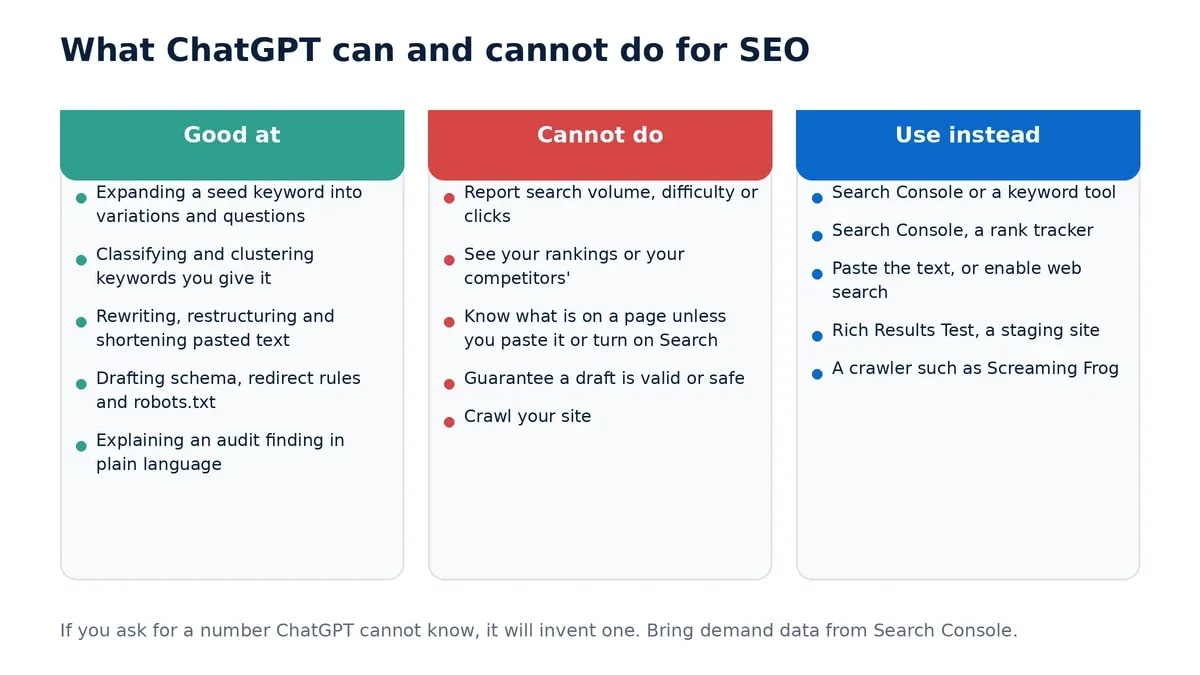
Two more things. First, ChatGPT will produce numbers if you ask for them, including "estimated search volume". However, those numbers are invented. Therefore, any prompt in this guide that touches demand tells you to bring your own data. Second, Google's guidance on generative AI content is clear on what matters: "focus on accuracy, quality, and relevance, especially when automatically generating the content", and generating many pages without adding value for users may violate the spam policy on scaled content abuse [1]. Consequently, use the prompts to work faster on pages you would have written anyway, not to manufacture pages.
Which plan do you need?
For these prompts, the free plan. It includes unlimited text chats and web search, with limited uploads and image generation [2]. However, the constraint that matters is input size: on the free plan, a single message tops out around 12 pages of text, and on Plus around 40 pages [2]. Because a 3,000-word article is about six pages, most drafts fit. But if you are pasting a long competitor page plus your own draft, split them across messages or upgrade.
What makes ChatGPT prompts for SEO work
Think of ChatGPT prompts for SEO as briefs to a junior SEO. Accordingly, the clearer the brief, the better the work. Five elements do most of the lifting:
- Role. "You are an SEO content strategist" produces more usable output than jumping straight into the request. Similarly, naming the reader's level helps.
- Task. One specific job. "Classify these 30 keywords by intent", not "help me with SEO".
- Input. The actual material: your draft, your query export, the URL. Also the element most people skip.
- Output format. A table with named columns, a numbered list, a pass/fail report. Formats make output checkable.
- Constraint. Character limits, word counts, a tone, a reading level, or "do not invent statistics". Otherwise, the model fills the gaps with defaults.
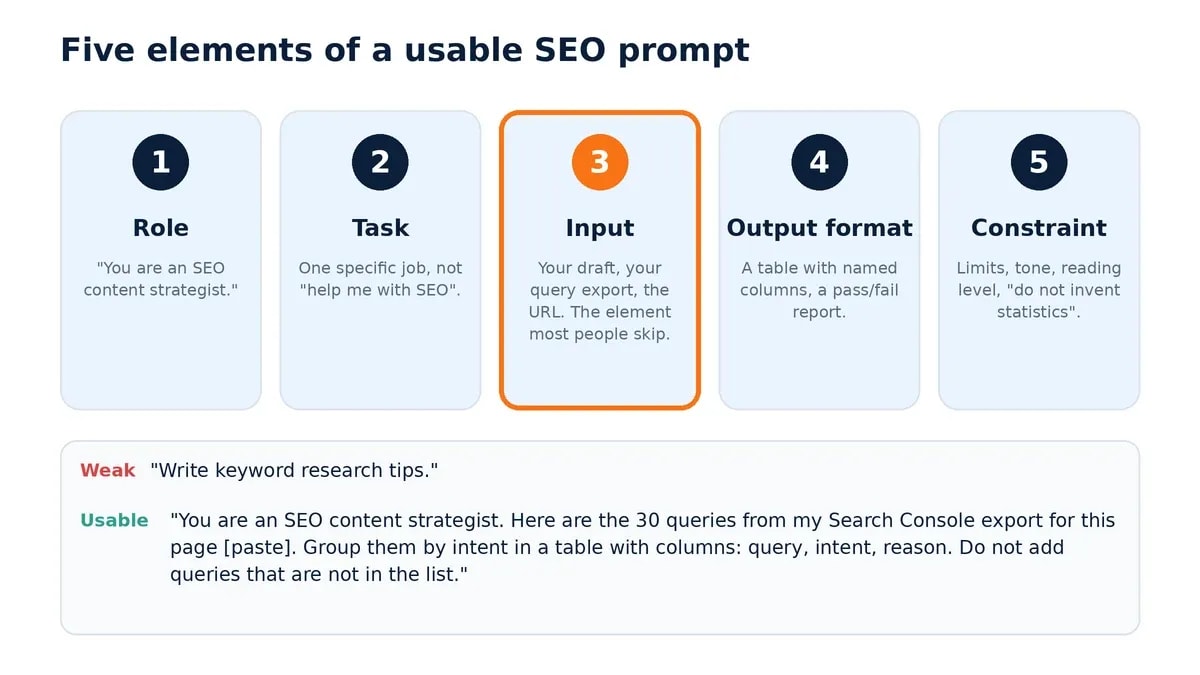
Compare the two versions of the same request below.
Weak: "Write keyword research tips."
Usable: "You are an SEO content strategist. Here are the 30 queries from my Search Console export for the page [paste]. Group them by intent (informational, commercial, transactional, navigational) in a table with columns: query, intent, reason. Do not add queries that are not in the list."
The second one can be checked. However, the first one cannot, because nothing in it is specific.
10 ChatGPT prompts for SEO keyword research
Input these need: a seed keyword, and ideally a Search Console query export or a keyword-tool list. Check afterwards: validate any keyword you plan to target against real volume and the live results page, because ChatGPT is guessing at demand. Also, if you are choosing a tool for that step, the keyword research tools guide for freelancers compares the budget options.
Prompt 1 — Expand a seed keyword
You are an SEO keyword researcher. Generate 20 keywords related to [primary keyword]. Group them by search intent: informational, commercial, transactional, navigational. Return a table with columns: keyword, intent, why a searcher would type it. Do not include search volume estimates.
Prompt 2 — Long-tail variations
You are an SEO strategist. Suggest 15 long-tail variations of [topic] that a beginner would type. Each should be 4 to 8 words. Prioritise question phrasing. Return as a numbered list.
Prompt 3 — Classify search intent
Classify the search intent of each keyword below. Return a table with columns: keyword, intent type, the page type that would satisfy it (guide, comparison, product page, tool). Keywords: [paste list].
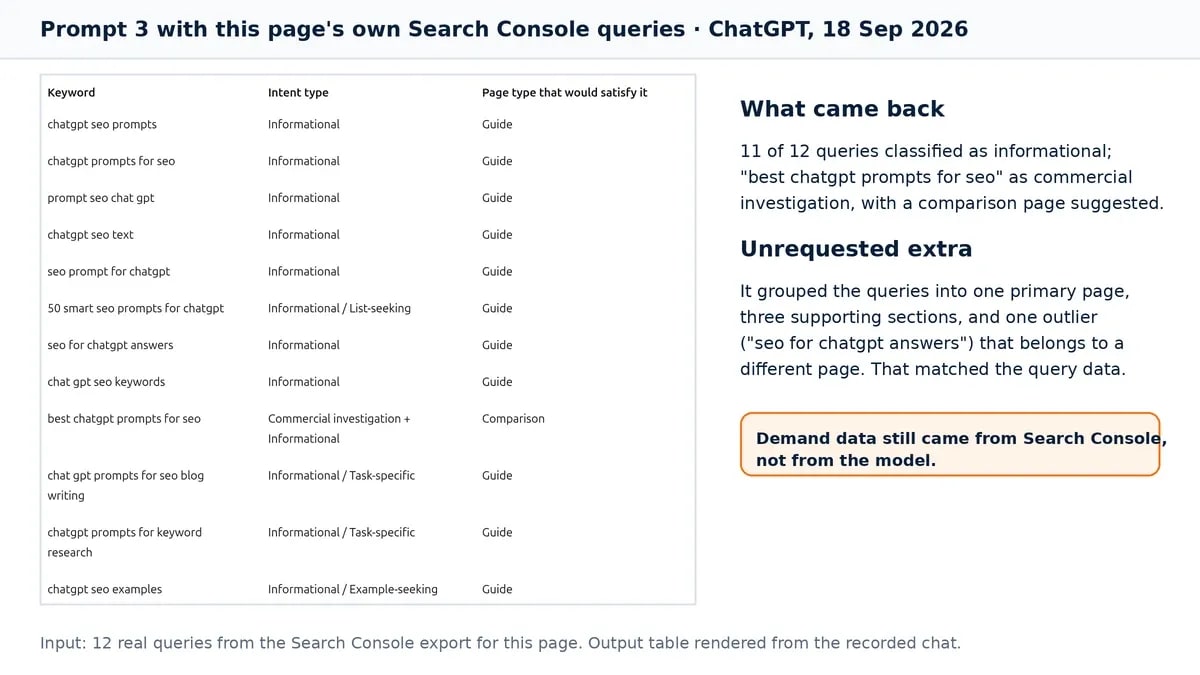
A real example of Prompt 3, run on 18 September 2026 with the twelve queries this page had actually received in Search Console over the previous three months: ChatGPT classified eleven as informational and one, "best chatgpt prompts for seo", as commercial investigation. Unprompted, it then grouped them into one primary cluster, three narrower use-case queries, and one outlier ("seo for chatgpt answers") that belongs to a different page. That grouping matched what the query data itself suggested, and it took about twenty seconds. The demand behind each query still came from Search Console, not from the model.
Prompt 4 — Cluster keywords by topic
Cluster these keywords into topical groups by meaning, not by shared words. Name each cluster, list its keywords, and suggest one page that could target the whole cluster. Keywords: [paste list].
Prompt 5 — Draft People Also Ask questions
List 10 questions someone researching [primary keyword] would ask next, in the wording they would use in a search box. Under each, write a one-sentence answer I can expand. Do not invent statistics.
Prompt 6 — Find gaps against a competitor page
Turn on web search. Read [competitor URL]. List the subtopics and questions it covers. Then compare with my outline: [paste outline]. Return a table: subtopic, covered by competitor (yes/no), covered by me (yes/no), worth adding (yes/no with a reason).
Prompt 7 — Build a topic cluster
Create a topic cluster for [primary keyword]. Include one pillar page and 8 supporting articles. For each supporting article give a working title, the question it answers, and which section of the pillar should link to it.
Prompt 8 — Seasonal angles
Suggest 10 seasonal or event-driven angles for [topic] over the next 12 months. For each, name the month it peaks and the query phrasing people would use. Mark any where you are unsure of timing.
Prompt 9 — Pull keywords from an existing page
Here is an article: [paste text]. Extract the 15 keywords and phrases it is clearly targeting, based on headings and repeated concepts. Mark which ones appear in the title, in a heading, and only in the body.
Prompt 10 — Related terms to cover
For an article targeting [primary keyword], list 15 related terms, entities and concepts a thorough article would naturally mention. Group them as: must cover, useful, optional. Do not call these LSI keywords and do not suggest repeating them for density.
One note on Prompt 10. "LSI keywords" is a term that keeps appearing in lists of ChatGPT prompts for SEO. However, Google's own advice is the opposite of density thinking: "Excessively repeating the same words over and over (even in variations) is tiring for users, and keyword stuffing is against Google's spam policies" [3]. Instead, ask for concepts to cover, not words to repeat. Meanwhile, the search intent analysis guide covers how to read the results page before deciding what a page should include.
10 content optimization prompts
Input these need: your draft or outline, the target keyword, and the audience. Check afterwards: read the output aloud, verify any fact it introduced, and run the piece through your own checklist. Accordingly, the SEO-friendly content checklist is the one Anobee uses.
Prompt 11 — Detailed outline
You are a content strategist. Create an outline for an article targeting [keyword] for [audience]. Include H2 and H3 headings, the single point each section must make, and the question each section answers. Flag any section where I would need first-hand experience or data to say something a competitor cannot.
Prompt 12 — Introduction that answers first
Write a 120-word introduction for an article about [topic]. State the direct answer in the first two sentences. Use [keyword] once, naturally. No rhetorical questions, no "in today's world". End with what the reader will be able to do after reading.
Prompt 13 — Snippet-ready definition
Rewrite this paragraph as a direct answer to "[question]" in under 50 words: [paste paragraph]. Start with the subject, not with "There are". Keep every fact from the original; add none.
Prompt 14 — Readability pass
Review this text for readability: [paste text]. Return a table with columns: original sentence, revised sentence, reason. Split sentences over 25 words, replace jargon that a beginner would not know, and keep technical terms that have no plain substitute. Do not change meaning.
Prompt 15 — Meta descriptions in bulk
Write a meta description for each page below. Each must be 120 to 155 characters, describe what the page actually contains, and include the page's keyword once. No clickbait. Return a table: page, meta description, character count. Pages: [list page titles and keywords].
Prompt 16 — Title options
Give me 5 title options for a page targeting [keyword]. Each 50 to 60 characters, keyword near the start, accurate to the content, no words like "ultimate" or "proven". Return with character counts.
Prompt 17 — Internal link suggestions
Here is my draft: [paste]. Here are the titles and URLs of my existing articles: [paste list]. Suggest up to 6 internal links from the draft, each with the exact sentence to link from, the anchor text (a natural phrase, not the exact keyword), and the destination. Only suggest links that help the reader continue.
Prompt 18 — Repetition check
Count how often each of these phrases appears in the text: [list phrases]. Text: [paste]. Flag any phrase that appears so often it reads as forced, and suggest a rewrite for each flagged instance.
Prompt 19 — Restructure a section
Rewrite this section with clearer structure: [paste]. Use one idea per paragraph, paragraphs of 2 to 4 sentences, and a subheading if the section covers more than one point. Keep all facts, links and citations exactly as they are.
Prompt 20 — Conclusion with a next step
Write an 80-word closing section for an article about [topic]. Restate the one decision the reader should make, then give a single concrete next step. Do not summarise every section and do not use "in conclusion".
10 technical SEO prompts
Input these need: your platform, the URLs involved, and the actual values (dates, titles, redirect pairs). Check afterwards: validate schema in Google's Rich Results Test, test redirect rules on a staging site or a single URL first, and never deploy a robots.txt draft without reading it. Also, for the background on these fixes, see technical SEO mistakes bloggers make.
Prompt 21 — FAQPage schema draft
Generate JSON-LD FAQPage markup for these question-and-answer pairs: [paste pairs]. Use schema.org vocabulary and valid JSON. The answers must match the visible text on my page word for word.
Before you use Prompt 21: since August 2023 Google shows FAQ rich results only for well-known, authoritative government and health websites [5]. Therefore, for everyone else the markup is harmless but earns no SERP feature. Add it because it describes the page, not because it will change the listing. Ultimately, the visible answers matter more than the markup.
Prompt 22 — Article schema draft
Generate JSON-LD Article markup for this page. Headline: [title]. Author name and URL: [name, URL]. Publisher: [site name]. Date published: [date]. Date modified: [date]. Main image URL: [URL]. Use only values I have given you; leave out any property I did not supply.
Prompt 23 — robots.txt for WordPress
Draft a robots.txt for a WordPress site with sitemap at [sitemap URL]. Disallow /wp-admin/ but allow /wp-admin/admin-ajax.php. Do not block /wp-content/ or /wp-includes/, because Google needs the CSS and JavaScript there to render pages. Explain each line in a comment.
Incidentally, the robots.txt guide for beginners explains why the older advice to block plugin and includes folders backfires.
Prompt 24 — Hreflang tags
Create hreflang link tags for a page available in these language-region versions: [list, e.g. en-us, en-gb, ne-np] with these URLs: [list]. Include an x-default pointing to [URL]. Every version must reference every other version, including itself.
Prompt 25 — Explain an audit finding
My crawler reports: [paste the finding, e.g. "canonical points to a redirecting URL" with example URLs]. Explain what this means, why it matters for indexing, and give the fix for [platform]. If there is more than one possible cause, list them in order of likelihood.
Prompt 26 — Sitemap review
Here is my sitemap: [paste XML or URL list]. Flag URLs that should not be in a sitemap: redirects, non-canonical variants, noindexed pages, paginated pages, tag archives. Return a table: URL, issue, keep or remove.
Prompt 27 — Redirect rules
Write 301 redirect rules in [.htaccess / Nginx / a WordPress redirect plugin's import format] for these old-to-new URL pairs: [paste pairs]. Match exact paths only, avoid regex unless a pair needs it, and flag any pair that would create a chain or loop.
Prompt 28 — Canonical strategy
I have these duplicate or near-duplicate URL groups: [describe, e.g. with and without trailing slash, filtered category pages, print versions]. For each group, say which URL should be canonical, why, and whether the others should be canonicalised, redirected or noindexed.
Prompt 29 — Image alt text in bulk
Write alt text for each image below. Describe what the image shows and its purpose on the page in under 125 characters. Include [keyword] only where the image actually depicts it. Return a table: filename, alt text. Images: [list filenames with a short description of each].
Prompt 30 — Page speed triage
My site runs on [platform/theme/host]. PageSpeed Insights reports: [paste the top opportunities]. For each, explain the cause in one sentence and give the specific fix for my setup: a setting, a plugin, or a code change. Order by expected impact.
10 on-page score prompts (Rank Math, Yoast and similar)
On-page plugins score visible, checkable things, which makes them a good fit for ChatGPT prompts for SEO. Rank Math's published tests include the focus keyword in the SEO title, meta description, URL, the first 10% of the content and at least one subheading; a density target between 1% and 1.5%; internal and external links; keyword in image alt text; and content-length bands up to 2,500 words for full marks [4].
Input these need: the plugin's test list (paste it), your draft, your focus keyword. Check afterwards: decide which tests matter for the reader. A 2,500-word article that should be 900 words is not better SEO. Moreover, Google's stated view on repetition is quoted above. Anobee's own CMS runs a similar on-page analyzer, and the same rule applies: fix the tests that help the reader, then stop. Meanwhile, the Rank Math setup guide covers the plugin side.
Prompt 31 — Full on-page test report
You are an on-page SEO editor. My focus keyword is [keyword]. Here are the tests my plugin runs: [paste the list]. Here is my draft: [paste]. For each test, return pass or fail, the evidence (quote the relevant line), and a specific fix for each fail. Do not rewrite the draft.
Prompt 32 — SEO title within the tests
My SEO title is [title] and the focus keyword is [keyword]. Rewrite it so the keyword appears in the first 50 characters, the whole title is 50 to 60 characters, and it still describes the page accurately. Give 3 options with character counts. No superlatives.
Prompt 33 — Meta description within the tests
My meta description is [text]; the focus keyword is [keyword]. Rewrite it to include the keyword naturally within 120 to 155 characters and to say what the page actually offers. Give 3 options with counts.
Prompt 34 — URL slug
Suggest a slug for a page targeting [keyword]. Lowercase, hyphenated, under 75 characters, no stop words unless the phrase needs them, no year unless the page is dated. Give 3 options.
Prompt 35 — Keyword placement map
Scan this draft for the exact phrase [keyword]: [paste]. Report where it appears: title, first 10% of the text, each H2/H3, meta description, image alt text. For each missing placement, suggest a sentence where it would fit without sounding forced. If it would sound forced everywhere, say so.
Prompt 36 — Secondary terms to add
This draft targets [primary keyword]: [paste]. Suggest 5 secondary terms or concepts the article should cover to be complete, and the section where each belongs. Do not suggest synonyms for the sake of variation.
Prompt 37 — Density sanity check
Count the occurrences of [keyword] in this text and give the density as a percentage of total words: [paste]. If it is above 1.5%, list the instances that could be removed without losing meaning. If it is below 1%, say whether adding one would read naturally, and where.
Prompt 38 — Title without weak words
My title is [title]. Suggest 5 alternatives that replace vague words with specific ones (a number, a named outcome, the audience). Keep the meaning and the focus keyword. Avoid "ultimate", "proven", "secret" and "powerful".
Prompt 39 — Alt text for one image
Write alt text for an image showing [describe the image]. Under 125 characters, descriptive first, and include [keyword] only if the image genuinely shows it.
Prompt 40 — Anchor text review
Here are the internal links in my draft as anchor text and destination: [list]. For each, say whether the anchor describes the destination clearly. Suggest a better anchor where it does not, using a natural phrase rather than the exact focus keyword. Return a table.
5 link building and outreach prompts
Input these need: the target site, why your page helps their readers, and your page's real strengths. Check afterwards: ChatGPT will invent domain metrics and "sites that accept guest posts". Therefore, verify every site by hand, and never send an email you have not rewritten in your own voice.
Prompt 41 — Outreach email
Write an outreach email to [site name] suggesting my article [title, URL] as a resource for their page [URL]. Under 100 words. Say specifically which part of their page it complements and why their readers gain from it. Plain subject line, no flattery, no "I hope this finds you well".
Prompt 42 — Prospect list criteria
Turn on web search. Find 15 pages in the [niche] space that link out to resources on [topic]: resource pages, roundups, "best guides" lists. Return a table: page URL, what it links to, why my page [URL] would fit. Do not estimate domain authority.
Prompt 43 — Broken link email
Write an email for broken link outreach. On [page URL] the link to [broken URL] no longer works. My page [URL, title] covers the same subject. Under 120 words, helpful tone, lead with the broken link, mention my page once.
Prompt 44 — Linkable asset ideas
Suggest 3 assets that sites in the [niche] space would cite: original data, a calculator or template, a tracked benchmark, a comparison table. For each, state what would make it citable, the effort to build it, and how it would be kept current.
Prompt 45 — Guest post pitch
Write a guest post pitch to [site] proposing [topic]. Explain in two sentences why it suits their audience, what angle is different from their existing coverage of [related topic], and link two of my published pieces as samples: [URLs]. Under 150 words.
5 prompts for AI Overviews and AI search
Input these need: your article. Check afterwards: Google says no special optimisation is required for its AI features. Instead, the best practices for SEO continue to apply, and what influences presence most is content people find "unique, compelling, and useful" [6]. These prompts help you state things clearly. However, they do not make commodity content citable. For the fuller picture, see how to get cited by ChatGPT.
Prompt 46 — Answer-first opening
Rewrite the opening of this article so the first two sentences directly answer "[main question]": [paste]. Under 60 words, self-contained, includes [keyword] once. Keep every fact from the original.
Prompt 47 — Self-contained FAQ answers
Turn these points into 5 question-and-answer pairs: [paste points]. Each answer must be 40 to 60 words and make sense without the rest of the article. Phrase questions the way people ask them aloud. Do not add facts that are not in my points.
Prompt 48 — Quotable sentences
From this article, extract up to 5 sentences that state a specific fact, number or finding and make sense on their own: [paste]. If a sentence needs context to be understood, rewrite it so it does not, without changing the fact.
Prompt 49 — Definition, evidence, implication
Restructure this section so each subtopic follows the order definition, evidence, practical implication: [paste]. Keep paragraphs under three sentences. Preserve every citation marker exactly as written.
Prompt 50 — Entity clarity
Review this article for places where the subject is ambiguous, for example a pronoun with no clear referent or a brand name that could be confused with another: [paste]. Suggest rewrites that name the entity explicitly. Do not add promotional mentions.
How to build your own ChatGPT prompts for SEO: the PROMPT framework
Stacking several small prompts beats one giant request. Moreover, a consistent structure makes each small prompt fast to write. I use six parts, which spell PROMPT.
| Part | What it sets | Example |
|---|---|---|
| Persona | Who ChatGPT is | "You are an on-page SEO editor." |
| Role | The perspective on this task | "Your job is to find gaps, not to rewrite." |
| Output | The exact format | "A table with columns: issue, severity, fix." |
| Method | The order of operations | "First headings, then keyword placement, then links." |
| Parameters | The constraints and inputs | "Keyword: X. Audience: beginners. Draft: [paste]." |
| Target | The goal, stated plainly | "All plugin tests passing without forced phrasing." |

The framework works because it removes the two things that make ChatGPT prompts for SEO generic: a missing input and an undefined format.
A stacked workflow in four prompts
- "You are an SEO content strategist. Here is my outline for [keyword]: [paste]. Suggest changes to heading order and any missing section a reader would expect. Return the revised outline only."
- "Using that outline, write a 120-word introduction that answers the main question in the first two sentences and uses [keyword] once."
- "Rewrite the section on [subtopic] with one idea per paragraph and a numbered list where steps occur. Keep all facts."
- "Run a pre-publish check against these tests: [paste plugin test list]. Focus keyword: [keyword]. Return pass/fail per test with evidence."
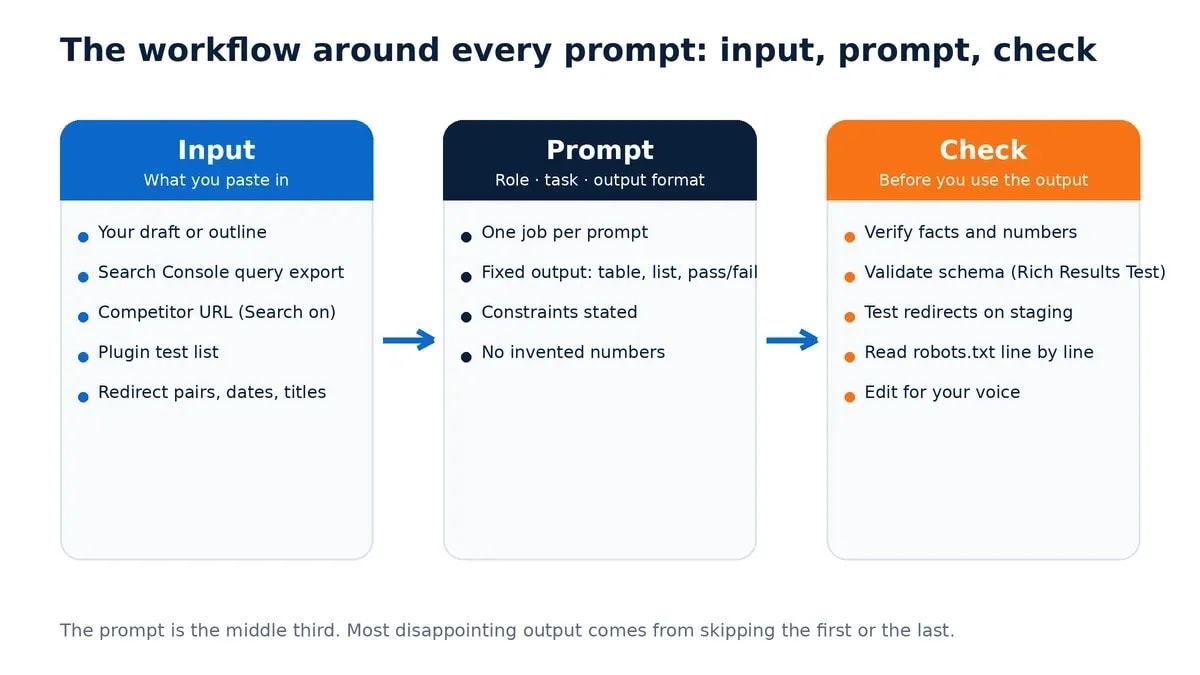
Then the part no prompt can do: read the whole thing, verify anything factual, and cut what does not earn its place. Ultimately, that pass decides whether the page is worth publishing. Also, if the draft still reads like a machine wrote it, the guide to humanizing AI content is the editing process Anobee uses.
Bottom line on ChatGPT prompts for SEO
ChatGPT prompts for SEO are instructions, not strategy. The 50 above cover the mechanical work: expanding keywords, structuring drafts, drafting markup, checking on-page tests, writing outreach and stating answers clearly. Each one is only as good as the input you paste in and the check you run on the output.
Start with the on-page score prompts if you publish on WordPress, because they give the quickest, most checkable improvement. Then use the keyword and content prompts to speed up drafting, and keep the demand data coming from Search Console rather than from the model. Finally, the complete on-page SEO checklist is the list to run before anything goes live.
Frequently Asked Questions
Can ChatGPT do keyword research?
Partly. It can expand a seed into related and long-tail keywords, classify search intent and cluster keywords by topic. It cannot give search volume, keyword difficulty or click data, and it will invent numbers if you ask for them. Use it for ideas and grouping, then validate with Search Console or a keyword tool.
Do I need ChatGPT Plus for SEO prompts?
No. The free plan includes unlimited text chats and web search, with limited uploads. Its practical constraint is an input limit of about 12 pages of text per message, so very long articles need to be split. Plus raises that to about 40 pages and adds reasoning models.
Does Google penalise content written with ChatGPT?
Google's guidance does not ban AI-assisted content. It asks for accuracy, quality and relevance, and warns that generating many pages without adding value for users may violate its scaled content abuse policy. Edit, verify and add something a reader cannot get elsewhere.
Can ChatGPT help with Rank Math or Yoast scores?
Yes, because those scores test visible things: keyword in the title, URL, first paragraph and a subheading, keyword density, links and alt text. Give ChatGPT the plugin's test list and your draft and it will report pass or fail per test. Aim for the tests that help readers, not a perfect score.
Does ChatGPT work for technical SEO?
It is good at producing drafts of schema markup, redirect rules, robots.txt and hreflang tags, and at explaining audit findings. Always validate the output: run schema through Google's Rich Results Test, test redirects before deploying, and never let it block CSS or JavaScript in robots.txt.
Sources and References
- Google Search Central — Guidance on using generative AI content ↩
- OpenAI — ChatGPT pricing and plan comparison ↩
- Google Search Central — SEO Starter Guide ↩
- Rank Math — How to score 100/100 in Rank Math tests ↩
- Google Search Central — Search updates: removing FAQ rich results for most sites ↩
- Google Search Central — Optimizing your website for generative AI features on Google Search ↩
Was this guide helpful?
Your answer helps Anobee improve future updates.

Written by
Bibek Thapa
AI-Powered Digital Growth Strategist
Bibek Thapa works across AI workflows, SEO, AI search optimization, content strategy, website growth, and productivity systems. Anobee documents practical lessons, tools, experiments, and systems for improving digital presence.
- AI workflows
- Digital growth
- SEO
- GEO
- AEO
- Content strategy
- Website growth