Website Growth
Image Optimization for SEO: 10 Techniques That Actually Move Rankings
By Bibek Thapa · Updated · 15 min read
Quick Answer
Image optimization for SEO means serving the right format at the right size, describing the image in text Google can read, and marking it up so the browser does not delay or shift the page. Audit first with PageSpeed Insights, standardise on WebP with a fallback, resize to displayed dimensions, then add width, height, srcset, loading and fetchpriority.
Table of ContentsOn this page
- What image optimization for SEO actually covers
- The SHARP framework
- Technique 1: Audit before you change anything
- Technique 2: Choose the format
- Technique 3: Compress to a target, not to a feeling
- Technique 4: Filenames and alt text
- Technique 5: Responsive images with srcset and sizes
- Technique 6: Lazy loading, and when not to
- Technique 7: fetchpriority and decoding
- Technique 8: WordPress and Rank Math
- Technique 9: Image structured data
- Technique 10: Google Images, Lens and AI answers
- Common image SEO mistakes
- The image optimization for SEO checklist
- Bottom line
- Frequently Asked Questions
- Sources and References
Key Takeaways
- JPEG XL is now in Chrome 145 and later, but only behind a flag, so it still needs a picture element fallback.
- Safari 17 and later supports JPEG XL. Firefox has it in preview releases only, so production use is premature.
- Google indexes images referenced in an img src attribute and does not index CSS background images.
- Never lazy load the image that paints largest. It adds resource load delay and worsens LCP directly.
- Alt text describes the image for people who cannot see it. Google warns explicitly against stuffing keywords there.
- Core Web Vitals targets are LCP under 2.5s, INP under 200ms and CLS under 0.1 at the 75th percentile.
Most image optimization for SEO advice ages badly, because browser support moves and the advice does not. One thing in this guide had moved since it was written. It described JPEG XL's return to Chrome as an announcement "worth tracking". It is further along than that now, and in a way that changes the advice: MDN lists JPEG XL as supported in Safari 17 and later, available in Chrome 145 and later behind the #enable-jxl-image-format flag, and present in Firefox preview releases only [1].
Being behind a flag in Chrome is the part that matters. Almost nobody turns that flag on, so a JPEG XL file served without a fallback will fail for most of your visitors. Track it, do not ship it.
Two smaller corrections. The title claimed ten "proven" techniques, which implies testing this site has not published. And a worked example describing a 90% page-weight reduction was written as a typical result rather than as the arithmetic it actually is, so it now reads as the illustration it was always meant to be.
What image optimization for SEO actually covers
Image optimization for SEO is two jobs sharing one name. Images are usually the heaviest thing on a page and the element that paints largest, which puts them at the centre of two different problems at once.
The first is performance. The published thresholds are LCP under 2.5 seconds, INP under 200 milliseconds and CLS under 0.1, measured at the 75th percentile [3]. On a content page the hero image is almost always the LCP element. That makes image delivery the single biggest lever on the score.
The second is discovery. Properly marked up images can appear in Google Images, a separate surface with its own traffic. Alt text and the surrounding page content are what Google reads to work out the subject [2].
Where this guide ends and the other one begins
This page covers image SEO in general: formats, markup, filenames, alt text, schema and Google Images. If you are optimising product images on an online store, where the constraints are platform limits and conversion rather than indexing, the ecommerce image optimization guide covers that specific case.
The SHARP framework
Most image advice reads as a list of disconnected tips. This turns it into a repeatable order, so nothing gets skipped between uploading an image and publishing the page.
- S, Scan and audit. Identify oversized, missing-alt or wrongly formatted images with PageSpeed Insights or Lighthouse before changing anything.
- H, Harmonise formats. Standardise on WebP, with AVIF where your pipeline supports it, inside a
<picture>element with a JPEG or PNG fallback. - A, Adjust dimensions and compression. Resize to the largest displayed size, then compress to the target for that image's role.
- R, Reinforce with markup. Add
width,height,srcset,sizes,loading,fetchpriorityanddecoding. - P, Power up with schema. Add ImageObject or Article schema and, where relevant, IPTC metadata.
The order matters. Compressing an image you are about to replace is wasted work, and markup applied to the wrong file helps nobody.
Technique 1: Audit before you change anything
Run the page through PageSpeed Insights and read which element it names as the LCP element. On most content pages it is the hero image. On some it is a heading, which changes the job entirely.
Then list every image over roughly 200KB and every image missing alt text. Those two lists are your work queue, and they are usually much shorter than people expect.
Auditing first stops the most common waste in image work: an afternoon spent compressing gallery thumbnails that were never the problem.
Technique 2: Choose the format
Google Search indexes images in BMP, GIF, JPEG, PNG, WebP, SVG and AVIF [2], so format is a performance decision rather than an indexing risk.
| Format | Use it for | Notes |
|---|---|---|
| WebP | Almost everything | Supported in current versions of every major browser [1] |
| AVIF | Hero images, large photos | Best compression. Chrome 85+, Firefox 93+, Edge 121+, Safari 16.1+ [1] |
| JPEG | Fallback inside <picture> | Universal |
| PNG | Transparency, screenshots with text | Larger files, keep for what needs it |
| SVG | Logos, icons, line art | Scales without loss, indexable by Google [2] |
| JPEG XL | Nothing in production yet | Safari 17+, Chrome 145+ behind a flag, Firefox preview only [1] |

MDN recommends serving AVIF inside a <picture> element with a fallback, and the same for WebP [1]. The markup is unglamorous and it is what stops a broken image:
<picture>
  <source srcset="hero.avif" type="image/avif">
  <source srcset="hero.webp" type="image/webp">
  <img src="hero.jpg" alt="Descriptive alt text"
       width="1200" height="630" fetchpriority="high">
</picture>
Technique 3: Compress to a target, not to a feeling
A quality setting around 75 to 85 in WebP is usually indistinguishable from the source at a fraction of the size. Below about 70 you start seeing it on gradients and skin tones.

Useful working targets, judged by whether the page hits its LCP budget rather than by the number itself:
- Thumbnails: under 30KB
- Content images: under 100KB
- Hero images: under 200KB
Squoosh and TinyPNG handle one-off compression in the browser at no cost. For a site publishing regularly, a plugin such as ShortPixel or Smush does it on upload so the step is never skipped.
An arithmetic example rather than a promise. A page carrying a 3.5MB hero and four 1.2MB photos is holding roughly 8.3MB of images. Converting to WebP at quality 80 and resizing to displayed dimensions commonly brings that under 1MB. That is the kind of change that moves a Poor LCP into Good. Whether it does on your page depends on your server and your theme.
Technique 4: Filenames and alt text
These are the two places where text and images meet, and Google reads both.
Filenames. Google's guidance prefers a short descriptive name such as my-new-black-kitten.jpg over IMG00023.JPG [2]. Rename before upload, because renaming after publication breaks the URL.
Alt text. Write what you would say describing the picture to someone on the phone. It is read alongside computer vision and the page content, and Google warns against keyword stuffing there [2].
- Good:
alt="Navy running shoe photographed from the side on a white background" - Bad:
alt="running shoes buy running shoes best running shoes 2026"
Decorative images that carry no information take an empty alt="", which tells a screen reader to skip them rather than read out a filename.
Technique 5: Responsive images with srcset and sizes
Serving a 1600px image to a 390px phone wastes most of the bytes. srcset offers the browser a set of widths and sizes tells it how wide the image will render, so it can choose.
<img src="photo-800.jpg"
     srcset="photo-400.jpg 400w, photo-800.jpg 800w, photo-1600.jpg 1600w"
     sizes="(max-width: 600px) 100vw, 800px"
     alt="Descriptive alt text" width="800" height="450">
A fallback src should always accompany srcset or <picture>, which is Google's own recommendation [2]. Most CMS platforms generate these variants automatically, so the job is usually checking that it happened rather than writing the markup by hand.
Technique 6: Lazy loading, and when not to
loading="lazy" defers images until they approach the viewport. It is the right default for everything below the fold.
There is one exception and it is absolute. Google's guidance states that you should never lazy load the LCP image, because it always adds unnecessary resource load delay and harms LCP [4].
Blanket lazy-loading plugins break this constantly. They apply the attribute to every image including the first, which is the usual reason LCP gets worse after an optimisation pass rather than better.
Technique 7: fetchpriority and decoding
fetchpriority="high" tells the browser to fetch an image ahead of other resources. Apply it to the one image you believe is the LCP element, or at most two, because prioritising more dilutes the effect [4].
decoding="async" lets the browser decode the image off the main thread, which helps responsiveness on image-heavy pages. It is a small win and safe to apply broadly.
Technique 8: WordPress and Rank Math
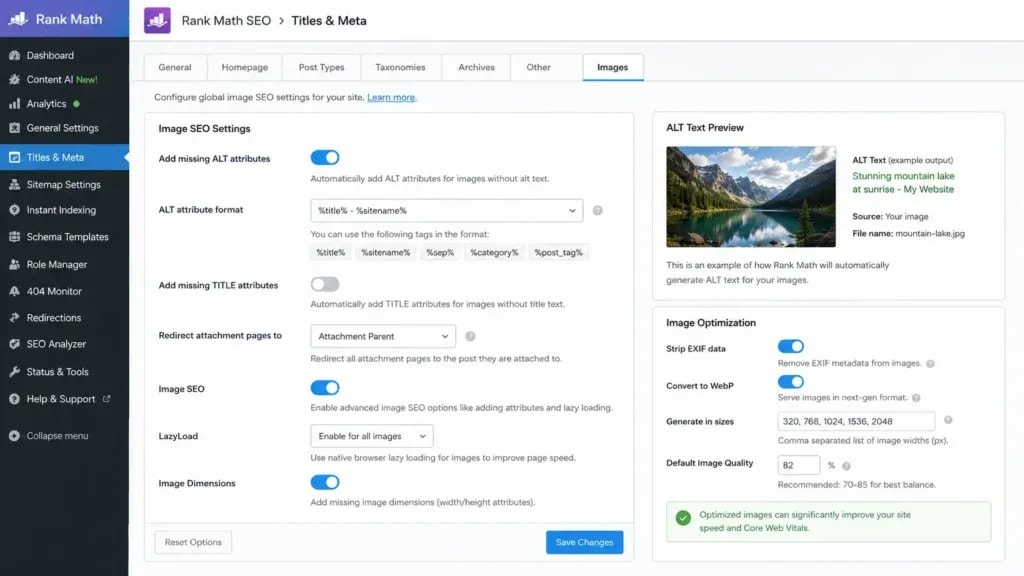
WordPress handles more of the image optimization for SEO work than people realise. The remaining gaps are specific.
- Upload already-compressed, correctly formatted images. Handle conversion before or during upload with a plugin, not afterwards.
- Set alt text in the Media Library or the image block. The Rank Math image SEO settings cover where those checks live.
- Set a featured image on every post. It feeds the
og:imagetag that controls how the post looks when shared. - Enable the image XML sitemap so Google can discover images independently of crawling the page, which Google recommends for discovery [2].
One caution worth stating plainly. An SEO plugin will tell you a focus keyword is missing from an alt attribute. It will not tell you that your hero image is 4MB and lazy loaded, which is the thing actually costing you.
Technique 9: Image structured data
Google's Article structured data lists image among its recommended properties, suggests images of at least 50K pixels when width is multiplied by height, and recommends supplying multiple aspect ratios such as 16x9, 4x3 and 1x1 [5].
Add schema that reflects what is genuinely on the page. Markup describing an image that does not exist is a liability, not an optimisation.
Technique 10: Google Images, Lens and AI answers
Three things decide whether an image can be surfaced at all.
First, use real <img> elements. Google does not index CSS background images [2], so a hero set in CSS is invisible to image search no matter how good it looks.
Second, submit an image sitemap, which Google recommends for discovery and which supports cross-domain URLs when images sit on a CDN [2].
Third, surround the image with relevant text. Page content is read alongside alt text to establish the subject [2], so an image dropped into an unrelated paragraph is harder to place.
There is no separate checklist for Google Lens or for AI answers. The same fundamentals, standard HTML elements, descriptive alt text, an image sitemap and fast loading, are what make an image available to all of them.
Common image SEO mistakes
- Uploading camera originals. A 3 to 8MB file straight from a phone is the single most common cause of a failing LCP.
- Lazy loading everything. The blanket setting is why LCP sometimes gets worse after an optimisation project [4].
- Omitting width and height. Without them the layout shifts as images arrive, which feeds CLS.
- Writing alt text for crawlers. Google warns against keyword stuffing there specifically [2].
- Using CSS backgrounds for content images. They cannot appear in Google Images [2].
- Shipping JPEG XL without a fallback. Chrome needs a flag, so most visitors will see nothing [1].
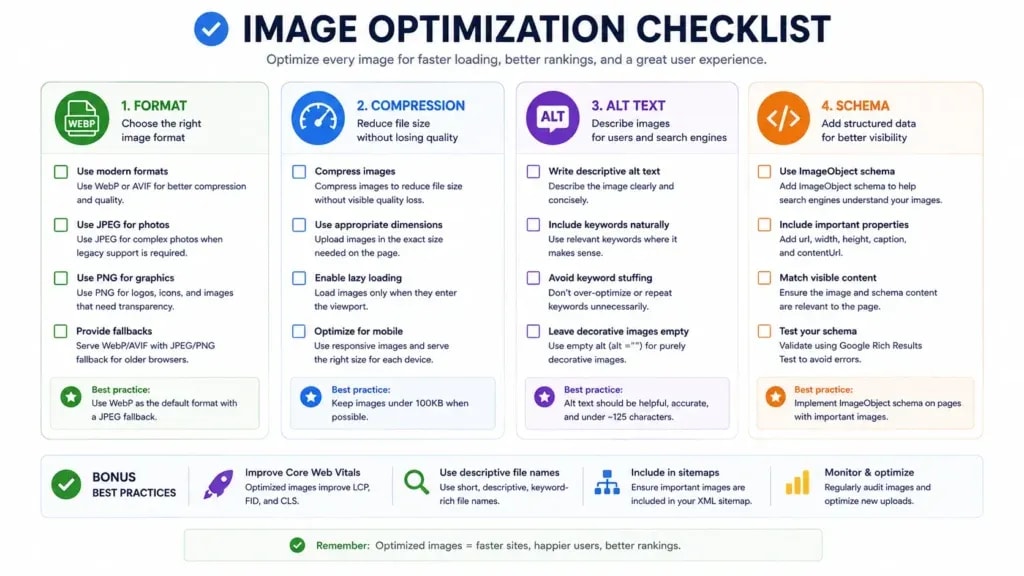
The image optimization for SEO checklist
- LCP element identified in PageSpeed Insights before any change
- Every image resized to its largest displayed dimension
- WebP or AVIF served, with a JPEG or PNG fallback in
<picture> widthandheighton every imagesrcsetandsizesfor anything that renders at multiple widthsloading="lazy"on everything except the LCP imagefetchpriority="high"on the LCP image only- Descriptive filenames, set before upload
- Meaningful alt text, empty
alt=""for decorative images - Image sitemap enabled and submitted
Bottom line
Image optimization for SEO is two jobs wearing one name. One is performance, where the hero image usually decides your LCP and the fix is format, size and markup. The other is discovery, where filenames, alt text and a sitemap decide whether the image can be found at all. Audit before you change anything, because the file that matters is rarely the one you assumed, and keep JPEG XL on the watch list rather than in production until Chrome turns it on by default.
Frequently Asked Questions
What is the best image format for SEO?
WebP for almost everything, with AVIF where your pipeline supports it and a JPEG or PNG fallback inside a picture element. Google Search indexes BMP, GIF, JPEG, PNG, WebP, SVG and AVIF, so format choice is a performance decision rather than an indexing one. JPEG XL is not ready for production yet.
Is JPEG XL usable on a live site in 2026?
Not without a fallback. MDN lists JPEG XL as supported in Safari 17 and later, available in Chrome 145 and later behind the enable-jxl-image-format flag, and present in Firefox preview releases only. Because Chrome requires a manual flag, most of your visitors will not render it, so serve it inside a picture element or wait.
How small should images be?
Small enough that the largest one does not delay the page past an LCP of 2.5 seconds, which in practice means most content images sit comfortably under 150KB and hero images under a few hundred. Judge it by the measured LCP on a real device rather than by hitting an arbitrary number.
Does alt text help SEO?
It helps Google understand the image, and it is how the image becomes findable in Google Images. Google says it uses alt text alongside computer vision and page content, and warns against keyword stuffing. Write what you would say describing the picture to someone on the phone.
Should every image be lazy loaded?
Every image except the one that paints largest on first view. Google's guidance is explicit that lazy loading the LCP image always adds unnecessary resource load delay and harms LCP. Gallery images, footer logos and anything below the fold are exactly what lazy loading is for.
Sources and References
Was this guide helpful?
Your answer helps Anobee improve future updates.

Written by
Bibek Thapa
AI-Powered Digital Growth Strategist
Bibek Thapa works across AI workflows, SEO, AI search optimization, content strategy, website growth, and productivity systems. Anobee documents practical lessons, tools, experiments, and systems for improving digital presence.
- AI workflows
- Digital growth
- SEO
- GEO
- AEO
- Content strategy
- Website growth