SEO & AI Search
Rank Math Image SEO Settings: A Practical Setup Guide
By Bibek Thapa · Updated · 11 min read
Quick Answer
Enable Rank Math's Image SEO module, then turn on missing ALT attributes and use a format based on a descriptive filename. Keep manually written alt text for important images. Rank Math adds fallback attributes at runtime; it does not update the Media Library. Also keep Images in Sitemaps enabled and verify the rendered HTML.

Table of ContentsOn this page
- The recommended Rank Math image SEO settings
- What Rank Math's Image SEO module actually does
- How to enable Rank Math image SEO
- How to choose an alt attribute format
- Free and PRO Image SEO settings
- Configure images in the Rank Math sitemap
- What these settings do not solve
- How to verify the settings on a live page
- Common Rank Math image SEO mistakes
- Rank Math image SEO checklist
- Frequently Asked Questions
- Sources and References
Key Takeaways
- Use Rank Math's automatic alt text as a fallback, not a replacement for image-specific descriptions.
- The free plugin can fill missing ALT and TITLE attributes; caption, description, casing, avatar, and replacement controls are PRO features.
- Rank Math applies generated attributes at runtime, so the saved Media Library fields remain unchanged.
- Check the live page source after setup because the automation only covers images inside post or page content.
Rank Math image SEO can tidy up missing image attributes and help search engines discover image URLs through your sitemap. That is handy on an older WordPress site where image metadata has been handled inconsistently. Still, a template cannot examine each image and explain what it shows.
Use the automation as a fallback. Write alt text yourself when an image carries meaning, leave decorative images with an empty alt attribute, and let Rank Math catch accidental omissions. Here is how to configure that workflow and confirm the result on the public page.
The recommended Rank Math image SEO settings
Start with this baseline:
| Setting | Recommended starting point | Why |
|---|---|---|
| Image SEO module | Enabled | Makes the Images settings available |
| Add missing ALT attributes | Enabled as a fallback | Covers unintentional omissions in post and page content |
| ALT attribute format | %filename% if filenames are descriptive | Usually more image-specific than repeating the post title |
| Add missing TITLE attributes | Optional | Can provide supplementary hover text, but it is not a substitute for alt text |
| Images in Sitemaps | Enabled | Helps search engines discover image URLs |
| Include Featured Images | Enabled when featured images are indexable and relevant | Adds those images to sitemap data even when a theme does not display them in content |
| PRO caption and description automation | Usually off until reviewed | Generated visible captions can be repetitive or inaccurate |
Treat these as starting points. A photography portfolio and a WooCommerce store will not need the same formats or editorial checks.
What Rank Math's Image SEO module actually does
The module can add missing image attributes to images inside the content of a post or page. In Rank Math's current documentation, the free controls include missing ALT attributes, the alt format, missing TITLE attributes, and the title format. PRO adds controls for captions, descriptions, text casing, avatar alt attributes, and find-and-replace rules [1].
Two details prevent most configuration mistakes:
- Rank Math does not overwrite an existing alt or title attribute when the corresponding setting is configured to fill missing values.
- It generates the fallback dynamically when the page loads. The value is not written into the WordPress Media Library or permanently inserted into the saved post content [1].
That runtime behavior is convenient because one format change can affect many rendered pages. An editor may still see an empty field in the Media Library, though. Audit the public HTML as well as the WordPress editing screen.

The automation also has a scope boundary. Rank Math says its Image SEO features apply to images inside post or page content, not images placed by a theme in a header, sidebar, or footer [1]. Page builders and custom templates can introduce similar edge cases, so verification matters.
How to enable Rank Math image SEO
1. Turn on the module
In WordPress, go to Rank Math SEO → Dashboard → Modules. Find Image SEO, switch it on, and save if prompted. Then open Rank Math SEO → General Settings → Images.

If the module or its settings are missing, confirm that Rank Math is in Advanced Mode and that the plugin is current before troubleshooting the theme.
2. Enable missing ALT attributes
Switch on Add missing ALT attributes. This tells Rank Math to supply an alt attribute only when one is absent.

The next field, Alt attribute format, controls the generated value. Rank Math uses %filename% by default, though it also offers variables drawn from the post, taxonomy, author, product, and image context [1].
Choose a variable for the description it is likely to produce, not because it contains a target keyword.
3. Decide whether you need image TITLE attributes
You may also enable Add missing TITLE attributes and choose a Title attribute format. A browser may show this value as a tooltip when someone hovers over the image.
The title attribute is supplementary. It does not replace the alt attribute, and repeating the same keyword phrase in both fields does not make an image twice as relevant. If the tooltip would add nothing for the visitor, leaving this option off is reasonable.
4. Save and clear page caches
Click Save Changes. If your site uses a page cache, CDN cache, or static-page layer, purge the affected cache before checking the result. Otherwise, the public page may keep serving the old markup.
How to choose an alt attribute format
There is no format that writes good alt text for every image. The useful choice depends on how disciplined the site's filename and editorial workflow already are.
Use %filename% only with descriptive filenames
%filename% can work as a fallback when files are named before upload:
rank-math-image-seo-module.webpcan become a readable description.IMG_4821.jpgcannot.seo-seo-plugin-rank-math-best-settings.pngis keyword stuffing in filename form.
Google says filenames provide light clues about an image, while alt text is the more important descriptive attribute. Its guidance recommends short, descriptive filenames and useful, contextual alt text rather than repeated keywords [2].
Rank Math's runtime output may remove separators or otherwise format a filename, but it cannot recover visual meaning that the filename never contained. Rename new files before uploading; changing a live media URL later can create broken references unless you manage the replacement carefully.
Avoid using %title% as the automatic answer for every image
The post title provides page context, not image-specific meaning. On an article called “Rank Math Image SEO Settings,” it could give identical fallback text to a settings screenshot, a sitemap screenshot, and an alt-text example. A screen-reader user still would not know what each image conveys.
If your old image filenames are useless, %title% may be a temporary safety net for missing attributes. Treat it as a cleanup bridge, then manually improve important images.
Write important alt text manually
Manual alt text should communicate the image's purpose in its immediate context. Consider these examples:
| Image | Weak alt text | Better alt text |
|---|---|---|
| Screenshot of the module card | Rank Math SEO | Image SEO module enabled in the Rank Math dashboard |
| Screenshot of the format field | image alt text | Rank Math Alt attribute format set to filename |
| Line chart | traffic graph | Google Image Search clicks rising from May to August |
| Product photo linking to a product | running shoes | Shop the blue Trail 4 running shoes |

The last example describes function as well as appearance because the image is a link. Context changes the right answer.
Google uses alt text together with page content and visual understanding to interpret an image. It advises writing useful, information-rich text in context and explicitly warns against keyword stuffing [2]. That is a stronger standard than “include the focus keyword.”
Preserve empty alt text for decorative images
A decorative flourish, redundant stock image, or separator should not be forced to announce the page title. W3C guidance recommends an empty attribute—alt=""—so assistive technology can ignore a decorative image [4].

This is where global automation needs care. An empty alt attribute is intentional, while a missing alt attribute may be accidental. Test whether your templates preserve the intentional empty value before rolling the setting across a large site.
Free and PRO Image SEO settings
Rank Math's Image SEO panel is easier to understand when separated by job rather than by a long list of “optimizations.”
Available in the free plugin
- Add missing ALT attributes
- Set the ALT attribute format
- Add missing TITLE attributes
- Set the TITLE attribute format
For many blogs, that is enough automation. The difficult part is not unlocking more fields; it is feeding the existing fields accurate source data.
Additional controls documented for PRO
- Add and format missing captions
- Add and format missing descriptions
- Change the casing of titles, alt text, captions, and descriptions
- Add alt attributes to avatars
- Apply dynamic text-replacement rules
Those features can save time on a well-governed library, but they do not identify what an image depicts. Preview the output before enabling visible captions sitewide. A generic caption under every image is more distracting than an omitted caption.
The old version of this article incorrectly grouped compression, WebP conversion, lazy loading, and EXIF removal into Rank Math Image SEO. Those are valuable parts of a broader image optimization workflow, but they are separate from the module documented here.
Configure images in the Rank Math sitemap
Open Rank Math SEO → Sitemap Settings → General and check two controls:
- Images in Sitemaps includes images associated with sitemap entries. Rank Math documents this setting as on by default.
- Include Featured Images adds featured images even when they do not appear in the post content [3].

Keep both enabled when the images are original, useful, and intended for search discovery. If a site uses placeholder artwork, licensed assets with indexing restrictions, or a CDN configuration that produces inaccessible URLs, resolve those conditions rather than toggling settings blindly.
An image sitemap helps discovery; it does not guarantee indexing or rankings. Google says an image sitemap can provide image URLs it might not otherwise discover [2]. It is a discovery mechanism, not a priority queue or an instant-indexing request.
After making changes, open your sitemap index and inspect a few post entries. If images are served from a CDN, verify that Googlebot can fetch those URLs. Google also recommends verifying the CDN hostname in Search Console so crawl errors can be reported [2].
What these settings do not solve
Rank Math image SEO settings do not replace the rest of image optimization. You still need to handle:
- Compression and dimensions: Upload an image at a sensible size and compression level rather than asking CSS to shrink an oversized file.
- Modern formats: Choose WebP or AVIF when your delivery stack and required fallbacks support them.
- Responsive delivery: Use
srcset,sizes, or a managed image service so small screens do not download desktop-sized assets. - Largest Contentful Paint: Do not lazily load an above-the-fold image that is likely to be the page's LCP element.
- Captions and surrounding copy: Place images near the text they support and write a caption only when it adds useful context.
- Original meaning: A variable cannot distinguish a decorative background from an instructional screenshot.
Google's image guidance covers image elements, responsive delivery, supported formats, page context, quality, speed, structured data, and descriptive metadata [2]. The plugin handles only part of that system. For stores, the ecommerce image optimization guide covers product-image decisions that fall outside Rank Math.
How to verify the settings on a live page
A green toggle in WordPress only confirms the setting was saved. The rendered page shows whether it worked.
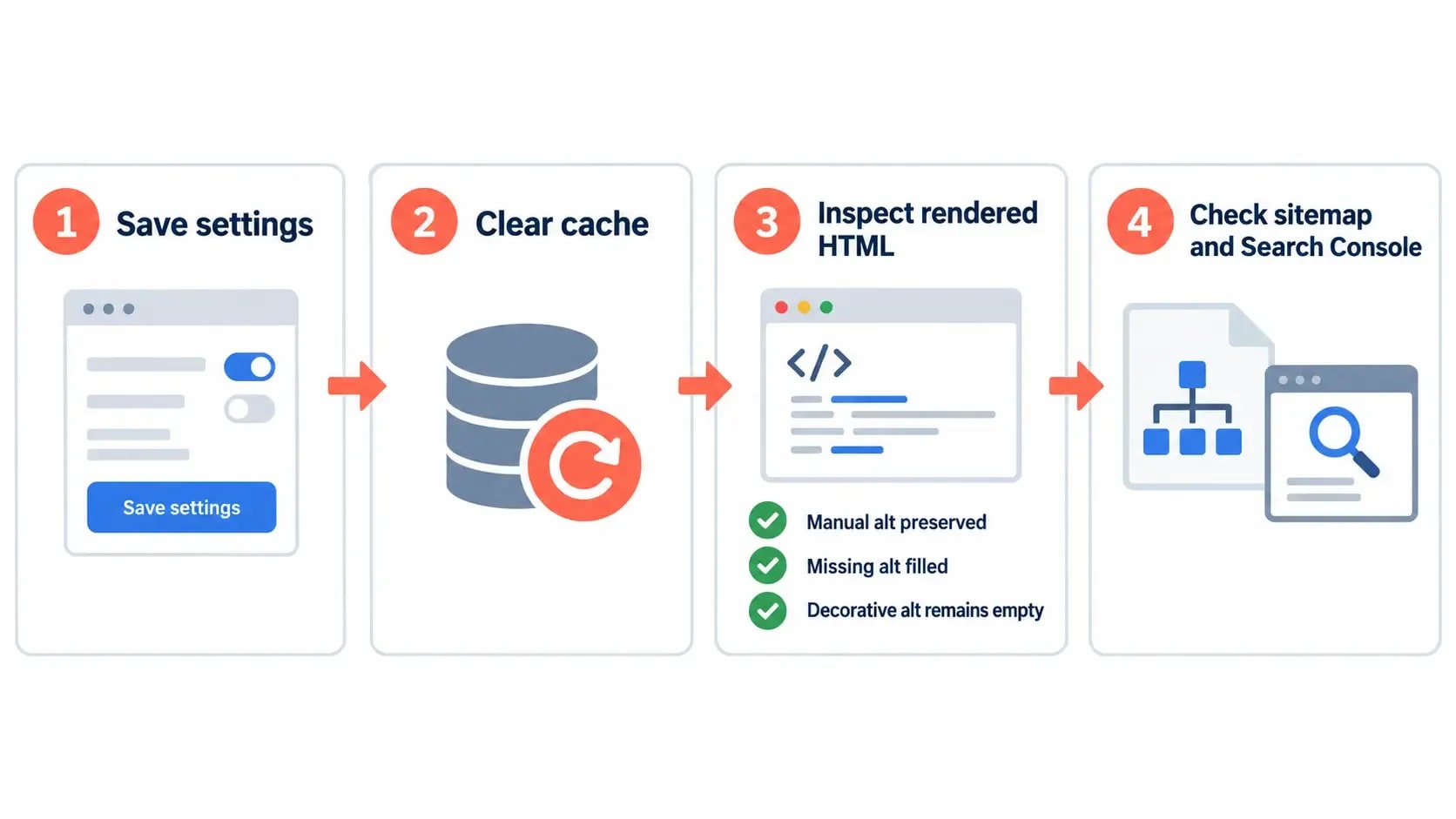
Run a five-minute spot check
- Choose a published post containing one image with manual alt text, one image with no alt text, and—if available—one decorative image with
alt="". - Clear the page and CDN caches.
- Open the public page in a private browser window.
- Inspect each image element in Developer Tools or view the rendered HTML.
- Confirm that Rank Math preserved manual text, filled the true omission, and left the decorative image silent.
- Check a header or sidebar image separately; the module is not designed to cover those theme areas.
- Open the relevant XML sitemap and confirm that expected image URLs appear.
For a larger site, crawl the rendered pages with Screaming Frog or another crawler. Separate these cases in the export:
- missing
altattribute; - empty
alt=""; - duplicated alt text;
- generic filenames;
- broken image URLs;
- images that are too large for their rendered dimensions.
An empty value is not automatically an error. Review the image's purpose before changing it.
Measure the outcome in Search Console
Google Search Console's Performance report lets you select the Image search type and examine queries, pages, clicks, impressions, and average position. Use a before-and-after period that accounts for normal seasonality and recent site changes.
Avoid crediting every movement to the plugin toggle. A new image, page rewrite, crawl event, internal-link change, or algorithm update may occur in the same period. The defensible question is narrower: did Google discover the intended pages and images, and did search visibility change after the verified implementation?
Common Rank Math image SEO mistakes
Treating generated alt text as finished editorial work
Automation prevents a blank. It does not guarantee an accurate description. Manually edit images that explain a process, convey data, identify a product, or function as a link.
Assuming the Media Library was updated
Rank Math applies these values on the frontend. A migration, plugin switch, API response, email template, or alternate rendering path may not inherit the runtime value. If the description matters beyond the webpage, store it with the asset or content too.
Repeating the post title on every image
This creates duplicate text and poor accessibility. A screenshot of the sitemap panel needs a different description from a screenshot of the ALT format field.
Giving decorative images keywords
Decorative images should normally remain silent. Filling them with a focus phrase creates clutter for screen-reader users and does not improve the page.
Expecting Rank Math to optimize image bytes
Attribute automation does not compress a JPEG, resize a screenshot, or correct an LCP loading decision. Audit those issues in the image-delivery stack.
Believing sitemap inclusion guarantees indexation
A sitemap helps discovery. Google still decides whether to crawl, index, and show an image. Review accessibility, page quality, canonical signals, image URLs, and robots directives when expected images do not appear.
Rank Math image SEO checklist
Use this list after configuration and during content publishing:
- Enable the Image SEO module.
- Turn on missing ALT attributes as a fallback.
- Use
%filename%only when filenames describe the image. - Write manual alt text for informative and functional images.
- Keep
alt=""for decorative images. - Decide whether TITLE tooltips serve a real visitor need.
- Leave automated captions off unless the generated text is useful and accurate.
- Keep Images in Sitemaps enabled for indexable assets.
- Include relevant featured images in the sitemap.
- Verify attributes in rendered HTML after clearing caches.
- Crawl templates that sit outside normal post content.
- Optimize file size, dimensions, format, and loading separately.
- Review Image search performance in Search Console without assuming causation.
A sound Rank Math image SEO setup is deliberately modest. Once these settings are stable, use the broader Rank Math setup guide to review sitemaps, titles, schema, and other sitewide controls. Activate only the options you can make useful. Each one should produce accurate output that survives a real-page check.
Frequently Asked Questions
Does Rank Math automatically add alt text to images?
Yes. After you enable the Image SEO module and Add missing ALT attributes, Rank Math can generate an alt attribute for images in post or page content that do not already have one. It applies the value when the page renders rather than saving it to the Media Library.
What is the best Rank Math alt attribute format?
For a site with consistently descriptive filenames, %filename% is a reasonable safety net. There is no universal best format: manually describe important images, and avoid using one post title for every image because it cannot explain what each image shows.
Should decorative images have automatic alt text?
No. A decorative image should normally use an empty alt attribute, alt="", so assistive technology can ignore it. Automatic fallback text can make decorative images noisy, so exclude or handle them deliberately.
Does Rank Math change image alt text in the Media Library?
No. Rank Math's automatic Image SEO settings add missing attributes dynamically on the rendered post or page. The original Media Library alt-text and title fields do not change.
Does Rank Math optimize image file size or convert images to WebP?
The Image SEO settings covered here manage attributes and related metadata, not compression or format conversion. Use WordPress, your image workflow, hosting stack, or a dedicated image-optimization tool for file size, dimensions, responsive delivery, and formats such as WebP or AVIF.
Sources and References
Was this guide helpful?
Your answer helps Anobee improve future updates.

Written by
Bibek Thapa
AI-Powered Digital Growth Strategist
Bibek Thapa works across AI workflows, SEO, AI search optimization, content strategy, website growth, and productivity systems. Anobee documents practical lessons, tools, experiments, and systems for improving digital presence.
- AI workflows
- Digital growth
- SEO
- GEO
- AEO
- Content strategy
- Website growth