Website Growth
Ecommerce Image Optimization: What to Fix, in the Order That Moves LCP
By Bibek Thapa · Updated · 12 min read
Quick Answer
Ecommerce image optimization means serving each product image at the size and format the page needs, without delaying the largest one. Find the LCP image first, never lazy-load it, serve AVIF or WebP with a fallback, declare width and height so nothing shifts, and write alt text a person would find useful. The targets are LCP under 2.5 seconds, INP under 200 milliseconds and CLS under 0.1.
Table of ContentsOn this page
- The three numbers you are actually optimising for
- Step 1: Find the LCP image before changing anything
- Step 2: Choose the image format, and keep the fallback
- Step 3: Size the image to the box it fills
- Step 4: Never lazy-load the LCP image
- Step 5: Reserve the space so nothing shifts
- Step 6: Write alt text a person would use
- Step 7: Make the images findable
- Platform notes: check what your store actually serves
- What to check after an ecommerce image optimization pass
- Common ecommerce image optimization mistakes
- Bottom line on ecommerce image optimization
- Frequently Asked Questions
- Sources and References
Key Takeaways
- Core Web Vitals targets are LCP under 2.5s, INP under 200ms and CLS under 0.1, measured at the 75th percentile.
- Google says never lazy-load the LCP image; use fetchpriority="high" on the one image likely to be it.
- AVIF works in Safari 16.1+, Chrome 85+ and Firefox 93+, but MDN still advises a picture-element fallback.
- Only 12% of images on the web were WebP and about 1% AVIF in 2024, so format alone is still an edge.
- 45% of image elements carried no alt text in 2024, which is an accessibility failure before it is an SEO one.
- Shopify accepts images up to 20 MB and 5000x5000 px, and recommends 2048x2048 px for square product shots.
Most ecommerce image optimization guides hand you a list of twenty things, ordered by nothing. However, on a product page the order is the whole job. One image usually decides the score, and the other nineteen changes do not touch it.
This page needed several corrections. It claimed images make up "50–70% of total page weight" with no source behind the figure, and it promised "10 Proven Steps" without any documented test to support the word proven. The CRISP framework it introduced was invented for the article rather than drawn from anything published, so it is gone too.
What replaces them is checkable. The thresholds and LCP guidance come from web.dev, the format support from MDN, and the platform limits from Shopify's own help centre. Meanwhile, the adoption figures come from the 2024 Web Almanac, which measured real pages rather than estimating them.
The three numbers you are actually optimising for
Everything below is in service of three published thresholds, measured at the 75th percentile of page loads and segmented by mobile and desktop [1].
| Metric | What it measures | Good |
|---|---|---|
| LCP | How long the largest visible element takes to render | Under 2.5 seconds [1] |
| INP | Responsiveness to interactions across the visit | Under 200 milliseconds [1] |
| CLS | Unexpected movement of page content | Under 0.1 [1] |

One note on vocabulary, because older guides still use the old term. INP became a stable Core Web Vital in 2024, replacing First Input Delay [1]. If an audit tool or article still reports FID as a Core Web Vital, it has not been updated since that change.
Images touch two of the three directly. The main product shot is usually the LCP element, and any image without reserved space contributes to CLS. Although INP appears on the same report, it is mostly a JavaScript problem rather than an image one.
Step 1: Find the LCP image before changing anything
Run the product page through PageSpeed Insights and read which element it names as the LCP element. On most product pages it is the main image. On some it is the product title, which changes the job entirely.

This step exists because the common failure in ecommerce image optimization is effort spent on the wrong file. Compressing forty gallery thumbnails feels productive and moves nothing. Consequently, the one image that paints largest is where the first hour belongs.
web.dev breaks LCP into four parts and suggests roughly 40% time to first byte, under 10% resource load delay, about 40% resource load duration and under 10% render delay [2]. Therefore, if load delay is the large share, the problem is discovery and priority rather than file size, and compression will not fix it.
Step 2: Choose the image format, and keep the fallback
AVIF compresses hardest, WebP is the safe default, and JPEG remains the fallback. Moreover, support is broad now. AVIF runs in Chrome 85+, Firefox 93+, Edge 121+ and Safari 16.1+, while WebP works in current versions of every major browser [3].
Even so, MDN still recommends serving AVIF inside a picture element with a fallback, and the same for WebP [3]. The markup is unglamorous. Nevertheless, it is the difference between a broken image and a slightly larger one:
<picture>
  <source srcset="product-navy-running-shoe.avif" type="image/avif">
  <source srcset="product-navy-running-shoe.webp" type="image/webp">
  <img src="product-navy-running-shoe.jpg" alt="Navy running shoe, side view"
       width="1200" height="1200" fetchpriority="high">
</picture>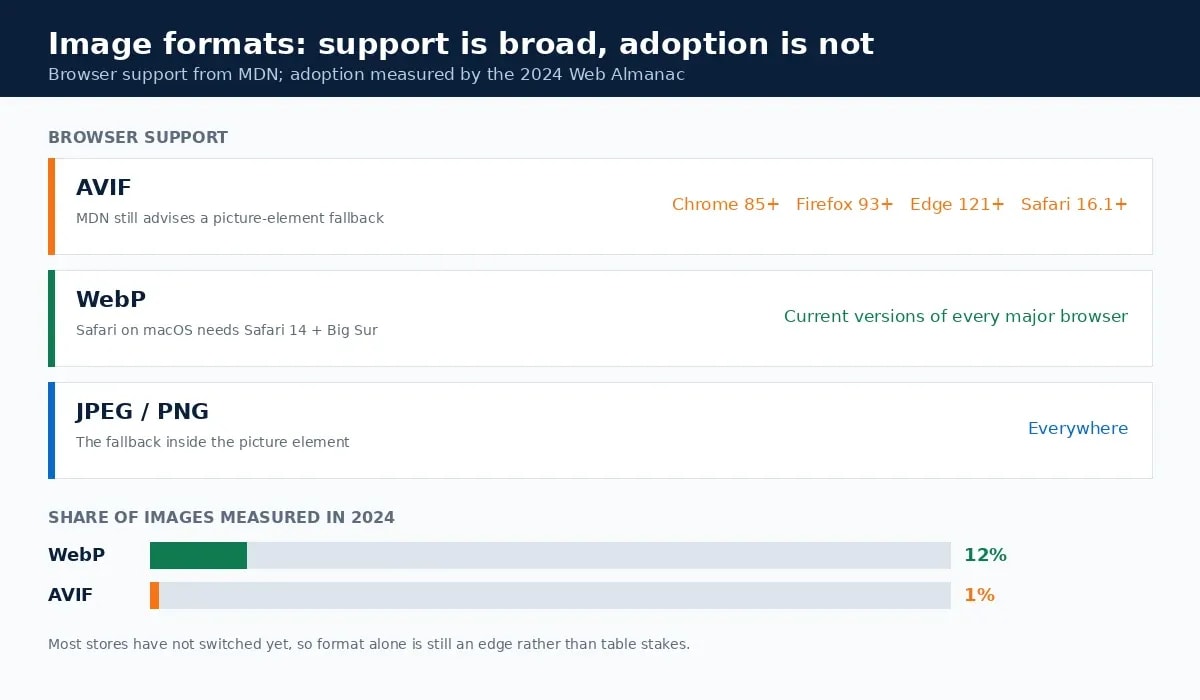
Google Search supports BMP, GIF, JPEG, PNG, WebP, SVG and AVIF for images referenced in an image src attribute. Therefore format choice is not an indexing risk [4].
There is also a competitive point hiding in the adoption data. The 2024 Web Almanac found WebP at 12% of images measured and AVIF at roughly 1% [6]. Ultimately, most stores have not done this yet.
Step 3: Size the image to the box it fills
Similarly, uploading a 5000-pixel file for a 600-pixel display box spends bandwidth on pixels nobody sees. Shopify accepts product images up to 20 MB and up to 5000 x 5000 pixels, or 25 megapixels, and says 2048 x 2048 usually displays best for square product images [5].
That ceiling is a limit, not a target. Upload at the recommended size and let the platform generate the variants. Then serve them through srcset, so a phone does not download a desktop file. Google also recommends always specifying a fallback src alongside srcset or a picture element [4].
For the numbers most stores ask about, the 2024 Web Almanac found the median image on the web weighs 12 KB. Additionally, the largest image on a page sits at about 135 KB at the median [6]. Thus a product image in the low hundreds of kilobytes is normal, and a one-megabyte hero is not.
Step 4: Never lazy-load the LCP image
Accordingly, this is the single highest-value rule in ecommerce image optimization, and web.dev states it plainly: "Never lazy-load your LCP image, as that will always lead to unnecessary resource load delay, and will have a negative impact on LCP" [2].

Blanket lazy-loading plugins and themes break this constantly. They apply loading="lazy" to every image including the first one. Consequently, LCP sometimes gets worse after an optimisation project rather than better.
The counterpart is fetchpriority="high" on the image you believe will be the LCP element. Apply it to one image, or at most two, because web.dev notes that prioritising more than that dilutes the effect [2]. Meanwhile, gallery shots, related products and review photos should all stay lazy.
Step 5: Reserve the space so nothing shifts
An image without declared dimensions pushes content down when it arrives. Set width and height attributes on every image, then let CSS scale it:
img { max-width: 100%; height: auto; }The browser uses the attribute ratio to reserve the right space before the file loads, so the layout holds still and CLS stays near zero. Indeed, this is the rare fix that costs nothing and needs no tooling.
Step 6: Write alt text a person would use
Alt text describes the image for people who cannot see it. Additionally, Google uses it alongside computer vision and page context to work out what an image shows, and warns against stuffing keywords into it [4].
The bar is low and widely missed: 45% of image elements had no alt text at all in 2024 [6]. For product images, describe the product as a person would say it aloud. "Navy running shoe, side view" works. Conversely, "buy navy running shoes cheap online store" reads as spam to both the screen reader and the algorithm.
Filenames follow the same logic. Google's guidance prefers a short descriptive name such as my-new-black-kitten.jpg over IMG00023.JPG [4]. Therefore export as navy-running-shoe-side.jpg rather than whatever the camera called the file.
Step 7: Make the images findable
Three things decide whether product images can appear in Google Images at all. First, use real image elements, since Google does not index CSS background images [4]. Second, submit an image sitemap, which Google recommends for discovery and which supports cross-domain URLs when images sit on a CDN [4]. Third, include images in your Product structured data. Google's own examples list several aspect ratios for the same product, such as 1x1, 4x3 and 16x9.
Also, if your store already publishes Product markup, the structured data guide covers how to check that it renders and validates.
Platform notes: check what your store actually serves
Platform advice ages faster than anything else here, so the durable version is a check rather than a claim. Open the product page, look at the network requests, and see which format and which pixel dimensions reach a phone-sized viewport.
- Shopify generates variants from your upload, so the useful lever is uploading at 2048 x 2048 and reviewing what the theme requests [5].
- WooCommerce depends on the theme and the plugins layered on top, so inspect the served file rather than trusting a plugin's settings page.
- Any platform with a lazy-loading plugin needs the first image excluded by hand. That option exists in every serious plugin, and it is off by default in most.
Whatever the stack, the test is the same. Does the LCP image arrive early, in a modern format, at roughly the size it is displayed?
What to check after an ecommerce image optimization pass
- PageSpeed Insights on the product page, confirming LCP under 2.5s and CLS under 0.1 [1].
- The LCP element named in the report is the image you optimised, not something else.
- The first image has no
loading="lazy"and does carryfetchpriority="high". - Every image has
width,heightand meaningful alt text. - The served format is AVIF or WebP, with a working fallback for older browsers [3].
- Filenames describe the product, and the image sitemap includes the new paths [4].
Common ecommerce image optimization mistakes
- Optimising every image except the one that counts. Find the LCP element first.
- Lazy-loading everything. The blanket setting is the most common cause of an optimisation project making LCP worse [2].
- Dropping the fallback. AVIF support is broad, not universal, and MDN still recommends a picture element [3].
- Uploading at the platform maximum. Shopify's 20 MB and 25 MP figures are limits, not recommendations [5].
- Writing alt text for crawlers. Google explicitly warns against keyword stuffing there [4].
- Using CSS background images for products. Google does not index them [4].
Bottom line on ecommerce image optimization
The work is narrow once it is ordered. Identify the LCP image, keep it out of the lazy-loading rule and give it priority, serve a modern format with a fallback, reserve the space, then describe the image honestly for the people and systems that cannot see it. The thresholds are published, the format support is documented, and the platform limits are on the vendor's own help page. Nothing here needs a framework, and most competing stores have not done it: WebP was on 12% of measured images in 2024, AVIF on about 1% [6].
Frequently Asked Questions
What is ecommerce image optimization?
It is the work of delivering product images at the smallest size and best format the page can use, in a way that does not delay the largest image or shift the layout. In practice that means choosing a modern format with a fallback, sizing images to their display box, declaring dimensions, and keeping the main product image out of any lazy-loading rule.
What is the best image format for product photos?
AVIF where you can generate it, WebP as the broadly safe default, with JPEG as the fallback. AVIF is supported in Safari 16.1 and later, Chrome 85+ and Firefox 93+, and MDN still recommends serving it inside a picture element with a fallback for anything older.
Should product images be lazy-loaded?
Every image except the one that paints largest on first view. Google's guidance is explicit: never lazy-load the LCP image, because it adds resource load delay and worsens LCP. Below-the-fold gallery shots, related products and review photos are exactly what lazy loading is for.
What size should Shopify product images be?
Shopify accepts files up to 20 MB and up to 5000 x 5000 pixels, or 25 megapixels, and says 2048 x 2048 pixels usually displays best for square product images. Uploading at that size and letting Shopify generate the smaller variants is simpler than uploading several sizes yourself.
Does image optimization actually affect rankings?
Indirectly, through page experience rather than as a direct content signal. LCP is a Core Web Vital and images are usually the LCP element on a product page, so image delivery is often the difference between passing and failing. Alt text and filenames matter separately, for Google Images and for accessibility.
Sources and References
- web.dev — Web Vitals (LCP 2.5s, INP 200ms, CLS 0.1 at the 75th percentile) ↩
- web.dev — Optimize Largest Contentful Paint ↩
- MDN — Image file type and format guide ↩
- Google Search Central — Google Images SEO best practices ↩
- Shopify Help Center — Product media types and requirements ↩
- Web Almanac 2024 — Media chapter (format adoption, alt text, lazy loading) ↩
Was this guide helpful?
Your answer helps Anobee improve future updates.

Written by
Bibek Thapa
AI-Powered Digital Growth Strategist
Bibek Thapa works across AI workflows, SEO, AI search optimization, content strategy, website growth, and productivity systems. Anobee documents practical lessons, tools, experiments, and systems for improving digital presence.
- AI workflows
- Digital growth
- SEO
- GEO
- AEO
- Content strategy
- Website growth