
Website Growth
GA4 MCP: How to Connect Google Analytics to an AI Assistant, Step by Step
By Bibek Thapa · Published · 14 min read
Quick Answer
GA4 MCP is Google's official, read-only MCP server for Google Analytics. To connect it, enable the Analytics Admin and Data APIs in a Google Cloud project, create a Desktop OAuth client, sign in with gcloud using the analytics.readonly scope, then add pipx run analytics-mcp to your AI client.

Table of ContentsOn this page
- Does GA4 have MCP?
- What you need before you start
- How to set up GA4 MCP, step by step
- Five questions we asked GA4 MCP about anobee.com
- What GA4 MCP does well, and where it falls short
- How to use Google's hosted Analytics MCP endpoints
- How to connect GA4 to ChatGPT
- How to connect GA4 to Claude
- Privacy and permissions
- Frequently Asked Questions
- Sources and References
Key Takeaways
- GA4 MCP is Google's official, read-only server. It runs locally with pipx and can read reports but cannot change your GA4 settings.
- Setup needs a Cloud project, the Admin and Data APIs, a Desktop OAuth client and a gcloud sign-in that grants both requested permissions.
- In our test on anobee.com, its channel report matched the GA4 interface exactly: 497 sessions and 186 engaged sessions.
- It cannot return Google search queries. That data stays in Search Console, and the assistant said so instead of guessing.
- Google also runs undocumented hosted Analytics MCP endpoints. They worked in our test but should be treated as a preview.
GA4 MCP is Google's official Model Context Protocol server for Google Analytics. It lets an AI assistant such as Claude or Gemini CLI read your GA4 accounts, run reports and pull realtime data in plain language. Access is read-only [1]. Setup has five parts. You need a Google Cloud project, two enabled Analytics APIs and a Desktop OAuth client. Then you sign in with gcloud using the Analytics read-only scope and add one config entry to your AI client [2].
On 17 October 2026 we set it up for anobee.com's own GA4 property, connected it to Claude Code and asked it five questions. Most were routine. The last one was written to fail. The answers, the errors we hit and the numbers it returned are all below.
Method note: Every step, screen and result in this guide comes from that single setup on 17 October 2026, using analytics-mcp version 0.7.0 on Linux. Google labels the server experimental, so menus and tool names can change. Anobee did not test Gemini CLI or ChatGPT.
Does GA4 have MCP?
Yes. Google publishes an open-source, local MCP server for Google Analytics. Its developer page says the server handles read requests only and cannot edit your Analytics configuration or settings [1]. You run it on your own computer with pipx run analytics-mcp. It then talks to the Google Analytics Admin API and Data API for you [2].
There is also a hosted option that Google has not formally announced. On 17 October 2026 we found two Google-run endpoints that answered MCP requests and returned data with our read-only token. Neither appeared on Google Cloud's list of supported remote MCP servers that day [4].
| Option | Where it runs | What it can do | Status on 17 October 2026 |
|---|---|---|---|
analytics-mcp (official) | Your computer | 9 tools: account summaries, property details, Google Ads links, annotations, custom dimensions and metrics, reports, funnel reports, conversions reports, realtime reports | Documented, experimental, version 0.7.0 released 29 July 2026 [3] |
analyticsdata.googleapis.com/mcp/v1 | 4 tools: run_report, get_metadata, run_realtime_report, check_compatibility | Answered our requests; no public reference page found | |
analyticsadmin.googleapis.com/mcp | 12 read-only tools, including accounts, properties, data streams, key events and data retention settings | Answered our requests; not documented | |
| Third-party connectors | The vendor's servers | Varies by vendor | Your GA4 data passes through another company |
For most people, the official local server is the safer choice today. It is documented, it refreshes its own sign-in, and you can see exactly what it runs.
What you need before you start
| Requirement | Why it is needed | What we used |
|---|---|---|
| A Google account with access to the GA4 property | The server can only see what that account can see | The account that owns anobee.com's GA4 |
| A Google Cloud project | The two Analytics APIs and the OAuth client live there | An existing project, because the account had hit its project limit |
Python 3.10 or newer and pipx | pipx run analytics-mcp downloads and starts the server [3] | Python 3.12, pipx 1.18.2 |
Google Cloud CLI (gcloud) | Creates the Application Default Credentials the server reads [5] | Google Cloud SDK 589.0.0 |
| An MCP client | The AI assistant that calls the tools | Claude Code 2.1.295 |
The server needs the scope https://www.googleapis.com/auth/analytics.readonly [2]. That is the permission boundary: whatever the AI is asked to do, the token it holds can only read.
How to set up GA4 MCP, step by step

Step 1: Choose a Google Cloud project
Open the Google Cloud console and create a project, or reuse one you already own. When we tried to create a new project, the console showed "Increase Project Limit", so we reused an existing project. Nothing in the setup requires a fresh project. Note the project ID, because the server config asks for it later.
Step 2: Enable the Google Analytics Admin API and Data API
In the API Library, open Google Analytics Admin API and click Enable, then do the same for Google Analytics Data API [2]. The Admin API answers configuration questions such as which properties you have. The Data API runs the reports.
On our first attempt the Data API's Enable button did nothing. Reloading the page and clicking again worked. Check APIs and Services, Enabled APIs and services afterwards and confirm that both names are listed.

Step 3: Check the OAuth consent screen
Under Google Auth Platform, open Audience. The app needs a user type; External works for a personal Google account. It also needs a status: testing, with your email added as a test user, or production. Our project was already External and in production, which meant Google would show an "unverified app" warning at sign-in. Because the app is yours and only you will sign in to it, that warning is expected.
Step 4: Create a Desktop OAuth client and download it
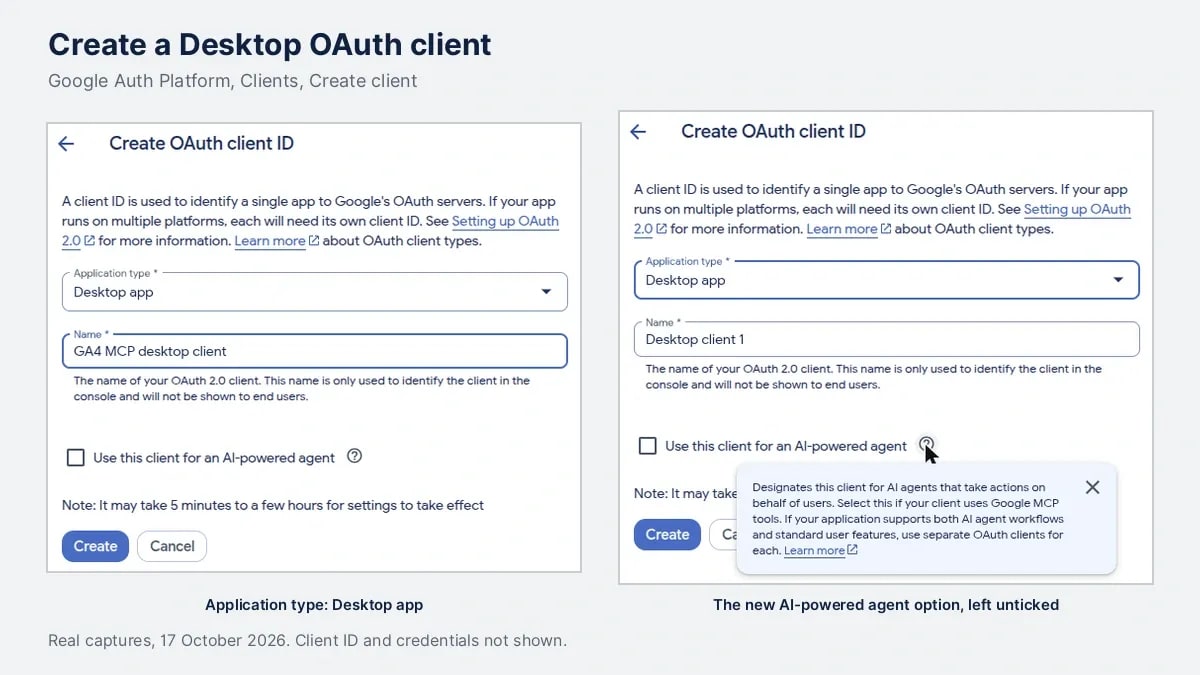
Open Clients, click Create client, and choose Desktop app as the application type. Give it a name you will recognize later, such as "GA4 MCP desktop client".
The form also showed a checkbox we had not seen before: Use this client for an AI-powered agent. Its help text says to select it when the client uses Google MCP tools. We left it unticked, because the local server signs in through gcloud, the route Google's own README describes [2].
After you click Create, Google shows the client credentials only once. Click Download JSON before you close that dialog, and keep the file private. Anyone with it can start a sign-in as your app.
Step 5: Sign in with gcloud and the Analytics read-only scope
Run this in a terminal, pointing at the JSON file you just downloaded:
gcloud auth application-default login --scopes https://www.googleapis.com/auth/analytics.readonly,https://www.googleapis.com/auth/cloud-platform --client-id-file=YOUR_CLIENT_FILE.jsonA browser window opens. Pick the Google account that has access to your GA4 property and continue past the unverified app warning. On the permissions page, tick both boxes: the Google Analytics read access and the Google Cloud access. Our first sign-in failed with "cloud-platform scope is required but not consented" because only the Analytics box was ticked. The second attempt ended with "Credentials saved to file", which points to your Application Default Credentials file [5].
Step 6: Add the server to your AI client
For Claude Code, Google's README gives one command [2]:
claude mcp add analytics-mcp --scope user -e "GOOGLE_APPLICATION_CREDENTIALS=PATH_TO_CREDENTIALS_JSON" -e "GOOGLE_PROJECT_ID=YOUR_PROJECT_ID" -- pipx run analytics-mcpFor Gemini CLI, add the same command, credentials path and project ID to the mcpServers list in ~/.gemini/settings.json [2]. Restart the client and type /mcp; analytics-mcp should be listed. In our test, Claude Code reported the server as connected and listed 9 tools, two more than the README names: list_property_annotations and run_conversions_report.
Five questions we asked GA4 MCP about anobee.com
Each question ran in a fresh Claude Code session with only the Analytics tools allowed. The assistant could not search the web or read files to fill gaps.
| Question | Tools it called | Result | Verdict |
|---|---|---|---|
| 1. List my GA4 accounts and properties | get_account_summaries | 3 accounts and 2 properties, with IDs, in one call | Answered well |
| 2. Sessions and engaged sessions by Session primary channel group, 15 September to 14 October 2026 | run_report three times | 497 sessions and 186 engaged sessions, matching the GA4 interface exactly | Answered well, after one wrong first try |
| 3. Top landing pages from the AI Assistant channel in the last 30 days, with sources | run_report with a channel filter | 45 sessions; 33 landed on one guide, all from chatgpt.com | Answered well, and it found something useful |
| 4. Active users right now, and on which pages | run_realtime_report twice | 1 active user across 3 pages, listed by page title | Answered, with a quirk |
| 5. Which Google queries brought organic traffic to one page, and why did it drop | 6 tool calls, including annotations and custom dimensions | No queries; it said GA4 cannot supply them and pointed to Search Console | Could not answer, and said so |

What the answers showed
Question 2 checked the numbers. The assistant first ran the report on Session default channel group. It then reran it on Session primary channel group, as asked, and ran a third report to get the total. Its table showed Direct 280, Organic Search 121, AI Assistant 47, Organic Social 41, Referral 7 and Unassigned 1. That matched GA4's own Traffic acquisition screen for the same dates, to the session. When we had read that screen on 15 October, it showed 493 sessions for the same range. GA4 kept updating those dates for days, so a number pulled from GA4 MCP should carry the date it was pulled.

Question 3 was the most useful. Of 45 AI Assistant sessions in the last 30 days, 33 landed on Anobee's guide to earning money online in Nepal, all from chatgpt.com. ChatGPT sent 41 sessions in total, Gemini 2 and Perplexity 2. Getting that from the GA4 interface takes a filtered exploration; here it took one sentence.
Question 4 used page titles. The realtime report lists pages by title rather than URL. Its page rows added up to 2 users while the total was 1. The assistant explained that one visitor viewed several pages. That is reasonable, but realtime numbers this small are a quick check, not a report.
Question 5 found the limit, and handled it honestly. GA4 has no organic Google query dimension in the Data API. Search Console clicks, impressions, CTR and average position exist only as metrics, and only with an active Search Console link [6]. Instead of inventing queries, the assistant said the data was not available. It showed that Google organic sessions to that page fell from 15 to 2 between two 30-day windows while sitewide organic traffic rose. Then it listed what to check in Search Console.
What GA4 MCP does well, and where it falls short
It does well at:
- answering "how many" and "which" questions across dimensions you would otherwise build an exploration for;
- comparing two date ranges and reporting the difference in plain language;
- staying read-only, so a vague request cannot change your property;
- showing its working: every tool call and its parameters were visible in the session log.
It falls short when:
- the data is not in GA4. Search queries, rankings and anything from Search Console need a separate source;
- numbers are very small. It will describe a pattern in 2 sessions as confidently as one in 2,000 unless you ask about sample size;
- the dimension name is ambiguous. It reached for Session default channel group first. Name the exact dimension when it matters;
- dates are recent. Data for the last few days can still change, as the 493 to 497 shift showed.
Each question took between 17 and 53 seconds. Claude Code's session log estimated $0.11 to $0.39 of model usage per question. On a subscription plan, that counts toward your plan's usage rather than a separate bill.
How to use Google's hosted Analytics MCP endpoints
If you would rather not run anything locally, the two hosted endpoints from the table above accept the same Google sign-in. We tested them on 17 October 2026 with two request headers. One carried a short-lived access token from gcloud auth application-default print-access-token as Authorization: Bearer. The other, x-goog-user-project, named our Cloud project.
Connected to Claude Code that way, the Data API endpoint ran question 2 again and returned the same 497 sessions and 186 engaged sessions. The Admin endpoint returned the property's data retention setting (14 months for event data).
Two cautions. Google's reference page for the Data API endpoint returned "404 Page Not Found" when we checked. Neither endpoint was on Google Cloud's supported products list [4]. The access token also expires, so a header you paste today will stop working, while the local server refreshes its own credentials. Treat the hosted endpoints as a preview.
How to connect GA4 to ChatGPT
ChatGPT connects only to remote MCP servers. OpenAI's help page says a server on a developer machine needs Secure MCP Tunnel. Full MCP support is for ChatGPT Business and Enterprise/Edu on the web, and Pro users can connect custom MCP servers with read and fetch permissions [7].
So the local GA4 MCP server cannot be added to ChatGPT as it is. You would need to expose it through Secure MCP Tunnel, or point ChatGPT at a remote endpoint that handles Google sign-in. We did not test either route with ChatGPT, so we cannot confirm that Google's hosted endpoints work there. If you only need a one-off answer, exporting a GA4 report and uploading it to ChatGPT is simpler.
How to connect GA4 to Claude
Claude Code is the route we tested, with the claude mcp add command from step 6. Claude Desktop reads MCP servers from its own config file. The same command, environment variables and arguments go into its mcpServers entry, though we did not test Claude Desktop itself. The Claude web app at claude.ai needs a remote server, so the local setup does not apply there.
Whichever client you use, start with a question you can check against the GA4 interface, as we did with question 2. If the totals match, you can trust the setup for harder questions.
Privacy and permissions
- Access: the token carries the Analytics read-only scope [2], and the server can only see properties your Google account can see.
- Where data goes: report results are sent to the AI model you use. Check that provider's data terms before connecting a client's property.
- Credentials:
gcloudstores your credentials in a local file. Keep it private, and rungcloud auth application-default revokewhen you stop using the server. - Sharing: never commit the OAuth client JSON or the credentials file to a repository.
For the GA4 basics this setup relies on, such as properties, data streams and channel groups, see the Google Analytics setup guide. If a Cross-network row shows up in your answers, the explainer on cross network in GA4 covers what it means.
Frequently Asked Questions
Does GA4 have an official MCP server?
Yes. Google publishes `analytics-mcp`, an open-source server you run locally with pipx. It uses the Analytics Admin and Data APIs, needs the Analytics read-only scope, and cannot change your GA4 settings. Google labels it experimental.
Can GA4 MCP change my Google Analytics settings?
No. Google says the server handles read requests only and cannot edit your Analytics configuration or settings. The sign-in also uses the analytics.readonly scope, so the credentials it holds cannot write to your property.
Can I connect GA4 to ChatGPT with MCP?
Only through a remote server. ChatGPT does not connect to local MCP servers directly, so you need Secure MCP Tunnel or a remote endpoint, plus a Business, Enterprise/Edu or Pro plan with custom MCP access. Anobee did not test this route.
Why do GA4 MCP numbers differ from what I saw in GA4 earlier?
Usually because GA4 updated the data. Our report for 15 September to 14 October showed 493 sessions in the interface on 15 October and 497 in both the interface and GA4 MCP on 17 October. Compare both on the same day.
Can GA4 MCP show the Google search queries that brought visitors?
No. The GA4 Data API has no organic search query dimension. Search Console metrics such as clicks and average position are available only with an active Search Console link, and the queries themselves stay in Search Console.
Sources and References
- Google for Developers: Try the Google Analytics MCP server ↩
- GitHub, googleanalytics: Google Analytics MCP Server (Experimental) README ↩
- PyPI: analytics-mcp ↩
- Google Cloud Documentation: Supported products, Google Cloud MCP servers ↩
- Google Cloud Documentation: Set up Application Default Credentials ↩
- Google for Developers: GA4 Data API dimensions and metrics schema ↩
- OpenAI Help Center: Connecting custom MCP servers in ChatGPT ↩
Was this guide helpful?
Your answer helps Anobee improve future updates.

Written by
Bibek Thapa
AI-Powered Digital Growth Strategist
Bibek Thapa works across AI workflows, SEO, AI search optimization, content strategy, website growth, and productivity systems at Anobee.
- AI workflows
- Digital growth
- SEO
- GEO
- AEO
- Content strategy
- Website growth


