SEO & AI Search
Bounce Rate and SEO: What Google Measures, and How to Fix a High One
By Bibek Thapa · Updated · 16 min read
Quick Answer
No, bounce rate is not a Google ranking factor. It appears nowhere in Google's documented ranking systems, and it is produced by analytics software on your own site rather than received by Google Search. It can still point at real problems. Check the tracking first, then work the causes in order: intent, speed, interruptions, next step, mobile.

Table of ContentsOn this page
- The documented answer
- What GA4's bounce rate actually measures
- What Google does measure, and the difference that matters
- When a high bounce rate is exactly right
- When a high bounce rate is worth investigating
- Before you fix anything, check the number is real
- The five causes, in the order worth fixing them
- What not to do
- How to tell whether it worked
- Bottom line on bounce rate and SEO
- Frequently Asked Questions
- Sources and References
Key Takeaways
- Google publishes a list of its ranking systems. Bounce rate and every other analytics metric are absent from it.
- GA4 counts a session as engaged if it lasts over 10 seconds, has a key event, or has 2+ page views.
- first_visit, first_open and session_start are excluded from engaged-session calculations, even as key events.
- A bounce rate under 40% on a content site usually means the analytics tag fires twice, not unusual engagement.
- For page experience, Google says "there is no single signal", so no bounce rate target buys a ranking.
- Mobile was 49.36% of worldwide traffic in August 2026, level with desktop rather than the 60% often quoted.
This page's own search data made the case for how to write it. Over three months it collected 219 impressions and no clicks. Its best positions were not on "bounce rate seo", which sits between 45 and 72. They were on queries like john mueller bounce rate not ranking factor (position 10) and google search central bounce rate not ranking factor official (position 8).

Those searchers are not asking whether bounce rate matters. They have already decided it does not, and they are looking for something to cite. Therefore the first half of this page is built as the citation: what Google's documentation says, quoted, linked and dated.
The second half answers the question that follows, which used to live on a separate page. That page sat outside Google's index entirely, because a site cannot hold two pages on one subject and expect both to be chosen. Consequently the fixes are now here, where the answer they belong to already is.
The documented answer
Google maintains a public guide to its ranking systems. It names them: BERT, crisis information systems, deduplication, exact match domain, freshness, link analysis and PageRank, local news, MUM, neural matching, original content, removal-based demotions, passage ranking, RankBrain, reliable information, reviews, site diversity and spam detection, plus a list of retired systems kept "for historical purposes" [1].
Bounce rate is not among them. Similarly, neither is engagement rate, time on page, session duration nor any other metric that comes out of an analytics product.
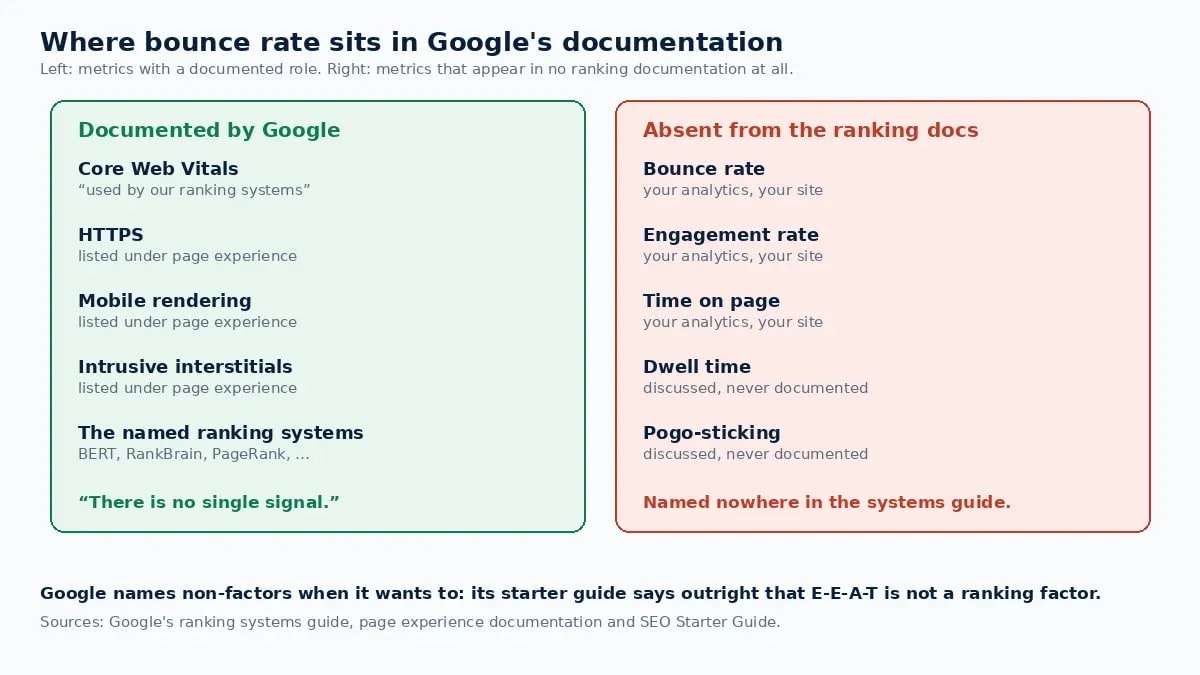
Moreover, that absence carries more weight than it might seem, because Google is willing to name non-factors explicitly when it wants to. Its SEO Starter Guide has a section called "Things we believe you shouldn't focus on", which states that "Google Search doesn't use the keywords meta tag", that "the length of the content alone doesn't matter for ranking purposes", and, flatly, on E-E-A-T: "Thinking E-E-A-T is a ranking factor. No, it's not" [2].
There is also a structural argument that does not depend on any statement. Google Analytics is software a site owner chooses to install. Most of the web does not run it, and sites running Plausible, Matomo, Fathom or nothing at all are ranked the same way. Consequently, a ranking system cannot depend on a number that exists for only some of its candidates.
A note on the Mueller and Illyes quotes. Googlers have said this repeatedly in videos, podcasts and on social platforms, and those statements are real. However, they are not documentation: they are not dated pages you can link to years later with confidence. If you need something citable, cite the ranking systems guide and the starter guide. That is what this section is for.
What GA4's bounce rate actually measures
Meanwhile, half the confusion around this question is a definition problem, and the definition changed.
In Universal Analytics, a bounce was any single-page session. Someone who landed on a 3,000-word guide, read it for twelve minutes and left counted exactly the same as someone who hit the wrong result and left in two seconds.
Then GA4 inverted the metric. Google's documentation defines an engaged session as one that meets any of these: "Lasts longer than 10 seconds, Has a key event, Has 2 or more screen or page views". Engagement rate is "the percentage of engaged sessions", and bounce rate is "the percentage of sessions that were not engaged" [4].
Three consequences are worth holding onto:
- A long single-page read is no longer a bounce. Anyone reading for more than ten seconds is engaged, however many pages they viewed.
- A fast, successful answer still is. Someone who arrives, reads a two-sentence definition in eight seconds, gets what they came for and leaves is counted as a bounce. The metric cannot tell that apart from a mis-click.
- Some events do not count.
first_visit,first_openandsession_startare excluded from engaged-session calculations even when marked as key events [4], so markingsession_startwill not quietly improve the number.
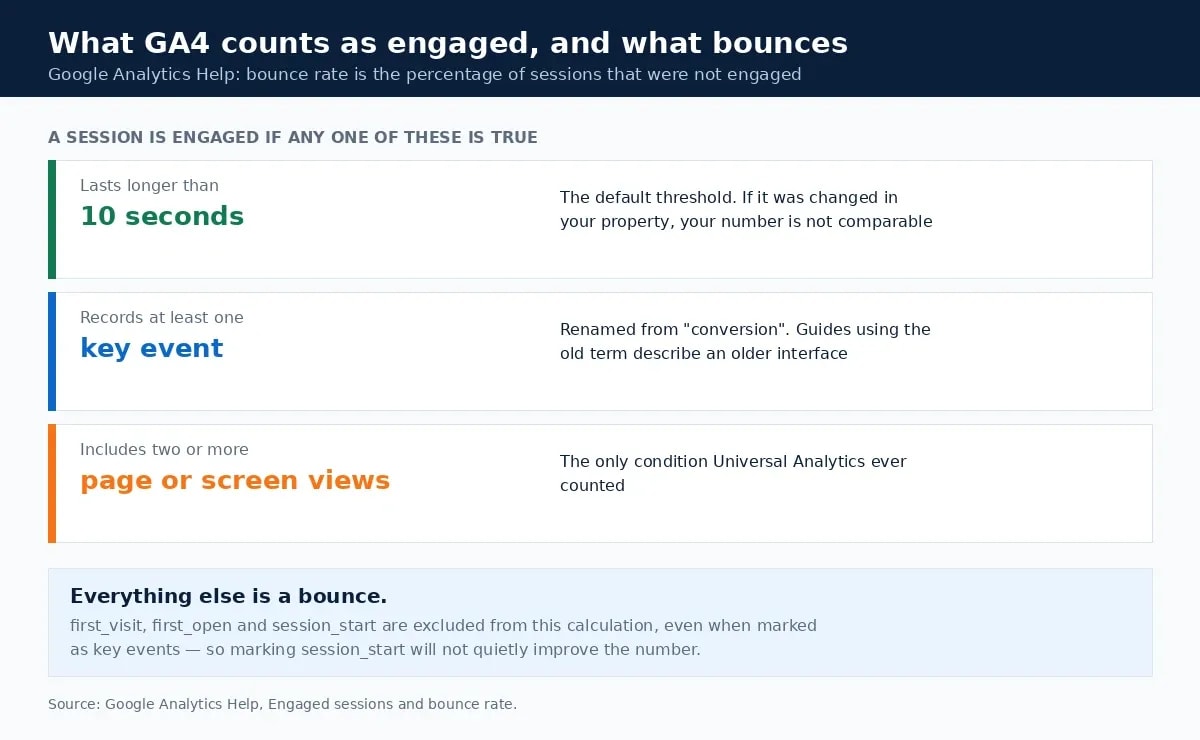
Note the vocabulary too. GA4 renamed conversions to key events, so any guide still saying "conversion event" here is describing an older interface.
So a GA4 bounce rate is not a satisfaction score. Instead, it measures sessions that failed one arbitrary ten-second test, on a metric Google Search never sees.
What Google does measure, and the difference that matters
Google Search observes what happens on its own results page. Which result someone clicks, whether they come back and click another, whether they rewrite the query: that behaviour is visible to Google because it happens on Google. Nevertheless, it is not the same thing as your bounce rate, and Google has never published a system that converts it into one.
What Google does document for the experience side is page experience, and the framing there is careful. "There is no single signal. Our core ranking systems look at a variety of signals that align with overall page experience" [3]. Core Web Vitals "are used by our ranking systems", but "getting good results in reports like Search Console's Core Web Vitals report or third-party tools doesn't guarantee that your pages will rank at the top", and "trying to get a perfect score just for SEO reasons may not be the best use of your time" [3].
Similarly, the quality rater guidelines describe satisfaction by the result, never by return behaviour. A result Fully Meets a need when "all or almost all users in the rating locale and user location would be completely satisfied by the result", and the guidelines add that "most queries cannot have a Fully Meets result" [5].
| Term | Where it is measured | Does Google Search use it? |
|---|---|---|
| Bounce rate | Your analytics, on your site | Not documented anywhere in the ranking systems guide [1] |
| Engagement rate | Your analytics, on your site | Same |
| Dwell time | Between a click and a return to the results page | Not a documented system; widely discussed, never published |
| Pogo-sticking | Google's results page | Not a documented system |
| Core Web Vitals | Field data from real Chrome users | Yes, documented, with no guarantee attached [3] |
When a high bounce rate is exactly right
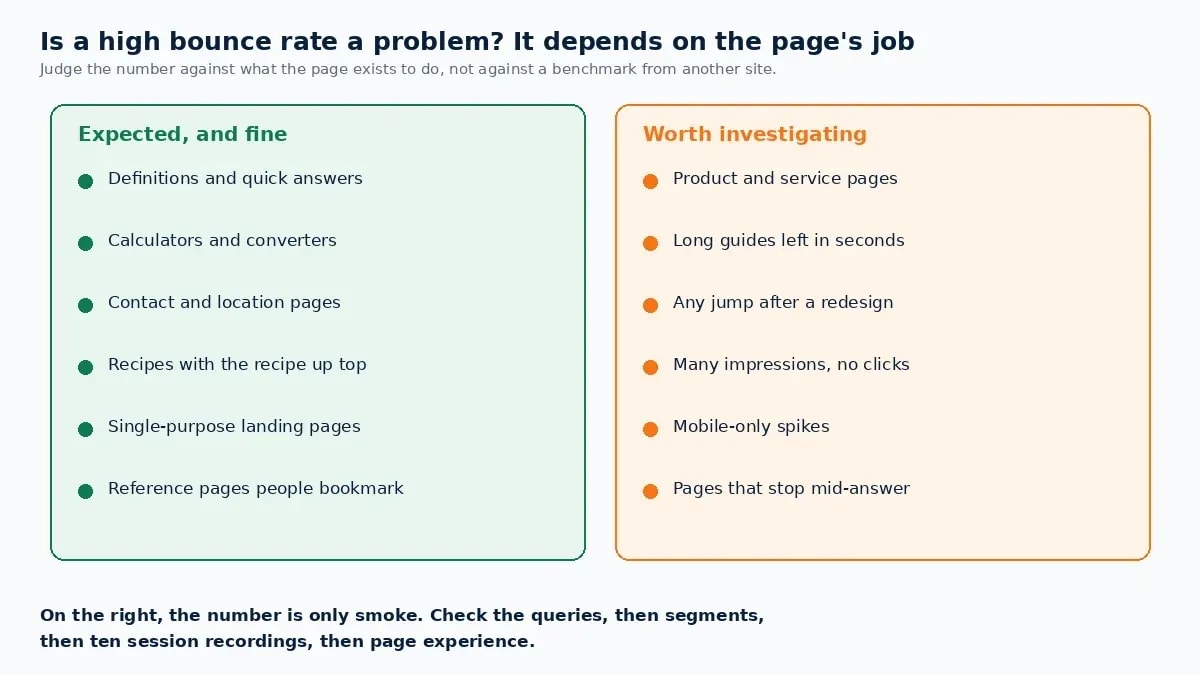
Bounce rate has no meaning until you know what the page is for. These page types should have high bounce rates, and a low one would be the warning sign:
- Definitions and quick answers. The visit ends when the question is answered.
- Calculators and converters. Someone runs the numbers and leaves.
- Contact and location pages. They wanted the phone number.
- Recipes with the recipe near the top. They are cooking now.
- Single-purpose landing pages. There is nothing else to click by design.
- Reference pages people bookmark. Repeat short visits are the point.
These pages fit Google's own description of a result that satisfies the need on the spot [5]. Otherwise, measuring them against an e-commerce benchmark produces a "problem" that is really the page working.
When a high bounce rate is worth investigating
Conversely, the metric earns attention when it contradicts the page's purpose:
- Product or service pages where visitors leave without reaching the next step.
- Long guides people leave in seconds, which suggests the page is not what the query promised.
- Any page whose number jumped after a redesign, a template change or a new consent banner.
- Pages with many impressions and no clicks, where the real problem is the listing rather than the page.
- Mobile-only spikes, which usually mean layout, speed or an interstitial.
In every case the number is the smoke. Ultimately, the diagnosis is elsewhere, and the rest of this page is that diagnosis.
Before you fix anything, check the number is real
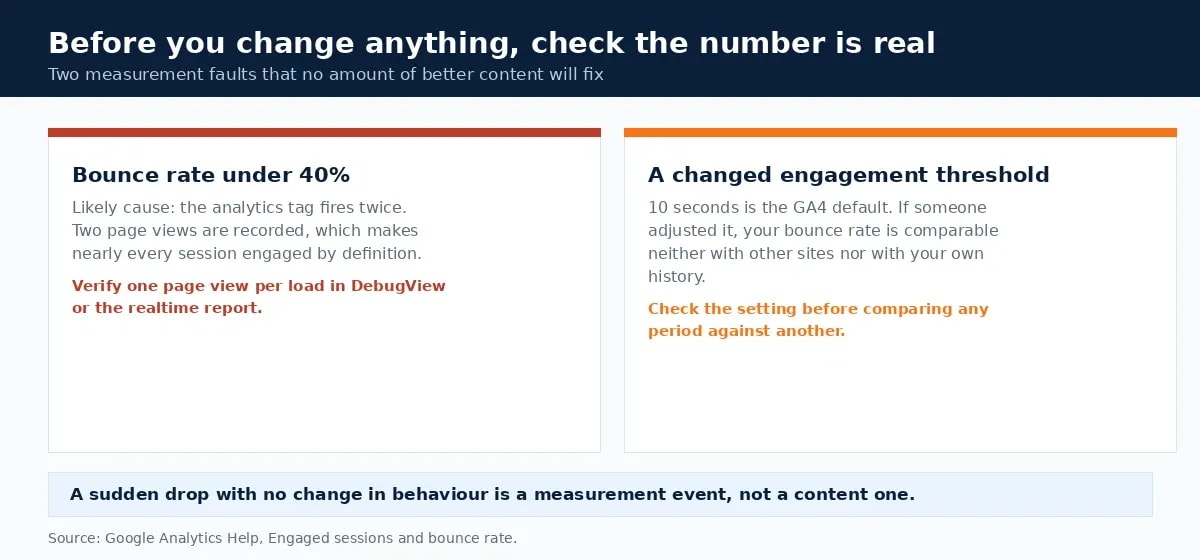
Two measurement faults account for a surprising share of alarming figures, and neither is fixed by better content.
- A bounce rate under 40% on a content site. The usual cause is an analytics tag firing twice, which registers two page views and makes nearly every session engaged by definition. Verify in DebugView or the realtime report that one page view fires per load.
- A changed engagement threshold. The 10-second rule is GA4's default [4]. If someone adjusted it, your bounce rate is comparable neither with other sites nor with your own history before the change.
Do this first. Otherwise every fix below gets credited or blamed for a measurement artefact.
The five causes, in the order worth fixing them
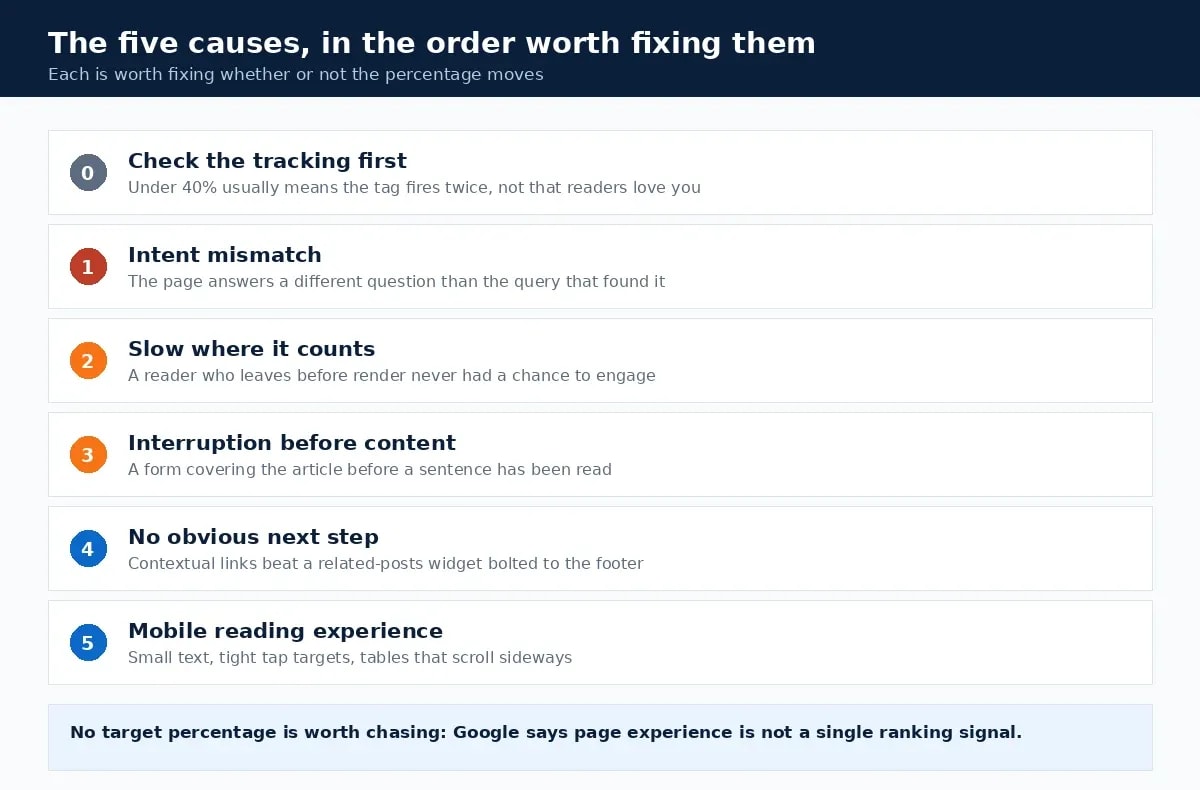
1. The page answers a different question than the query
This is the largest cause and the fastest fix. Somebody searches a specific question, lands on a page covering the general subject, and leaves within seconds because the answer is not visible.
The check is mechanical. Open Search Console, list the queries bringing impressions to the page, and read the first screen as if you had just typed each one. If the answer is not on that first screen, the page has an intent problem rather than an engagement problem.
Google's guidance frames this as whether content "provides substantial value when compared to other pages in search results" and whether the reader leaves feeling they have learned enough [8]. Therefore the fix is usually structural: answer the question in the opening paragraph, then expand. The search intent analysis guide covers classifying the query against the live results page.
2. The page is slow where it counts
A reader who leaves before the content renders never had a chance to engage, and under GA4's rule they will not reach ten seconds of anything worth counting.
The published thresholds are LCP under 2.5 seconds, INP under 200 milliseconds and CLS under 0.1, measured at the 75th percentile [6]. On a content page the largest element is almost always the main image, which makes image delivery the dominant variable. The image optimization guide covers the sequence.
Stop at "good" rather than chasing a perfect score, which Google says "may not be the best use of your time" [3].
3. The interruption arrives before the content
An email form that covers the article before a sentence has been read converts worse and costs more than one that appears after meaningful scrolling. Google's page experience guidance asks directly whether pages "avoid using intrusive interstitials" and whether readers can "easily distinguish the main content from other content" [3].
The practical rule is one interruption, delayed. Fire the form after the reader has scrolled past roughly half the article, rather than on a timer measured in seconds. Additionally, stacking a pop-up, a sticky footer bar and a sidebar widget is not three chances to convert. It is three reasons to leave.
4. There is nowhere obvious to go next
A reader who finishes and finds no relevant next step leaves, which is reasonable behaviour rather than a failure. Similarly, contextual links inside the body outperform a related-posts widget at the bottom. They appear at the moment the related question occurs.
Two or three genuine links per article is plenty. Each should answer a question the current paragraph raises, with anchor text describing the destination. Ultimately, link counts beyond that stop helping and start reading as filler.
5. The mobile reading experience
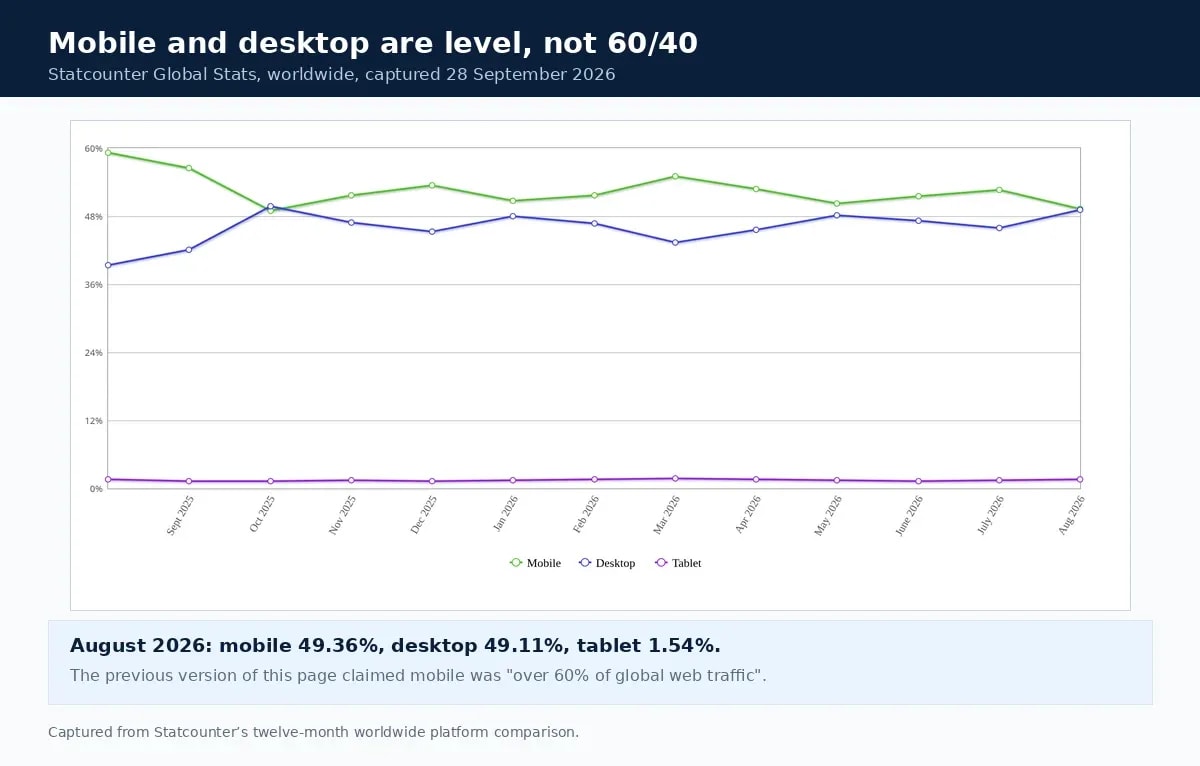
Mobile deserves attention on its own terms, although not for the reason usually given. Worldwide, mobile was 49.36% of traffic in August 2026 and desktop 49.11% [7]. The honest framing is that the two are level, not that mobile dominates.
What matters is that mobile failures are invisible on a desktop monitor. Body text below 16px, tap targets too small to hit accurately, tables forcing horizontal scrolling, a hero image pushing the first paragraph below the fold. Thus you should test on a real phone rather than a resized browser window, because the emulator will not reproduce a slow connection.
What not to do
- Chasing a target percentage. No bounce rate buys a ranking, because page experience is not a single signal [3].
- Adding pagination to a readable article. Splitting one post across five pages raises page views and degrades the thing being measured.
- Firing a timed event to force engagement. It changes the number and nothing else.
- Auto-playing anything. It produces an engagement signal and a departure in the same instant.
- Comparing Universal Analytics and GA4 figures. Different definitions; the comparison is meaningless [4].
- Using someone else's benchmark. Different content types, traffic mixes and engagement thresholds make those figures meaningless across sites.
- Reading a sitewide average. It mixes page types that should behave differently.
How to tell whether it worked
Measure the page against its own history, not against anyone else's number. Take a four-week baseline before the change, then compare the four weeks after. Additionally, read three things together: engagement rate, average engagement time, and whether Search Console impressions and clicks moved in the same direction.
If engagement rate rises while clicks stay flat, you improved the experience for the traffic you already had. Meanwhile, if both rise, the intent fix was the one that mattered.
Bottom line on bounce rate and SEO
Bounce rate does not affect SEO. It is not in Google's published list of ranking systems, it is produced by software most of the web does not run, and Google states plainly when something is not a factor, as it does for E-E-A-T. However, the metric can tell you where to look. Verify the tracking, confirm what your property counts as engaged, then work the five causes in order: intent, speed, interruptions, next steps, mobile. Each is worth fixing whether or not the percentage moves, which is the test of whether a fix was real.
Frequently Asked Questions
Is bounce rate a Google ranking factor?
No. Google publishes a guide to its ranking systems, and neither bounce rate nor any other Google Analytics metric appears in it. Bounce rate is calculated by analytics software installed on your own site; Google Search does not depend on it, and most sites on the web have no Google Analytics at all.
How does GA4 calculate bounce rate?
GA4 defines an engaged session as one that lasts longer than 10 seconds, has a key event, or has two or more page or screen views. Bounce rate is the percentage of sessions that were not engaged. Note that first_visit, first_open and session_start are excluded from the calculation even when marked as key events.
What is a good bounce rate?
One that matches what the page is for. A definition page, a calculator or a contact page should have a high bounce rate, because the visit ends when the job is done. A product page or a multi-step guide should not. Compare a page against its own history and its purpose rather than against a published benchmark.
Why did my bounce rate suddenly drop?
Check the tracking before celebrating. A bounce rate under 40% on a content site usually means the analytics tag fires twice, which registers two page views and makes almost every session engaged by definition. A sudden drop with no corresponding change in behaviour is a measurement event, not a content one.
How do you actually reduce a high bounce rate?
Verify the tracking, then work five causes in order: whether the page answers the query that found it, whether it renders fast enough to be read, whether an interruption arrives before the content, whether there is an obvious next step, and whether the mobile experience holds up. Each is worth fixing whether or not the percentage moves.
What should I track instead of bounce rate?
Track the outcome the page exists to produce, plus the Search Console data for the queries it actually attracts. Engagement rate and engaged time are useful context in GA4, and a session recording tool will show you why people leave. Those tell you something; bounce rate on its own does not.
Sources and References
- Google Search Central — A guide to Google Search ranking systems ↩
- Google Search Central — SEO Starter Guide, "Things we believe you shouldn't focus on" ↩
- Google Search Central — Understanding Google page experience ↩
- Google Analytics Help — [GA4] Engagement rate and bounce rate ↩
- Google — Search Quality Rater Guidelines (11 September 2025) ↩
- web.dev — Web Vitals thresholds ↩
- Statcounter — Desktop vs Mobile vs Tablet market share worldwide ↩
- Google Search Central — Creating helpful, reliable, people-first content ↩
Was this guide helpful?
Your answer helps Anobee improve future updates.

Written by
Bibek Thapa
AI-Powered Digital Growth Strategist
Bibek Thapa works across AI workflows, SEO, AI search optimization, content strategy, website growth, and productivity systems. Anobee documents practical lessons, tools, experiments, and systems for improving digital presence.
- AI workflows
- Digital growth
- SEO
- GEO
- AEO
- Content strategy
- Website growth