Content & Marketing
Email List Building Guide: What the Free Plans Actually Give You in 2026
By Bibek Thapa · Updated · 12 min read
Quick Answer
Email list building means collecting addresses from people who chose to hear from you, then sending to them without a platform in between. Pick a free plan that fits your list: Kit is free to 10,000 subscribers, beehiiv to 2,500, MailerLite to 250. Automations are paid on all three. Before the first send, set up SPF, DKIM and DMARC and add one-click unsubscribe.
Table of ContentsOn this page
- What email list building actually gets you
- Step 1: Choose a platform on what the free plan includes
- Step 2: Build one lead magnet worth an email address
- Step 3: Put the form where the intent already is
- Step 4: Meet the sender requirements before you send
- Step 5: Write the welcome sequence you actually promised
- Step 6: Segment the email list before it gets big
- Step 7: Keep the list legal and clean
- Common email list building mistakes
- Bottom line on email list building
- Frequently Asked Questions
- Sources and References
Key Takeaways
- Kit's free plan covers up to 10,000 subscribers, but visual automations and sequences start at $33/month.
- beehiiv Launch is free to 2,500 subscribers with unlimited sends; email automations begin on Scale at $43/month.
- MailerLite's free plan is now 250 subscribers and 2,500 emails a month, not the 1,000 it once was.
- Google asks bulk senders for SPF, DKIM and DMARC, spam rates under 0.10%, and one-click unsubscribe above 5,000 a day.
- Mailchimp's segmentation study found 100.95% higher clicks, but it was last updated in 2017 and should be read that way.
- Under CAN-SPAM you must honour an opt-out within 10 business days and include a valid physical postal address.
The advice in an email list building guide ages in two places: the price list and the rules for getting delivered. Both moved. This page previously pointed beginners at MailerLite's free plan as a fit for up to 1,000 subscribers. Today that plan stops at 250 subscribers and 2,500 emails a month [3]. It also implied free plans come with automation. On Kit, sequences and visual automations start at $33 a month [1]; on beehiiv, at $43 [2].
So this refresh rebuilds the platform section against each company's current pricing page, checked on 27 September 2026. It also adds the part the old version skipped entirely: Google's sender requirements, which decide whether any of this reaches an inbox.
A few things are gone. The CONVERT framework was invented for the article rather than drawn from anything, and a framework nobody else uses is a memory aid, not knowledge. The ROI and open-rate figures attributed loosely to "Litmus, HubSpot and the DMA" could not be traced to a specific published study, so they are out. One unfilled internal link placeholder has been filled.
What email list building actually gets you
An email list is a file of addresses belonging to people who asked for something. Ultimately, that is the entire mechanic, and it is why the channel survives every platform shift. Nobody ranks your newsletter. Nobody throttles it to 4% of your subscribers to sell you reach back.
However, it does not get you attention by default. A subscriber granted permission on a specific promise, and the permission lasts exactly as long as you keep it. Treat the list as an audience you have to re-earn each send and the numbers look after themselves.
The useful comparison is not email against social media. Social platforms are where people find you, while email is where the relationship continues on terms you control. Both have a job. Also, the social media marketing guide covers the discovery half.
Step 1: Choose a platform on what the free plan includes
The free tiers differ more than the marketing pages suggest. Moreover, the differences are the ones that bite later. Here is what each includes, taken from its own pricing page on 27 September 2026 and priced at a 1,000-subscriber list.
| Platform | Free plan | Automations on free? | First paid tier at 1,000 subscribers |
|---|---|---|---|
| Kit | Up to 10,000 subscribers, unlimited broadcasts, forms and landing pages, tagging and segmentation [1] | No — visual automations and sequences are paid | Creator, $33/month (or $390 a year) [1] |
| beehiiv | Launch: up to 2,500 subscribers, unlimited sends, custom domain, recommendation network [2] | No — email automations start on Scale | Scale, $43/month (or $517 a year) [2] |
| MailerLite | Up to 250 subscribers, 2,500 emails a month, 3 automations, 1 landing page, 3 forms [3] | Yes — three of them | Comfort, $12/month (or $10.80 billed yearly) at 500 subscribers [3] |
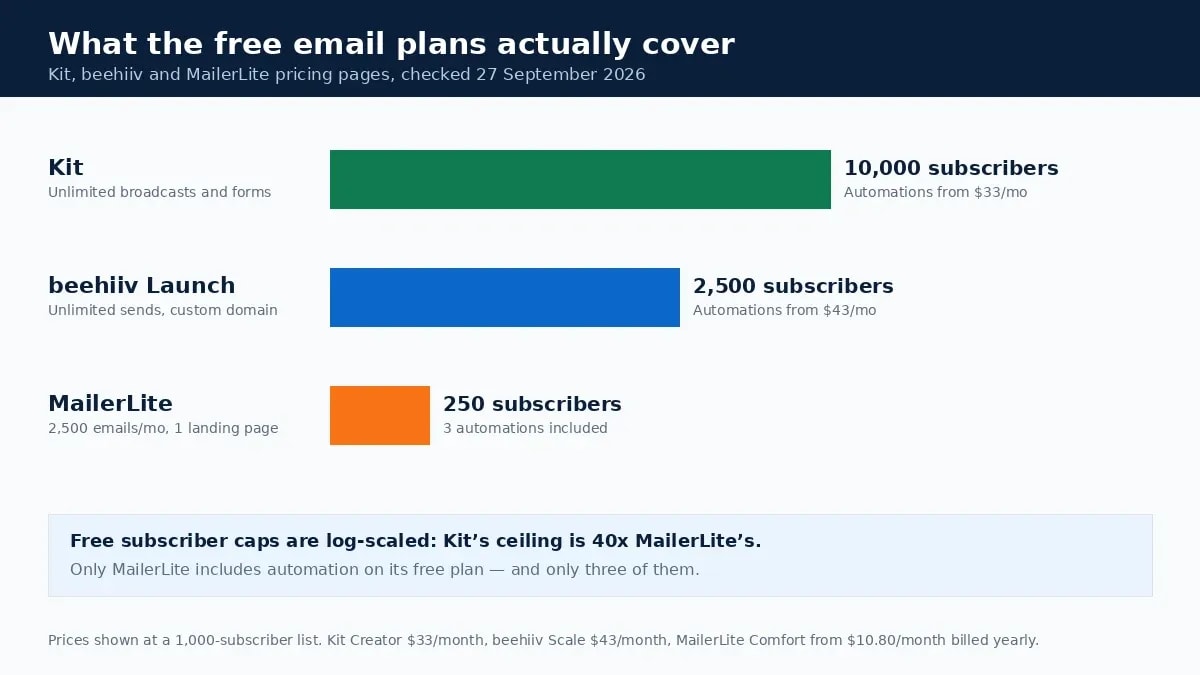
Three things follow from that table. Kit's free ceiling is unusually high, so a newsletter can run for a long time before paying. Similarly, MailerLite puts automation in the free plan, alone among the three, although its subscriber cap arrives quickly. Meanwhile, beehiiv sits between them, and its recommendation network is a growth channel the others do not match.

Therefore pick on the feature you will need in month three, not month one. Migrating a list is tedious rather than difficult, but the tedium is real, and it always arrives at the worst moment.

Step 2: Build one lead magnet worth an email address
A lead magnet is what somebody receives immediately in exchange for subscribing. The ones that work solve a narrow problem completely; the ones that do not are general guides on broad topics.
Specificity is the whole lever. "Complete guide to digital marketing" is a category. "A client-onboarding checklist for freelance designers who bill monthly" is a thing one person recognises as theirs. Furthermore, narrow offers make the follow-up obvious, because you already know why every subscriber joined.
Formats that hold up in practice:
- A checklist that replaces a task somebody is currently doing from memory.
- Templates and spreadsheets with the calculations already built.
- One real example torn down start to finish, decisions included.
- Swipe files of things the reader would otherwise write from scratch.
Skip the 40-page ebook. Although length signals effort to the author, it signals cost to the reader. Meanwhile, the profitable blog niche guide is the right place to start if you are not yet sure who the offer is for.
Step 3: Put the form where the intent already is
Placement beats design. Accordingly, a form inside a post about a problem converts better than a sidebar widget on every page. The reader is already thinking about the thing you are offering to fix.
- In-content forms, placed after the section that names the problem the lead magnet solves.
- A dedicated landing page with one offer, one field and no navigation, which is what you link to from elsewhere.
- Exit-intent, used sparingly and never on mobile, where it reads as an error rather than an offer.
- The end of your highest-traffic posts, where an interested reader has already spent several minutes.
Ask for the email address alone unless you will genuinely use the extra field. Every additional box is another reason to close the tab. Instead, if personalisation matters later, collect the name in the welcome email, where the person has already committed.
Step 4: Meet the sender requirements before you send
This is the section the old version of this email list building guide was missing, and it is the one that decides whether any of the rest matters. Google publishes requirements for sending to personal Gmail accounts, and they have applied since 2024 [4].
Every sender must:
- Authenticate with SPF or DKIM, and publish valid forward and reverse DNS records for the sending IP.
- Use a TLS connection for transmission.
- Keep spam rates in Postmaster Tools below 0.10%, and never reach 0.30% [4].
Send 5,000 or more messages a day to Gmail accounts and three more apply: SPF, DKIM and DMARC, a From header aligned with the sending domain, and one-click unsubscribe on marketing mail, implemented through the List-Unsubscribe-Post and List-Unsubscribe headers [4].

Most of this is a one-time setup inside your platform's domain settings, and every provider above documents it. Do it before the first send, not after a deliverability problem. Indeed, reputation is far easier to keep than to repair.
Step 5: Write the welcome sequence you actually promised
The welcome email is the one message you can be sure is wanted, because the person just asked for it. Deliver the lead magnet in it. No preamble, no company history, a link near the top.
After that, a short sequence does more than a long one. Three or four emails are enough to hand over the thing, explain who you are, show one more useful idea, and say what will arrive and how often. Consequently, setting that expectation is the cheapest retention work available.
If your platform's free plan has no automation, and on Kit and beehiiv it does not, the workaround is a manual broadcast schedule until the paid tier is worth it. Nevertheless, plan the sequence now: writing it later, under pressure, is how generic welcome emails get made.
Step 6: Segment the email list before it gets big
Segmentation means sending different messages to subscribers who joined for different reasons. Tag people by the lead magnet they chose, and you have a usable segment on day one at no cost.
Mailchimp's own study of roughly 11,000 segmented campaigns found segmented sends produced 14.31% higher opens and 100.95% higher clicks than the same senders' unsegmented ones [5]. That is a large effect, and it is worth reading with its date attached: the page was last updated in February 2017. Treat it as a direction, not a forecast.
The practical version is smaller than it sounds. Two or three segments, defined by why somebody subscribed, cover most of the benefit. Otherwise complexity costs more in maintenance than it returns in clicks.
Step 7: Keep the list legal and clean
US rules under CAN-SPAM are specific and cheap to follow. Honour an opt-out within 10 business days, include a valid physical postal address in every message, and never charge a fee or demand extra information as a condition of unsubscribing. The FTC puts penalties at up to $53,088 per email in violation [6].
UK and EU rules go further. Under PECR you generally need consent before emailing an individual. Nevertheless, a narrow soft opt-in covers existing customers who bought something similar and were given a way to opt out at collection and in every message since [7]. Bought lists satisfy none of that.
List hygiene is the other half. Remove hard bounces immediately, and consider unsubscribing people who have not opened anything in six months. Google recommends exactly that: periodically confirm subscribers still want to be there [4]. Thus a smaller engaged list delivers better than a large indifferent one, because the platforms grade you on engagement.
Common email list building mistakes
- Optimising the form before the offer. Button colour will not rescue a vague lead magnet.
- Collecting addresses with no plan for the first email. The silence after subscribing is where interest dies.
- Treating the free plan as permanent. Read the cap before you build on it, then price the upgrade you will hit.
- Emailing only when you have something to sell. Subscribers who hear from you only at launches learn to ignore launches.
- Importing contacts who never subscribed. Conference badges and old client lists are not consent.
- Chasing list size. A thousand engaged readers beat ten thousand dormant ones, and cost less to send to.
Bottom line on email list building
Email list building is a small number of decisions made in the right order: an offer specific enough to be worth an address, a form where the intent already exists, authentication done before the first send, and a welcome sequence that delivers what was promised. Platform choice matters less than the marketing suggests, but the free tiers are not what they were: 10,000 subscribers on Kit, 2,500 on beehiiv, 250 on MailerLite, with automation paid on two of the three. Check the cap against where you expect to be in six months, then stop thinking about tools and go write the thing people are subscribing for.
Frequently Asked Questions
What is email list building?
It is the practice of collecting email addresses from people who agreed to hear from you, usually by offering something specific in exchange, and then contacting them directly rather than through a social platform. The list is yours: no algorithm decides who sees your next message, and no platform change can take the addresses away.
Which email platform is free for beginners?
Kit's free plan covers up to 10,000 subscribers with unlimited broadcasts, forms and landing pages. beehiiv's Launch plan is free to 2,500 subscribers with unlimited sends and a custom domain. MailerLite's free plan is smaller at 250 subscribers and 2,500 monthly emails, but it does include three automations, which the other two reserve for paid plans.
How many subscribers do you need before email is worth it?
Fewer than most people assume, because the number that matters is revenue per subscriber, not list size. A hundred people who asked for a specific thing and got it will out-earn a few thousand collected through a generic 'subscribe for updates' box. Build the offer first and let the count follow.
What does Gmail require from email senders?
All senders need SPF or DKIM authentication and a valid forward and reverse DNS record, and should keep Postmaster Tools spam rates below 0.10%. Senders of 5,000 or more messages a day to personal Gmail accounts also need DMARC, aligned From headers, and one-click unsubscribe in marketing messages.
Is buying an email list ever a good idea?
No. Bought addresses never consented to hear from you, which breaks UK and EU rules outright and destroys the sender reputation your real subscribers depend on. Once spam complaints climb, the messages people did ask for stop arriving too.
Sources and References
- Kit — Pricing (Free to 10,000 subscribers; Creator $33/mo) ↩
- beehiiv — Pricing (Launch free to 2,500; Scale $43/mo) ↩
- MailerLite — Pricing (Free 250 subscribers, 2,500 emails) ↩
- Google — Email sender guidelines (authentication, spam rate, one-click unsubscribe) ↩
- Mailchimp — Effects of List Segmentation on Email Marketing Stats (updated 2017) ↩
- FTC — CAN-SPAM Act: A Compliance Guide for Business ↩
- ICO — Electronic mail marketing under PECR ↩
Was this guide helpful?
Your answer helps Anobee improve future updates.

Written by
Bibek Thapa
AI-Powered Digital Growth Strategist
Bibek Thapa works across AI workflows, SEO, AI search optimization, content strategy, website growth, and productivity systems. Anobee documents practical lessons, tools, experiments, and systems for improving digital presence.
- AI workflows
- Digital growth
- SEO
- GEO
- AEO
- Content strategy
- Website growth