Content & Marketing
Content Audit Guide (2026): A Working Process, Run on This Site's Own 241 URLs
By Bibek Thapa · Updated · 13 min read
Quick Answer
A content audit reviews every URL you have published, attaches real performance data to each one, and ends with one decision per page: keep, update, merge, redirect, noindex or delete. Build the inventory from your sitemap, pull 16 months of Search Console data, normalise the URLs first, then score each page on intent, decay and business value. Audit to make pages useful, not fresh.

Table of ContentsOn this page
- What a content audit is, and what it is for
- Step 0: normalise the URLs, or the audit will lie to you
- Step 1: build the inventory and reconcile the three counts
- Step 2: attach the data that supports a decision
- Step 3: find decay before it shows up as a traffic drop
- Step 4: check intent match against the live SERP
- Step 5: find cannibalisation, including the kind you created yourself
- Step 6: score every page, then decide
- Step 7: execute the content audit, link, and re-check
- The content audit checklist
- Common content audit mistakes
- Bottom line on running a content audit
- Frequently Asked Questions
- Sources and References
Key Takeaways
- Normalise URLs first. Search Console reports strings, not pages: 9 of Anobee's 10 top URLs were redirecting or legacy forms.
- Anobee's audit inventory: 241 URLs with impressions in 16 months against 94 in the sitemap and 119 indexed.
- Falling impressions with flat clicks is the early decay signal. It shows up months before traffic drops.
- Every URL gets exactly one action: keep, update, merge, redirect, noindex or delete. No page leaves the sheet undecided.
- Check backlinks and internal links before deleting. A page with no traffic but inbound links should be redirected, not removed.
- Google: removing unhelpful content "could help the rankings of your other content", but the signal reapplies over months.
Most content audit guides describe the process without ever running it. Consequently, the step that breaks real audits goes unmentioned. This refresh runs the process on Anobee's own site, and the first pass hit that step immediately. Search Console reported 241 URLs with impressions over 16 months, against 94 in the sitemap, and nine of the ten highest-performing URLs were addresses that no longer exist as pages.
The previous version of this page claimed ten "proven" steps and invented a framework called RANK. It also carried a case study about a 120-article blog that cannot be sourced, and left eight sections as empty headings with no table or content under them. All of that is gone. Instead, what is left is the process, the decisions, and this site's own numbers.
What a content audit is, and what it is for
A content audit is a structured review of every page you have published, ending in one decision per URL. The decision set is small: keep, update, merge, redirect, noindex, delete.
The reason to run one is not tidiness. Google's guidance on the 2022 helpful content update describes "a new site-wide signal". It states plainly that "any content, not just unhelpful content, on sites determined to have relatively high amounts of unhelpful content overall is less likely to perform well in Search" [1]. The same post says that "removing unhelpful content could help the rankings of your other content". However, it warns that the classification is reapplied "over a period of months" rather than lifting the moment you press delete [1].
There is a limit to that logic, and Google states it in the helpful-content guidance. Adding or removing a lot of content mainly because you think it will make the site look fresh does not work [2]. Therefore an audit that turns into a deletion spree is optimising for the appearance of a clean site rather than for readers.
Step 0: normalise the URLs, or the audit will lie to you
This is the step that separates a content audit from a spreadsheet. It is missing from most guides because most guides never pull real data.
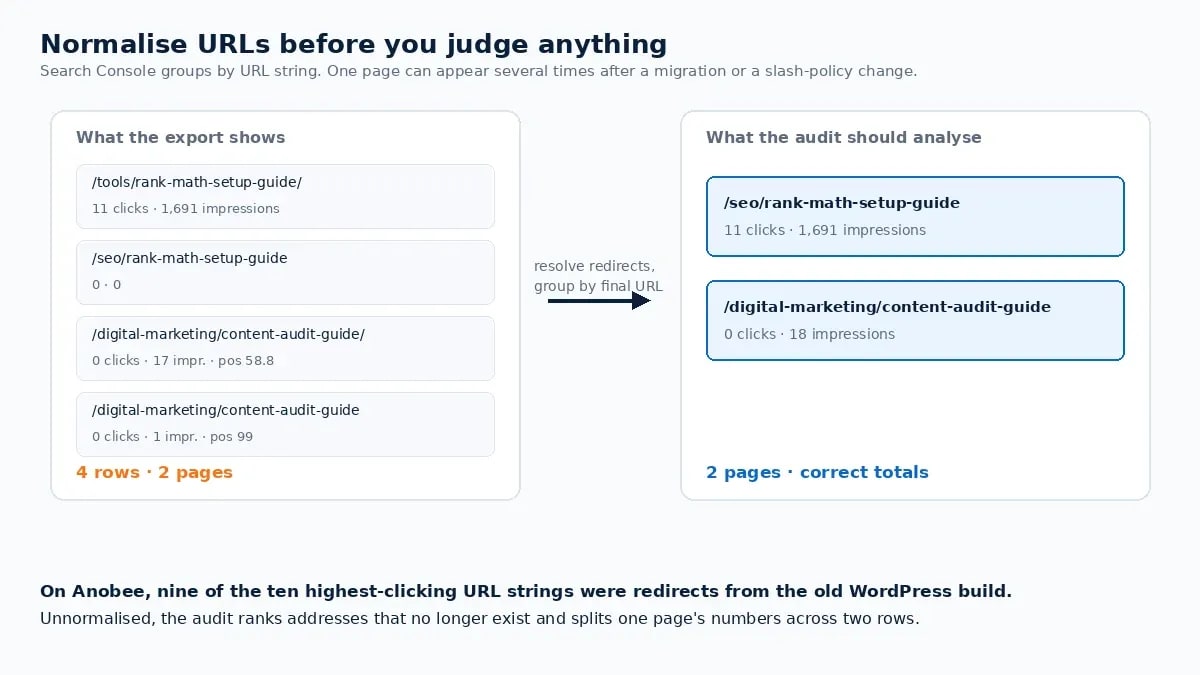
Search Console's Performance report groups by URL string, not by page. After any migration, slug change or trailing-slash policy change, the same page can appear under several strings. Meanwhile, old addresses keep accumulating impressions for months.
Anobee's own 16-month Pages report makes the point better than an explanation can. The ten URLs with the most clicks were:
| URL as reported by Search Console | Clicks | Impressions | What it actually is |
|---|---|---|---|
/online-business/earn-online-in-nepal-guide/ | 49 | 2,945 | 308 redirect to the no-slash form |
/ | 17 | 568 | The live homepage |
/online-business/affiliate-marketing-in-nepal/ | 12 | 935 | 308 redirect |
/tools/rank-math-setup-guide/ | 11 | 1,691 | 301 redirect to /seo/rank-math-setup-guide |
/online-business/google-adsense-low-value-content/ | 7 | 583 | 308 redirect |
/seo/keyword-research-for-nepali-blog/ | 7 | 251 | 308 redirect |
/online-business/google-adsense-approval-guide/ | 5 | 637 | 308 redirect |
/online-business/best-blogging-platforms-for-nepal/ | 5 | 428 | 308 redirect |
/tools/google-analytics-setup-guide/ | 4 | 2,021 | 301 redirect to a different section |
/about-us/ | 4 | 165 | 301 redirect to /about |

Nine of ten are not pages. They are strings Google still has on file from before this site moved off WordPress, each redirecting to the live URL. Consequently, an audit that treats that table as a ranking of pages will conclude the strongest content is a tools section that no longer exists.
So before analysing anything:
- Export the Pages report for 16 months.
- Strip the protocol and host, then resolve redirects. A quick crawl or a batch
curl -sIover the list gives you the final URL for each string. - Group rows by final URL and sum clicks and impressions.
- Mark any string whose final URL is a 404 as an inventory item in its own right. Those are redirect or removal decisions, not content decisions.
Only then does the spreadsheet describe pages.
Step 1: build the inventory and reconcile the three counts
Here are the three numbers to have in front of you before any judgement:
- URLs you publish. Anobee's sitemap: 94.
- URLs Google knows. The Page indexing report [4]: 518 known, 119 indexed and 399 not indexed, of which 174 are redirects and 135 are 404s.
- URLs earning impressions. The 16-month Pages report: 241.

The gaps are the content audit's opening findings. 241 earning URLs against 94 published means legacy addresses are still carrying a meaningful share of search visibility. Similarly, 119 indexed against 94 published means Google is indexing things outside your sitemap. Finally, the sitemap-filtered view of the indexing report, which on this site shows 73 of 94 submitted URLs indexed, tells you how the pages you actually care about are doing.
The Search Console setup guide covers getting these reports, and a crawler fills in the rest. Screaming Frog is free up to 500 URLs per crawl [5]. It returns titles, headings, status codes, canonical tags and word counts in bulk, which is everything the inventory needs that Search Console does not supply.
Step 2: attach the data that supports a decision
For each normalised URL, the minimum useful columns:
| Column | Source | What it decides |
|---|---|---|
| Clicks, impressions, CTR, average position (16 months) | Search Console Performance [3] | Whether the page has demand and visibility |
| Same four metrics for the previous period | Performance, comparison mode [3] | Decay direction |
| Indexed / not indexed and the reason | Page indexing report [4] | Whether the page is even eligible |
| Engagement rate, engaged time, key events | Your analytics | Whether arriving readers stay and act |
| Referring domains | A backlink tool, if you have one | Whether deleting would throw away links |
| Internal links in | Crawler | Whether other pages depend on it |
| Word count, title, H1, canonical | Crawler | Quick quality and duplication signals |
| Target query and current SERP type | Search Console plus a manual check | Intent match |
Sixteen months is not arbitrary. It is the longest window Search Console keeps, and it lets you compare a full year plus the run-up.
Step 3: find decay before it shows up as a traffic drop
Content decay rarely announces itself. The reliable early signal is impressions falling while clicks stay flat. Impressions move first when rankings slip from position 8 to position 15, while the page still catches a few clicks from brand or long-tail queries.
In the Performance report, set 16 months, switch on comparison with the previous period, open the Pages tab, and sort by impression change. Flag:
- Pages losing impressions with flat or rising clicks. Highest priority; they are still ranking but sliding.
- Pages that have lost five or more average positions. Second priority.
- Pages with high impressions and near-zero CTR. Often a title or intent problem rather than a content one.
Anobee's own case for the last category: this page recorded 17 impressions and 0 clicks at an average position of 58.8 over three months. At position 58 the CTR question does not arise, because the page is not being seen. That distinction matters. Ultimately the fix for position 58 is topical authority and links, not a new title tag.
Step 4: check intent match against the live SERP
Now open the target query in a private window and compare result types. If the top ten are step-by-step tutorials and your page is a definition piece, the intent has moved. If they are comparison pages and yours is a how-to, same conclusion.
Mark each page: match, partial, mismatch. A mismatch on a page with impressions is usually the highest-value rewrite in the audit, because the demand is proven and only the format is wrong. Meanwhile, the competitor content analysis process covers how to read the SERP properly rather than glancing at it.
Step 5: find cannibalisation, including the kind you created yourself
Two pages targeting one intent split signals. The usual check is to filter the Performance report by a query and see how many of your URLs appear for it. Then search site:yourdomain.com "target keyword" for a second view.
There is a second kind of cannibalisation that is entirely self-inflicted, and this site has it. The Search Console export for this very article lists two rows: /digital-marketing/content-audit-guide/ with 17 impressions at position 58.8, and /digital-marketing/content-audit-guide with 1 impression at position 99. One page, two URL strings, two positions. The slash version redirects and the canonical points at the no-slash form, so this will consolidate. Nevertheless, until it does the audit sees two entries.
Check three things agree for every page: the URL in the sitemap, the canonical tag, and the form your redirects settle on. Otherwise you get duplicate rows in every report you build for the rest of the content audit.
Step 6: score every page, then decide
Scoring exists to stop the content audit becoming a series of opinions. Five dimensions, 1 to 5 each:
| Dimension | 1 | 5 |
|---|---|---|
| Search demand | No impressions in 16 months | Consistent impressions on target queries |
| Trajectory | Falling impressions and position | Stable or rising |
| Intent match | Wrong format for the SERP | Matches the dominant result type |
| Quality and accuracy | Thin, stale, unsourced | Current, specific, sourced |
| Business value | No conversion or link value | Converts, or carries links and cluster weight |
Totals map to actions, and every URL gets exactly one:
| Total | Action | What it means |
|---|---|---|
| 20–25 | Keep | Leave it alone; re-check next cycle |
| 16–19 | Update | Refresh facts, tighten, add what is missing |
| 12–15 | Rewrite | The angle or format is wrong; the topic is right |
| 9–11 | Merge | Fold into a stronger page, then redirect |
| 7–8 | Redirect | Nothing worth keeping, but the URL has equity |
| 5–6 | Noindex | Useful to people, not a search asset |
| Below 5 | Delete | Only after the checks below |

Before deleting anything, confirm four things: no referring domains, no internal links you would break, no conversions in analytics, and no role in covering a topic your cluster needs. A page with zero traffic and two external links is a redirect, not a delete. Also keep Google's warning in view: content removed mainly to make a site look fresh does not earn rankings [2].
Step 7: execute the content audit, link, and re-check
Order the work by effort against expected return. Updates to pages already ranking on page two come first, merges second, deletions last. Deletions are the least reversible and the slowest to pay off [1].
When a refreshed page goes live, add internal links to it the same day from two or three related pages that already rank. This is the step most audits skip, and it is the one that gets the page re-crawled. Additionally, the technical SEO mistakes guide covers what else can hold a refreshed page back, and the topical authority guide covers where the page should sit in the cluster.
Then set the re-check. Record the date of each change in the audit sheet and look at the refreshed pages at 8 and 12 weeks against their own pre-change baseline. Keep the sheet rather than starting a new one next time. Ultimately, two dated columns on the same sheet turn an audit into a trend.
The content audit checklist
Before you start
Per page
Before removing a page
After executing
Common content audit mistakes
- Analysing URL strings instead of pages. The mistake this article's own audit hit first, and the reason nine redirecting URLs looked like top performers.
- Deleting on traffic alone. Links, internal links, conversions and topic coverage all outrank a zero in the sessions column.
- Pruning for freshness. Google says directly that this does not work [2].
- Expecting an immediate recovery. The helpful-content signal is reapplied over months [1].
- Refreshing without internal links. The page has no new path for a crawler to follow.
- Ignoring positions 5 to 20. These pages already have demand and standing; they are the cheapest wins in the sheet.
- Auditing once. Keep the sheet, add dated columns, and re-run the decay check quarterly.
Bottom line on running a content audit
A content audit is a decision-making exercise with a spreadsheet attached, not a spring clean. Normalise the URLs before you judge anything, because Search Console reports strings and a migration leaves plenty of them. Then reconcile what you publish, what Google knows and what earns impressions, and find decay while it is still only impressions. Give every URL one action, check links before deleting, and add internal links the day a refresh ships. Finally, keep the sheet so the next audit compares rather than restarts.
Frequently Asked Questions
How do you do a content audit?
Build an inventory of every URL from your sitemap, attach 16 months of Search Console data plus engagement data from analytics, normalise the URLs so redirects and duplicate forms do not double-count, then judge each page on intent match, decay, cannibalisation and business value. Finish by assigning exactly one action per URL and scheduling a re-check.
How often should you run a content audit?
A full pass every 6 to 12 months suits most sites, with a lighter decay check each quarter. Run one immediately after a migration, a CMS change, a significant traffic drop, or before applying to an ad or affiliate programme that reviews content quality.
Should you delete low-traffic pages?
Only after checking what else the page carries. Traffic is one signal; backlinks, internal links, conversions and topical coverage are others. A page with no traffic but two referring domains is a redirect candidate, not a delete. Google also warns against removing content mainly to look fresh.
What is content decay and how do you spot it?
Content decay is a slow decline in a page's impressions, clicks or average position. The earliest reliable signal is falling impressions while clicks stay flat, visible in Search Console when you compare 16 months against the previous period. Pages that have lost five or more positions are the next tier.
What tools do you need for a content audit?
Search Console, your analytics, a spreadsheet and a crawler. Screaming Frog is free up to 500 URLs and supplies titles, headings, status codes and word counts in bulk. Paid tools add backlink counts and keyword difficulty, which help prioritise but are not required to complete the audit.
Sources and References
- Google Search Central — What creators should know about the August 2022 helpful content update ↩
- Google Search Central — Creating helpful, reliable, people-first content ↩
- Google Search Console Help — Performance report (pages, dates, comparison) ↩
- Google Search Console Help — Page indexing report ↩
- Screaming Frog — SEO Spider pricing and free version limits ↩
Was this guide helpful?
Your answer helps Anobee improve future updates.

Written by
Bibek Thapa
AI-Powered Digital Growth Strategist
Bibek Thapa works across AI workflows, SEO, AI search optimization, content strategy, website growth, and productivity systems. Anobee documents practical lessons, tools, experiments, and systems for improving digital presence.
- AI workflows
- Digital growth
- SEO
- GEO
- AEO
- Content strategy
- Website growth