

Quick Answer: If you blog, you probably need AI tools by now. The ones I actually use are Claude for writing and ChatGPT for images. Here is why those two and not the other eight.
You have probably noticed every “best AI writing tools” list looks the same. ChatGPT here, Jasper there. Same feature table copied from one article to the next. The Backlinko AI writing comparison does it well but misses real workflow. What these reviews miss is how the tools actually behave when you are staring at a blank screen at 11 PM with a deadline tomorrow. If you are using AI tools for blogging, you need real workflow details, not feature tables.
I have been testing AI writing tools on anobee.com since mid-2025. Over a dozen of them, across maybe a hundred articles by now. What I settled on is simple: Claude for content, ChatGPT for images. No single tool does everything well, and trying to find one that does is a waste of time. Match the tool to the task instead.
Why Bloggers Need AI Writing Tools for Bloggers 2026
Blogging is more competitive than it was two years ago. According to Ahrefs on AI writing tools, the landscape shifts every quarter. The average first-page result on Google runs over 2,000 words. Publishing at that depth weekly takes real time. AI tools help by handling the mechanical parts: structure, grammar, keyword placement, formatting and optimizing AI content for search. You still have to bring the experience and the opinions.
Google allows AI-assisted content if it shows E-E-A-T. Google’s AI content guidance makes this clear. In practice, the AI can write the draft, but the personal experience, the specific examples, the original insight need to come from you. The tool is an accelerator, not a replacement. Bloggers who treat it like one get penalized. Bloggers who treat it like an assistant and edit the output actually see results.
The best AI writing tools for bloggers 2026 are not about replacing the writer. They are about removing friction. When you remove the friction of staring at a blank page, you write more. When you write more, you get better. When you get better, your traffic grows. That is the real value these tools bring.grows. That is the real value these tools bring.
1. Claude (Best for Long-Form Content)
Best for full blog posts, guides, tutorials. $20/month for Pro, handles 100K tokens per conversation.
Claude is my main tool. When I ask it to write a 3,000-word guide, the output reads like something I would have written after editing it myself. The tone holds, the structure makes sense, the sentences do not all sound the same length. That evenness is harder to get from other tools than you would expect.
I paste my entire outline, research notes, keyword list into one prompt and Claude produces a coherent article that follows my structure. That alone saves about an hour per post. The 100K token context window means I can feed it multiple source articles and ask it to synthesize them into something new without losing track of the original points.
The free tier runs out fast. If you write multiple articles daily, you need Pro. At $20/month it pays for itself quickly. I have tried cheaper options and the editing time they require ends up costing more in labor than you save on subscription.
When I started using Claude in mid-2025, I published 2 articles per week. Within 3 months I was publishing daily. Not because Claude wrote them for me, but because drafting went from 4 hours to 1 hour. That time adds up. Over a year, that is roughly 700 extra hours I can spend on promotion, link building, and improving older posts.
Claude also handles formatting well. Give it markdown instructions and it follows them. Headings, bullet lists, bold text, table structures all come out clean. That might sound minor, but when you publish daily, every minute you save on formatting is a minute you spend on making the content better.
2. ChatGPT (Best for Image Generation + Brainstorming)
Best for blog images, headline ideas, brainstorming. Free with GPT-4o mini, $20/month for DALL-E access.
I use ChatGPT for images and planning, not for writing. The DALL-E integration produces blog-ready featured images and saves me from digging through stock photo sites. That alone saves maybe $50 a month on stock photo subscriptions. The images are custom to my content, so they do not look generic.
When I am stuck on article angles or need headline variations, ChatGPT generates 20 options in seconds. The brainstorming alone is worth the subscription. I will type a topic and ask for ten different angles. Usually the sixth or seventh option sparks something I would not have thought of on my own.
For writing full articles though? Not great. Articles written entirely in ChatGPT need heavy editing to sound natural. The tone turns generic, the structure gets repetitive. I have also found ChatGPT less reliable for research compared to Claude. More fact-checking needed. It tends to make confident statements that sound plausible but are not always accurate.
The search feature in ChatGPT is useful for research. You can ask it to look up current data on a topic and it pulls from live sources. I use this for fact-checking statistics and finding recent examples to include in my posts.
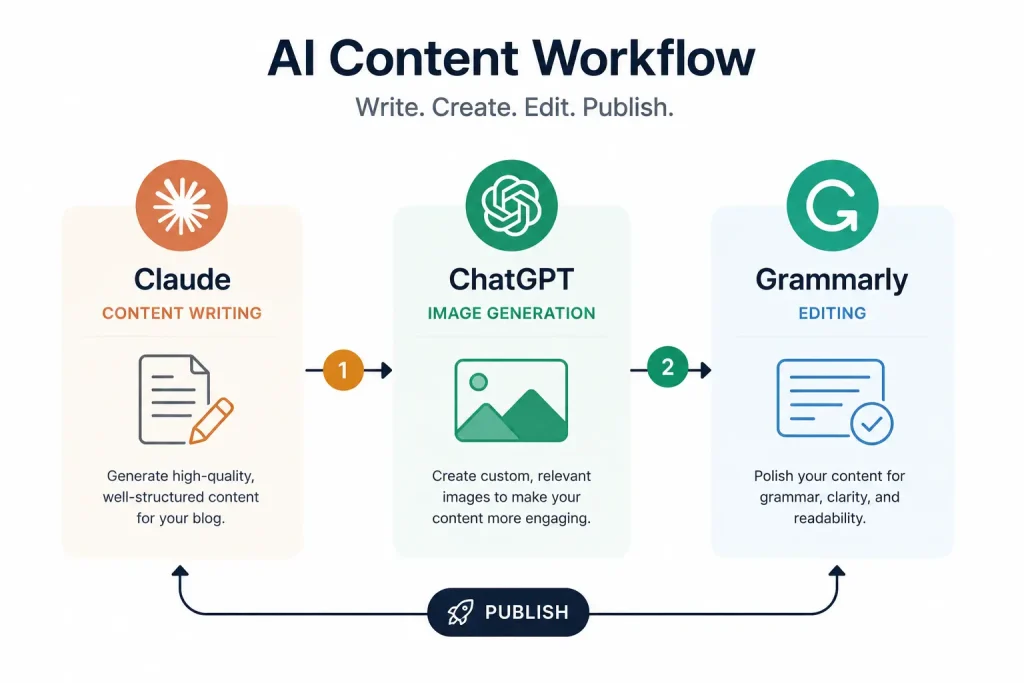
My setup: ChatGPT for images, Claude for content. Each does what the other cannot. For bloggers looking at AI writing tools for bloggers 2026, this two-tool approach beats any single all-in-one solution I have tested.
3. Jasper (Best for Marketing Copy)
Best for sales pages, email sequences, ad copy. $49/month for Creator, $69/month for Pro.
Jasper targets marketers, not general bloggers. The template library covers email campaigns, Facebook ads, Google ads, product descriptions. If you write marketing copy regularly, this is your tool. The templates guide you step by step through each format, so you do not need to figure out structure from scratch.
The brand voice feature trains Jasper on your existing writing. Feed it a few blog posts and it matches your tone. The SEO mode works with Surfer SEO and suggests keywords to include. For blogs that also run e-commerce or sell digital products, Jasper bridges the gap between content writing and sales copy.
But $49/month is expensive for a solo blogger writing articles. Jasper makes sense for marketing teams. For someone running a single blog, probably not worth it unless you also sell products. I tested Jasper for three months and found the output quality good but not significantly better than Claude for article writing. Where Jasper wins is in the structured templates. If you write the same type of content over and over, the templates save setup time.
4. Copy.ai (Best Free Tier)
Best for short content, social posts, email lines. Free for 2,000 words/month, $36/month for Starter.
Copy.ai has the most generous free tier among serious tools. 2,000 free words per month is enough to test it or publish a few short posts. For a beginner blogger who is not sure if AI writing tools are worth investing in, this is the safest starting point.
The interface is clean. Workflow templates guide you through specific content types instead of a blank chat box. The chat mode works well for quick output like social captions. I use Copy.ai for Twitter threads and LinkedIn posts because the short-form output needs almost no editing.
For long-form content, Copy.ai does not match Claude. Works best under 500 words. Anything longer needs restructuring. The free tier word limit also makes long-form impractical. But as a companion tool for social content and short pieces, it earns its place in the stack.
5. Writesonic (Best for SEO Content)
Best for SEO articles, product descriptions. Free trial, $19/month for Business.
Writesonic has built-in SEO features. Give it a keyword. It suggests headings, word count, semantic terms before you start writing. Output scores well on SEO tools out of the box. The article writer takes your keyword and produces a structured draft with proper heading hierarchy.
The WordPress plugin makes publishing easy. Write in Writesonic, export, and Rank Math picks up the SEO score. Setting up Rank Math for SEO ensures your articles meet technical requirements. The integration reduces the technical SEO work you need to do manually.
Output has improved in 2026 but still needs editing for tone. Writesonic articles over-optimize for keywords. They sound robotic without a human pass. I have found that Writesonic works best as a starting structure that I then rewrite in my own voice. The headings and keyword placement are solid. The actual sentences need work.
For bloggers focused purely on SEO traffic, Writesonic offers more built-in optimization than any other tool on this list. But do not publish the raw output. Treat it as a structured first draft.
6. Google Gemini (Best Integration)
Best for Google Workspace users, research, data analysis. Free with 1M token context, $19.99/month for Advanced.
Gemini lives inside Google products. If you use Google Workspace, Gemini works across Docs, Gmail, and Sheets. You can draft blog posts in Google Docs with AI help. That seamless integration is its biggest advantage. No copy-pasting between tools. Just write with AI assistance directly in your document.
The 1 million token context window is the largest of any tool. You can paste entire research papers and ask Gemini to summarize them. The Google Search grounding pulls more current data than tools without live search. This makes Gemini excellent for research-heavy articles where you need up-to-date facts.
Writing quality is behind Claude. Gemini is good at analysis and research. For blog content, the output is generic. It lacks the natural voice that Claude produces. I use Gemini for research and outlining, then switch to Claude for the actual writing.
The free tier is generous. 1M token context at no cost makes Gemini the best research assistant among AI writing tools for bloggers 2026. Just do not rely on it for the final draft.
7. Grammarly (Best for Editing)
Best for grammar checks, tone fixes, clarity. Free basic, $12/month for Premium.
Grammarly is not a writing generator. It is an editor. After Claude finishes a draft, I run it through Grammarly for one final pass. This catches the small errors that slip through during a fast writing session.
It catches the patterns AI writing tends to leave behind: passive voice, repetitive sentence starts, unnatural phrasing. The tone detector helps keep things conversational. The readability score tells you if your sentences are too dense for a general audience.
It does not replace human editing. Catches grammar, not bad facts or missing experience. But as a safety net before hitting publish, it is essential. Every article I publish goes through Grammarly. The Premium tier at $12/month is worth it for the tone and clarity suggestions alone.
8. ProWritingAid (Best for Deep Editing)
Best for detailed writing analysis. Free limited, $30/month for Premium.
ProWritingAid goes deeper than Grammarly. Checks readability, sentence length variation, pacing, overused words. If you want to improve your writing over time, the reports are genuinely useful. The weekly progress reports show how your writing changes.
The sticky sentences report alone has made my writing clearer. It flags sentences that are hard to read and suggests splits. Over time, you learn to write cleaner sentences from the start.
But the interface is more complex than Grammarly. For a quick proofread, Grammarly is faster. ProWritingAid is better for a deep edit once a week on your most important articles. I use it monthly on cornerstone content that I plan to update and keep as evergreen.
9. Rytr (Best Budget Option)
Best for tight budgets, short content. Free for 10K chars/month, $9/month for Saver.
At $9/month, Rytr is the cheapest paid AI writing tool. For a blogger just starting out with zero budget, it provides basic capabilities. The Saver plan at $9 is accessible even when your blog is not making money yet.
Supports 30+ languages. Templates cover 40+ content types. The use case library is useful for experimenting with different content formats.
Output quality is noticeably lower than Claude or ChatGPT. Rytr articles need significant editing. Works for short posts but struggles beyond 1,000 words. I see Rytr as a training tool. Use it to understand what AI can do, learn prompting, then upgrade when you outgrow it.
10. Sudowrite (Best for Creative Writing)
Best for storytelling, narrative content. $19/month for Hobby, $29/month for Professional.
Sudowrite is built for creative writers but works for bloggers who write narrative content. The Story Engine generates complete structures. The Describe feature expands flat sentences into vivid descriptions. The Rewrite feature offers multiple versions of the same sentence in different tones.
It is excellent for blog introductions and conclusions. If you struggle with opening hooks, Sudowrite generates 10 approaches. The first five are usually generic. The last five often have something interesting.
For standard how-to or listicle posts, it is overkill. Best for bloggers who blend storytelling with information. If your blog relies on personal narratives and detailed descriptions, Sudowrite is worth the $19/month. If you write straightforward tutorials, skip it.
AI Writing Tools Comparison Table
When comparing AI writing tools for bloggers 2026, the most important factors are content quality, pricing, and specific use cases. No single AI writing tool for bloggers works for every task. The best AI writing tools for bloggers 2026 combine writing, editing, and image generation into a workflow.
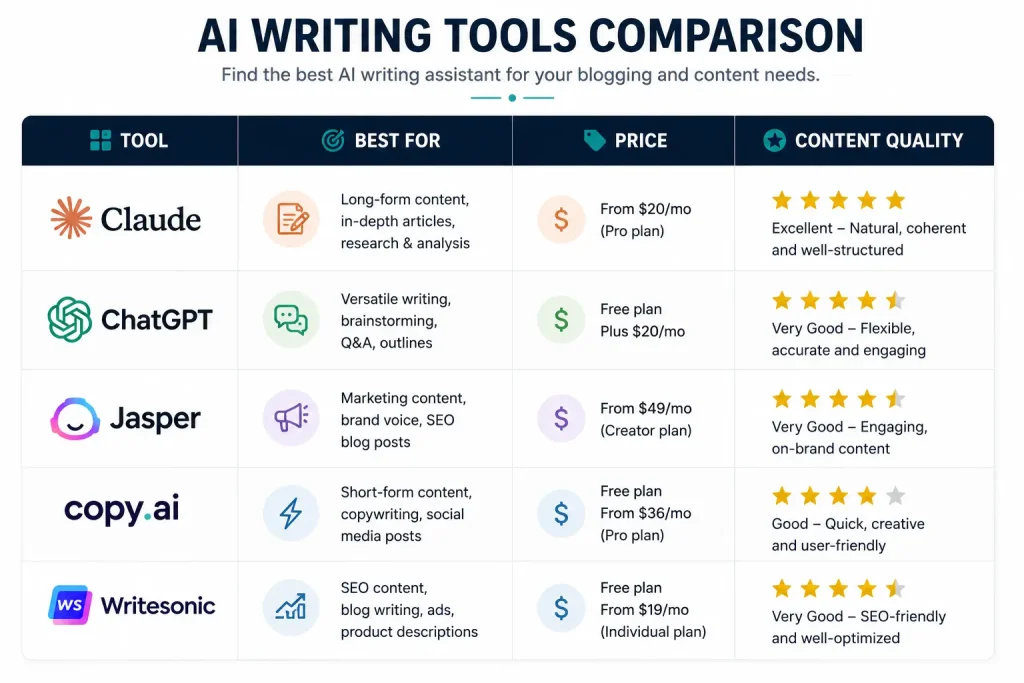
| Tool | Best For | Free Tier | Paid Starts At | Word Limit | Content Quality | Image Gen |
|---|---|---|---|---|---|---|
| Claude | Long-form content | Yes (limited) | $20/month | 100K tokens | Excellent | No |
| ChatGPT | Images + Brainstorming | Yes (GPT-4o mini) | $20/month | Varies | Good | Yes (DALL-E) |
| Jasper | Marketing copy | No | $49/month | Unlimited | Good | No |
| Copy.ai | Short-form content | Yes (2K words) | $36/month | Unlimited | Good | No |
| Writesonic | SEO content | Yes (trial) | $19/month | Unlimited | Good | No |
| Gemini | Research + Analysis | Yes (1M tokens) | $19.99/month | 1M tokens | Good | No |
| Grammarly | Editing | Yes (basic) | $12/month | Unlimited | N/A (editor) | No |
| ProWritingAid | Deep editing | Yes (limited) | $30/month | Unlimited | N/A (editor) | No |
| Rytr | Budget writing | Yes (10K chars) | $9/month | Unlimited | Fair | No |
| Sudowrite | Creative writing | No | $19/month | Varies | Excellent | No |
Which AI writing tool for bloggers 2026 is right depends on what you write.
This depends on what you write. There is no universal best tool. The right choice depends on your content type, budget, and publishing frequency.
Long guides over 2,000 words? Get Claude Pro. Needs the least editing of any tool I have tested. The combination of context window, tone consistency, and formatting reliability makes it the best choice for in-depth content.
Need blog images? Add ChatGPT Plus. The $20/month replaces what you would spend on stock photos anyway. Custom images also perform better in Google Discover than stock photos.
Tight budget? Start with Copy.ai free tier for short posts and Rytr at $9/month for longer ones. Pair them with free SEO tools for bloggers to maximize visibility. Upgrade when your blog makes money. The key is to start using AI tools early so you build the habit of editing AI output before it becomes critical to your workflow.
Marketing content? Jasper at $49/month is worth it if you regularly write sales pages and email sequences. The ROI comes from conversion-optimized copy, not from word count.
SEO focused? Writesonic at $19/month gives you built-in keyword optimization that reduces the time you spend on SEO setup. Pair it with Claude for the actual writing.
My stack: Claude for writing, ChatGPT for images, Grammarly for editing. $52/month total. Covers everything I need. This combination of AI writing tools for bloggers 2026 gives me the best output quality across all content types I produce.
Which AI writing tool is best for SEO?
Claude and Writesonic. Claude writes naturally optimized content. Writesonic has built-in SEO scoring. Use Claude for the draft, then run through Rank Math before publishing. Follow the Rank Math 100/100 guide for best results.
Can Google detect AI-written content?
Google does not penalize AI content that meets quality standards. The key is human editing for accuracy, personal experience, and E-E-A-T signals. Publish raw AI output and you risk it.
What is the cheapest AI writing tool?
Copy.ai gives 2,000 free words per month. Rytr starts at $9/month for paid. Both work for beginners.
Do AI writing tools help with rankings?
Indirectly, yes. They help you publish more content faster, building topical authority. But Google ranks on E-E-A-T, not on whether AI wrote it. You still need to add the experience and original insight yourself.
Which tool do professional bloggers use?
Most professionals I know use Claude for writing and ChatGPT for images. The trend is toward specialized stacks, not all-in-one tools.