AI Tools & Workflows
AI Marketing Tools: 8 Picks by Job, With Free Plan Limits Checked
By Bibek Thapa · Published · 10 min read
Quick Answer
Start with one tool per marketing job, not a suite. ChatGPT covers ideas and drafts, Canva covers design, Buffer covers social scheduling, Mailchimp or HubSpot covers email and contacts, Zapier connects them, Descript edits video, and Google Ads and Meta already include AI for ads at no extra fee. Every one of these has a free plan, so test before you pay.
Table of ContentsOn this page
- AI marketing tools at a glance
- Which AI marketing tools made this list?
- 1. ChatGPT: the assistant behind every other job
- 2. Canva: design and ad creative for non-designers
- 3. Buffer: social scheduling with an AI assistant
- 4. Mailchimp: email marketing, but check the plan for AI
- 5. HubSpot: an AI marketing platform for contacts, email and ads
- 6. Zapier: the glue between your AI marketing apps
- 7. Descript: AI video and podcast editing
- 8. Google Ads and Meta: the AI you already have
- Free AI marketing tools: a 0 USD starter stack
- A paid stack for about 60 USD a month
- How to choose AI marketing tools without wasting money
- Frequently Asked Questions
- Sources and References
Key Takeaways
- Pick AI marketing tools by job: writing, design, social, email, CRM, automation, video and ads. One tool per job beats one big suite for small teams.
- Every tool here has a free plan, but the limits differ: Buffer allows 3 channels, Zapier 100 tasks a month, Descript 60 media minutes a month.
- Check where the AI sits: Mailchimp's generative AI features are not included in its Essentials plan, only in Standard and Premium.
- Google Ads Performance Max and Meta Advantage+ apply AI to bidding, placements and creative inside the ad platforms, with no separate fee listed.
- A paid starter stack of ChatGPT Plus, Canva Pro, Buffer and Mailchimp Standard costs about 60 USD a month at the prices shown on 2 November 2026.
The best AI marketing tools for a small team are not one big platform. They are one tool per job. You need an assistant for words, a design tool, a scheduler and an email or CRM tool. Add something to connect them, a video editor, and the AI already inside your ad accounts. Every tool below has a free plan, so you can learn which jobs you actually repeat before paying.
How this list was built: on 2 November 2026, Anobee read each vendor's official pricing page in a signed-out browser. For each one we recorded the free plan, the first paid plan and where the AI features sit. No paid accounts were bought, and nothing here is a performance test. Some vendors show local prices, and these pages were opened from Nepal. Check the page in your own country before you buy.
AI marketing tools at a glance
| Job | Tool | Free plan, as listed | First paid plan, as listed |
|---|---|---|---|
| Ideas, drafts, research | ChatGPT | Unlimited text chats, limited uploads and images [1] | Plus, 20 USD a month [1] |
| Design and ad creative | Canva | Limited AI, 1 Brand Kit, 5 GB storage [2] | Pro, price varies by country [2] |
| Social scheduling | Buffer | 3 channels, 10 queued posts each, AI Assistant [3] | Essentials, 5 USD a month per channel, billed yearly [3] |
| Email marketing | Mailchimp | Basic plan for very small lists [4] | Standard from 20 USD a month, with generative AI [4] |
| CRM and campaigns | HubSpot | Free tools for up to 2 users [5] | Starter from 20 USD a month per seat, offer price lower [5] |
| Connecting tools | Zapier | 100 tasks a month, two-step Zaps [6] | Professional from 19.99 USD a month [6] |
| Video and podcasts | Descript | 60 media minutes a month, 720p export [7] | Hobbyist 16 USD a month billed yearly [7] |
| Paid ads | Google Ads and Meta | AI built into campaign types [8] [9] | No separate AI fee listed; you pay for ads |
Only need writing help? Anobee's comparison of the best AI writing tools for bloggers goes deeper on Jasper, Copy.ai and Claude. For search work, see the best AI SEO tools by budget. This page covers the rest of the marketing week.
Which AI marketing tools made this list?
Here, an AI marketing tool is software that uses generative AI or machine learning for part of a marketing job. It might write a draft, make an image, suggest a post, segment contacts, run an automation or place an ad. That is a wide net, so two rules decided the picks:
- It does a job a solo marketer or small business repeats every week. Enterprise suites that start with a sales call are left out.
- It has a free plan. You should be able to try the workflow before the bill starts.
People also search for an "AI marketing platform". That usually means one suite for contacts, email, ads and reporting, with AI across all of it. HubSpot is the example below. "AI marketing apps" and "AI marketing software" are looser terms for single-job tools.
1. ChatGPT: the assistant behind every other job
ChatGPT is the most flexible of the AI tools for digital marketing, because it is not tied to one channel. For example, you can turn a product page into ad angles or draft ten email subject lines. It can also rewrite a post for LinkedIn or sort customer reviews into the objections your copy should answer.
The Free plan already covers most of that. OpenAI lists unlimited text chats, subject to abuse guardrails, plus limited uploads, image creation, voice and deep research [1]. Plus costs 20 USD a month and adds advanced reasoning, projects, scheduled tasks and custom GPTs [1]. Projects are the useful part for marketers. Your brand voice note, product facts and past campaigns stay in one place, so you stop pasting them into every chat. A Go plan sits between the two, and OpenAI notes it may include ads [1].
The risk is facts. ChatGPT drafts with confidence, and a wrong price in an ad is your problem, not the tool's. Paying from Nepal? Anobee's guide to paying for ChatGPT Plus in Nepal covers the legal card options.
2. Canva: design and ad creative for non-designers
Most small teams already make their social graphics, thumbnails and simple ads in Canva. Its AI now handles resizing, translation and background removal too.
Canva Free includes the editor, templates and one Brand Kit with three colours. You also get 5 GB of storage, AI ad creation and limited AI access [2]. Pro adds the full resize, translate and background tools, five Brand Kits and social scheduling. It also gives ten times the AI usage of Free [2].
Pricing is the catch, though. Canva prices Pro by country. On 2 November 2026 the page showed 55 US dollars a year to a visitor in Nepal [2]. Your page may show more. Heavy AI users should also note that Canva meters AI separately and sells an AI Pass add-on [2].
3. Buffer: social scheduling with an AI assistant
Buffer schedules posts across social networks. Its AI Assistant rewrites one post into versions for each channel.
The free plan is generous for a small brand: up to 3 channels, 10 scheduled posts per channel that you can refill, 100 saved ideas, 1 user and the AI Assistant [3]. Essentials removes the post limit. It costs 5 USD a month per channel billed yearly, which is 60 USD a year for one channel [3].
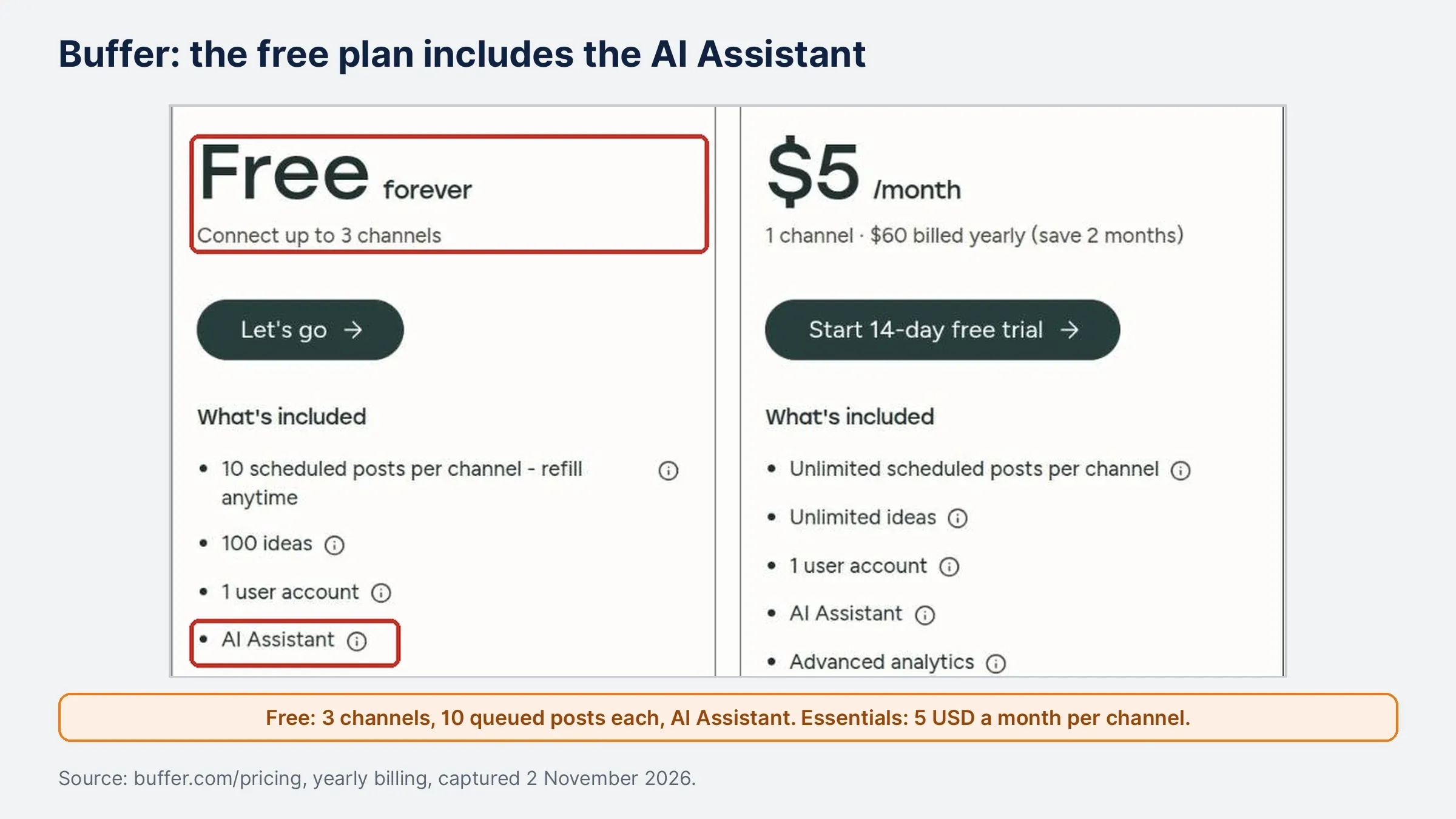
So the headline price is per channel. Three channels cost 15 USD a month, and five cost 25 USD.
4. Mailchimp: email marketing, but check the plan for AI
Mailchimp shows why "it has AI" is not enough to know before you buy AI marketing tools for email.
Its free plan is for very small lists. The pricing page puts the cap at under 250 contacts in its plan table [4]. Its plan text says fewer than 500 contacts. Confirm the cap when you sign up.
On 2 November 2026 Mailchimp listed Essentials from 13 USD a month, Standard from 20 USD and Premium from 350 USD [4]. Some plans had 50% off for the first 12 months. Now look at the plan comparison. Generative AI features are included at no extra cost on Standard and Premium, and not included on Essentials [4].

In practice, if AI help inside your email tool is the reason to upgrade, skip Essentials. Anobee's email marketing guide for beginners covers what to send once the tool is ready.
5. HubSpot: an AI marketing platform for contacts, email and ads
HubSpot is the platform option on this list. CRM, email, forms, ad management and reporting sit in one account, with AI agents on top.
You can start free. HubSpot's free tools cost 0 USD a month for up to 2 users, with no credit card [5]. Marketing Hub Starter lists 20 USD a month per seat. A new-customer offer showed 7 USD on 2 November 2026 [5]. Starter includes 500 HubSpot Credits, 1,000 marketing contacts, email marketing, simple automation and ad management [5]. HubSpot says its AI agents and features run on those credits [5].
However, the next tier is a different budget. Professional starts at 800 USD a month [5]. Plan for the regular price after any first-year offer, and watch how fast you use credits.
6. Zapier: the glue between your AI marketing apps
Zapier connects the other tools. For example, a new form lead can go to your email list, and a new blog post can go to Buffer. A customer message can also pass through an AI step that drafts a reply for you to approve.
The free plan gives 100 tasks a month, unlimited two-step Zaps, Tables and Forms, and Zapier Copilot [6]. Copilot builds an automation from a plain description. Professional starts at 19.99 USD a month and adds multi-step Zaps, premium apps, webhooks and AI fields [6]. Team starts at 69 USD a month for up to 25 users [6].
So count tasks before you rely on the free plan. Each action in a Zap uses tasks, and a busy automation can pass 100 in a few days.
7. Descript: AI video and podcast editing
Descript is one of the few AI marketing tools built for video and audio. You edit the recording by editing its transcript, which suits marketers who cut short clips, webinars and podcasts without a video editor.
Free gives 60 media minutes a month, 100 AI credits once and 720p export [7]. One hour-long webinar uses the whole month. Hobbyist is 16 USD per person a month billed yearly, or 24 USD monthly [7]. It includes 10 media hours, 400 AI credits a month, watermark-free 1080p export and Underlord, Descript's AI co-editor [7]. Creator, at 24 USD a month billed yearly, adds 4K export and 800 AI credits [7].
8. Google Ads and Meta: the AI you already have
For ads, the most used AI marketing tools are inside the ad platforms. Neither page checked lists a separate AI fee.
- Google Ads Performance Max runs one campaign across Search, YouTube, Display, Discover, Gmail and Maps. Google says Smart Bidding bids in each auction based on conversion probability [8]. Its generative AI tools also combine your text, images and video into ad variations [8].
- Meta Advantage+ applies AI to audience, placement and budget in its sales, app and leads campaigns [9]. Single-step options cover other objectives.
These systems decide where your budget goes. Give them clean conversion tracking and good creative. Then check placement and search term reports before you raise spend.
Free AI marketing tools: a 0 USD starter stack
A small business can run a full marketing week on free plans:
- ChatGPT Free for ideas, drafts and rewrites.
- Canva Free for graphics and simple ads.
- Buffer Free for three social channels.
- Mailchimp Free or HubSpot Free for a small email list.
- Zapier Free for one or two simple automations.
- Descript Free for one short video a month.
Usually one limit forces the first upgrade. It might be a fourth social channel, more than 100 automation tasks, a bigger list or watermark-free video.
A paid stack for about 60 USD a month
Once free limits block weekly work, this is a sensible first paid setup. Prices are as shown on 2 November 2026:
| Tool | Plan | Monthly cost |
|---|---|---|
| ChatGPT | Plus | 20.00 USD |
| Canva | Pro, at the yearly price shown in Nepal | 4.58 USD |
| Buffer | Essentials, 3 channels, billed yearly | 15.00 USD |
| Mailchimp | Standard, from | 20.00 USD |
| Total | 59.58 USD |

Add Descript Hobbyist at 16 USD a month if video is part of the plan. Still, treat the total as a floor. Canva may cost more outside Nepal, and Mailchimp rises with your contact count.
How to choose AI marketing tools without wasting money
Picking AI marketing software is mostly about timing. Pay for a job when the free plan blocks it, not before.
- List the jobs you repeat every week. If you post daily but email monthly, pay for the scheduler first.
- Run each free plan for two weeks. Note the day a limit actually stops you.
- Check where the AI sits. As Mailchimp shows, the AI can sit one tier above the feature you wanted.
- Price the second year. Several plans above show first-year offers.
- Avoid paying twice for the same AI. With ChatGPT Plus, you may not need a writing add-on in every other tool.
Do you also want your brand mentioned in ChatGPT, Gemini or Perplexity answers? That is a separate job with its own tools, compared in Anobee's guide to AI visibility tracking tools. More guides are in the AI tools section.
Frequently Asked Questions
What is the best free AI marketing tool?
For most small teams, the free plan of ChatGPT is the most useful single free tool, because it covers ideas, drafts, rewrites and research for every channel. Canva Free is the best free option for visuals, and Buffer Free adds an AI assistant to social scheduling for up to three channels.
Do I need an AI marketing platform or separate tools?
Separate tools are usually the better start for solo marketers and small businesses, because each one has a free plan and you only pay for the jobs you do often. An all-in-one platform such as HubSpot makes more sense once contacts, email and reporting need to live in one place for a team.
Are AI marketing tools worth paying for?
Pay only when a free limit blocks a job you repeat every week, such as more than three social channels, more than 100 Zapier tasks a month or watermark-free video exports. Otherwise the free plans are enough to learn which tool you actually use.
Can AI run my marketing on its own?
No. These tools speed up drafting, design, scheduling and ad delivery, but a person still has to choose the offer, check facts, approve what is published and judge the results. Ad platforms automate bidding and placement, but you still set the goal, budget and creative inputs.
Sources and References
Was this guide helpful?
Your answer helps Anobee improve future updates.

Written by
Bibek Thapa
AI-Powered Digital Growth Strategist
Bibek Thapa works across AI workflows, SEO, AI search optimization, content strategy, website growth, and productivity systems at Anobee.
- AI workflows
- Digital growth
- SEO
- GEO
- AEO
- Content strategy
- Website growth