
Website Growth
GA4 vs Google Search Console: Which Answers Which Question
By Bibek Thapa · Updated · 9 min read
Quick verdict
Comparison guideGoogle Search Console shows what happens on Google Search before a click: impressions, clicks, queries and position. GA4 shows what visitors do after they arrive from any source: sessions, engagement and key events. Use Search Console for search visibility and GA4 for on-site behavior. Their numbers never match exactly, so compare trends, not totals.
Table of ContentsOn this page
- GA4 vs Google Search Console at a glance
- Which tool answers which question
- GA4 vs Google Search Console on the same page
- Why GA4 and Search Console numbers never match
- Connecting Search Console to GA4
- GA4 vs Google Search Console: which to use, in one line each
- Frequently Asked Questions
- Sources and References
Key Takeaways
- Search Console measures Google Search before the click; GA4 measures behavior after arrival from every source.
- Google calls Search Console the source of truth for Search performance and GA4 the source of truth for on-site behavior.
- Clicks and sessions are the closest metrics, but they are counted differently and will not match.
- One Anobee page had 8 Search Console clicks and 7 GA4 google/organic sessions in October 2026.
- The same page got 19 sessions from ChatGPT, which Search Console cannot see at all.
In GA4 vs Google Search Console, the split is simple. Search Console shows what happens on Google Search before anyone reaches your site: impressions, clicks, queries and average position. GA4 shows what people do after they arrive, from Google or anywhere else: sessions, engagement and key events. Google itself calls Search Console the source of truth for Search performance and Google Analytics the source of truth for behavior on your site [1].
So the useful question is not which tool is better, but which one answers the question in front of you. This guide maps common questions to the right tool, then shows one real Anobee page in both tools and explains why the numbers never line up.
Method note: the comparison uses Anobee's own Search Console and GA4 data for one page, 1 to 28 October 2026, read in both tools on 1 November 2026. Definitions come from Google's documentation, checked the same day.
GA4 vs Google Search Console at a glance
| Item | Google Search Console | GA4 |
|---|---|---|
| What it measures | Your site's performance in Google Search results | Visitor behavior on your site or app |
| When in the journey | Before the click, on Google | After arrival, on your site |
| Traffic it covers | Google Search only (web, image, video, news and Discover breakdowns) | Every source: search engines, AI assistants, social, email, direct |
| Main volume metric | Clicks | Sessions |
| Unique to it | Impressions, queries, average position, indexing and Core Web Vitals reports | Engagement, key events, conversions, user journeys |
| How data is collected | Processed by Google for every verified property | A tag you install, so it depends on your setup |
| Time zone | Pacific Time, not editable | The property's own time zone |

The last two rows matter more than they look. Google notes that it processes Search Console data the same way for every property [1]. By contrast, GA4 depends on how you implemented the tag, so a missing tag on some pages affects GA4 and not Search Console.
Which tool answers which question
| Your question | Why | Use |
|---|---|---|
| Which Google searches show my page? | Only Search Console has query and impression data | Search Console |
| Is my page ranking higher or lower than last month? | Average position comes from Google Search | Search Console |
| Do people click my result when they see it? | Click-through rate is clicks divided by impressions | Search Console |
| Is my page indexed? | Indexing and URL Inspection reports | Search Console |
| How many visits did a page get from all sources? | Search Console only sees Google Search | GA4 |
| How much traffic came from ChatGPT or Perplexity? | AI assistants are not Google Search | GA4 |
| Did visitors read, scroll or click anything? | Engagement and events are on-site behavior | GA4 |
| Did search visitors sign up or buy? | Key events and conversions live in GA4 | GA4 |
| Is a drop in organic traffic a ranking problem or a site problem? | Search Console shows visibility; GA4 shows what happened after arrival | Both |
For that last question, Google suggests a workflow: spot the change in organic sessions, then go to Search Console to find which queries and pages moved [1].
GA4 vs Google Search Console on the same page
Here is one Anobee page, the guide to earning money online in Nepal, for 1 to 28 October 2026.
In Search Console, with a filter for that page, the Web search type showed 8 clicks, 409 impressions, a 2% click-through rate and an average position of 16.1.

In GA4, the Landing page report for the same page and dates showed 50 sessions in total. Only 7 of them came from google / organic. The largest source was chatgpt.com / ai-assistant with 19 sessions, then direct with 17.

Put side by side, the two tools agree more than they differ:
| Metric for this page, 1 to 28 Oct 2026 | Search Console | GA4 |
|---|---|---|
| Google Search clicks | 8 | Not available |
| google / organic sessions | Not available | 7 |
| Impressions | 409 | Not available |
| Sessions from all sources | Not available | 50 |
| Sessions from ChatGPT | Not visible | 19 |
| Search queries | 44 | Not available |
Eight clicks and seven sessions is about as close as these tools get. However, the bigger lesson is in what each one cannot see. Search Console had no idea that ChatGPT sent more visitors to this page than Google did. Meanwhile, GA4 had no idea that the page appeared 409 times in Google results. Most of those impressions came from queries such as "how to earn money online in nepal" and "how to make money online in nepal", which produced no click.
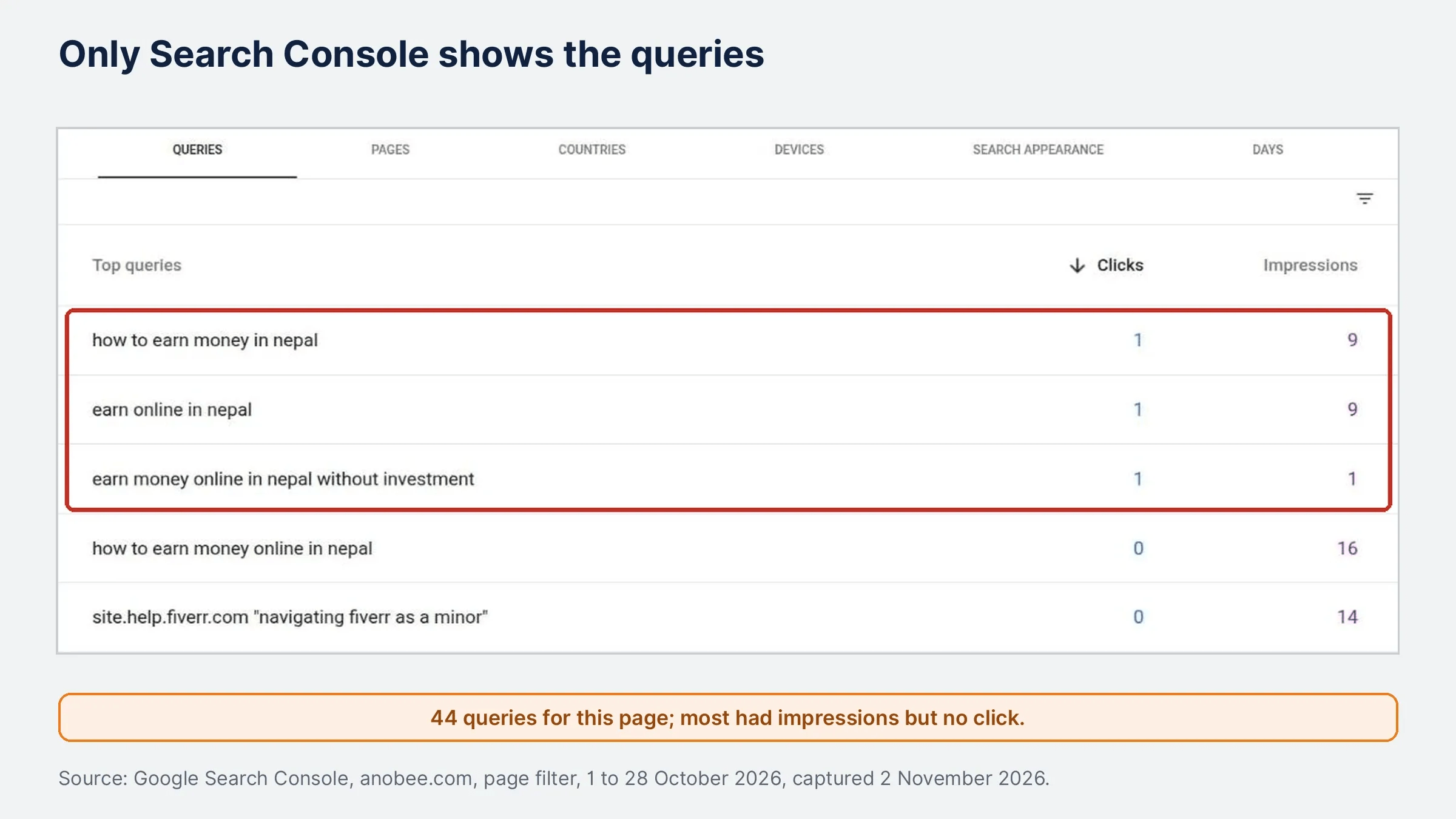
Two smaller details showed up as well. First, the clicks attributed to individual queries added up to fewer than the page's 8 total clicks. Search Console warns on screen that "chart totals and table results might be partial when filters are applied." Second, Search Console listed four jump-link versions of the page, each with one impression. One example is the URL ending in #how-to-receive-online-payments-in-nepal. GA4 reports the page path only, so those versions never appear there.
Why GA4 and Search Console numbers never match
Google's guidance is direct. In any GA4 vs Google Search Console comparison, even the closest metrics, clicks and sessions, do not match exactly [1]. Small differences are normal, so look into the gap only when it is large. These are the reasons Google lists:
- Clicks are not sessions. A click is one tap on a Google result. A session is a period of activity on your site [1], and it ends after 30 minutes of inactivity by default [3]. One click can turn into more than one session.
- Time zones differ. Search Console uses Pacific Time and cannot be changed; GA4 uses the property's time zone [1]. Anobee's property is set to Kathmandu, more than 12 hours ahead of Pacific Time. As a result, a day boundary in one tool falls in the middle of a day in the other.
- Attribution differs. GA4 offers attribution models, while Search Console counts every click from Google Search [1].
- Canonical URLs. Search Console reports on the Google-selected canonical URL; GA4 reports on any URL that loads the tag [1].
- Consent and tagging. If visitors decline tracking, or a page is missing the tag, GA4 records fewer sessions [1]. Search Console is unaffected.
- Non-HTML files. Search Console includes PDFs and similar files when they appear in Search; GA4 may not measure them [1].
- Bots. GA4 excludes known bots and spiders automatically; Search Console does not necessarily filter them [1].
- Search types. Search Console splits traffic into web, image, video, news and Discover, which GA4 does not mirror [1].
So if GA4 shows far fewer Google sessions than Search Console shows clicks, start with the tag and consent setup. The GA4 setup guide covers the base installation, and the guide to (not set) in GA4 explains the most common gaps in source data.
Connecting Search Console to GA4
You can link the two so that some Search Console data appears inside GA4. Linking adds two reports, Google Organic Search Queries and Google Organic Search Traffic [2]. Before you rely on them, note the limits Google lists:
- Search Console data reaches both tools about 48 hours after collection [2].
- Reports cover at most 16 months, because Search Console keeps 16 months of data [2].
- One GA4 web data stream can link to only one Search Console property, and the reverse is also true [2].
- The Search Console report collection is unpublished by default. Find it under Library in GA4 and publish it [2].
- You need the Editor role in GA4 and verified ownership in Search Console to create the link [2].
To link them, go to Admin, Product links, Search Console links in GA4 [2]. If Search Console is not set up yet, the Search Console setup guide walks through verification first.
Still, linking does not merge the data. The queries report still uses Search Console dimensions only, so you cannot slice queries by a GA4 dimension such as engagement [2].
GA4 vs Google Search Console: which to use, in one line each
- Search Console: when the question is about Google Search, before the click.
- GA4: when the question is about visitors, after the click, from any source.
- Both: when organic traffic changes and you need to know whether visibility or the site experience caused it.
In practice, the GA4 vs Google Search Console question comes down to a weekly habit. If you only have time for one check, open Search Console for queries and pages, then open GA4's landing page report filtered to google / organic. The engaged sessions guide explains which GA4 metric tells you whether those visitors stayed.
Frequently Asked Questions
Is Google Search Console part of GA4?
No. They are separate products. You can link a Search Console property to one GA4 web data stream, which adds two Search Console reports to GA4, but each tool still collects its own data.
Why does Search Console show different numbers from GA4?
Search Console counts clicks from Google Search, while GA4 counts sessions from tagged pages. Time zones, canonical URLs, attribution, consent, bots and missing tags all widen the gap. Google says small differences are normal.
Do I need both GA4 and Google Search Console?
For most websites, yes. Search Console tells you how you appear and get clicked in Google Search. GA4 tells you what visitors do after they arrive, including visitors from AI assistants, social and direct visits.
Which tool is more accurate for organic search traffic?
Neither is wrong. Google calls Search Console the source of truth for Search performance and GA4 the source of truth for behavior on your site. Compare their trends rather than expecting identical totals.
Sources and References
Was this guide helpful?
Your answer helps Anobee improve future updates.

Written by
Bibek Thapa
AI-Powered Digital Growth Strategist
Bibek Thapa works across AI workflows, SEO, AI search optimization, content strategy, website growth, and productivity systems at Anobee.
- AI workflows
- Digital growth
- SEO
- GEO
- AEO
- Content strategy
- Website growth


