SEO & AI Search
Structured Data for Bloggers: What Google Actually Reads, Audited on This Page
By Bibek Thapa · Updated · 13 min read
Quick Answer
Structured data is JSON-LD that labels your page for machines. For a blog, three types carry almost all the value: Article (or BlogPosting), BreadcrumbList, and Organization or Person. Google states there are no required properties and no guarantee of rich results, so add the recommended fields, mark up only what readers can see, and test the output rather than trusting the plugin.

Table of ContentsOn this page
- What structured data is, and what it is for
- The types worth a blogger's time
- Article or BlogPosting: a settled question
- Auditing this page's own markup
- FAQ schema: correct, and currently pointless
- The rules you cannot break
- Implementing it without a WordPress plugin
- Testing your structured data: what to trust
- Common mistakes with structured data
- The blogger's structured data checklist
- Bottom line on structured data for bloggers
- Frequently Asked Questions
- Sources and References
Key Takeaways
- Google's docs: Article objects may be Article, NewsArticle or BlogPosting, with no documented advantage to any one of them.
- "There are no required properties" and rich results are never guaranteed, so treat schema as clarity work, not a ranking lever.
- FAQPage rich results have been limited to well-known government and health sites since August 2023.
- This page's own test: 2 valid items, Articles and Breadcrumbs. Its FAQ markup returns nothing.
- Its BlogPosting block carries dateModified with no datePublished, and an image left over from the old WordPress site.
- Never mark up content readers cannot see. The penalty is loss of rich result eligibility, applied by manual action.
Most structured data guides for bloggers list schema types and stop. Instead, this one audits a real page, and the page is this one. Running it through Google's Rich Results Test on 25 September 2026 returned two valid items: Articles and Breadcrumbs. Meanwhile, the FAQ markup sitting in the page's source returned nothing at all. The Article block also carries a dateModified with no datePublished, and an image left over from the site's WordPress era.
That is a fairly typical result, which is why it is worth showing. The previous version of this page promised "9 Powerful Schema Tips" and invented a framework called CLEAR. It also carried five unattributed "expert insights" written for the article rather than quoted from anyone, left a "Research Notes" section in the published text, and pointed at eight internal links that were never filled in. Consequently, all of that is gone, along with the WordPress-only instructions, since this site no longer runs WordPress.
What structured data is, and what it is for
Structured data is machine-readable labelling. Instead of leaving a crawler to infer that one line is the headline and another is the author, you state it, in a vocabulary both sides agree on: schema.org. Google's recommended delivery format is JSON-LD. It is a block of JSON inside a script tag that sits apart from the visible HTML, so it is easy to change without touching the article.
What it buys you is narrower than most guides suggest. It makes a page eligible for certain search features, and it removes ambiguity about who wrote what and when. However, Google's Article documentation is direct about the limits of that bargain: "Google does not guarantee that features that consume structured data will show up in search results" [1].
So the honest framing is this: structured data is clarity work with an option attached. The clarity is real and permanent. Nevertheless, the option may never be exercised.
The types worth a blogger's time
| Schema type | What it does | Worth it? |
|---|---|---|
| Article / BlogPosting | Identifies the page as an article, with author, dates, headline and image | Yes. The core block |
| BreadcrumbList | Shows where the page sits in the site hierarchy, and can replace the URL in the listing [4] | Yes. Second most useful, and easy |
| Organization | Identifies the publisher, its logo and its official profiles | Yes, once at site level |
| Person | Identifies the author, ideally linked to a real author page | Yes, and usually the weakest part of a blog's setup |
| FAQPage | Marks up visible question-and-answer content | Rarely. See the section below |
| HowTo | Marks up step-by-step instructions | No. Rich results were cut to desktop only in 2023 and are effectively gone |
| Review / AggregateRating | Star ratings | Only with genuine user ratings. Faking this is a policy violation [2] |
| VideoObject, ImageObject | Media metadata | Only if you publish original video or the images matter in their own right |

Three types do the work. Otherwise, everything else is situational.
Article or BlogPosting: a settled question
Here is the most-argued and least-important decision in blog structured data. Google's documentation states that "Article objects must be based on one of the following schema.org types: Article, NewsArticle, BlogPosting" [1], and it describes no difference in how they are treated. There is no documented ranking or eligibility advantage to picking one.
BlogPosting is a sensible default for blog structured data because it is the most literal description. That is the whole argument. Therefore migrating an existing site from Article to BlogPosting is not an optimisation, and anyone selling it as one is filling a section.
The properties matter far more than the type. Google's Article page states plainly: "There are no required properties; instead, add the properties that apply to your content" [1]. It then recommends author, datePublished, dateModified, headline and image. For the author, it asks for "a link to a web page that uniquely identifies the author", with sameAs as an alternative [1]. Similarly, for images it recommends "multiple high-resolution images (minimum of 50K pixels when multiplying width and height)" in 16x9, 4x3 and 1x1 [1].
Auditing this page's own markup
Here is the structured data audit that prompted this refresh. The page ships three JSON-LD blocks: BlogPosting, BreadcrumbList and FAQPage. Google's Rich Results Test, run on 25 September 2026, detected two valid items: Articles and Breadcrumbs.

| Property | What this page has | Verdict |
|---|---|---|
@type | BlogPosting | Fine. No advantage over Article either way [1] |
headline | Matches the H1 | Fine |
author | Person, name and author-page URL | Acceptable. No sameAs, so the author is not tied to any external profile [1] |
publisher | Organization with a logo URL | The logo points at fav-icon-anobee.png, a favicon rather than a logo image |
datePublished | Missing | A recommended property simply absent [1] |
dateModified | Present | Fine, and the only date Google can read here |
image | wordpress_fallback_seo_4_…png | A leftover from the previous site, and not the image on the page |
mainEntityOfPage | Canonical URL, no trailing slash | Fine, and consistent with the canonical tag |
| BreadcrumbList | Home → SEO & AI Search → this post | Valid, and the second item detected |
| FAQPage | Six questions, all visible on the page | Correctly built, and currently produces nothing (see below) |
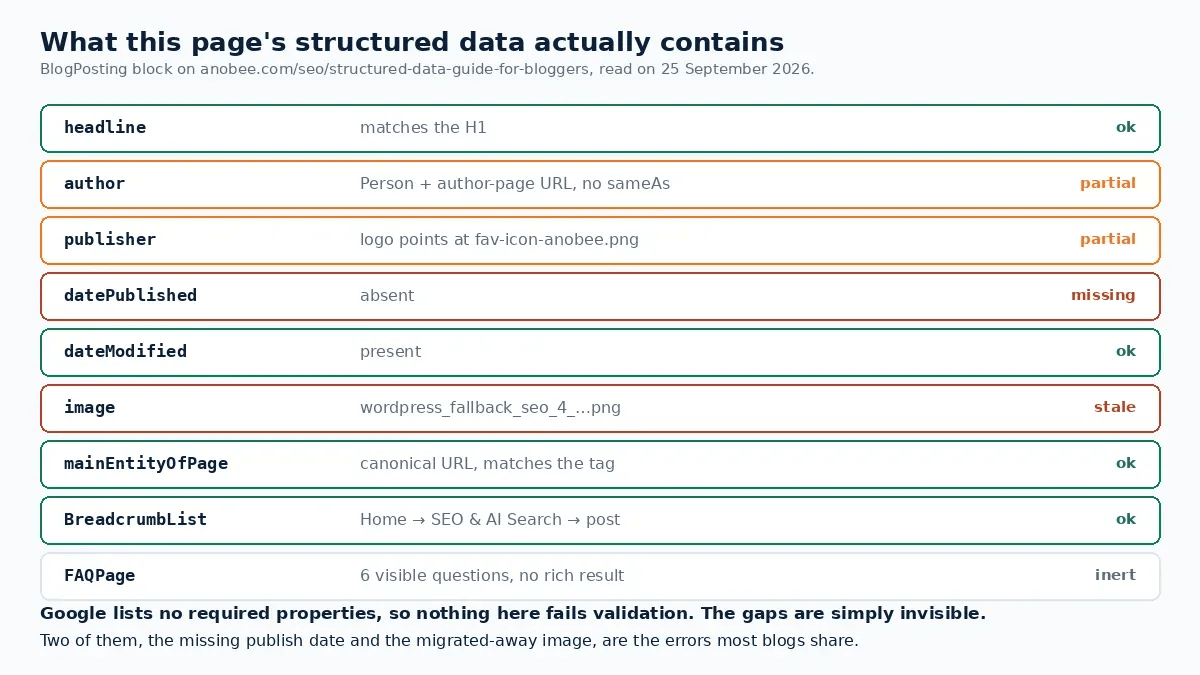
Two of those findings are worth generalising, because they are the structured data errors most blogs share.
A missing datePublished is invisible until you look. No tool shouts about it, because nothing is required. The page still validates. Instead, it quietly gives Google one date instead of two, on a site where article freshness is part of the pitch.
Structured data images drift. The image value here still points at a WordPress-era fallback file, long after the migration. Nobody notices, because the visible hero is set separately in the CMS. However, if the schema image, the visible image and the og:image disagree, the one Google reads for article features is the schema one.
FAQ schema: correct, and currently pointless
The FAQPage block on this page is built properly. Every question is visible on the page, which is the rule [2]. Nevertheless, it earns nothing, and the Rich Results Test confirms it by not listing FAQ among the detected rich result types.
The reason is a policy change, not a mistake. In August 2023 Google announced that "FAQ (from FAQPage structured data) rich results will only be shown for well-known, authoritative government and health websites". For all other sites, "this rich result will no longer be shown regularly" [3]. Similarly, the same post limited HowTo rich results to desktop, and they have since disappeared from general results.
Google's own guidance on what to do about it is refreshingly unbothered: "While you can drop this structured data from your site, there's no need to proactively remove it. Structured data that's not being used does not cause problems for Search, but also has no visible effects in Google Search" [3].
So keep it if your CMS emits it for free. Otherwise, do not spend an afternoon adding it to 80 posts expecting dropdowns in the results.
The rules you cannot break
Google's general structured data guidelines are short, and they are enforced [2]:
- "Don't mark up content that is not visible to readers of the page." Hidden FAQs, off-screen ratings, invented breadcrumbs. If the reader cannot see it, it does not belong in the markup.
- "Don't mark up irrelevant or misleading content, such as fake reviews or content unrelated to the focus of a page."
- The consequence is specific: pages lose eligibility for rich results, and Google can issue a manual action through Search Console for structured data problems [2]. Normal web ranking is not affected, but the enhancement is gone until it is fixed.
Review markup is where blog structured data most often crosses the line. If the ratings did not come from real users, the stars are a violation. Moreover, the risk applies across the site.
Implementing it without a WordPress plugin
If your CMS generates structured data, your job is to check the output rather than write it. Otherwise, one block per page is enough. Here is a minimal, correct Article block:
{
  "@context": "https://schema.org",
  "@type": "BlogPosting",
  "headline": "Structured Data for Bloggers: What Google Actually Reads",
  "image": ["https://example.com/img/cover-16x9.webp"],
  "datePublished": "2026-06-30T09:00:00+05:45",
  "dateModified": "2026-09-25T09:00:00+05:45",
  "author": {
    "@type": "Person",
    "name": "Jane Smith",
    "url": "https://example.com/authors/jane-smith",
    "sameAs": ["https://www.linkedin.com/in/janesmith"]
  },
  "publisher": {
    "@type": "Organization",
    "name": "Example Blog",
    "logo": {
      "@type": "ImageObject",
      "url": "https://example.com/img/logo.png"
    }
  },
  "mainEntityOfPage": "https://example.com/post-slug"
}
Four rules go with it. First, emit the block from one place only: a plugin and a hand-written block producing the same type is how duplicate markup happens. Second, point mainEntityOfPage at the canonical URL in exactly the form the canonical tag uses, slash for slash. Third, use a real logo file rather than a favicon. Finally, set dateModified when the content actually changes, not on a schedule, because a date that always says today stops meaning anything.
Breadcrumbs go in a separate BreadcrumbList block, in the order a reader would walk the site, and Google's documentation covers the case where a page belongs to more than one trail [4].
Testing your structured data: what to trust
Rich Results Test [5] is the one that matters. It reports what Google parsed and which rich result types the page qualifies for. This is how the audit above was produced, and it is the only way to learn that a correctly built FAQ block is earning nothing.
Schema.org Validator checks the structured data against the vocabulary itself. It is useful for hand-written JSON-LD, since it catches property names Google's test ignores.
Search Console Enhancements is the site-wide view. Moreover, it is the only one that tells you a template change broke 400 pages last Tuesday.
A plugin's own green tick tells you the plugin ran. Ultimately, it says nothing about what Google made of the result.
Common mistakes with structured data
- Marking up invisible content. The one rule with a manual action attached [2].
- Adding FAQ schema for the rich result. That result has been restricted since August 2023 [3].
- Chasing HowTo markup. Cut to desktop in 2023, and gone in practice [3].
- Leaving
datePublishedout. Recommended, absent on this page until now, and nothing warns you [1]. - Letting the schema image go stale. It survives migrations that the visible image does not.
- Using the favicon as the publisher logo. It validates; it is not what the property means.
- Running two schema sources at once. One type, one emitter.
- Fake review markup. A policy violation with site-wide consequences [2].
The blogger's structured data checklist
Per post
Site level
After publishing
The entity optimization guide covers the layer above this one: connecting the Organization and Person nodes so the site reads as one identity rather than several. Meanwhile, the technical SEO mistakes guide covers what else silently breaks in a template.
Bottom line on structured data for bloggers
Three blocks do nearly all the work: Article, BreadcrumbList, and the Organization and Person entities behind them. Google requires no properties, guarantees no rich results, and treats Article and BlogPosting alike. Therefore the decisions that matter are whether the recommended fields are present, whether they are true, and whether anything is marked up that a reader cannot see. Then test the live URL, because the gap between what a plugin claims and what Google parsed is where the errors live. Ultimately, on this page that gap was a missing publish date and an image from a site that no longer exists.
Frequently Asked Questions
Should bloggers use Article or BlogPosting schema?
Either. Google's documentation says Article objects must be based on Article, NewsArticle or BlogPosting, and it does not describe any advantage to one over the others. BlogPosting is a reasonable default for blog content, but switching an existing site from Article to BlogPosting is not an optimisation worth doing on its own.
Does structured data improve rankings?
Not directly, and Google does not describe it as a ranking factor. What it can do is make a page eligible for rich results such as breadcrumbs and article features, which change how a listing looks rather than where it sits. Google also states it does not guarantee that features consuming structured data will appear.
Is FAQ schema still worth adding?
For most blogs it will not produce a rich result. Since August 2023, Google shows FAQ rich results only for well-known, authoritative government and health websites. Google's own advice is that there is no need to remove existing FAQ markup, because unused structured data causes no problems, but it has no visible effect either.
Which schema properties should a blog post include?
Google lists no required properties for Article, only recommended ones: author, datePublished, dateModified, headline and image. In practice add all five, point the author to a real author page, use a genuine publisher logo, and keep dateModified honest. BreadcrumbList is a separate block and is the second most useful thing a blog can add.
How do you check your structured data is working?
Run the page through Google's Rich Results Test, which reports which rich result types the page is eligible for, then watch the Enhancements reports in Search Console for site-wide errors. A plugin reporting success proves only that the plugin ran; the test shows what Google parsed.
Sources and References
- Google Search Central — Article (Article, NewsArticle, BlogPosting) structured data ↩
- Google Search Central — General structured data guidelines ↩
- Google Search Central Blog — Changes to HowTo and FAQ rich results (August 2023) ↩
- Google Search Central — Breadcrumb structured data ↩
- Google — Rich Results Test ↩
Was this guide helpful?
Your answer helps Anobee improve future updates.

Written by
Bibek Thapa
AI-Powered Digital Growth Strategist
Bibek Thapa works across AI workflows, SEO, AI search optimization, content strategy, website growth, and productivity systems. Anobee documents practical lessons, tools, experiments, and systems for improving digital presence.
- AI workflows
- Digital growth
- SEO
- GEO
- AEO
- Content strategy
- Website growth