Quick Answer
To create a redirect in Rank Math, switch to Advanced mode, enable the Redirections module, open Rank Math SEO > Redirections and add the old path as the source. Enter the most relevant destination, choose 301 for a permanent move or 302/307 for a temporary one, activate the rule, save it and test the returned status code while logged out.

Table of ContentsOn this page
- Which redirect should you use?
- When should you create a redirect?
- Enable Rank Math redirections
- Rank Math redirect guide: create a 301 redirect
- How to use the Rank Math 404 Monitor
- Exact match versus regex redirects
- Avoid redirect chains and loops
- Rank Math redirect guide: troubleshooting failed rules
- Managing redirects in bulk
- Rank Math versus a dedicated redirect system
- SEO-safe redirect checklist
- Frequently Asked Questions
- Sources and References
Key Takeaways
- Use a 301 redirect for a permanent URL move and a 302 or 307 only when the original URL will return.
- Redirect an old URL to the closest useful replacement, not automatically to the homepage.
- Start with Exact Match; broader match rules and regex can redirect more URLs than intended.
- A 404 log is a lead list, not a redirect list. Fix internal typos and ignore random bot requests that have no useful destination.
- Test the status code, final URL, redirect chain and public response after every important rule.
A redirect should do one simple job: take someone from an old URL to the closest useful replacement. The risky part is that a small mistake can affect far more than one page. A broad match can catch working URLs, while a loop can make both pages inaccessible. A homepage redirect may leave visitors nowhere near the content they expected.
This Rank Math redirect guide shows how to create and test individual rules. It also explains which 404s deserve action and how to troubleshoot rules that misbehave. It also separates features in the core module from current Pro-only controls.
Verification note: The instructions and feature tiers in this guide were checked against Google Search Central and Rank Math's official documentation on September 9, 2026. Plugin screens can change, so use the linked vendor documentation when your dashboard labels differ.
Which redirect should you use?
Use a permanent redirect only when the old location is not coming back. Google treats permanent redirects as a signal that the destination should become canonical, while temporary redirects tell its systems to keep the source URL as the likely search result [1].
| Status | Meaning | Use it when |
|---|---|---|
| 301 | Permanent redirect | A post slug, category path or domain has permanently changed |
| 302 | Temporary redirect | The source URL will return after a short-term change |
| 307 | Temporary redirect | The move is temporary and the request method must be preserved |
| 410 | Content deleted | The URL is permanently gone and has no relevant replacement |
| 451 | Unavailable for legal reasons | Access is removed because of a legal demand |

Rank Math groups 301, 302 and 307 under redirection types. It presents 410 and 451 as maintenance codes because they return an error status rather than send the visitor to a destination [3].
For most renamed or consolidated WordPress pages, 301 is the correct choice. A 302 or 307 makes sense for a temporary campaign, maintenance window or short-lived substitution where the original URL will return.
Do not use a temporary redirect because it feels safer. Choose it only when the move itself is temporary.
When should you create a redirect?
A redirect earns its place when somebody may still request an old URL and a close replacement exists.
Common cases include:
- changing a post or page slug
- combining two overlapping articles into one stronger page
- moving a category or directory
- migrating from HTTP to HTTPS or from one domain to another
- replacing a deleted product with its direct successor
- correcting a URL pattern during a platform migration
Do not create a redirect merely because a strange path appears in a 404 log. WordPress sites receive requests for typos, old scripts, vulnerable files and URLs that never existed. If there is no useful equivalent, a genuine 404 or 410 is more honest than sending everything to the homepage.
Google specifically advises against redirecting many old URLs to one irrelevant destination because the result can confuse users and may be treated as a soft 404 [6].
Enable Rank Math redirections
Rank Math places the Redirections module behind Advanced mode. In WordPress:
- Open Rank Math SEO > Dashboard.
- Switch the dashboard to Advanced Mode if the module is not visible.
- Find Redirections and turn it on.
- Open Rank Math SEO > Redirections.
Rank Math supports three working entry points: the main Redirections screen, the 404 Monitor and the Advanced tab in an individual post editor [2]. The main screen is the clearest place to create and audit standalone rules.
If the entire Rank Math installation still needs configuration, complete the Rank Math setup guide before adding sitewide redirect rules.
Rank Math redirect guide: create a 301 redirect
Open Rank Math SEO > Redirections and select Add New. Work from the old address to the new one; reversing those fields is an easy way to build a loop.

1. Enter the source URL
The source is the old URL that should stop serving its original response. Rank Math accepts the full URL or the path after the domain. For a page at https://example.com/old-guide/, you can enter /old-guide/.
Copy the path from a crawl, analytics record, Search Console, external link or browser address bar. When case, slashes and directories matter, typing it from memory is an avoidable risk.
Rank Math can place several source URLs in one rule when they all share the same destination [2]. That is useful after merging a small group of closely related pages. Keep unrelated moves in separate rules so they remain easy to diagnose.
2. Choose the safest match type
Start with Exact Match for one known URL. It is the easiest option to predict and test.
Move beyond Exact Match only when one rule truly applies to a group of URLs:
- Contains matches paths containing the supplied text.
- Starts With matches paths beginning with the supplied pattern.
- Ends With matches paths ending with the supplied pattern.
- Regex evaluates a regular-expression pattern.
Rank Math documents all five match types [3]. Contains, Starts With and Ends With can catch live URLs you did not intend to move, so list sample matches before activating them. Regex is appropriate for a repeatable URL pattern, not as a shortcut for a handful of unrelated pages.
3. Decide whether to ignore case
Enable Ignore Case only when uppercase and lowercase versions should lead to the same destination. If the server treats two case variants as different resources, confirm which version is valid before combining them.
4. Enter the destination URL
The destination should return a successful response and satisfy the reason someone requested the old page. Use the full HTTPS URL to remove ambiguity.
Before saving, open the destination in a private window. Confirm that it:
- returns the intended page
- does not redirect again unnecessarily
- is not blocked or marked
noindex - has a self-referencing canonical when appropriate
- genuinely replaces the old content
Never point a rule back to its own source. Rank Math identifies a source and destination that are the same as a cause of infinite loops [5].
5. Select the status and activate the rule
Choose 301 Permanent Move for a permanent change. Select 302 or 307 only when the original URL will return. Then leave the rule active and save it.
Categories and scheduled activation or deactivation are Pro controls in Rank Math's current documentation [2]. You do not need them for a normal permanent redirect.
6. Test the public response
Test while logged out so an administrator-only debugger or cache bypass does not hide the public behavior.
Open the old URL and confirm the final page. Then inspect the HTTP response with a redirect checker, browser developer tools or this command:
curl -sIL https://example.com/old-guide/For a simple permanent move, the useful result is one 301 response followed by a 200 response from the intended destination. A browser arriving at the right page is not enough: JavaScript, a meta refresh or a chain can look correct without returning the server-side status you meant to create.
How to use the Rank Math 404 Monitor
The 404 Monitor records paths that visitors or bots requested but WordPress could not find. Enable it from Rank Math SEO > Dashboard, then open Rank Math SEO > 404 Monitor. Like Redirections, it requires Advanced mode.
In Simple mode, Rank Math shows the URI, hit count and last access time. Advanced mode adds the referrer and user agent, but it logs separate requests in more detail. Rank Math recommends using Advanced mode only when Simple mode does not provide enough information to solve a problem [4].
Treat the log as a queue for investigation:
| What you find | Best response |
|---|---|
| A broken internal link | Correct the link on the page that contains it |
| An old URL with a relevant replacement | Add a permanent redirect |
| A typo in a high-traffic external link | Redirect it and, when practical, ask the source to update the link |
| A deleted page with no substitute | Keep 404 or return 410 |
| Random probes for files that never existed | Usually ignore them; do not create fake destinations |
| Many similar valid old URLs | Map the pattern carefully before considering a broader rule |
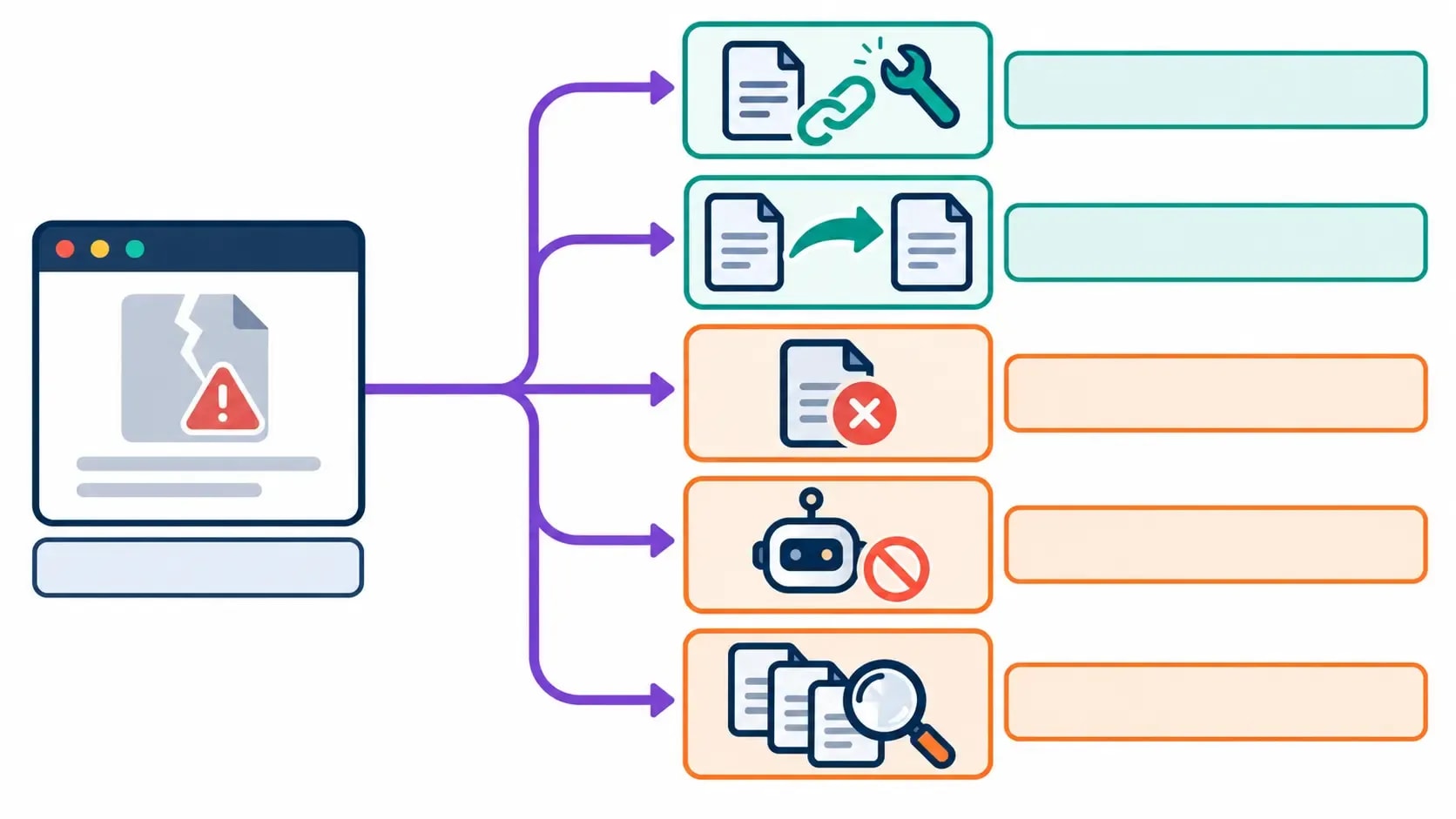
A high hit count can look urgent without being important. Bots may request the same nonexistent path hundreds of times. Use the referrer, existing links, historical traffic and the old page's purpose to decide whether a redirect would help a real visitor.
Exact match versus regex redirects
Exact Match is the default for a reason. Each source has one visible destination, and another editor can understand the rule later.
Regex becomes useful when many URLs share a stable pattern—for example, a directory name changes while the rest of every path remains the same. Before publishing a regex rule:
- Export or save the list of affected URLs.
- Write examples that must match.
- Add examples that must not match.
- Test the pattern in a regex tester using real paths.
- Enable Rank Math's redirection debugger on a staging site or as an administrator.
- Crawl the affected section after activation.
Rank Math warns that an incorrect regular expression can match too many URLs and recommends testing patterns before using them live [2]. If you cannot describe the intended set in one precise sentence, build individual Exact Match rules instead.
Avoid redirect chains and loops
A chain sends an old URL through one or more intermediate redirects before reaching the live page:
/old-a/ → /old-b/ → /current-page/
Change the first rule so /old-a/ points directly to /current-page/. Google advises redirecting to the final destination and keeping unavoidable chains low because chains add latency and not every client handles long sequences reliably [6].
A loop has no final destination:
/page-a/ → /page-b/ → /page-a/

Loops can also arise when Rank Math conflicts with a server, CDN, localization plugin or WordPress canonical redirect. Test the complete chain rather than viewing only the rule stored in Rank Math.
After a URL move, update internal links to point directly to the final address. Keep the redirect for old bookmarks and external links. For larger migrations, also update canonicals, hreflang annotations and XML sitemaps to the new URLs [6]. The XML sitemap strategy guide explains what belongs in the live sitemap.
Rank Math redirect guide: troubleshooting failed rules
A useful Rank Math redirect guide needs a troubleshooting order because a correct-looking rule may be overridden elsewhere. Start with the boring checks. They resolve many failures without requiring a plugin conflict test or server change.
Confirm the module and rule
Check that Advanced mode is active, the Redirections module is enabled and the specific rule is switched on. Reopen the rule and compare the requested path character by character with the source.
Exact Match will fail when the path differs. A broad match may be intercepted by another rule first. Also confirm that the destination is not the source and that the destination itself loads.
Clear every relevant cache
Purge the WordPress page cache, hosting cache, reverse proxy and CDN cache. Then test in a private browser or with curl. A cached response may be served before WordPress evaluates the new rule, but caching is only one possible cause—not a universal diagnosis.
Rank Math's troubleshooting guide specifically covers redirects that fail on cached pages [5].
Look for another redirect owner
A redirect can be created at several layers:
- CDN or edge rules
- web-server configuration
- hosting control panel
- WordPress core behavior
- another redirect, security or SEO plugin
- theme or custom PHP code

Inspect those layers instead of stacking a second rule over an unknown first one. If you need to disable plugins, use a staging site or a maintenance window and restore them one at a time.
Enable the Rank Math debugger
Administrators can enable Debug Redirections under Rank Math SEO > General Settings > Redirections. Rank Math then shows an interstitial identifying the matching rule before completing the redirect; ordinary visitors do not see that diagnostic screen [5].
Turn the debugger off after the problem is resolved.
Check query strings and pattern rules
Determine whether a tracking parameter or query string changes the match. Parameterized URL redirections are listed as a Pro feature, and Rank Math passes parameters to the destination by default unless a filter changes that behavior [2].
For regex, reduce the rule to a single failing example and test the capture groups. Do not widen a pattern on the live site until it starts matching; that can solve one URL by breaking an entire directory.
Managing redirects in bulk
For a handful of changes, manual Exact Match rules are easier to review. Large migrations need a URL map with at least an old URL, proposed destination and redirect status before anything is imported.
Rank Math's CSV import and export feature is Pro-only. Its current CSV workflow can create, update and delete redirect records and requires at least source and destination columns for new rules [7].
Before importing a bulk file:
- remove duplicate sources
- confirm every destination exists
- identify sources that already redirect
- check for many-to-one mappings that are not genuinely equivalent
- save a backup of current rules
- test a representative batch first
- crawl the complete mapping after activation
For a sitewide or domain migration, follow Google's broader migration process: prepare the new site, map old URLs, implement permanent server-side redirects where possible, update internal references and monitor both properties in Search Console [6]. Our Google Search Console setup guide covers property verification and initial reporting.
Rank Math versus a dedicated redirect system
Rank Math is a reasonable owner when it already runs on the site and the redirect set is modest enough to review in WordPress. It keeps individual rules, 404 investigation and post-level changes in one place.
A server, CDN or dedicated redirect tool may fit better when:
- redirects must run before WordPress or PHP
- a migration involves a large, governed mapping
- several team members need approvals and change history
- the site needs detailed logs or automated tests
- the organization already manages routing centrally
- redirects must continue even if WordPress is unavailable
Several systems should not own overlapping rules. Document the authoritative layer, back it up and record why each important redirect exists. A clear, testable mapping matters more than the logo on the redirect screen.
SEO-safe redirect checklist
Before approving an important redirect, confirm that:
- the source is the exact old URL or a tested pattern
- the destination is the closest useful replacement
- 301 is used only for a permanent move
- the destination returns 200 and is indexable when it should rank
- the rule produces no loop or avoidable chain
- internal links point directly to the final URL
- canonical and sitemap references use the final URL
- caches were cleared after activation
- the response was tested while logged out
- important migrations are monitored in Search Console and analytics
Google says 301 and other permanent redirects do not cause a loss in PageRank, but URL moves can still produce temporary search fluctuations while systems recrawl and reindex the new locations [6]. That is a more useful expectation than assigning a made-up transfer percentage to every redirect.
Use this Rank Math redirect guide again before any important slug change or site migration. The practical rule is simple: map the old URL to a relevant live page, choose the correct status, test the response, update internal references and watch the result. If no relevant replacement exists, let the missing URL stay missing.
Frequently Asked Questions
Is the Rank Math Redirections module free?
The core Redirections module is available in Rank Math. Some management features are Pro-only, including redirect categories, scheduled activation or deactivation, parameterized redirects and CSV import or export.
Which Rank Math redirect type should I use?
Use 301 when the move is permanent. Use 302 or 307 when the original URL will return. Use 410 when content is permanently gone and has no suitable replacement, or 451 when access is unavailable for legal reasons.
Should I redirect every 404 shown by Rank Math?
No. Redirect only when a requested URL has a clear replacement or represents an old URL that moved. Fix broken internal links at their source, and leave random probes, typos and deleted pages without a relevant substitute as 404 or 410 responses.
Why is my Rank Math redirect not working?
Check that Advanced mode and the Redirections module are enabled, the rule is active, the source path and match type are correct, and the destination differs from the source. Then clear caches and check for competing rules at the CDN, server, WordPress or plugin layer.
Should I update internal links after adding a 301 redirect?
Yes. Point internal links directly to the final URL. The redirect should remain for old bookmarks and external links, but your own navigation should not send visitors and crawlers through an avoidable extra request.
Sources and References
- Google Search Central - Redirects and Google Search ↩
- Rank Math - How to Set Up Redirections ↩
- Rank Math - How to Create a Redirection ↩
- Rank Math - How to Monitor 404 Errors ↩
- Rank Math - Solving Redirection Issues Using Rank Math SEO ↩
- Google Search Central - Site Moves and Migrations ↩
- Rank Math - How to Create and Edit Redirects Using CSV ↩
Was this guide helpful?
Your answer helps Anobee improve future updates.

Written by
Bibek Thapa
AI-Powered Digital Growth Strategist
Bibek Thapa works across AI workflows, SEO, AI search optimization, content strategy, website growth, and productivity systems. Anobee documents practical lessons, tools, experiments, and systems for improving digital presence.
- AI workflows
- Digital growth
- SEO
- GEO
- AEO
- Content strategy
- Website growth